
1. Entwodiksyon
The Imada ESL-200 is a handheld digital LED stroboscope designed for precise measurement of rotating, reciprocating, and linear motion. It is suitable for applications in production, quality control, and preventive maintenance. This unit features a bright, long-lasting LED light source, a wide measuring range, adjustable flash duration for sharper images, and selectable units (FPM or Hz).
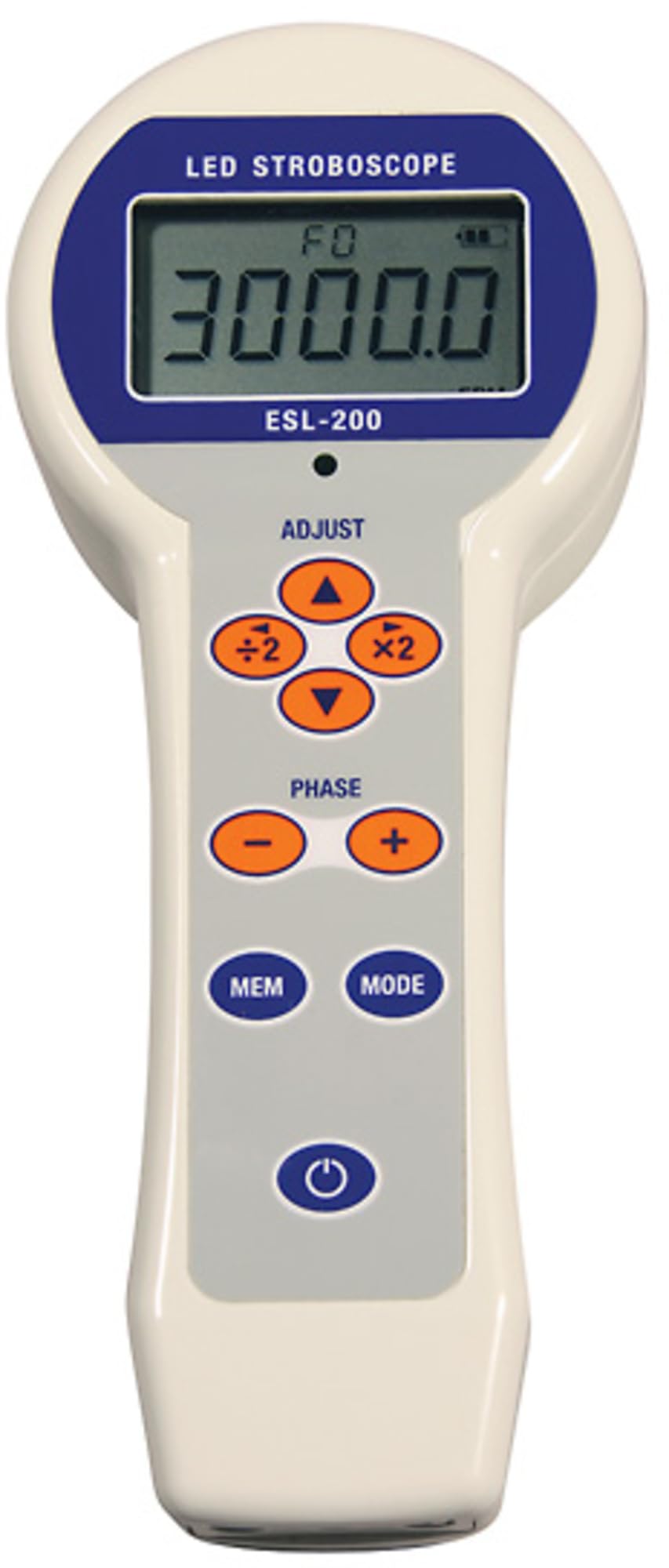
Yon devan view of the Imada ESL-200 Handheld Digital LED Stroboscope, showing its digital display and control buttons.
2. Enfòmasyon sou Sekirite
- Pwoteksyon je: Avoid direct exposure to the stroboscope's flashing light, as it can cause discomfort or temporary vision impairment. Do not stare directly into the light source.
- Anviwònman Fonksyònman: Use the device in a well-lit area to minimize the effect of the flashing light. Avoid use in explosive or hazardous environments unless specifically rated for such conditions.
- Sous pouvwa: Use only the specified battery type and ensure correct polarity during installation. Do not mix old and new batteries or different battery types.
- Antretyen: Pa eseye ouvri oswa repare aparèy la. Konfye tout antretyen bay pèsonèl kalifye.
- Trip Hazard: When using with a tripod, ensure the setup is stable to prevent tipping.
3. Pake kontni
Verifye ke tout atik yo prezan lè w ap debale yo:
- Imada ESL-200 Handheld Digital LED Stroboscope
- Manyèl itilizatè
- Carrying Case (if included with specific model variant)
- Batteries (not included, purchase separately)
4. Pwodwi Features
- LEDs produce an extremely bright, long-lasting light source.
- Push-button operation with x2 and /2 buttons allowing for quick adjustments of flash rates.
- Stores up to nine flash rates for both FPM (Flashes Per Minute) and Hz (Hertz) for quick retests.
- Highly stable, drift-free operation provides precision accuracy.
- Rugged aluminum housing withstands challenging industrial environments.
5. Enstalasyon
5.1 Enstalasyon batri
- Jwenn kouvèti konpatiman batri a sou aparèy la.
- Open the cover and insert the required batteries (not included) according to the polarity markings (+/-).
- Byen fèmen kouvèti lòj batri a.
5.2 Montaj Tripod
The ESL-200 features a 1/4"-20 UNC thread on its base, allowing for mounting on a standard camera tripod. This provides stability for extended use or precise positioning.
- Attach the stroboscope to a compatible tripod by screwing the tripod's mounting screw into the thread on the stroboscope's base.
- Ensure the stroboscope is securely fastened to prevent accidental detachment.
6. Operasyon Enstriksyon
6.1 Limen/Etenyen
- Pou pouvwa sou aparèy la, peze la POUVWA button. The digital display will illuminate.
- Pou koupe pouvwa a, peze epi kenbe POUVWA bouton jiskaske ekspozisyon an etenn.
6.2 Adjusting Flash Rate
The flash rate can be adjusted in either Flashes Per Minute (FPM) or Hertz (Hz).
- Sèvi ak la UP epi DESANN arrow buttons to incrementally increase or decrease the flash rate.
- For rapid adjustments, press the x2 button to double the current flash rate or the /2 button to halve it.
- To switch between FPM and Hz units, press the INITE bouton.
6.3 Storing Flash Rates
The ESL-200 can store up to nine frequently used flash rates for quick recall.
- To store a flash rate, adjust to the desired rate, then press and hold the STORE button. Select a memory location (1-9) using the arrow buttons and press STORE ankò pou konfime.
- To recall a stored flash rate, press the RAPPEL button, select the desired memory location, and press RAPPEL ankò.
6.4 Adjusting Flash Duration
The adjustable flash duration feature allows for sharper images of fast-moving objects.
- Consult the device's on-screen menu or dedicated button (if available) to access flash duration settings.
- Increase or decrease the flash duration as needed to achieve the clearest image of the target.
7. Antretyen
7.1 Netwayaj
- Wipe the exterior of the stroboscope with a soft, dry cloth.
- Do not use abrasive cleaners, solvents, or harsh chemicals, as these can damage the housing or display.
- Keep the LED light source clean and free of dust for optimal performance.
7.2 Depo
- Lè w pa itilize yo pou yon bon bout tan, retire pil yo pou anpeche yo koule.
- Store the stroboscope in its carrying case (if applicable) in a cool, dry place, away from direct sunlight, extreme temperatures, and high humidity.
NAN. Depanaj
| Pwoblèm | Kòz posib | Solisyon |
|---|---|---|
| Aparèy pa limen. | Pil ki mouri oswa ki mal enstale. | Ranplase pil yo ak nouvo, asire w ke polarite a kòrèk. |
| Lekti ki pa egzak oswa ki pa estab. | Incorrect flash rate setting, improper distance to target, or ambient light interference. | Adjust flash rate to synchronize with target motion. Ensure appropriate distance and minimize external light sources. Use tripod for stability. |
| Ekran an fèb oswa li ap tranble. | Ba pouvwa batri. | Ranplase pil. |
9. Espesifikasyon
- Modèl: ESL-200
- Ekspozisyon: LCD 5 chif
- Sous limyè: dirije
- Flash Range: 12 to 150,000 FPM (Flashes Per Minute) / RPM
- Inite: Selectable FPM or Hz
- Dire Flash: Reglabl
- memwa: Stores up to 9 flash rates
- Lojman: Rugged aluminum
- Sous pouvwa: Mache ak pil (Pil pa enkli)
- Montaj: 1/4"-20 UNC Tripod Thread
- Dimansyon pwodwi: Apeprè 11"L x 9.75"W x 3.5"H
- Pwa atik: Apeprè 1.6 ons
10. Garanti ak sipò
10.1 Garanti
The Imada ESL-200 Handheld Digital LED Stroboscope is covered by a 1-Year Universal Guarantee soti nan dat acha a. Garanti sa a kouvri domaj nan materyèl ak atizan konn fè nan itilizasyon nòmal.
10.2 Sipò teknik
For technical assistance, troubleshooting, or warranty claims, please contact Imada customer service. Refer to the Imada official websit la pou jwenn enfòmasyon kontak ki pi resan yo.