
SHARP IG-HC15-B
SHARP Plasmacluster Ion Generator IG-HC15-B Instruction Manual
Model: IG-HC15-B
1. Entwodiksyon
Mèsi pou acha aasing the SHARP Plasmacluster Ion Generator IG-HC15-B. This device is designed to improve the air quality in your vehicle by generating high-density Plasmacluster 25000 ions. It effectively reduces odors, collects pollen, and fine dust particles, providing a more comfortable environment. Please read this manual thoroughly before use to ensure proper operation and maintenance.
2. Prekosyon sekirite
To prevent injury to yourself and others, or damage to the product, always observe the following safety precautions:
- Do not disassemble, repair, or modify the unit. This may cause electric shock, fire, or malfunction.
- Do not allow water or any liquids to enter the unit. This may cause electric shock or fire.
- Use only the provided USB car adapter and USB cable. Using incompatible power sources may cause fire or damage.
- Ensure the unit is securely placed in a cup holder and does not obstruct the driver's view or interfere with driving operations.
- Keep the air inlet and outlet clear of obstructions. Blocked airflow can reduce performance or cause overheating.
- Do not use the unit in extremely hot or humid environments, or where flammable gases are present.
3. Pake kontni
Verifye ke tout atik yo prezan nan pakè a:
- SHARP Plasmacluster Ion Generator (Main Unit)
- USB machin adaptè
- USB Cable (approx. 1.5m)
- Inite Netwayaj Bwòs
4. Pwodwi souview
The SHARP Plasmacluster Ion Generator IG-HC15-B is designed to fit conveniently into your vehicle's cup holder. It features a sleek black design and intuitive controls.

Imaj 1: Devan view of the SHARP Plasmacluster Ion Generator IG-HC15-B, showing the main unit with its cup holder design and USB cable connection.
Konpozan kle:
- Priz lè: Where purified air and Plasmacluster ions are released.
- Kontwòl Panel: Features large buttons for easy operation (Power, Mode selection).
- Inlet lè: Located at the bottom, draws in ambient air.
- Pò USB: Pou koneksyon pouvwa.
5. Enstalasyon
Follow these steps to set up your Plasmacluster Ion Generator:
- Mete Inite a: Insert the main unit firmly into a vehicle cup holder. Ensure it is stable and does not wobble during driving.
- Konekte kab USB: Connect one end of the provided USB cable to the USB port on the bottom of the ion generator.
- Konekte ak pouvwa: Plug the other end of the USB cable into the provided USB car adapter. Then, insert the USB car adapter into your vehicle's 12V accessory power outlet (cigarette lighter socket).
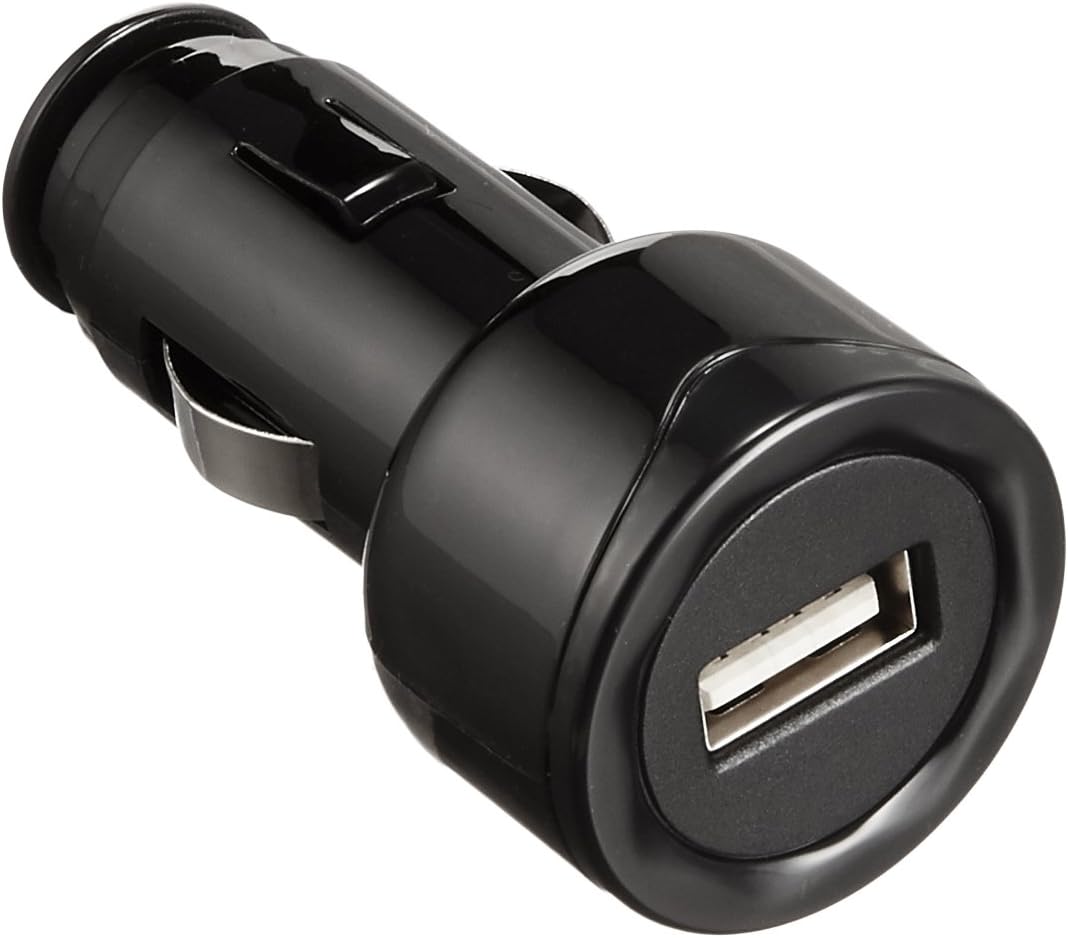
Image 2: The included USB car adapter, used to power the unit from your vehicle's accessory outlet.
6. Operasyon Enstriksyon
The unit is designed for simple operation with large, easy-to-press buttons.
Limen/Etenyen:
- Pou limen inite a, peze la Pouvwa button. The unit will start in the default operating mode.
- Pou fèmen inite a, peze la Pouvwa bouton ankò.
Mòd operasyon:
Peze a Mode bouton pou chanje mòd fonksyònman ki disponib yo:
- Mòd estanda: Provides balanced air purification and ion generation for everyday use.
- Mòd turbo: Activates high-speed operation for approximately double the deodorization speed. Ideal for quickly removing strong odors.
- Silans Mode: Operates at a reduced fan speed for quieter performance, suitable for use in a quiet vehicle environment. The operating noise level is approximately 36dB in this mode.
Airflow Angle Adjustment:
Inite a gen yon 2-stage switching mechanism for adjusting the blowing angle of the airflow. Manually adjust the top part of the unit to direct the airflow as desired.
7. Antretyen
Regular cleaning ensures optimal performance and extends the lifespan of your ion generator.
Netwaye inite prensipal la:
- Before cleaning, ensure the unit is powered off and disconnected from the power source.
- Siye deyò aparèy la avèk yon twal mou epi sèk. Pa sèvi ak pwodui netwayaj abrazif oswa solvan.
- Use the provided unit cleaning brush to gently remove dust and debris from the air inlet and outlet grilles.
Cleaning the Ion Generating Unit:
The ion generating unit requires periodic cleaning to maintain ion generation efficiency. Refer to the detailed instructions in the full product manual for specific steps on how to access and clean this component using the cleaning brush.
NAN. Depanaj
If you encounter any issues with your ion generator, please refer to the following common problems and solutions:
| Pwoblèm | Kòz posib | Solisyon |
|---|---|---|
| Aparèy pa limen. | Pa gen ekipman pou pouvwa oswa koneksyon ki lach. | Check if the USB cable is securely connected to both the unit and the USB car adapter. Ensure the car adapter is properly inserted into the vehicle's power outlet and the vehicle's power outlet is functional. |
| Sikilasyon lè a fèb oswa pa genyen. | Air inlet/outlet blocked by dust or foreign objects. | Turn off and unplug the unit. Use the cleaning brush to clear any obstructions from the air inlet and outlet. |
| Bri dwòl pandan operasyon an. | Foreign object inside the unit or unstable placement. | Turn off and unplug the unit. Check for any foreign objects near the fan or air inlets. Ensure the unit is placed stably in the cup holder. |
| Odor reduction is not effective. | Ion generating unit is dirty or operating mode is not optimal. | Clean the ion generating unit as per maintenance instructions. Try using the Turbo Mode for stronger odor removal. |
9. Espesifikasyon
Technical specifications for the SHARP Plasmacluster Ion Generator IG-HC15-B:

Image 3: Diagram showing the dimensions of the SHARP Plasmacluster Ion Generator, approximately 17 cm (6.7 inches) in height.
| Karakteristik | Detay |
|---|---|
| Nimewo Modèl | IG-HC15-B |
| Dimansyon (Dyamèt x Wotè) | 7.4 cm x 16.2 cm (apeprè 2.9 x 6.4 pous) |
| Pwa atik | 0.26 kg (apeprè 0.57 lbs) |
| Sous pouvwa | Car Adapter (USB 5V) |
| Konsomasyon pouvwa (Max) | Apeprè. 1.9W |
| Operating Noise (Max) | Apeprè. 36dB |
| Longè kòd pouvwa | Apeprè. 1.5m |
| Pwodwi pou Telefòn enkli | USB Car Adapter, USB Cable, Unit Cleaning Brush |
10. Garanti ak sipò
For warranty information, technical support, or service inquiries, please contact SHARP customer service or visit the official SHARP websit la. Kenbe resi acha ou kòm prèv acha pou reklamasyon garanti.
Official SHARP Websit: https://global.sharp/
Ask a question about this manual
Ask about setup, troubleshooting, compatibility, parts, safety, or missing instructions. Manuals+ will review the question and use this page’s manual context to help answer it.