
1. Entwodiksyon
The Aduro Amplify LED Wireless Speaker, model BSP15, is a portable audio device designed for wireless music playback and hands-free calling. It features integrated LED lighting with multiple settings to enhance the audio experience. This manual provides instructions for the proper setup, operation, and maintenance of your speaker.
Ki sa ki nan bwat la:
- Aduro Amplify LED Wireless Speaker (BSP15)
- Chaje kab
2. Enfòmasyon sou Sekirite
- Do not expose the speaker to water or moisture. This product is not water-resistant.
- Avoid extreme temperatures. Do not place near heat sources or in direct sunlight for extended periods.
- Pa eseye demonte oswa modifye oratè a. Sa ka anile garanti a epi lakòz domaj.
- Sèvi sèlman ak kab chaje ki vini ak li a oswa yon kab ekivalan sètifye.
- Kenbe soti nan atenn timoun yo.
3. Pwodwi Features
- Koneksyon Wireless: Connects to smartphones, tablets, and other Bluetooth-enabled devices.
- Easy-Touch Pairing: Simplifies the process of connecting to your device.
- Mikwofòn entegre: Pèmèt apèl telefòn san men.
- Sòti son kalite siperyè: Delivers clear and loud audio.
- Multiple LED Settings: Offers various light modes to complement your audio experience.
4. Kontwòl souview
The Aduro Amplify speaker features intuitive controls located on the top panel for easy access to functions.
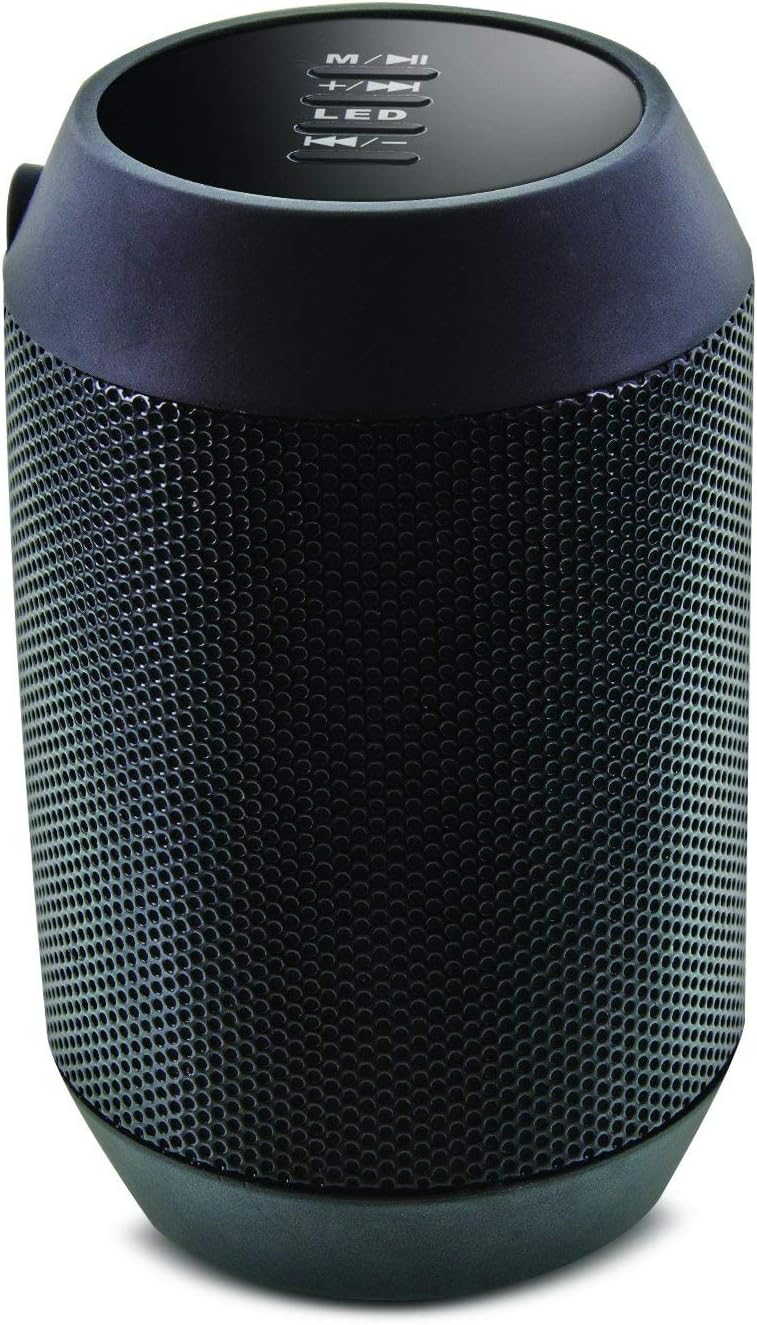
Imaj: Anlè view of the Aduro Amplify speaker, highlighting the control panel. From top to bottom, buttons include: M/▶█ (Mode/Play/Pause), +/▶▶ (Volume Up/Next Track), LED (LED Mode Control), ◀◀/- (Volume Down/Previous Track).
- M/▶█ Button: Press to switch between modes (e.g., Bluetooth, AUX). Press and hold to power on/off. Short press to Play/Pause music.
- +/▶▶ Button: Short press to increase volume. Press and hold to skip to the next track.
- Bouton ki ap dirije: Press to cycle through different LED light modes.
- ◀◀/- Button: Short press to decrease volume. Press and hold to go to the previous track.
5. Enstriksyon Enstalasyon
5.1 Chaje Oratè a
Before first use, fully charge the speaker. Connect the provided charging cable to the speaker's charging port and the other end to a USB power source (e.g., computer USB port, USB wall adapter). The LED indicator will show charging status and turn off or change color when fully charged.
5.2 Limen/Etenyen
- Pou limen: Peze epi kenbe la M/▶█ button for approximately 3 seconds until you hear an audible prompt or see the LED indicator light up.
- Pou etenn: Peze epi kenbe la M/▶█ button for approximately 3 seconds until you hear an audible prompt or the LED indicator turns off.
5.3 Bluetooth Pairing
Pou konekte oratè w la ak yon aparèy ki gen Bluetooth:
- Ensure the speaker is powered on and in Bluetooth pairing mode. The LED indicator will typically flash rapidly, indicating it is ready to pair.
- On your smartphone, tablet, or other device, navigate to the Bluetooth settings.
- Pèmèt Bluetooth epi chèche aparèy ki disponib.
- Select "Aduro BSP15" (or similar name) from the list of found devices.
- Once paired, the speaker will emit an audible confirmation, and the LED indicator will typically stop flashing and remain solid.
- Oratè a ap otomatikman eseye rekonekte ak dènye aparèy ki konekte a lè li limen.
5.4 Koneksyon filaire (AUX)
For devices without Bluetooth, you can use a 3.5mm audio cable (not included) to connect to the speaker's AUX input port. Once connected, the speaker should automatically switch to AUX mode. If not, press the M/▶█ button to cycle to AUX mode.
6. Operasyon Enstriksyon
6.1 Jwe odyo
- Jwe/Poz: Kout peze la M/▶█ bouton.
- Volim moute: Kout peze la +/▶▶ bouton.
- Volim desann: Kout peze la ◀◀/- bouton.
- Pwochen Track: Peze epi kenbe la +/▶▶ bouton.
- Track Previous: Peze epi kenbe la ◀◀/- bouton.
6.2 Apèl men lib
When connected via Bluetooth, the speaker's built-in microphone allows for hands-free calling.
- Reponn apèl: Kout peze la M/▶█ bouton an lè yon apèl k ap antre sonnen.
- Fini apèl: Kout peze la M/▶█ bouton pandan yon apèl.
- Rejte apèl: Peze epi kenbe la M/▶█ bouton an lè yon apèl k ap antre sonnen.
6.3 LED Light Settings
Peze a dirije button to cycle through the available light modes. The speaker offers various visual effects, including pulsating lights that react to music.
7. Antretyen
7.1 Netwayaj
Siye oratè a avèk yon twal mou epi sèk. Pa sèvi ak pwodui netwayaj abrazif, alkòl, oswa lòt solvang chimik, paske sa yo ka domaje sifas la.
7.2 Depo
When not in use for extended periods, store the speaker in a cool, dry place away from direct sunlight and extreme temperatures. It is recommended to charge the battery periodically to maintain its lifespan.
NAN. Depanaj
- Oratè a pa vle limen:
Ensure the battery is charged. Connect the charging cable and try again after a few minutes. - Pa ka konekte ak yon aparèy Bluetooth:
Ensure the speaker is in pairing mode (LED flashing). Make sure Bluetooth is enabled on your device and it is within range (typically 10 meters/30 feet). Turn both devices off and on again, then try pairing. Ensure no other devices are currently connected to the speaker. - Pa gen son oswa volim ki ba:
Check the volume levels on both the speaker and your connected device. Ensure the speaker is correctly paired or the AUX cable is fully inserted. If using AUX, ensure the correct mode is selected. - Limyè LED yo pa fonksyone:
Press the LED button to cycle through modes. If still unresponsive, power cycle the speaker.
9. Espesifikasyon

Imaj: Bò kote view of the Aduro Amplify LED Wireless Speaker, showing its cylindrical design and speaker grille.
| Non modèl | BSP15 |
| Nimewo Modèl Atik | LU4-01-BSP15 |
| Mak | Aduro |
| Materyèl | Plastik |
| Kalite Oratè | Subwoofer |
| Karakteristik espesyal | Built-in Microphone, Portable |
| Koneksyon Teknoloji | San fil (Bluetooth) |
| Kominikasyon san fil | Bluetooth |
| Audio Sòti Mode | Stereo |
| Oratè maksimòm pwodiksyon pouvwa | 5 Watts |
| Metòd kontwòl | Manyen |
| Dimansyon pwodwi | 6"D x 3.8"W x 3.5"H |
| Pwa atik | 6.7 ons |
| Nivo rezistans dlo | Pa reziste dlo |
| Sous pouvwa | Aparèy elektrik ak fil (pou chaje) |
10. Garanti ak sipò
10.1 Garanti limite
This Aduro product is covered by a limited warranty against defects in materials and workmanship under normal use. The duration and terms of the warranty may vary. Please refer to the warranty card included with your purchase or contact Aduro customer support for specific details.
10.2 Sipò pou Kliyan
For technical assistance, warranty claims, or product inquiries, please contact Aduro customer support. Contact information can typically be found on the manufacturer's official websit la oubyen sou anbalaj pwodwi a.
Manufacturer: Aduro