
Excelvan EHD11
Manyèl Itilizatè Pwojektè Mini LED Excelvan EHD11 la
Model: EHD11
1. Entwodiksyon
This manual provides detailed instructions for the setup, operation, and maintenance of your Excelvan EHD11 Mini LED Projector. Please read this manual thoroughly before using the projector to ensure proper operation and to extend the product's lifespan. Keep this manual for future reference.
2. Enstriksyon Sekirite Enpòtan
To prevent fire or electric shock, do not expose this appliance to rain or moisture. Observe the following safety precautions:
- Do not block any ventilation openings. Ensure adequate space around the projector for proper airflow.
- Pa mete pwojektè a sou yon charyo, yon kanpe oswa yon tab ki pa estab.
- Do not operate the projector near water or moisture.
- Sèvi ak sèlman atachman/akseswa manifakti a espesifye.
- Unplug this projector during lightning storms or when unused for long periods.
- Refere tout sèvis yo bay pèsonèl sèvis kalifye.
- Evite gade dirèkteman nan lantiy pwojektè a lè lamp se sou.
3. Pake kontni
Tanpri verifye ke tout atik yo prezan epi yo an bon kondisyon:
- Excelvan EHD11 Projector
- Pouvwa kab
- Kontwòl Remote
- AV Kab
- Manyèl itilizatè
4. Pwodwi souview
4.1 Projector Front and Top View

Imaj 4.1: Devan ak anwo view of the Excelvan EHD11 projector, showing the lens, ventilation, and control buttons (Source, Menu).
4.2 Projector Rear View ak Pò yo

Imaj 4.2: Dèyè view of the Excelvan EHD11 projector, highlighting the dual built-in speakers and various input/output ports including USB, HDMI, VGA, AV, and audio out.
4.3 Opsyon koneksyon

Image 4.3: Diagram illustrating the wide range of devices compatible with the projector, such as PCs, smartphones, USB storage, TV set-top boxes, game consoles, DVD players, digital cameras, and external speakers.
5. Enstalasyon
5.1 Plasman ak Distans Pwojeksyon
Position the projector on a stable, flat surface. The projection distance directly affects the screen size. Refer to the diagram below for recommended distances and corresponding screen sizes.

Image 5.1: Chart detailing the relationship between projection distance (in meters) and screen size (in inches) for a 16:9 aspect ratio, ranging from 32 inches at 1.2 meters to 200 inches at 6 meters.
5.2 Koneksyon pouvwa
Connect the power cable to the projector's power input and then to a power outlet. The power indicator light will illuminate.
5.3 Konekte Sous Antre yo
The projector supports multiple input sources. Connect your desired device (e.g., PC, DVD player, game console, USB drive) to the corresponding port on the rear of the projector using the appropriate cable (HDMI, VGA, AV, USB).
5.4 Ajisteman Fokus ak Keystone
After powering on, adjust the focus ring around the lens until the image is clear. If the image appears trapezoidal, use the keystone correction dial to square the image. The projector supports a ±15° keystone adjustment.
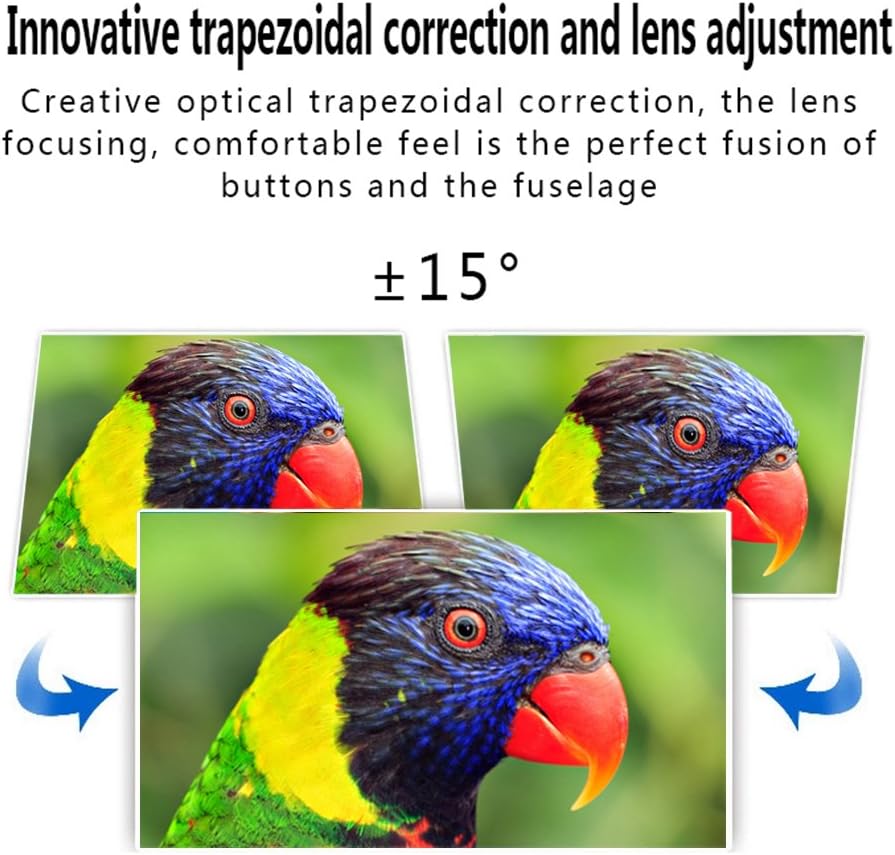
Image 5.4: Visual representation of the ±15° trapezoidal correction and lens adjustment feature, showing how to correct distorted images.
6. Operasyon Enstriksyon
6.1 Power On/Off
Peze bouton pouvwa a sou pwojektè a oswa sou kontwòl remote la pou limen oswa etenn aparèy la.
6.2 Seleksyon Sous
Press the 'Source' button on the projector or remote control to cycle through available input sources (HDMI1, HDMI2, USB1, USB2, VGA, AV, YPbPr, TV/DTV). Select the input corresponding to your connected device.
6.3 Navigasyon meni
Press the 'Menu' button to access the projector's settings. Use the arrow keys on the projector or remote to navigate, and 'OK' or 'Enter' to confirm selections. Adjust settings such as picture mode, aspect ratio, sound mode, and language.
6.4 Sòti odyo
The projector features built-in speakers. For enhanced audio, connect external speakers to the 'Audio Out' port using a 3.5mm audio cable.
7. Antretyen
7.1 Netwayaj Lantiy
Use a soft, lint-free cloth and a specialized lens cleaning solution to gently wipe the projector lens. Avoid abrasive materials or excessive pressure.
7.2 Vantilasyon
Regularly check that the projector's ventilation openings are clear of dust and debris. Blocked vents can lead to overheating and affect performance. Do not place the projector on soft surfaces that may obstruct airflow.
NAN. Depanaj
| Pwoblèm | Kòz posib | Solisyon |
|---|---|---|
| Pa gen imaj sou ekran an | Power cable disconnected; Incorrect input source selected; Input device not powered on or connected properly. | Check power connection; Select correct input source; Ensure input device is on and cables are secure. |
| Imaj la twoub | Konsantrasyon an pa ajiste. | Ajiste bag konsantre sou lantiy pwojektè a. |
| Image is distorted (trapezoidal) | Keystone la pa ajiste. | Ajiste kadran koreksyon trapèz la. |
| Pa gen son | Volume too low; Audio cables not connected; Incorrect audio output selected on source device; External speakers not connected or powered. | Increase volume; Check audio cable connections; Ensure source device is outputting audio; Connect external speakers if desired. |
| Input source needs to be set every time | Projector defaults to a specific input or does not save last setting. | Manually select the desired input source after powering on. Check menu settings for an 'Auto Source' or 'Last Input' option if available. |
9. Espesifikasyon
- Mak: Excelvan
- Modèl: EHD11 (FBA_151224-F6)
- Kalite ekspozisyon: LCD
- Rezolisyon ekspozisyon: 1920 x 1080 (Full HD sipòte)
- Koneksyon Teknoloji: HDMI, USB, VGA, AV
- Karakteristik espesyal: 3D-Ready, Portable
- Pwa atik: 6.49 liv
- Dimansyon pake: 16.9 x 13.1 x 8.5 pous
- Manifakti: Excelvan
- Dat premye disponib: 8 novanm 2014
10. Garanti ak sipò
Pou enfòmasyon sou garanti a oswa sipò teknik, tanpri gade dokiman yo te bay lè w te achte a oswa kontakte machann ou an. Kenbe resi acha w la kòm prèv acha.
Ask a question about this manual
Ask about setup, troubleshooting, compatibility, parts, safety, or missing instructions. Manuals+ will review the question and use this page’s manual context to help answer it.