
Inter-Tech 88887203
Inter-Tech 88887203 Case IPC Storage 4U-4410 Instruction Manual
Modèl: 88887203
Entwodiksyon
This manual provides detailed instructions for the installation, operation, and maintenance of the Inter-Tech 88887203 Case IPC Storage 4U-4410. This 4U rack-mountable chassis is designed for building robust storage systems, offering extensive drive capacity and efficient cooling solutions. Please read this manual thoroughly before proceeding with any installation or operation.
Enfòmasyon sou Sekirite
- Always disconnect the power supply from the wall outlet before opening the chassis or performing any installation/maintenance.
- Handle components with care to avoid damage from electrostatic discharge (ESD). Use an anti-static wrist strap if available.
- Asire bon vantilasyon alantou chasi a pou anpeche surchof.
- Do not operate the chassis in environments with excessive dust, humidity, or extreme temperatures.
- Refer to the manuals of other components (motherboard, PSU, drives) for their specific safety guidelines.
Pwodwi souview
The Inter-Tech 88887203 Case IPC Storage 4U-4410 is a versatile 4U rack-mountable chassis engineered for high-capacity storage applications. It features a robust design and ample space for various components.
Karakteristik kle:
- Kondwi Bays: Up to ten 2.5" or 3.5" hot-swap hard drive bays, four internal 2.5" drive bays, and three external 5.25" drive bays.
- Sistèm refwadisman: Three hot-swap 120mm fans located behind the drive brackets and two 80mm fans at the rear for optimal airflow.
- Konpatibilite plak mèr: Supports Mini ITX, µATX, ATX, eATX, SSI EEB motherboards.
- Konektivite Panèl Devan an: Includes one USB 2.0 port.
- Faktè fòm: 4U rack-mountable.

Figi 1: Devan view of the Inter-Tech 88887203 Case IPC Storage 4U-4410, showcasing the ten hot-swap drive bays and front panel controls.
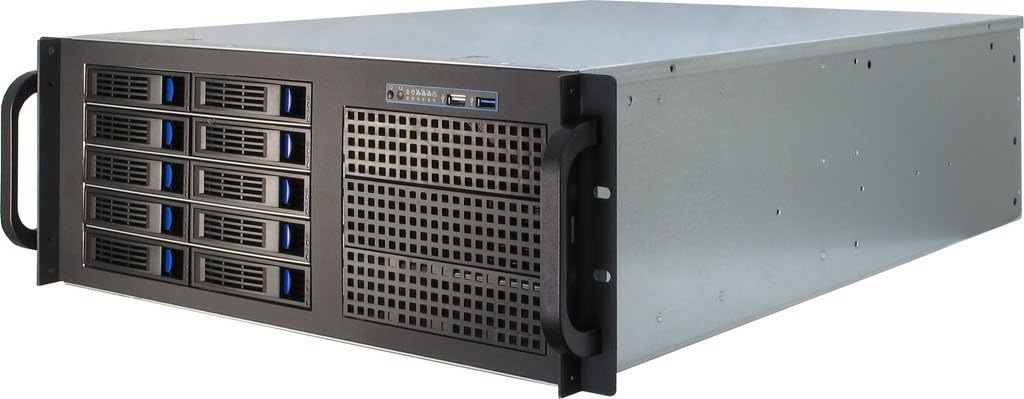
Figi 2: Devan angilè view of the chassis, highlighting its rack-mount handles and overall structure.
Enstalasyon ak Enstalasyon
1. Debalaj ak Enspeksyon
- Retire chasi a nan anbalaj li avèk prekosyon.
- Inspect the chassis for any signs of damage during transit. Contact your vendor immediately if damage is found.
- Verify that all accessories, such as screws, cables, and adapter brackets, are present.
2. Removing the Top Cover
Locate and remove the screws securing the top cover of the chassis. Carefully slide the cover backward and lift it off to access the internal components.
3. Enstalasyon mèr
- Install the I/O shield into the rear panel opening.
- Align the motherboard with the standoffs inside the chassis. Ensure the screw holes on the motherboard match the standoffs.
- Secure the motherboard using the provided screws.
4. Enstalasyon Inite Alimantasyon (PSU)
This chassis does not include a power supply unit. Install your ATX power supply into the designated bay at the rear of the chassis. Secure it with screws. Adapter brackets are provided for specific PSU types if needed.
5. Kondwi Enstalasyon
5.1. Hot-Swap 2.5"/3.5" Drives
- Open the latch on the desired hot-swap drive bay.
- Slide the drive tray out of the bay.
- Mount your 2.5" or 3.5" drive onto the tray using the appropriate screws.
- Slide the populated tray back into the bay until it clicks securely into place.
- Connect the necessary Molex power cables to the backplane for the hot-swap bays. Ensure sufficient power connections for all drives.

Figi 3: Devan angilè view showing several hot-swap drive bays partially open, illustrating the easy access for drive installation and removal.
5.2. Internal 2.5" Drives
Locate the internal 2.5" drive mounting points, typically near the bottom or side of the chassis. Secure your 2.5" drives using screws.
5.3. External 5.25" Devices
Remove the front bezel cover for the desired 5.25" bay. Slide your optical drive or other 5.25" device into the bay from the front and secure it with screws or the provided rails.
6. Fan Configuration and Cooling
The chassis comes pre-installed with three 120mm hot-swap fans at the front and two 80mm fans at the rear. These fans are designed to provide efficient airflow for cooling your components, especially the hard drives. The front 120mm fans are daisy-chained and powered by a single Molex connector. Ensure all fan power connectors are properly connected to your motherboard or power supply.
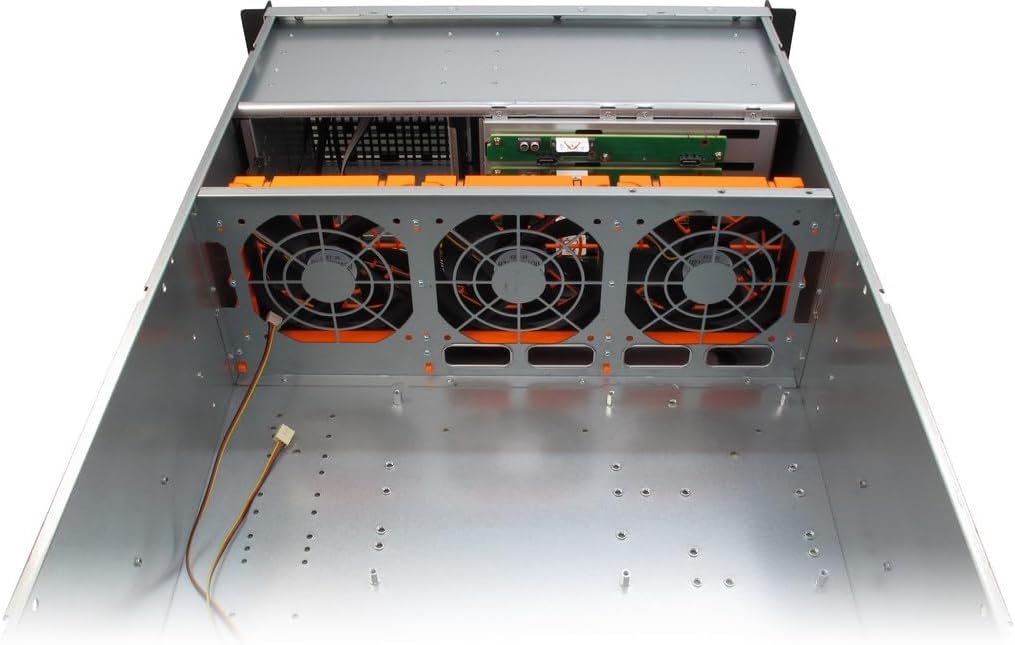
Figi 4: Internal top-down view, illustrating the placement of the three 120mm hot-swap fans at the front of the chassis, designed for optimal drive cooling.

Figi 5: Dèyè view of the chassis, showing the two 80mm fan mounts, I/O shield cutout, and expansion slots.

Figi 6: Bò entèn view of the chassis, showing the general layout, drive cages, and fan mounting areas.
7. Jesyon kab
Route all power and data cables neatly to ensure proper airflow and ease of future maintenance. Use cable ties if necessary.
8. Closing the Chassis
Once all components are installed and cables are managed, carefully slide the top cover back into place and secure it with the screws removed earlier.
Enstriksyon Operasyon
1. Limen
- Connect the power cable from your PSU to a wall outlet.
- Press the power button on the front panel of the chassis.
- Observe the power indicator lights and listen for system startup sounds.
2. Hot-Swap Drive Usage
The hot-swap drive bays allow for the removal and insertion of drives while the system is running, provided your operating system and HBA/RAID controller support hot-swapping. Always ensure the drive is safely ejected or unmounted from the operating system before physically removing it to prevent data loss.
Antretyen
1. Netwayaj
- Regularly clean dust from the chassis interior and fan filters (if present) to maintain optimal airflow and cooling performance.
- Use compressed air to remove dust from fans and heatsinks.
- Siye sifas eksteryè ak yon mou, damp twal. Evite pwodui netwayaj abrazif.
2. Ranplasman fanatik
The front 120mm fans are hot-swappable. To replace a fan, ensure the system is powered off or the fan is safely disconnected from power if hot-swapping. Unclip the old fan and replace it with a new one, ensuring correct orientation for airflow.
3. Ranplasman kondwi
For hot-swap drives, follow the hot-swap drive usage guidelines. For internal drives, power down the system, disconnect power, and then replace the drive.
Depanaj
Pwoblèm komen ak solisyon:
- Pa gen pouvwa:
- Check if the power cable is securely connected to both the PSU and the wall outlet.
- Asire w ke switch PSU a nan pozisyon 'ON'.
- Verify all internal power connections (24-pin ATX, 8-pin CPU, etc.) are seated correctly.
- Twòp bri fanatik:
- Inspect fans for dust buildup and clean them.
- Asire w pa gen okenn fil elektrik ki bloke lam vantilatè yo.
- Consider replacing noisy fans if cleaning does not resolve the issue.
- Kondwi ki pa detekte:
- Verify that all SATA data and power cables are securely connected to the drives and motherboard/backplane.
- Ensure the Molex power connectors for the hot-swap backplane are properly connected.
- Check BIOS/UEFI settings to ensure SATA ports are enabled and configured correctly (e.g., AHCI mode for hot-swap).
- Ensure your HBA card is properly installed and drivers are loaded in the operating system.
Espesifikasyon
| Karakteristik | Detay |
|---|---|
| Mak | Entè-Tech |
| Non modèl | Inter-Tech 88887203 Case IPC Storage 4U-4410, o.PSU |
| Nimewo Modèl | 88887203 |
| Kalite Ka | 4U etajè-montable |
| Mèr konpatibilite | Mini ITX, µATX, ATX, eATX, SSI EEB |
| Hot-Swap Drive Bays | 10 x 2.5"/3.5" |
| Bay Drive Entèn | 4 x 2.5" |
| External Drive Bays | 3 x 5.25" |
| Metòd refwadisman | Air (3x 120mm front hot-swap fans, 2x 80mm rear fans) |
| Front Panel USB Ports | 1 x USB 2.0 |
| Pwa atik | 14850 gram |
| Manifakti | A Plus Consulting GmbH |
Sipò ak garanti
For technical support, warranty information, or further assistance, please visit the official Inter-Tech websit la oubyen kontakte konsesyonè lokal ou a. Kenbe resi acha ou a pou reklamasyon garanti.
Official Inter-Tech Websit: www.inter-tech.de
Ask a question about this manual
Ask about setup, troubleshooting, compatibility, parts, safety, or missing instructions. Manuals+ will review the question and use this page’s manual context to help answer it.