
1. Entwodiksyon
This manual provides essential instructions for the installation, operation, maintenance, and troubleshooting of the APC Smart-UPS SRT3000RMXLT 3kVA 208V Rackmount Uninterruptible Power Supply (UPS). Please read this manual thoroughly before installing or operating the equipment to ensure proper usage and safety.
2. Enfòmasyon sou Sekirite
Observe all warnings and operating instructions in this manual. Failure to do so may result in injury or equipment damage.
- Sekirite elektrik: Inite sa a gen volim danjeretagPa eseye demonte UPS la. Se sèlman pèsonèl kalifye ki ta dwe fè antretyen an.
- Sekirite batri: Batteries can present a risk of electrical shock and high short-circuit current. Remove watches, rings, or other metal objects before handling batteries. Use tools with insulated handles.
- Pwa: The UPS is heavy. Use proper lifting techniques and ensure adequate support during installation.
- Anviwònman: Install the UPS indoors in a controlled environment, free from excessive dust, moisture, and extreme temperatures.
3. Pake kontni
Carefully unpack the UPS and inspect for shipping damage. The package should contain the following items:
- APC Smart-UPS SRT3000RMXLT Unit
- Power Supply (Built-In)
- Rack-montage pyès ki nan konpitè
- CD dokimantasyon
- USB kab
- Serial kab
4. Enstalasyon
4.1 Enstalasyon Fizik
The SRT3000RMXLT is designed for rack installation. Ensure the rack is stable and capable of supporting the UPS weight (approximately 69 pounds).
- Mount the UPS into a standard 19-inch rack using the provided rack-mounting hardware.
- Asire w ke gen ase sikilasyon lè toutotou aparèy la. Pa bloke ouvèti vantilasyon yo.

Figi 4.1: Devan view of the APC Smart-UPS SRT3000RMXLT. This image shows the front panel with the display and ventilation grille.
4.2 Connecting the UPS
Connect the UPS to the utility power and your equipment.
- Connect the UPS input power cord to a dedicated 208V AC outlet. The UPS uses a Type B - 3 pin (North American) power plug.
- Connect your equipment to the output receptacles on the rear of the UPS. The unit provides 12 IEC 320 C13/C14 outlets.
- For communication, connect the USB cable or serial cable from the UPS to your computer or network management card.
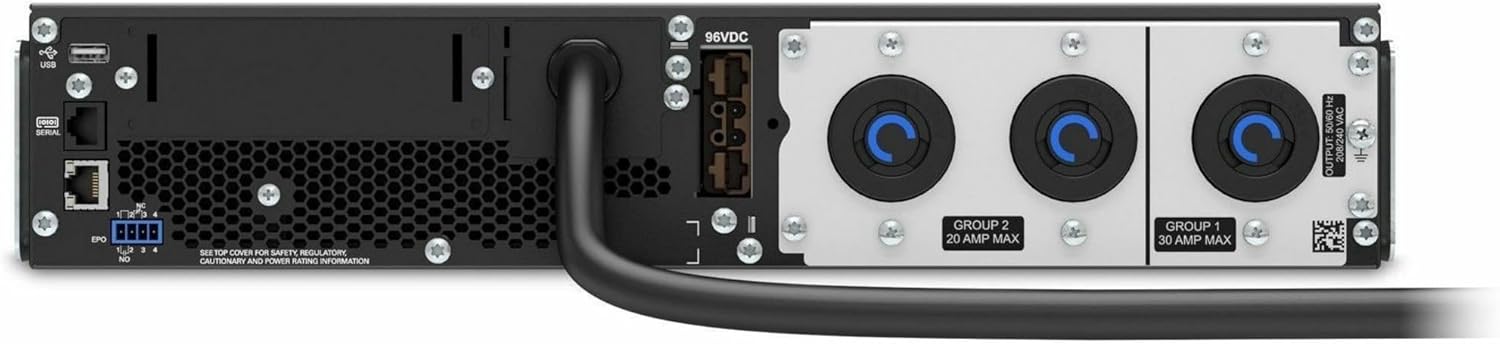
Figi 4.2: Dèyè view of the APC Smart-UPS SRT3000RMXLT. This image displays the various input and output ports, including USB, serial, EPO, and the 12 output receptacles, along with the main power input.
4.3 Premye pouvwa-up
Apre tout koneksyon yo an sekirite:
- Press the power button on the front panel to turn on the UPS.
- The UPS will perform a self-test and the display will show the current status.
- Allow the batteries to charge for at least 6 hours before relying on them for extended backup time.
5. Fonksyonman UPS la
5.1 Ekspozisyon ak Kontwòl Panèl Devan an
The front panel features an LCD display and control buttons for monitoring and configuring the UPS.
- Ekspozisyon LCD: Shows real-time status, load, battery charge, input/output voltage, and event logs.
- ESC bouton: Exits the current menu or cancels an operation.
- OK bouton: Konfime yon seleksyon oswa antre nan yon meni.
- Flèch anwo/desann: Navige nan opsyon meni yo oubyen ajiste paramèt yo.
5.2 Operasyon debaz
- Limen: Peze epi kenbe bouton pouvwa a jiskaske ekran an limen.
- Etenn: Press and hold the power button until the UPS powers down. Ensure all connected equipment is safely shut down first.
- mòd batri: Nan evènman an nan yon pouvwa outage, the UPS will automatically switch to battery power. The display will indicate 'On Battery'.
- Tès pwòp tèt ou: Initiate a manual self-test through the front panel menu to verify battery and UPS functionality.
6. Antretyen
6.1 Ranplasman batri
The UPS uses sealed lead-acid batteries. Battery life is typically 3-5 years, depending on environmental conditions and usage. Replace batteries when the UPS indicates a 'Battery Fault' or 'Replace Battery' warning.
- Contact APC support or a certified service technician for battery replacement.
- Always use genuine APC replacement battery cartridges (RBCs) to ensure compatibility and optimal performance.
- Resikle pil fin vye yo yon fason responsab.
6.2 Netwayaj
Keep the UPS free from dust and debris to ensure proper ventilation.
- Use a soft, dry cloth to clean the exterior of the UPS.
- Pa sèvi ak pwodui netwayaj likid oswa solvan.
- Asire ouvèti vantilasyon yo pa gen obstak.
NAN. Depanaj
Seksyon sa a bay solisyon pou pwoblèm komen. Pou pwoblèm ki pi konplèks, kontakte sipò teknik.
| Pwoblèm | Kòz posib | Solisyon |
|---|---|---|
| UPS la pa limen | No input power; Battery disconnected or discharged | Check power cord connection; Ensure utility power is present; Allow batteries to charge. |
| UPS la ap bipe kontinyèlman | On battery power; Overload condition | Check utility power; Reduce connected load. |
| 'Replace Battery' indicator | Batri prèske nan fen lavi | Order and replace the battery cartridge. |
| UPS not providing power to outlets | Output circuit breaker tripped; UPS in fault mode | Reset circuit breaker; Check display for fault codes and consult manual. |
8. Espesifikasyon
Key technical specifications for the APC Smart-UPS SRT3000RMXLT.
| Karakteristik | Spesifikasyon |
|---|---|
| Nimewo Modèl | SRT3000RMXLT |
| Mak | APC |
| Kapasite pouvwa sòti | 3000 VA / 2700 Watt |
| Nominal Sòti Voltage | 208V AC |
| Nominal Antre Voltage | 208V AC / 230V AC |
| Antre frekans | 60 Hz |
| Koneksyon Sòti | 12 x IEC 320 C13/C14 |
| Kalite batri | Asid plon |
| Tan rechaj tipik | 6 èdtan |
| Typical Backup Time (Full Load) | 4 minit |
| Faktè fòm | Etajè |
| Dimansyon (H x W x P) | 9 x 23 x 34 pous |
| Pwa | 69 liv |
| Tanperati Fonksyònman | 0 - 40 °C (32 - 104 °F) |
9. Garanti ak sipò
9.1 Enfòmasyon sou Garanti
APC provides a standard warranty for this product. Please refer to the warranty card included with your product or visit the official APC websit la pou wè kondisyon garanti detaye ki espesifik pou rejyon ou an.
9.2 Sipò teknik
For technical assistance, product information, or troubleshooting beyond the scope of this manual, please contact APC customer support. Have your model number (SRT3000RMXLT) and serial number ready when contacting support.
- Vizite APC ofisyèl la websit pou resous sipò, FAQ, ak enfòmasyon pou kontakte yo.
- Online resources often include updated manuals, firmware, and diagnostic tools.