
1. Entwodiksyon
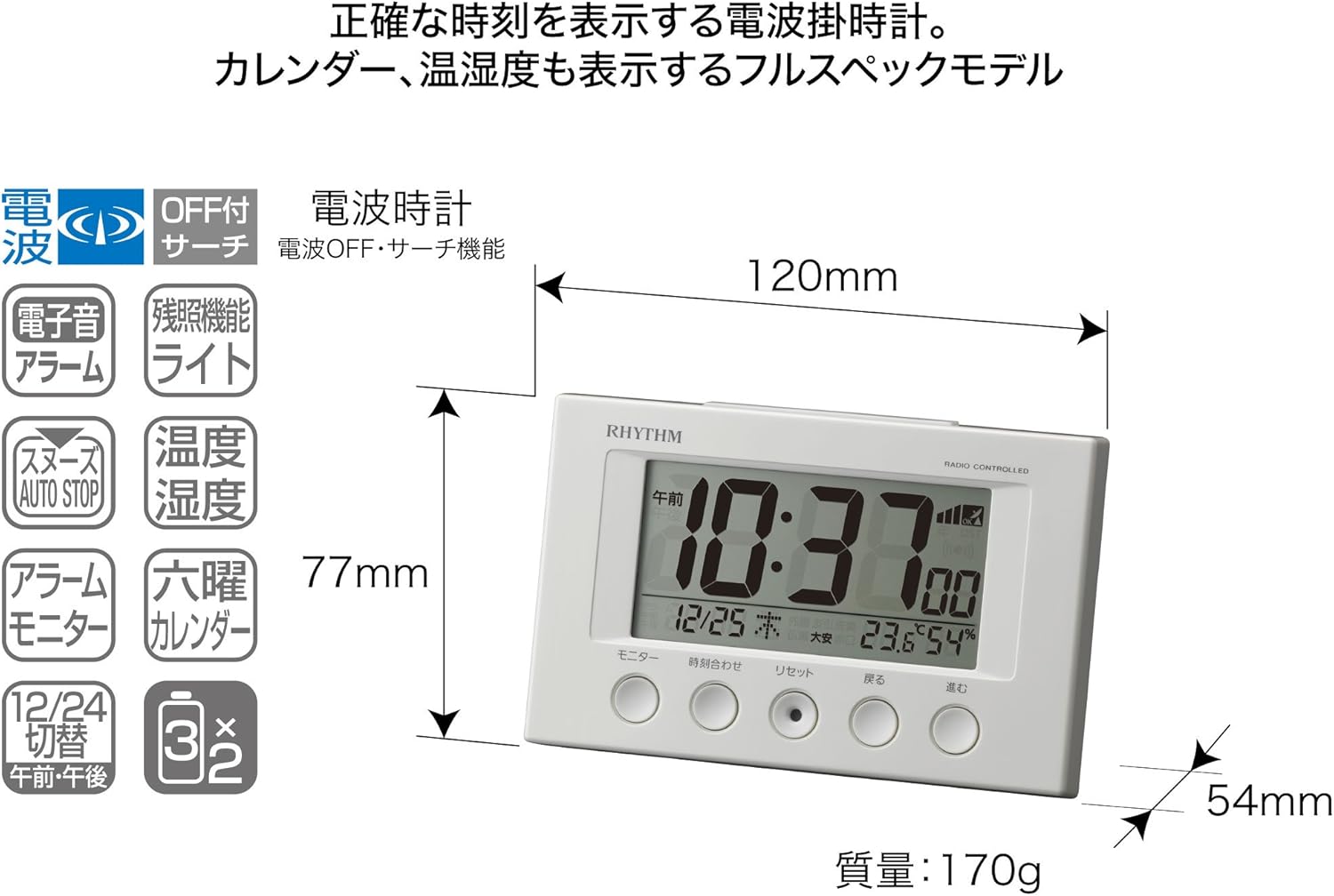
Mèsi pou acha aasing the RHYTHM 8RZ166SR03 Fit Wave Smart Alarm Clock. This device is a radio-controlled alarm clock equipped with a thermometer, hygrometer, and calendar display. Its compact design and user-friendly interface make it ideal for various indoor settings. This manual provides detailed instructions to help you set up, operate, and maintain your new alarm clock.
Karakteristik kle:
- Atomic Clock Movement: Automatically synchronizes time via radio waves for precise accuracy.
- Ekspozisyon Tanperati: Shows ambient temperature from -9.9 to 50 ℃.
- Ekspozisyon imidite: Shows ambient humidity from 20% to 95%.
- Electronic Sound Alarm: Features an alarm with an auto-stop function.
- Fonksyon Snooze: Temporarily silences the alarm.
- Dial Light: Includes an afterglow function for visibility in low light (5 seconds).
- Ekspozisyon kalandriye: Shows date and day of the week, including Rokuyoku (Japanese traditional calendar).
- Ekspozisyon 12/24 èdtan: Switchable time format.
2. Pake kontni
Tanpri verifye ke tout atik yo prezan nan pakè a:
- RHYTHM 8RZ166SR03 Fit Wave Smart Alarm Clock
- Manyèl Enstriksyon (dokiman sa a)
Note: 2 x AA manganese batteries are required and sold separately.
3. Pwodwi souview
Devan View and Display Elements:

This image displays the front of the RHYTHM 8RZ166SR03 alarm clock. It features a large digital LCD screen at the top, showing time, date, temperature, and humidity. Below the screen are five circular control buttons labeled (from left to right): Monitor, Time Adjustment, Reset, Back, and Forward.

This diagram illustrates the various elements of the LCD display:
- Ekspozisyon tan: Shows the current time in 12-hour (AM/PM) or 24-hour format.
- Radio Wave Reception Indicator: Displays the status of radio wave reception.
- Endikatè alam: An icon appears when the alarm is activated.
- Ekspozisyon Tanperati: Montre tanperati chanm aktyèl la.
- Ekspozisyon imidite: Shows the current room humidity.
- Ekspozisyon kalandriye: Shows the current date and day of the week, including Rokuyoku.
Retounen View ak Kontwòl:
The back of the clock features the alarm ON/OFF slide switch on the left side and the battery compartment cover in the center. The model number '8RZ166' and 'MADE IN CHINA' are also visible.
Control Buttons Explained:

This image details the function of each button:
- Bouton pou kontwole: Used to check the alarm sound.
- Time Adjustment Button: Used for manual time setting and switching between 12/24 hour display.
- Bouton Reyajiste: Resets the clock and also functions as a forced radio wave reception button.
- Back Button (←): Used to decrease values during alarm or time settings.
- Forward Button (→): Used to increase values during alarm or time settings.
- Alarm Switch (on back): Slides up for ON, down for OFF.
- Snooze Button (top): Activates the snooze function and the dial light.
4. Enstalasyon
4.1 Enstalasyon batri
- Remove the battery compartment cover on the back of the clock.
- Insert two (2) AA manganese batteries, ensuring the correct polarity (+/-) as indicated inside the compartment.
- Ranplase kouvèti lòj batri a.
This image shows the open battery compartment with two AA batteries correctly inserted, indicating the positive and negative terminals.
4.2 Initial Power On and Radio Wave Reception
After battery installation, the clock will automatically attempt to receive radio waves to set the correct time. This process may take several minutes. Ensure the clock is placed in an area with good reception, away from electronic devices that may cause interference.

This diagram illustrates how radio-controlled clocks receive standard time signals from two transmission stations (one in Fukushima, 40kHz, and one in Fukuoka/Saga, 60kHz) to automatically correct and display the precise time. The clock will automatically adjust its time based on these signals.
If reception is successful, the time will be set automatically. If not, you may need to manually set the time (refer to Section 5.1).
5. Operasyon Enstriksyon
5.1 Manual Time and Date Setting
In cases where radio wave reception is difficult or for specific time zone adjustments:
- Peze epi kenbe la Ajisteman Tan button until the time display starts flashing.
- Sèvi ak la Back (←) epi Forward (→) bouton pou ajiste lè yo.
- Peze a Ajisteman Tan button again to move to minutes, then adjust using Back (←) epi Forward (→).
- Kontinye peze Ajisteman Tan pou chanje paramèt ane, mwa ak jou, epi ajiste chak ak Back (←) epi Forward (→).
- Yon fwa tout paramèt yo kòrèk, peze bouton an Ajisteman Tan bouton an yon dènye fwa pou konfime epi sòti nan mòd konfigirasyon an.
5.2 Anviwònman Alam
- Pou mete lè alam lan, peze epi kenbe bouton an Ajisteman Tan button until the alarm time starts flashing (this may require cycling past the current time settings if already in manual time setting mode).
- Sèvi ak la Back (←) epi Forward (→) bouton yo pou mete lè ak minit alam ou vle a.
- Peze a Ajisteman Tan bouton an pou konfime lè alam lan.
5.3 Aktive/Dezaktive Alam lan
Sèvi ak la Alarm ON/OFF slide switch located on the back of the clock:
- Glise switch la UP pou aktive alam lan. Yon ikòn alam ap parèt sou ekran an.
- Glise switch la DESANN to deactivate the alarm. The alarm icon will disappear.
5.4 Snooze Function and Dial Light
Lè alam lan sonnen, peze gwo bouton an Bouton Snooze located on the top of the clock. This will:
- Temporarily silence the alarm (snooze duration is preset).
- Activate the dial light for approximately 5 seconds, illuminating the display for easy viewnan fè nwa.
The alarm will sound again after the snooze period. To stop the alarm completely, slide the Alam ON/OFF switch pou OFF.
5.5 Display Modes (12/24 Hour Format)
To switch between 12-hour (with AM/PM indicator) and 24-hour time formats, briefly press the Ajisteman Tan button outside of setting mode.
5.6 Checking Alarm Sound
Pou preview the alarm sound, press the Siveye button on the front of the clock.
6. Antretyen
6.1 Netwayaj
To clean the clock, wipe it gently with a soft, dry cloth. Do not use abrasive cleaners, solvents, or chemical sprays, as these can damage the casing oswa ekspozisyon.
6.2 Ranplasman batri
When the display becomes dim or the clock functions erratically, it is time to replace the batteries. Follow the battery installation steps in Section 4.1. It is recommended to replace both batteries at the same time with new ones.
NAN. Depanaj
| Pwoblèm | Kòz posib | Solisyon |
|---|---|---|
| Clock does not display anything or display is dim. | Pil yo mouri oswa yo pa byen mete. | Ranplase pil yo ak nouvo pil AA, asire polarite ki kòrèk la. |
| Time is incorrect or does not set automatically. | Poor radio wave reception; clock is outside reception area; interference from other electronics. | Move the clock to a different location, away from electronic devices. Try manual time setting (Section 5.1). Press the Reset button to force reception. |
| Alam lan pa sonnen. | Alarm is not activated; alarm volume is too low (if adjustable); incorrect alarm time set. | Ensure the Alarm ON/OFF switch is in the ON position. Verify the alarm time is set correctly. |
| Time drifts by an hour occasionally. | Daylight Saving Time (DST) adjustment issues, especially if the clock is designed for a specific region's DST rules. | Manually adjust the time if the automatic DST adjustment is not suitable for your region. Some radio-controlled clocks are optimized for specific regional signals. |
| Display is difficult to read from certain angles. | LCD displays have optimal viewang ing. | Ajiste a viewing angle or the position of the clock for better clarity. |
8. Espesifikasyon
| Karakteristik | Spesifikasyon |
|---|---|
| Nimewo Modèl | 8RZ166SR03 |
| Mak | RITM |
| Mouvman | Atomic clock (Radio-controlled) |
| Materyèl ankadreman | Plastik |
| Kalite ekspozisyon | Digital LCD |
| Sous pouvwa | Battery Powered (2 x AA manganese batteries, sold separately) |
| Pwa atik | 0.17 Kilogram |
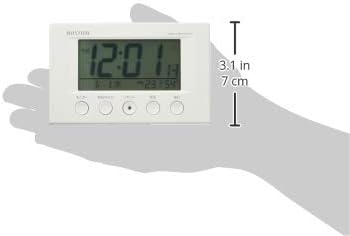
| Dimansyon pwodwi | 12W x 7.7H x 5.4D centimetres (approx. 4.7 x 3.0 x 2.1 inches) |
| Tanperati Display Range | -9.9 ℃ pou 50 ℃ |
| Ranje ekspozisyon imidite | 20% a 95% RH |
| Karakteristik espesyal | Calendar Display, Humidity Display, Snooze, Temperature Display, Dial Light (afterglow function) |
| Kalite chanm | Bedroom, General Indoor Use |
9. Garanti ak sipò
RHYTHM products are manufactured with high-quality standards. For warranty information, please refer to the documentation provided at the time of purchase or contact your retailer. If you encounter any issues or require technical assistance, please contact the RHYTHM customer support or your local distributor. Keep your purchase receipt as proof of purchase.