
1. Entwodiksyon
This manual provides essential information for the safe and efficient operation of your NEC X555UNS 55-inch 1080p LED TV. Please read these instructions thoroughly before installation and use, and retain them for future reference.
The NEC X555UNS is designed for professional signage applications, particularly for building video walls, offering superior off-angle viewing and minimal color shift due to its S-IPS panel technology. It supports 24/7 operation with advanced heat management and localized dimming for improved brightness uniformity.

Image: The NEC X555UNS 55-inch LED TV displaying vibrant, colorful content, showcasing its high-quality visual output.
2. Enfòmasyon sou Sekirite
Toujou obsève prekosyon sekirite sa yo pou evite domaj nan pwodwi a epi asire sekirite itilizatè a:
- Ensure the product is installed by qualified personnel.
- Pa bloke ouvèti vantilasyon.
- Evite ekspoze inite a ak lapli oswa imidite.
- Use only the power cord supplied with the unit or a suitable replacement.
- Dekonekte kouran anvan ou netwaye oswa antretyen.
- Pa eseye repare aparèy la tèt ou. Konfye tout antretyen bay pèsonèl sèvis kalifye.
3. Pake kontni
Verifye ke tout atik yo prezan nan pakè a:
- NEC X555UNS 55-inch LED TV Unit
- Kanpe
- Kòd pouvwa
- Kontwòl Remote
- Manyèl Enstriksyon (dokiman sa a)

Imaj: Devan view of the NEC X555UNS 55-inch LED TV, showing its sleek, dark display panel when powered off.
4. Enstalasyon ak Enstalasyon
4.1 Enstalasyon Fizik
The NEC X555UNS is designed for video wall applications. Ensure proper mounting hardware is used for secure installation. The unit weighs approximately 81 pounds (36.7 kg).
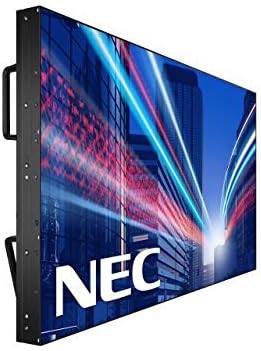
Imaj: Bò kote view of the NEC X555UNS 55-inch LED TV, highlighting its robust construction and integrated handles for easier installation in video wall configurations.
4.2 Koneksyon
Connect your video sources and network cables to the appropriate ports on the display. The X555UNS offers various connectivity options:
- HDMI: For high-definition video and audio input.
- DVI-D: For digital video input.
- LAN: For network control and content distribution.
- DisplayPort: Supports UHD pass-through for daisy-chaining multiple displays in a video wall setup.
- Plas OPS: Allows for integration of single board computers.
For video wall configurations, utilize the DisplayPort for UHD daisy-chaining to achieve a high-resolution display across the entire wall.
4.3 Premye pouvwa sou
- Connect the power cord to the display and a suitable power outlet.
- Peze bouton pouvwa a sou ekran an oswa sou kontwòl remote la.
- The display will power on and show the NEC logo.
- Use the on-screen menu to configure initial settings such as language, input source, and display mode.
La Auto ID feature can simplify installation time, especially in multi-display setups, by reducing configuration steps to a single button press.
5. Operasyon Enstriksyon
5.1 Operasyon debaz
Use the remote control or the buttons on the display to navigate the on-screen menu (OSD). Adjust settings such as brightness, contrast, color temperature, and input source.
5.2 Ekspozisyon Karakteristik
- S-IPS Panel Technology: Provides excellent off-angle viewing and minimizes color shift, making it ideal for public viewing and video walls.
- Direct LED Backlighting with Localized Dimming: Enhances brightness uniformity and achieves a higher dynamic contrast ratio.
- Operasyon 24/7: Designed for continuous use with advanced thermal protection, internal temperature sensors, and fan-based cooling.
- 700 cd/m² Brightness: Ensures clear visibility even in brightly lit environments.
6. Antretyen
6.1 Netwaye Display la
Pou netwaye ekran an, siye l dousman avèk yon twal mou ki pa gen pousyè. Pou mak ki difisil pou retire,ampRense twal la yon ti kras avèk dlo oswa yon pwodui netwayaj ekran dou ki pa abrazif. Pa flite likid dirèkteman sou ekran an.
6.2 Swen Jeneral
- Kenbe ekspozisyon an nan yon zòn ki byen vantile pou anpeche surchof.
- Evite mete objè lou sou ekran an.
- Tcheke koneksyon kab yo regilyèman pou asire yo byen fèm.
NAN. Depanaj
If you encounter issues with your NEC X555UNS, refer to the following common problems and solutions:
| Pwoblèm | Kòz posib | Solisyon |
|---|---|---|
| Pa gen pouvwa | Power cord disconnected; Power outlet faulty. | Check power cord connection; Test power outlet with another device. |
| Pa gen Imaj | Incorrect input source selected; Video cable loose or faulty. | Select correct input source; Check video cable connections. |
| Pòv Kalite Foto | Resolution mismatch; Display settings incorrect. | Adjust resolution on source device; Calibrate display settings (brightness, contrast). |
If the problem persists, contact NEC customer support.
8. Espesifikasyon
| Karakteristik | Detay |
|---|---|
| Non modèl | X555UNS |
| Gwosè ekran | 55 pous |
| Teknoloji ekspozisyon | LED, S-IPS Panel |
| Rezolisyon | 1080p (Full HD) |
| Aspè rapò | 16:9 |
| Rafrechisman pousantaj | 60 Hz |
| Klète | 700 cd/m² (nits) |
| Koneksyon | HDMI, DVI-D, LAN, DisplayPort |
| Karakteristik espesyal | Flat, S-IPS Panel, Auto ID, UHD Daisy Chain, OPS Slot, 24/7 Operation, Advanced Thermal Protection |
| Dimansyon pwodwi | 54 x 12 x 34 pous (apeprè) |
| Pwa atik | 81 liv (apeprè) |
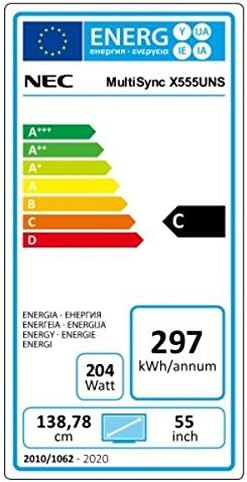
Image: Energy efficiency label for the NEC MultiSync X555UNS, showing energy consumption details and efficiency class.
9. Garanti ak sipò
For warranty information and technical support, please refer to the official NEC website or contact your local NEC representative. Keep your purchase receipt as proof of purchase.
Resous sou entènèt: Vizite www.necdisplay.com for product documentation, drivers, and support contact information.
Sipò Kliyan: For direct assistance, please contact NEC customer service.