
PRORECK PARTY 15
PRORECK Party 15 Portable PA Speaker System
Manyèl itilizatè
Model: PARTY 15
Entwodiksyon
Mèsi pou acha aasing the PRORECK Party 15 Portable PA Speaker System. This system is designed to deliver powerful and clear audio for various applications, including parties, DJ events, home studios, and social gatherings. Featuring Bluetooth connectivity, USB/SD card playback, FM radio, and integrated LED lights, the Party 15 offers versatile audio solutions. Please read this manual thoroughly before operating the system to ensure proper use and to maximize its performance and longevity.
Enfòmasyon enpòtan sou sekirite
Toujou swiv prekosyon sekirite debaz yo lè w ap itilize pwodui sa a pou diminye risk dife, chòk elektrik, ak blesi.
- Do not expose this equipment to rain or moisture.
- Do not open the speaker enclosure. There are no user-serviceable parts inside. Refer all servicing to qualified service personnel.
- Asire ekipman pou pouvwa a voltage matche ak voltage espesifye sou inite a.
- Pwoteje kòd elektrik la pou yo pa mache oswa kwense, sitou nan priz, resipyan konvenyans, ak pwen kote yo sòti nan aparèy la.
- Deploge aparèy sa a pandan tanpèt zèklè oswa lè li pa itilize pou yon peryòd tan ki long.
- Pa bloke okenn ouvèti vantilasyon. Enstale li dapre enstriksyon manifakti a.
- Itilize sèlman ak charyo a, kanpe, tripod, bracket, oswa tab ki espesifye pa manifakti a, oswa vann ak aparèy la.
Ki sa ki nan bwat la
Carefully unpack your PRORECK Party 15 system and ensure all items listed below are present and in good condition. If any items are missing or damaged, please contact your retailer immediately.

Image: Complete PRORECK Party 15 system with all included accessories.
- 1 x Oratè aktif
- 1 x Passive Speaker
- 2 x Oratè kanpe
- 1 x mikwofòn filaire
- 1 x Speakon Cable (for connecting active to passive speaker)
- 1 x pouvwa kab
- 1 x kontwòl remote

Imaj: Detaye view of the wired microphone, remote control, and various cables.
Enstalasyon
Follow these steps to set up your PRORECK Party 15 speaker system.
1. Asanblaj Sipò Oratè a
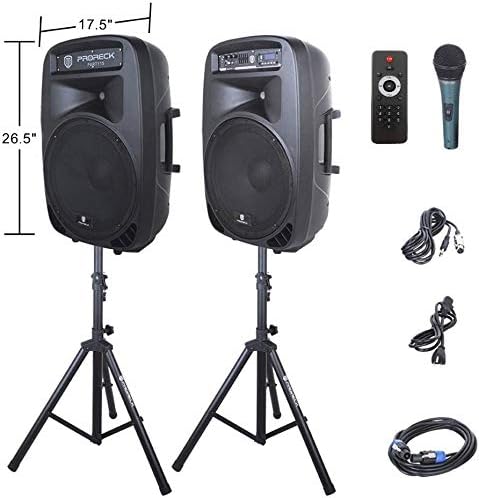
Image: The two included speaker stands.
- Unfold the tripod legs of each speaker stand until they are fully extended and stable.
- Loosen the height adjustment knob on the stand and extend the pole to your desired height. Ensure the safety pin is inserted through the appropriate hole to secure the height.
- Sere boulon ajisteman wotè a byen fèm.
2. Plasman Oratè
- Carefully lift each speaker and place it onto the top pole of a speaker stand. Ensure the speaker is securely seated.
- Position the active speaker (the one with the control panel) near a power outlet.
- Place the passive speaker within reach of the included Speakon cable from the active speaker.
Image: PRORECK Party 15 speakers set up on their stands.
3. Konekte Oratè yo
- Locate the Speakon output on the rear panel of the active speaker and the Speakon input on the rear panel of the passive speaker.
- Connect one end of the Speakon cable to the active speaker's Speakon output and the other end to the passive speaker's Speakon input. Ensure a secure connection.

Image: Rear panels of the active and passive speakers, highlighting the Speakon connection.
4. Koneksyon pouvwa
- Ensure the master volume knob on the active speaker is turned down to its minimum setting.
- Connect the power cable to the active speaker's power input and then plug it into a suitable electrical outlet.
Enstriksyon Operasyon
This section details how to operate your PRORECK Party 15 speaker system and utilize its various features.
Kontwòl Panel Plis paseview

Imaj: Detaye view of the active speaker's control panel.
The active speaker features a comprehensive control panel with an LCD display, various input options, volume controls, and an equalizer.
1. Power On/Off
- After connecting the power cable, locate the power switch on the rear panel of the active speaker.
- Flip the switch to the "ON" position to power on the system. The LCD display will illuminate.
- Pou etenn li, vire switch la nan pozisyon "OFF".
2. Seleksyon mòd
Peze a MÒD button on the control panel or remote control to cycle through available input modes: Bluetooth, USB, SD Card, FM Radio, and Line Input.
3. Bluetooth Koneksyon
- Select "Bluetooth" mode using the MÒD button. The LCD display will show "BLUE".
- Sou aparèy ou ki gen Bluetooth la (telefòn entelijan, tablèt, elatriye), chèche aparèy Bluetooth ki disponib yo.
- Select "PRORECK PARTY 15" from the list. Once paired, the speaker will emit a confirmation sound.
- You can now play audio from your device through the speakers.
4. Lekti Kat USB/SD
- Insert a USB drive or SD card containing MP3 audio files into the respective slot on the control panel.
- The system will automatically switch to USB or SD mode and begin playing the first compatible audio fileSi non, peze bouton an MÒD bouton an pou chwazi antre ki kòrèk la.
- Sèvi ak la JWE/POZ, ANVAN, ak PWOCHÈ buttons on the control panel or remote to manage playback.
5. FM Radyo
- Select "FM Radio" mode using the MÒD bouton.
- Peze a JWE/POZ button to initiate an automatic scan for available FM stations. The system will save detected stations.
- Sèvi ak la ANVAN epi PWOCHÈ bouton yo pou navige nan estasyon ki sove yo.
6. Itilizasyon Mikwofòn
- Connect the wired microphone to the 1/4'' MIC input on the control panel.
- Adjust the "MIC VOL" knob to control the microphone's volume level.
- Ensure the main volume is set appropriately to avoid feedback.
7. Fonksyon kontwòl Remote
Image: The included remote control.
The remote control allows for convenient operation from a distance (up to 20 feet). Functions include:
- MOD: Switch between input modes.
- JWE/POZ: Jwe oswa mete yon poz nan lekti odyo a.
- ANVAN/PROCHÈ: Skip tracks or navigate FM stations.
- VOL + / VOL-: Ajiste volim mèt.
- EQ: Chanje paramèt predefini egalizatè yo.
- Numeric buttons for direct track selection (in USB/SD mode).
8. Ajisteman egalizatè
The control panel features a 5-band graphic equalizer. Adjust the sliders to fine-tune the audio output to your preference. Experiment with different settings to achieve the desired sound for various music genres or vocal performances.
9. Limyè ki ap dirije

Image: PRORECK Party 15 speakers demonstrating various LED light colors.
The PRORECK Party 15 speakers are equipped with built-in LED lights that activate with sound. These lights enhance the party atmosphere. There is a dedicated switch on the rear of the active speaker to turn the LED lights on or off.
Antretyen
Bon antretyen asire lonjevite ak pèfòmans optimal sistèm oratè ou a.
- Netwayaj: Sèvi ak yon twal mou epi sèk pou netwaye deyò oratè yo. Pa sèvi ak pwodui netwayaj abrazif, sir, oswa solvan.
- Depo: Lè w pa itilize oratè yo pou yon bon bout tan, sere yo nan yon kote ki fre epi sèk, lwen limyè solèy dirèk ak tanperati ekstrèm.
- Vantilasyon: Asire w ouvèti vantilasyon yo pa gen pousyè ak debri pou anpeche yo chofe twòp.
- Câbles: Tcheke tout kab yo regilyèman pou wè si yo gen siy itilizasyon oswa domaj. Ranplase nenpòt kab ki domaje imedyatman.
Depanaj
If you encounter issues with your PRORECK Party 15 system, refer to the following common problems and solutions.
| Pwoblèm | Kòz posib | Solisyon |
|---|---|---|
| Pa gen pouvwa | Kab kouran an pa konekte; Entèriptè kouran an etenn; Pwoblèm priz la ap fonksyone byen. | Ensure power cable is securely connected and plugged into a working outlet. Check power switch on rear panel. |
| Pa gen son ki soti nan moun kap pale | Volume too low; Incorrect input mode; Speakon cable loose/damaged; Audio source issue. | Increase master volume. Select correct input mode. Check Speakon cable connection between active and passive speakers. Verify audio source is playing. |
| Bluetooth pa asosye | Speaker not in Bluetooth mode; Device too far; Device already paired to another speaker. | Ensure speaker is in Bluetooth mode ("BLUE" on display). Move device closer to speaker. Disconnect device from other Bluetooth connections. |
| Mikwofòn pa mache | Mic volume too low; Microphone not connected properly; Microphone faulty. | Increase "MIC VOL" knob. Ensure microphone is fully inserted into the 1/4'' input. Test with another microphone if available. |
| Son defòme | Volume too high; Input signal too strong; Equalizer settings. | Reduce master volume or input source volume. Adjust equalizer settings. |
| Limyè ki ap dirije pa travay | LED switch off; Volume too low for activation. | Ensure the LED switch on the rear panel is in the "ON" position. Increase volume to activate sound-reactive lights. |
Espesifikasyon
| Non modèl | PATI 15 |
| Kalite Oratè | Woofer |
| Gwosè Oratè | 15 pous |
| Oratè maksimòm pwodiksyon pouvwa | 2000 Watts P.M.P.O (Peak Music Power Output) |
| Koneksyon Teknoloji | Filaire, San fil (Bluetooth) |
| Teknoloji kominikasyon san fil | Bluetooth |
| Gamme Bluetooth | 10 mèt (apeprè 33 pye) |
| Karakteristik espesyal | LED Light, FM Radio, USB Port, SD Card Reader, Digital LCD Display |
| Antre | 1/4'' Mic, RCA Line Inputs, USB, SD Card |
| Sòti yo | Speakon Output (for passive speaker), RCA Line Output |
| Materyèl | Akrilonitrile butadien stirèn (ABS) |
| Dimansyon pwodwi (chak oratè) | 19"D x 30"W x 29"H (approximate, likely including handles/feet) |
| Pwa Atik (total) | 81.6 liv |
| Sous pouvwa | Fil elektrik |
Garanti ak sipò
PRORECK products come with a limited warranty. For specific warranty terms and conditions, please refer to the warranty card included with your product or visit the official PRORECK website. For technical support, troubleshooting assistance, or parts inquiries, please contact PRORECK customer service through their official channels.
Manufacturer: PRORECK AUDIO
Ask a question about this manual
Ask about setup, troubleshooting, compatibility, parts, safety, or missing instructions. Manuals+ will review the question and use this page’s manual context to help answer it.