
1. Entwodiksyon
The Sony SBH54 is a versatile Stereo Bluetooth Headset designed for wireless communication and audio playback. It offers both handset and headset functionalities, allowing you to take and make calls, view messages, listen to music, and tune into FM radio directly from its display. Crafted from premium metal with a splash-proof design, it combines elegance with durability.
Key features include Bluetooth Wireless 3.0, NFC technology for easy pairing, an OLED display, and built-in noise cancellation for clear audio during calls. The headset supports A2DP profile and can connect to two devices simultaneously.
2. Pwodwi souview
The SBH54 features a compact design that fits comfortably in your hand. It includes an OLED display for information at a glance and physical controls for media and call management.
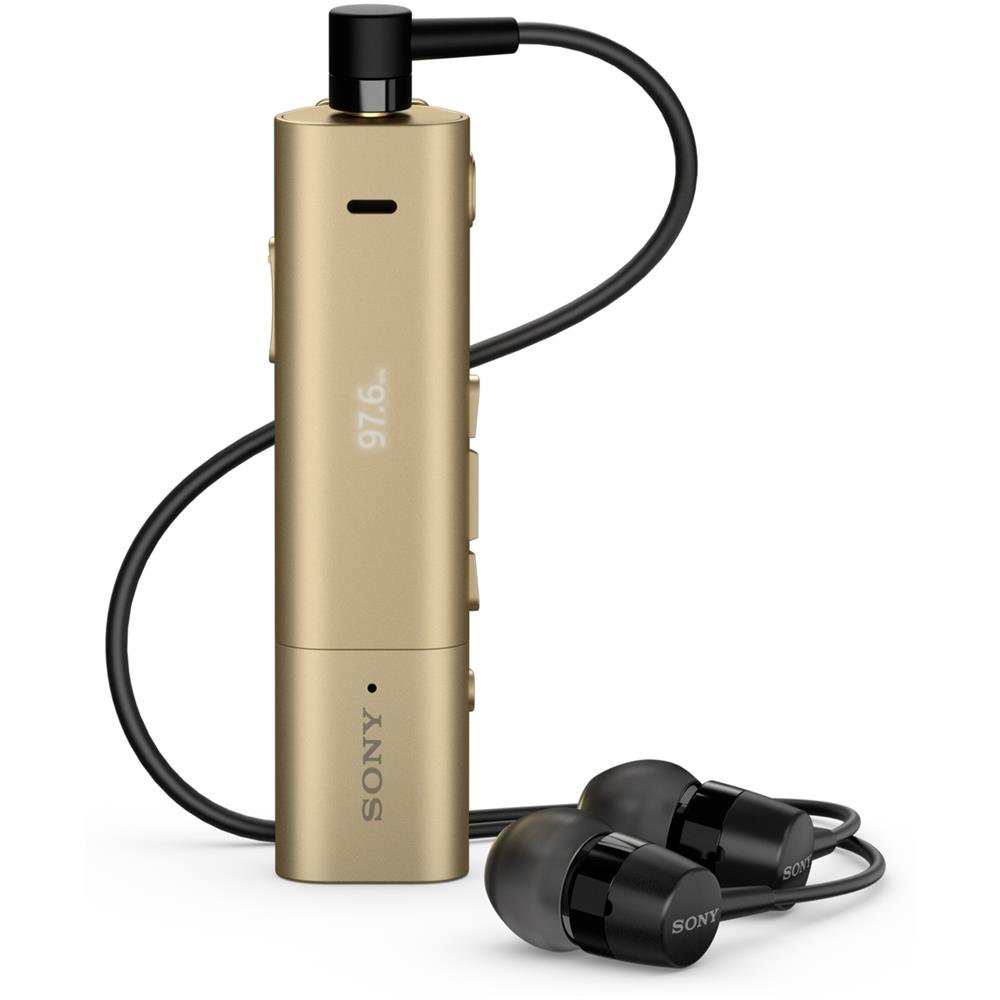
Image: Sony SBH54 Gold Stereo Bluetooth Headset. This image displays the compact, gold-colored headset with its integrated clip and display screen.
Kontwòl ak Endikatè:
- Ekspozisyon OLED: Shows caller ID, messages, music track information, and FM radio frequency.
- Bouton milti-fonksyon: For call answering/ending, play/pause music.
- Bouton Volim: Ajiste volim odyo a.
- Bouton Navigasyon: For menu navigation and track skipping.
- Mikwofòn: Integrated for voice calls.
- Kas ekoutè Jack: 3.5mm port for connecting the included premium headphones.
- Pò chaje: Pò mikwo USB pou chaje aparèy la.
3. Enstalasyon
3.1 Chaje kas ekoutè a
- Connect the supplied USB cable to the headset's charging port and to a USB power adapter or a computer's USB port.
- Endikatè batri a sou ekran an ap montre eta chaj la.
- Chaje kask la konplètman anvan premye itilize.
3.2 Pairing with a Device (Bluetooth)
- Asire w ke kas ekoutè a chaje epi li etenn.
- Press and hold the power button until the headset enters pairing mode (indicated by a specific light pattern or message on the display).
- Sou telefòn entelijan ou oswa lòt aparèy ki gen Bluetooth, aktive Bluetooth epi chèche aparèy ki disponib yo.
- Chwazi "SBH54" nan lis aparèy yo jwenn yo.
- Si yo mande w, antre kòd sekrè "0000" la (kat zewo).
- Once paired, the headset will indicate a successful connection.
3.3 Pairing with a Device (NFC)
For devices with NFC (Near Field Communication):
- Ensure NFC is enabled on your smartphone and the screen is unlocked.
- Touch the NFC detection area of your smartphone to the NFC detection area on the SBH54 headset.
- Swiv nenpòt envit ki sou ekran pou konplete pwosesis kouple a.
4. Itilizasyon kas ekoutè a
4.1 Power On/Off
- Pou limen: Peze epi kenbe bouton pouvwa a jiskaske ekspozisyon an limen.
- Pou etenn: Peze epi kenbe bouton pouvwa a jiskaske ekran an etenn.
4.2 Fè ak Resevwa Apèl
- Reponn yon apèl: When a call comes in, press the multi-function button.
- Fini yon apèl: During a call, press the multi-function button.
- Rejte yon apèl: Press and hold the multi-function button when a call comes in.
- Fè yon apèl: Dial the number on your phone. The call will automatically route to the headset. You can also use voice commands if supported by your phone.
- Handset Function: The compact SBH54 can be used as an unobtrusive handset for calls.
- Anilasyon bri: The headset features echo, wind, and noise cancellation for clear voice transmission.
- Vwa HD: Enhances voice clarity for both parties during a call.
4.3 Mizik lèktur
- Jwe/Poz: Peze bouton milti-fonksyon an.
- Pwochen Track: Press the forward navigation button.
- Track Previous: Press the backward navigation button.
- Kontwòl Volim: Sèvi ak bouton monte/diminye volim yo.
4.4 FM Radyo
- Aktive radyo FM: Navigate through the headset menu to select the FM Radio function.
- Estasyon mizik: Use the navigation buttons to scan or manually tune to FM frequencies.
- Sove Prereglaj: The headset may allow saving favorite stations (refer to on-screen prompts).
5. Antretyen
- Netwayaj: Siye kas ekoutè a ak yon twal mou epi sèk. Evite itilize pwodui chimik ki agresif oswa materyèl abrazif.
- Rezistans dlo: The SBH54 has a splash-proof design. This means it can withstand light splashes of water but should not be submerged or exposed to heavy rain. Ensure the charging port cover is securely closed.
- Depo: Sere kas ekoutè a nan yon kote ki fre epi sèk, lwen limyè solèy dirèk ak tanperati ekstrèm.
- Swen batri: Pou pwolonje lavi batri a, evite dechaje batri a nèt souvan. Chaje l regilyèman.
NAN. Depanaj
Pwoblèm komen ak solisyon:
- Kas ekoutè a pa limen: Asire w batri a chaje. Konekte l nan yon sous kouran epi eseye ankò.
- Pa ka konekte ak yon aparèy:
- Asire w ke kas ekoutè a nan mòd koneksyon.
- Asire w ke Bluetooth aktive sou aparèy ou an.
- Deplase ekoutè a pi pre aparèy ou an.
- Rekòmanse tou de kas ekoutè a ak aparèy ou an.
- Efase ansyen koneksyon Bluetooth yo sou aparèy ou an epi eseye konekte l ankò.
- Pa gen odyo oswa odyo ki gen move kalite:
- Tcheke nivo volim yo sou kas ekoutè a ak sou aparèy ki konekte a.
- Ensure the headset is within range of your device.
- Dekonekte epi rekonekte koneksyon Bluetooth la.
- Ensure the headphones are properly plugged into the 3.5mm jack.
- FM Radio not working: Asire w ou nan yon zòn ki gen bon resepsyon siyal FM.
7. Espesifikasyon
| Karakteristik | Detay |
|---|---|
| Mak | Sony |
| Nimewo Modèl | SBH54GD |
| Koulè | Lò |
| Plasman Zòrèy | Nan Zòrèy |
| Faktè fòm | Nan Zòrèy |
| Kontwòl bri | Anile aktif bri |
| Pwa atik | 0.1 Kilogram |
| Kalite chofè odyo | Chofè dinamik |
| Gamme frekans | 20 Hz - 20,000 Hz |
| Materyèl patiraj | Metal |
| Aparèy konpatib | Telefòn entelijan, òdinatè pòtab, tablèt, aparèy ki gen Bluetooth |
| Nivo rezistans dlo | Water Resistant (Splash-proof) |
| Koneksyon Teknoloji | Bluetooth, NFC |
| Teknoloji san fil | Bluetooth, NFC |
| Bluetooth vèsyon | 3.0 |
| Kalite kontwòl | Kontwòl Medya |
| Metòd kontwòl | Remote |
8. Garanti ak sipò
For warranty information and customer support, please refer to the documentation included with your purchase or visit the official Sony support websit. Tèm garanti espesifik yo ka varye selon rejyon an ak détayan an.
Sipò sou entènèt: www.sony.com/electronics/support