
1. Entwodiksyon
This manual provides detailed instructions for installing, configuring, and maintaining your GIGABYTE GA-B150M-D3H Micro ATX motherboard. The GA-B150M-D3H is designed to support 6th Generation Intel Core Processors and features Dual Channel DDR4 memory, PCIe Gen3 x4 M.2 connector, SATA Express, and 8-channel HD audio with Audio Noise Guard.
Please read this manual thoroughly before beginning installation to ensure proper setup and operation.
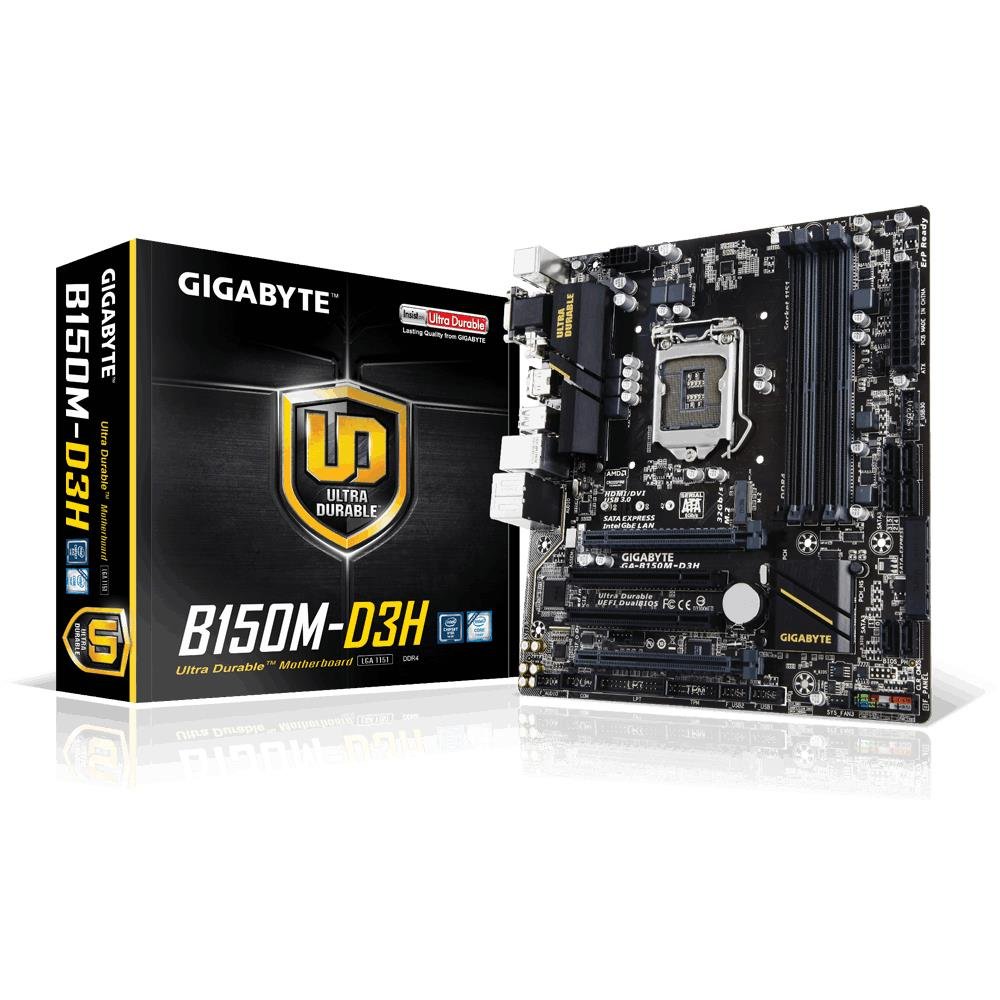
Image 1.1: GIGABYTE GA-B150M-D3H Micro ATX Motherboard. This image displays the overall layout of the motherboard, highlighting its compact Micro ATX form factor and various component slots.
2. Enfòmasyon sou Sekirite
Obsève prekosyon sekirite sa yo pou evite domaje kat manman an epi pou evite blese tèt ou:
- Toujou dekonekte kòd kouran an nan priz miray la anvan ou touche nenpòt konpozan.
- Mete yon braslè ponyèt anti-estatik oswa touche souvan yon objè metal ki konekte a tè pou dechaje elektrisite estatik la.
- Manyen kat manman an nan kwen li yo pou evite touche konpozan sansib yo.
- Kenbe kat manman an lwen imidite ak tanperati ekstrèm.
- Ensure proper ventilation within the computer case to prevent overheating.
3. Pake kontni
Verifye ke tout bagay yo prezan nan pake kat manman ou an:
- GIGABYTE GA-B150M-D3H Motherboard
- Manyèl itilizatè
- I / O Shield
- SATA Câbles
- CD/DVD chofè
Note: Contents may vary slightly depending on region or revision.
4. Mèr Layout
Familiarize yourself with the various components and connectors on the GA-B150M-D3H motherboard.
Image 4.1: GIGABYTE GA-B150M-D3H Motherboard Layout. This image provides a visual reference for the location of key components such as the CPU socket, DIMM slots, PCIe slots, SATA ports, and M.2 connector.
Konpozan kle:
- Sokèt CPU LGA 1151: For 6th Generation Intel Core Processors.
- DDR4 DIMM Slots (4): Supports Dual Channel DDR4 memory up to 2133 MHz.
- Fant PCIe: Includes PCIe Gen3 x16 for graphics cards and PCIe x1 slots for expansion.
- M.2 Connector: Supports PCIe NVMe & SATA SSDs with up to 32Gb/s data transfer.
- SATA Express Connector: For up to 16Gb/s data transfer.
- Pò SATA 6Gb/s: Pou konekte aparèy depo SATA tradisyonèl yo.
- 24-Pin ATX Power Connector: Antre prensipal pouvwa.
- 8-Pin ATX 12V Power Connector: Antre pouvwa CPU.
- Antèt Panèl Devan an: For power button, reset button, LED indicators, and USB ports.
- Konektè odyo: 8-channel HD Audio with high quality capacitors and Audio Noise Guard.
5. Enstalasyon ak Enstalasyon
Swiv etap sa yo pou byen enstale kat manman w lan ak konpozan yo.
5.1. Enstale CPU a
- Locate the LGA 1151 CPU socket.
- Louvri levye priz CPU a epi leve plak chajman an.
- Carefully align the CPU with the socket, ensuring the gold triangle on the CPU matches the triangle on the socket. Do not force the CPU into the socket.
- Desann plak chaj la epi byen sere l ak levye a.
5.2. Enstale Refwadisè CPU a
Refer to your CPU cooler's instruction manual for specific installation steps. Ensure thermal paste is applied correctly between the CPU and cooler base.
5.3. Enstale Memwa (RAM)
- Louvri klip yo nan tou de bout fant DDR4 DIMM yo.
- Aliyen modil memwa a ak fant lan, asire w ke dan ki sou modil la koresponn ak kle ki nan fant lan.
- Peze byen fèm sou tou de bout modil memwa a jiskaske klip yo kase nan plas yo.
- For dual-channel performance, install memory modules in matching colored slots (e.g., DIMM1 and DIMM2).
5.4. Installing Expansion Cards
- Remove the metal bracket from the desired PCIe slot on your computer case.
- Aliyen kat ekspansyon an ak plas PCIe a epi peze byen fèm jiskaske li byen chita.
- Fikse kat la ak yon vis sou bwat òdinatè a.
5.5. Konekte Aparèy Depo
- Aparèy SATA yo: Connect one end of the SATA data cable to a SATA 6Gb/s port on the motherboard and the other end to your hard drive or SSD. Connect the SATA power cable from your power supply to the device.
- M.2 SSD: Mete SSD M.2 a nan fant M.2 a yon ti jan an pant, apresa pouse l dousman anba epi sere l byen sere ak vis ki vini ak li a.
- SATA Express: If using a SATA Express device, connect it to the designated SATA Express connector.
5.6. Connecting Front Panel Connectors
Connect the cables from your computer case's front panel (power button, reset button, HDD LED, power LED, front USB, front audio) to the corresponding headers on the motherboard. Refer to the motherboard layout diagram for exact locations and pin assignments.
5.7. Konekte ekipman pou pouvwa a
- Connect the 24-pin ATX main power connector from your power supply to the 24-pin power socket on the motherboard.
- Connect the 8-pin ATX 12V CPU power connector to the 8-pin socket near the CPU.
- Asire w tout koneksyon kouran yo byen fèm.
6. Operasyon Enstriksyon
6.1. Premye bòt
After assembling all components, connect your monitor, keyboard, and mouse. Power on the system. The system should display the GIGABYTE splash screen and then enter the BIOS/UEFI setup or attempt to boot from a connected storage device.
6.2. Enstalasyon BIOS/UEFI
Pou antre nan konfigirasyon BIOS/UEFI a, peze bouton an. DEL key repeatedly during the boot process when the GIGABYTE logo appears. Here you can configure system settings, boot order, and monitor hardware status. The GA-B150M-D3H features GIGABYTE UEFI Dual BIOS for enhanced reliability.
6.3. Enstalasyon chofè
After installing your operating system, install the necessary drivers for the motherboard components. These can be found on the included driver CD/DVD or downloaded from the official GIGABYTE website. Key drivers include chipset, audio (Realtek ALC892 codec), LAN, and any integrated graphics drivers.
6.4. Enstalasyon Sistèm Operasyon an
Insert your operating system installation media (USB drive or DVD) and configure the boot order in the BIOS/UEFI to boot from it. Follow the on-screen instructions to install your preferred operating system (e.g., Windows 8.1, Windows 10).
7. Antretyen
7.1. Netwayaj
Netwaye anndan bwat òdinatè w la regilyèman pou anpeche pousyè akimile, sa ki ka lakòz li chofe twòp. Sèvi ak lè konprese pou retire pousyè nan vantilatè yo, radyatè yo, ak konpozan kat manman an. Asire w ke sistèm nan etenn epi debranche anvan ou netwaye li.
7.2. Mizajou BIOS yo
GIGABYTE periodically releases BIOS updates to improve system stability, compatibility, and performance. Visit the official GIGABYTE website for your motherboard model (GA-B150M-D3H) to check for the latest BIOS version and follow the provided instructions for updating. Exercise caution during BIOS updates, as an interruption can render the motherboard inoperable.
NAN. Depanaj
Seksyon sa a adrese pwoblèm komen ou ka rankontre.
8.1. No Power / System Does Not Turn On
- Check if the power supply is connected correctly to the motherboard (24-pin and 8-pin connectors).
- Asire w ke switch ekipman pou pouvwa a nan pozisyon ON an.
- Verifye ke kab bouton pouvwa a sou panèl devan an byen konekte ak tèt kat manman an.
- Teste ekipman pou pouvwa a avèk yon lòt sistèm oswa yon aparèy pou teste ekipman pou pouvwa.
8.2. Pa gen okenn rezilta ekspozisyon
- Ensure the monitor is connected to the correct graphics output (either integrated graphics on the motherboard or a dedicated graphics card).
- Remete kat grafik la ak modil memwa yo.
- Eseye demarre ak yon sèl modil memwa enstale.
- Tcheke si monitè a limen epi li configuré sou sous antre ki kòrèk la.
8.3. Enstabilite Sistèm / Aksidan
- Tcheke tanperati CPU ak GPU yo pou asire yo nan limit fonksyònman ki an sekirite.
- Verify that all drivers are installed and up to date.
- Kouri zouti dyagnostik memwa pou tcheke si gen pwoblèm RAM.
- Ensure the power supply provides sufficient and stable power to all components.
9. Espesifikasyon
Detailed technical specifications for the GIGABYTE GA-B150M-D3H motherboard:
| Karakteristik | Spesifikasyon |
|---|---|
| Non modèl | GA-B150M-D3H |
| Faktè fòm | Mikwo ATX (24.4cm x 22.5cm) |
| CPU Socket | LGA 1151 |
| Procesè konpatib yo | 6yèm jenerasyon processeur Intel Core yo |
| Chipset | Intel B150 Express Chipset |
| Teknoloji memwa | DDR4 |
| Memwa fant | 4 x DDR4 DIMM sockets (Dual Channel) |
| Kapasite Memwa Maksimòm | 16 GB |
| Vitès revèy memwa | 2133 MHz |
| PCIe fant | 1 x PCI Express x16, 1 x Total PCIe Ports |
| Entèfas Depo | PCIe Gen3 x4 M.2, SATA Express, SATA 6Gb/s |
| Odyo Codec | Realtek ALC892 codec, 8-channel HD Audio |
| Pò USB | Total 8 USB Ports (including USB 2.0) |
| Main Connector pouvwa | 24-Pin ATX |
| CPU Power Connector | 8-Pin ATX 12V |
| Karakteristik inik | GIGABYTE UEFI Dual BIOS, Audio Noise Guard with LED Trace Path Lighting, App Center (Easy Tune, Cloud Station) |
10. Garanti ak sipò
For warranty information, please refer to the warranty card included in your product package or visit the official GIGABYTE websit. Tèm ak kondisyon garanti yo ka varye selon rejyon an.
For technical support, driver downloads, BIOS updates, and further product information, please visit the GIGABYTE official support websit:
https://www.gigabyte.com/Support
When contacting support, please have your motherboard model (GA-B150M-D3H) and serial number ready.


