
AUO M170ETN01.1
Manyèl Itilizatè Panèl LCD AUO M170ETN01.1
Model: M170ETN01.1 | Brand: AUO
Entwodiksyon
This manual provides essential information for the proper installation, operation, and maintenance of your AUO M170ETN01.1 LCD Panel. Please read this manual thoroughly before use to ensure optimal performance and longevity of the product.
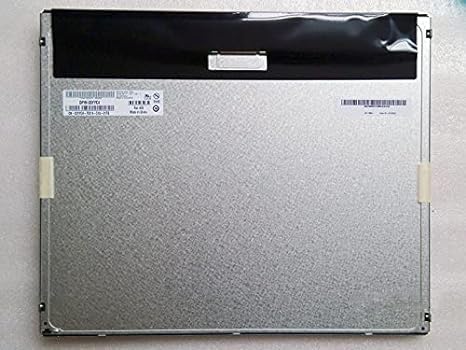
Figi 1: Dèyè view of the AUO M170ETN01.1 LCD Panel. This image displays the metallic back panel, which houses the internal components and connection interfaces. The top section is covered by a black protective material, and a label with product information is visible on the left side.
Karakteristik pwodwi
- Gwosè ekspozisyon: 17 pous
- Rezolisyon: High resolution 1280x1024 (SXGA)
- Klate: 250 Nit
- Viewing Ang: Lajè viewing angle 85/85/80/80 (Typ.)(CR≥10)
- Pwopòsyon kontras: High contrast 1000:1
- Pwofondè koulè: 16.7 milyon koulè
- Sifas: Anti-glare, Glossy screen surface
- Entèfas: LVDS koòdone
- Includes LED driver
- Top Grade A+, brand new, 100% original panel
Enstalasyon ak Enstalasyon
This section outlines the steps for safely setting up and installing the AUO M170ETN01.1 LCD Panel into a compatible desktop monitor system.
- Preparasyon: Ensure the power to the host system (e.g., desktop monitor housing) is disconnected. Work on a clean, static-free surface.
- Manyen ak Swen: The LCD panel is a delicate component. Avoid touching the display surface directly. Hold the panel by its edges.
- Montaj: Carefully align the AUO M170ETN01.1 panel with the mounting points within the monitor casing. Secure it using the appropriate screws, ensuring not to overtighten.
- Konekte kab LVDS la: Locate the LVDS (Low-Voltage Differential Signaling) connector on the back of the LCD panel. Gently connect the LVDS cable from the monitor's main board to this connector, ensuring it is fully seated and latched if applicable.
- Connect LED Driver/Backlight Cable: Connect the backlight cable from the monitor's power supply or inverter board to the LED driver input on the LCD panel. Verify the correct polarity if not keyed.
- Koneksyon an sekirite: Double-check all cable connections to ensure they are firm and properly aligned.
- Reyasanblaj: Carefully reassemble the monitor casing, ensuring no cables are pinched.
Nòt: Professional installation is recommended for users unfamiliar with monitor component replacement.
Enstriksyon Operasyon
Once installed, the AUO M170ETN01.1 LCD Panel operates as part of your desktop monitor system. Its functionality is primarily controlled by the monitor's internal electronics and the connected computer's display settings.
- Pouvwa sou: Connect the monitor's power cable and turn on the monitor using its power button.
- Ekspozisyon Sòti: Ensure your computer is connected to the monitor via a compatible video cable (e.g., VGA, DVI, HDMI, DisplayPort, depending on your monitor's inputs).
- Anviwònman Rezolisyon: For optimal display quality, set your computer's display resolution to 1280 x 1024 piksèl. This is the native resolution of the M170ETN01.1 panel.
- Brightness/Contrast Adjustment: Use the monitor's on-screen display (OSD) menu to adjust brightness, contrast, and other image settings to your preference.
- Viewing Ang: The panel offers wide viewing angles. Adjust your seating position for the best visual experience.
Antretyen
Proper maintenance helps extend the lifespan and maintain the performance of your LCD panel.
- Netwaye ekran an:
- Etenn monitè a epi deploge li anvan w netwaye.
- Use a soft, lint-free cloth (e.g., microfiber cloth) slightly dampened with water or a specialized LCD screen cleaner.
- Siye sifas ekran an dousman. Evite mete twòp presyon.
- Do not use harsh chemicals, alcohol, ammonia-based cleaners, or abrasive materials, as these can damage the anti-glare coating.
- Retire pousyè: Regularly dust the monitor casing and vents to prevent dust buildup, which can affect cooling.
- Evite limyè solèy la dirèk: Do not expose the monitor to direct sunlight or excessive heat, as this can degrade the LCD panel over time.
- Jesyon pouvwa: Utilize your computer's power management settings to put the monitor into sleep mode when not in use, conserving energy and extending backlight life.
Depanaj
This section addresses common issues you might encounter with the AUO M170ETN01.1 LCD Panel.
| Pwoblèm | Kòz posib | Solisyon |
|---|---|---|
| Pa gen imaj sou ekran an |
|
|
| Imaj la twoub oswa defòme |
|
|
| Piksèl mouri oswa piksèl kole |
|
|
If the problem persists after attempting these solutions, please refer to the Support section or consult a qualified technician.
Espesifikasyon
| Nimewo Modèl | M170ETN01.1 |
| Mak | AUO |
| Gwosè ekran | 17 pous |
| Rezolisyon | 1280 x 1024 Pixels (SXGA) |
| Aspè rapò | 5:4 |
| Imaj klète | 250 lm (Nits) |
| Pwopòsyon kontras | 1000:1 |
| Koulè Pwofondè | 16.7 milyon |
| Viewing Ang | 85/85/80/80 (Typ.)(CR≥10) |
| Sifas ekran | Anti-glare, Glossy |
| Entèfas | LVDS |
| Dimansyon pwodwi | 14.11 x 11.67 x 0.41 pous |
| Pwa atik | 2.79 liv |
Garanti ak sipò
The AUO M170ETN01.1 LCD Panel is provided as a component. Warranty coverage typically depends on the seller or the final product (e.g., desktop monitor) into which it is integrated.
- Enfòmasyon sou garanti: Please refer to the warranty policy provided by your point of purchase or the manufacturer of the complete monitor system. The product is described as "Top Grade A+, brand new, 100% original."
- Sipò teknik: For technical assistance regarding the integration or performance of this LCD panel, it is recommended to contact the manufacturer of the device it is installed in, or a qualified computer hardware technician.
- Pwodwi ASIN: B014IUWX7K (for reference when contacting seller/support)
Ask a question about this manual
Ask about setup, troubleshooting, compatibility, parts, safety, or missing instructions. Manuals+ will review the question and use this page’s manual context to help answer it.