
Entwodiksyon
The ASTRO Gaming A40 TR Headset and MixAmp Pro TR are designed to provide a high-fidelity audio experience for gaming on PlayStation 4 and PC. The A40 TR headset offers user customization, allowing transformation from an open-back to a closed-back noise-canceling headset with optional Mod Kits. The MixAmp Pro TR features all-digital components for clear, interference-free audio and voice communication, with customizable settings via the ASTRO Command Center software.

Image: The ASTRO Gaming A40 TR Headset and MixAmp Pro TR, showcasing both components together. The headset is black with gold accents, and the MixAmp is a compact black unit with control dials.
Kontni pake
Verifye ke tout atik ki nan lis anba a yo enkli nan anbalaj pwodwi ou a:
- ASTRO A40 TR Headset
- ASTRO MixAmp Pro TR
- A40 TR Inline Mute Cable (2.0m)
- TOSlink Optical Cable (3.0m)
- Micro-USB Cable (3.0m)
- Digital Daisy Chain Cable (0.5m)
- Swappable Microphone
Enstalasyon
Connecting to PlayStation 4 (PS4)
- Konekte a TOSlink Optical Cable from the MixAmp Pro TR's OPTICAL port to the PS4's Optical Out port.
- Konekte a Mikwo-USB kab from the MixAmp Pro TR's USB port to an available USB port on the PS4.
- Konekte a A40 TR Inline Mute Cable from your A40 TR Headset to the headset port on the front of the MixAmp Pro TR.
- Sou PS4 ou a, ale nan Settings > Sound and Screen > Audio Output Settings.
- Mete Prensipal Sòti Port pou Soti dijital (optik).
- Chwazi Dolby Digital (Bitstream) for the audio format.
- Ale nan Anviwònman> Aparèy> Aparèy Audio.
- Mete Aparèy Antre pou USB Headset (ASTRO MixAmp Pro TR).
- Mete Aparèy Sòti pou USB Headset (ASTRO MixAmp Pro TR).
- Ajiste Kontwòl Volim (Kas Ekoutè) nan maksimòm.
- Mete Sòti nan kas ekoutè pou chat odyo or Tout odyo as preferred.
Konekte ak PC
- Konekte a Mikwo-USB kab from the MixAmp Pro TR's USB port to an available USB port on your PC.
- Konekte a A40 TR Inline Mute Cable from your A40 TR Headset to the headset port on the front of the MixAmp Pro TR.
- On your PC, ensure the MixAmp Pro TR is selected as the default playback and recording device in your sound settings.
- Telechaje epi enstale ASTRO Command Center software from the official ASTRO Gaming website to customize settings, update firmware, and manage EQ presets.
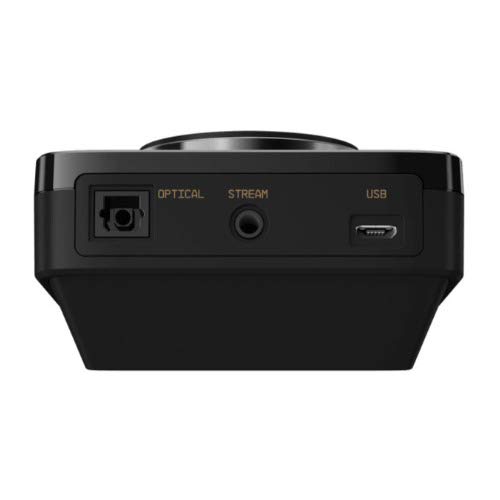
Imaj: Dèyè view of the ASTRO MixAmp Pro TR, highlighting the Optical, USB, AUX, and Stream ports for various connections.
Operating the MixAmp Pro TR
Melanj laAmp Pro TR provides intuitive controls for managing your audio experience:
- Kadran Volim Prensipal la: The large dial on the left controls the overall volume of your headset. Rotate clockwise to increase volume, counter-clockwise to decrease.
- Game/Voice Balance Dial: The smaller dial on the right allows you to adjust the balance between game audio and voice chat.
- Rotate towards "GAME" to prioritize game audio.
- Rotate towards "VOICE" to prioritize voice chat.
- EQ Presets Button: Located in the center, this button cycles through four customizable equalizer presets. The active preset is indicated by the illuminated icon (star, headphone, etc.). These presets can be configured using the ASTRO Command Center software.
- Dolby Button: Activates or deactivates Dolby Surround Sound. When active, the Dolby logo will illuminate.
- Bouton Mikwofòn bèbè: Located on the A40 TR Inline Mute Cable, this switch mutes or unmutes your microphone. When muted, the MixAmp's volume dials will typically glow red.
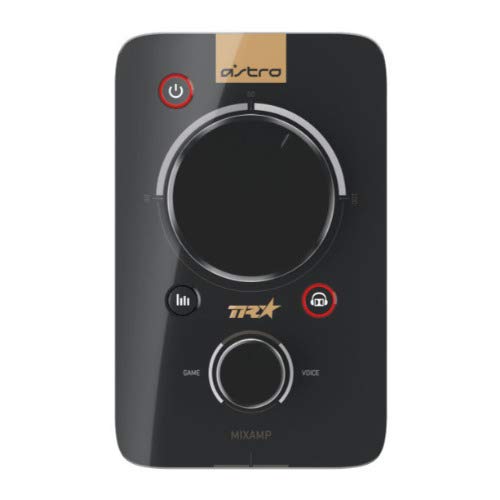
Imaj: Anlè view of the ASTRO MixAmp Pro TR, showing the large master volume dial, the smaller game/voice balance dial, and the EQ preset buttons.
Antretyen
- Netwayaj: Use a soft, dry cloth to clean the headset and MixAmp. Avoid abrasive cleaners or solvents.
- Depo: Store the headset and MixAmp nan yon kote ki fre, sèk lwen limyè solèy la dirèk ak tanperati ekstrèm.
- Swen kab: Manyen kab yo ak anpil atansyon pou evite domaj. Evite pliye byen file oswa rale twòp.
- Kousen zòrèy: Periodically check ear cushions for wear and tear. Replacement cushions are available from ASTRO Gaming.
Depanaj
If you encounter issues with your ASTRO Gaming A40 TR Headset or MixAmp Pro TR, try the following solutions:
| Pwoblèm | Solisyon |
|---|---|
| Pa gen odyo nan kas ekoutè a. |
|
| Mikwofòn pa mache. |
|
| Odyo ki defòme oswa ki gen move kalite. |
|
For more detailed troubleshooting, please refer to the official ASTRO Gaming support resources.
Espesifikasyon
- Nimewo Modèl: 939-001511
- Repons frekans: 20 - 20,000 Hz
- Enpedans nominal: 48 ohm
- Presyon Bando: 2.6N
- Dimansyon pwodwi: 9.06 x 13.87 x 4.33 pous
- Pwa atik: 1.06 liv
- Koneksyon: Optik, USB
- Konpatibilite: PlayStation 4, PC
Garanti ak sipò
For detailed warranty information and product support, please visit the official ASTRO Gaming websit la oubyen gade dokiman yo bay la:
Ensure you register your product on the ASTRO Gaming website for the latest updates and support.