
Entwodiksyon
Mèsi pou acha aasing the Madison FREESOUND-VR40R Vintage Portable Radio. This device combines a classic retro design with modern audio technology, offering versatile listening options. This manual provides detailed instructions on how to set up, operate, and maintain your radio to ensure optimal performance and longevity.
The FREESOUND-VR40R is a portable, USB-rechargeable radio designed for those who appreciate a vintage aesthetic combined with modern audio technologies. It features an analog dial tuner, Bluetooth, USB, AUX, and FM connectivity, bass enhancement, and a convenient dual metal handle for portability.
Enstriksyon Sekirite
Tanpri li enstriksyon sekirite sa yo ak anpil atansyon anvan ou itilize aparèy la epi konsève yo pou referans pita. Si ou pa itilize yo kòrèkteman, sa ka lakòz chòk elektrik, dife oswa lòt danje.
- Pa ekspoze aparèy la anba lapli oswa imidite pou evite dife oswa chòk elektrik.
- Pa ekspoze aparèy la nan limyè solèy la dirèk oswa nan tanperati ekstrèm.
- Pa ouvri c laasing. Pa gen pyès ki ka sèvi ak men itilizatè a anndan an. Konfye tout antretyen bay pèsonèl kalifye.
- Use only the specified power adapter/charging cable.
- Kenbe aparèy la lwen gwo chan mayetik.
- Clean the device only with a dry, soft cloth. Do not use liquid cleaners.
- Asire w ke gen bon vantilasyon toutotou aparèy la. Pa bloke okenn ouvèti vantilasyon.
Pwodwi souview
Familiarize yourself with the components and features of your Madison FREESOUND-VR40R radio.

Figi 1: Devan View. Shows the analog dial tuner, speaker grille, Madison logo, and control knobs for volume and source selection.
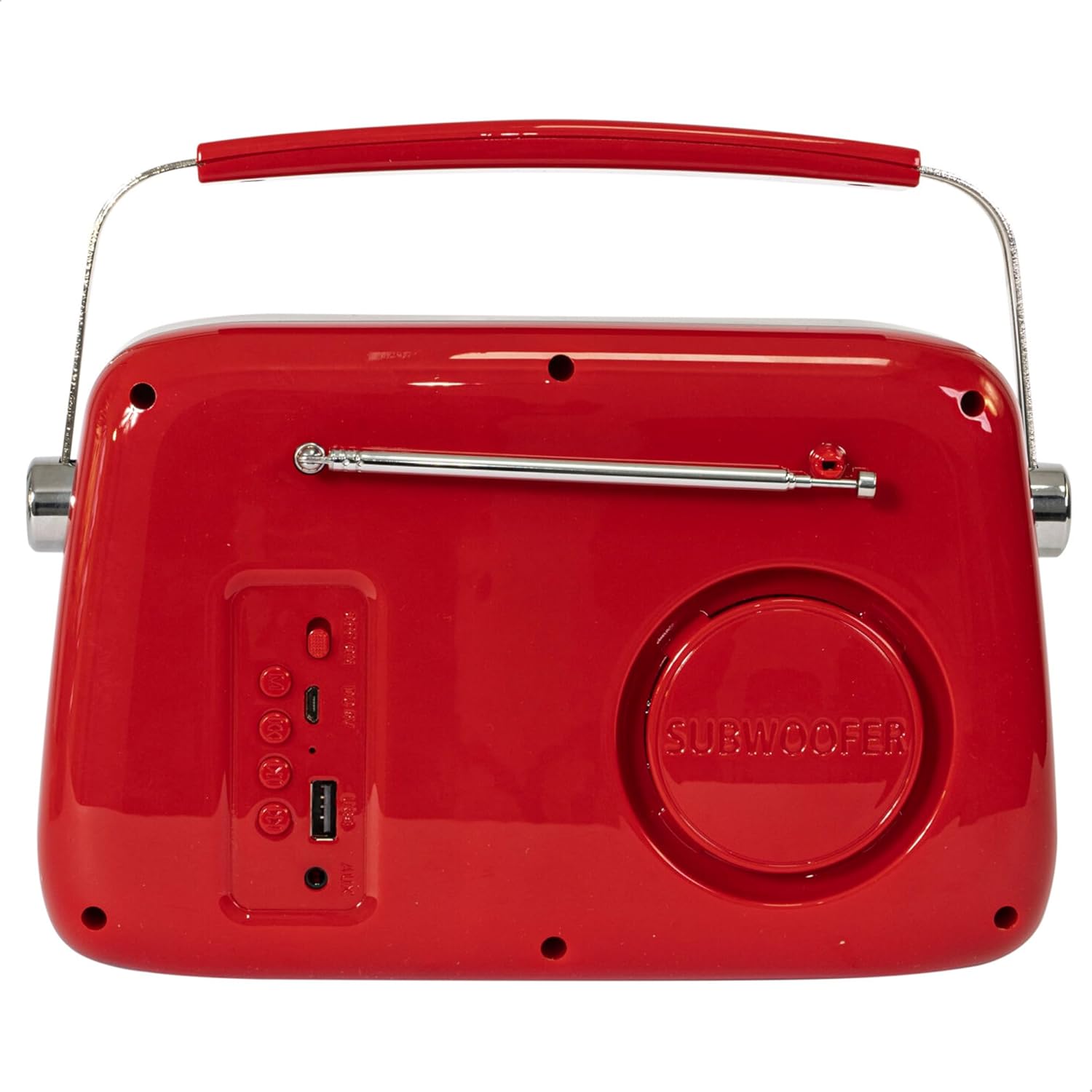
Figi 2: Dèyè View. Displays the subwoofer, USB port, AUX input, and power/mode buttons.
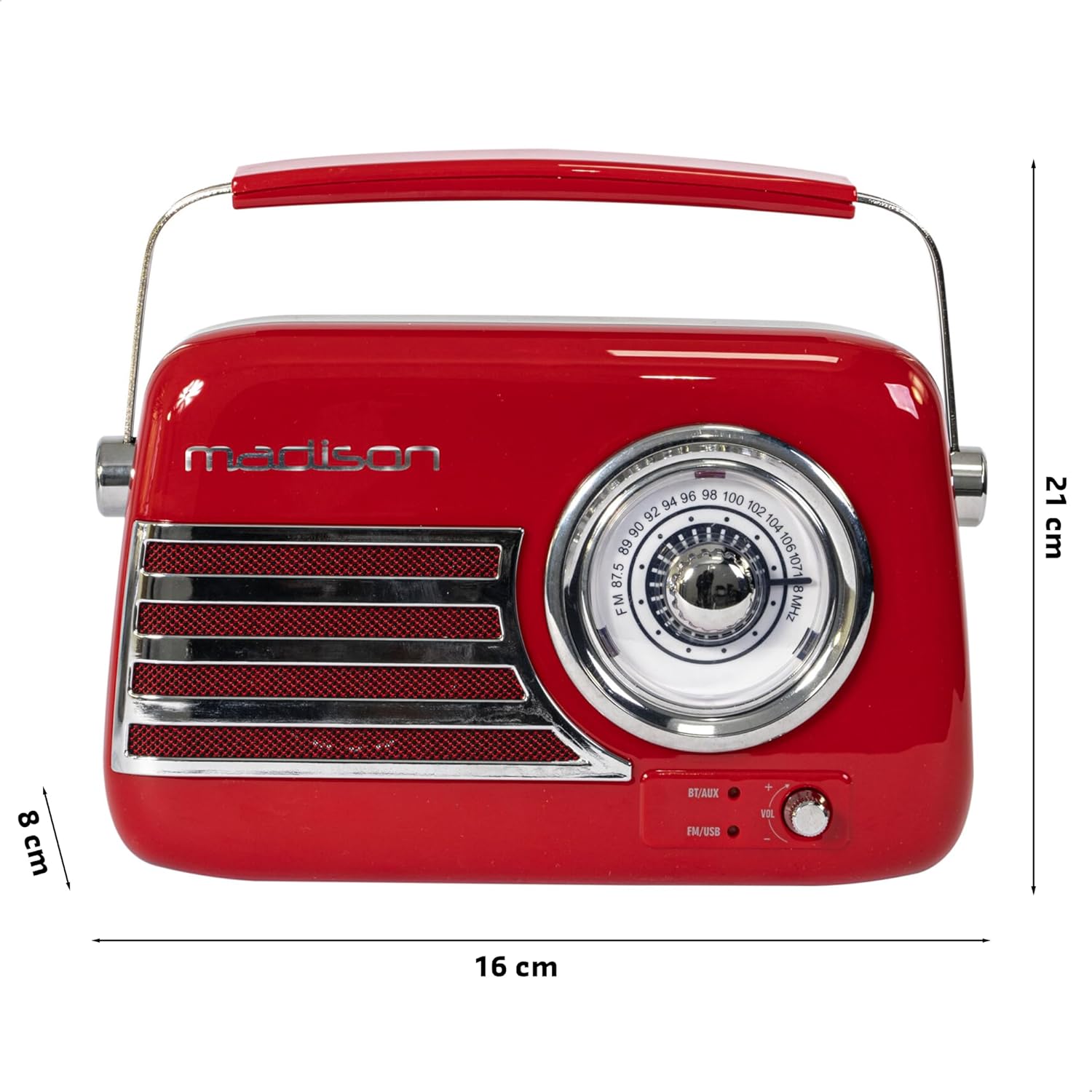
Figi 3: Dimansyon pwodwi a. Illustrates the radio's approximate dimensions: 21 cm length, 8 cm width, and 16 cm height.

Figi 4: Dèyè View with Antenna Extended. Shows the telescopic antenna fully extended for improved FM reception.
Karakteristik kle:
- Analog Dial Tuner: For classic FM radio tuning.
- Koneksyon Bluetooth: Stream audio wirelessly from your smartphone or tablet.
- USB lèktur: Jwe mizik dirèkteman nan yon kle USB.
- Antre AUX: Konekte aparèy odyo ekstèn yo atravè yon kab odyo 3.5mm.
- Radyo FM: Enjoy your favorite FM stations with the retractable antenna.
- Amelyorasyon Bass: Integrated subwoofer for richer bass sound.
- Batri rechargeable: Built-in long-lasting battery for portable use.
- Konsepsyon pòtab: Lightweight with a dual metal handle for easy carrying.
Enstalasyon
Chaje batri a:
- Locate the USB charging port on the rear of the radio.
- Connect the provided USB charging cable to the radio's USB port.
- Konekte lòt bout kab USB a nan yon adaptè kouran USB konpatib (pa enkli) oubyen nan yon pò USB òdinatè.
- Limyè endikatè chaj la ap limen. Yon fwa li fin chaje nèt, limyè a ka chanje koulè oswa etenn, sa depann de modèl la.
- Yon chaj konplè anjeneral pran plizyè èdtan.
Premye pouvwa sou:
- Ensure the radio is sufficiently charged.
- Press and hold the Power/Mode button (usually located on the rear or front panel) to turn on the radio.
- The front indicator lights will show the currently selected source.
Enstriksyon Operasyon
Kontwòl Volim:
Vire a Volim knob (VOL) on the front panel to adjust the sound level. Turn clockwise to increase volume, counter-clockwise to decrease.
Selecting a Source:
Peze a Sous/Mòd button (often labeled BT/AUX or FM/USB) repeatedly to cycle through the available input modes: Bluetooth, AUX, FM Radio, and USB.
- Mòd Bluetooth:
- Switch the radio to Bluetooth mode. The Bluetooth indicator light will blink, indicating it's ready for pairing.
- Sou smartphone ou oswa tablèt, aktive Bluetooth epi chèche aparèy ki disponib.
- Select "FREESOUND-VR40R" (or similar name) from the list.
- Once paired, the Bluetooth indicator light will become solid, and you can stream audio from your device.
- Mòd radyo FM:
- Switch the radio to FM mode.
- Lonje antèn teleskopik la nèt pou yon resepsyon optimal.
- Vire a Akor Dial on the front panel to manually select your desired FM radio station.
- Mòd Lektur USB:
- Mete yon kle USB ki gen odyo MP3 ladan l files into the USB port on the rear of the radio.
- Switch the radio to USB mode. The radio will automatically begin playing the audio files.
- Use the playback controls (if available, usually on the rear panel) to skip tracks or pause/play.
- AUX Input Mode:
- Connect one end of a 3.5mm audio cable (not included) to the AUX input port on the rear of the radio.
- Connect the other end of the cable to the headphone jack or audio output of your external device (e.g., MP3 player, CD player).
- Switch the radio to AUX mode. Audio from your external device will now play through the radio.
Antretyen
Netwayaj:
Pou kenbe aparans ak fonksyonalite radyo ou a:
- Siye sifas ekstèn yo ak yon twal mou, sèk, epi ki pa gen pousyè.
- Pa sèvi ak pwodui netwayaj abrazif, sir, oswa solvan paske yo ka domaje fini an.
- Avoid spraying liquids directly onto the radio.
Depo:
If you plan to store the radio for an extended period:
- Konplètman chaje batri a anvan depo.
- Sere radyo a nan yon kote ki fre epi sèk, lwen limyè solèy dirèk ak tanperati ekstrèm.
- For optimal battery health, recharge the battery every 3-6 months, even if not in use.
Depanaj
| Pwoblèm | Kòz posib | Solisyon |
|---|---|---|
| Pa gen kouran / Radyo a pa limen. | Batri ap vide. | Chaje radyo a avèk kab USB ki vini ak li a. |
| Pa gen son. | Volim nan twò ba oswa twò ba. Yo chwazi move sous. | Increase the volume. Ensure the correct input source (Bluetooth, FM, USB, AUX) is selected. |
| Move resepsyon FM. | Antenna not extended. Weak signal. | Fully extend the telescopic antenna. Try repositioning the radio for better signal. |
| Aparèy Bluetooth la pa ka konekte. | Radio not in pairing mode. Device too far. Bluetooth disabled on source device. | Ensure radio is in Bluetooth pairing mode (blinking light). Move device closer. Enable Bluetooth on your smartphone/tablet. |
| Lektur USB a pa fonksyone. | USB drive not inserted correctly. Unsupported file fòma. | Ensure USB drive is fully inserted. Check if audio fileyo nan fòma MP3. |
Espesifikasyon
| Nimewo Modèl: | 10-5567MA |
| Dimansyon pwodwi (L x W x H): | 21 x 8 x 16 cm |
| Pwa: | 635 gram |
| Koulè: | Wouj |
| Materyèl: | Plastik |
| Sous pouvwa: | Internal Rechargeable Battery (via USB) |
| Kalite batri: | 1 Lityòm-polymère (enkli) |
| Koneksyon: | Bluetooth, USB, Auxiliary (AUX) |
| Gwoup Radyo: | FM |
| Karakteristik espesyal: | Telescopic antenna, Analog dial tuner, Bass enhancement |
| Eleman ki enkli: | USB Chaje Kab |
| Manifakti: | Lotronic S.A. |
| Peyi orijin: | Lachin |
Garanti ak sipò
For warranty information and customer support, please refer to the warranty card included with your product or visit the official Madison websit la. Kenbe prèv acha ou a pou nenpòt reklamasyon garanti.
For technical assistance or troubleshooting beyond this manual, please contact Madison customer service.
Note: Availability of spare parts is not specified in the product information.