
ZEBRONICS ZEB-250JP
Zebronic ZEB-250JP USB Vibration Game Pad Remote Joystick User Manual
Model: ZEB-250JP
Entwodiksyon
This manual provides detailed instructions for the setup, operation, and maintenance of your Zebronic ZEB-250JP USB Vibration Game Pad. Please read this manual carefully before using the product to ensure proper functionality and longevity.
Karakteristik pwodwi
- Dual vibration and shock function for immersive gaming.
- Ergonomic slip-proof handle design for comfortable grip.
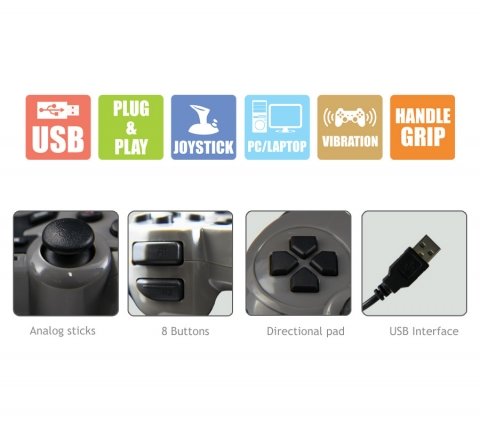
- Equipped with a directional pad, 8 fire buttons, and 2 analog sticks.
- Compatible with Windows XP, Vista, and Windows 7 operating systems.
- Supports both digital and analog modes.
Kontni pake
- Zebronic ZEB-250JP Game Pad
- Installation CD (for drivers, if required)
Enstriksyon Enstalasyon
- Connect the Game Pad: Locate an available USB port on your computer (Desktop or Laptop). Insert the USB connector of the ZEB-250JP Game Pad into the USB port. The device is designed for plug-and-play functionality.
- Enstalasyon chofè: For optimal performance, especially on older operating systems like Windows XP or Vista, it is recommended to install the drivers from the provided installation CD. Insert the CD into your computer's optical drive and follow the on-screen instructions. For Windows 7 and newer, drivers may install automatically.
- Sistèm konpatibilite: Ensure your computer is running a compatible operating system (Windows XP, Vista, Windows 7).
Enstriksyon Operasyon
Kontwòl souview
- Pad direksyonèl (D-Pad): Used for directional movement or menu navigation.
- Baton analòg: Two analog sticks provide 360-degree movement for finer control in games.
- Fire Buttons (8 buttons): Bouton aksyon pou kòmandman nan jwèt la.
- Fonksyon Vibration: The game pad features dual vibration motors that provide tactile feedback during gameplay, enhancing immersion. This function is automatically activated by compatible games.
Seleksyon mòd
The game pad supports both digital and analog modes. The mode can typically be switched using a dedicated button on the game pad (often labeled 'Mode' or 'Analog') or is automatically detected by the game. Refer to your game's settings for specific controller configurations.
Antretyen
- Keep the game pad clean by wiping it with a soft, dry cloth.
- Evite ekspoze aparèy la nan tanperati ekstrèm, limyè solèy dirèk, oswa imidite.
- Pa sèvi ak pwodwi chimik piman bouk oswa pwodui netwayaj abrazif.
- Store the game pad in a safe place when not in use to prevent damage to the cable or buttons.
Depanaj
- Game Pad Not Detected:
- Ensure the USB cable is securely connected to both the game pad and the computer.
- Try connecting the game pad to a different USB port.
- Rekòmanse òdinatè w lan.
- Verify that the necessary drivers are installed from the provided CD or through Windows Update.
- Vibration Function Not Working:
- Konfime ke jwèt w ap jwe a sipòte fidbak vibrasyon.
- Tcheke paramèt jwèt la pou asire w ke vibrasyon an aktive.
- Asire w ke chofè yo byen enstale.
- Buttons or Analog Sticks Unresponsive:
- Test the game pad on another computer or in a different game to isolate the issue.
- Ensure the game pad is in the correct mode (digital/analog) for the game.
- Renstale chofè aparèy yo.
Espesifikasyon
| Mak | ZEBRONIK |
| Modèl | ZEB-250JP |
| Koneksyon Teknoloji | USB |
| Kalite kontwolè | Gamepad |
| Aparèy konpatib | Windows (Desktop, Laptop) |
| Sistèm operasyon sipò | Windows XP, Vista, Windows 7 |
| Karakteristik espesyal | Handle Grip, Joystick, Plug and Play, Vibration |
| Dimansyon pwodwi | 24.1 x 18.3 x 6.4 cm |
| Pwa atik | 290 g |
Enfòmasyon sou Garanti
This product is covered by a standard manufacturer's warranty. Please refer to the warranty card included in your package or contact Zebronic's customer support for specific warranty terms and conditions. Keep your purchase receipt as proof of purchase.
Sipò
For further assistance, technical support, or service inquiries, please visit the official Zebronics websit la oubyen kontakte depatman sèvis kliyan yo. Ou ka jwenn plis enfòmasyon ak detay kontak sou Zebronics Store on Amazon.
Ask a question about this manual
Ask about setup, troubleshooting, compatibility, parts, safety, or missing instructions. Manuals+ will review the question and use this page’s manual context to help answer it.