
Entwodiksyon ak souview
The Eton Scorpion II is a rugged, multipowered portable emergency weather radio and flashlight designed for reliability in various conditions. This compact unit is an essential tool for outdoor activities and emergency preparedness, offering multiple ways to stay informed and powered.
Key features include AM/FM/NOAA weather bands for critical updates, a built-in LED flashlight for illumination, and a USB port for charging smartphones. Its robust exterior and aluminum carabiner ensure durability, while multiple power options provide continuous operation.
Enstalasyon
Before initial use, it is recommended to fully charge the Scorpion II using the USB port. This ensures the internal 800 mAh Lithium Ion battery is ready for extended use.
- Inisyal chaj: Connect the provided USB cable to the unit's USB input port and to a standard USB power source (e.g., computer, wall adapter). Allow several hours for a full charge.
- Antèn: For optimal radio reception, extend the telescopic antenna fully.

Enstriksyon Operasyon
Power On/Off
Peze epi kenbe la Pouvwa button located on the unit to turn the radio on or off.
Radyo Akor
Sèvi ak la Bann button to cycle through AM, FM, and NOAA weather bands. Use the Tune +/- buttons to manually adjust the frequency. The digital display will show the current frequency.
Kontwòl Volim
Ajiste nivo pwodiksyon odyo a lè l sèvi avèk la Volim +/- bouton.
LED Flashlight & SOS
Peze a Flach button to activate the built-in LED flashlight. Some models may include an SOS function, which can be activated by pressing and holding the flashlight button, causing the light to flash Morse code for distress.

Chaje Smartphone
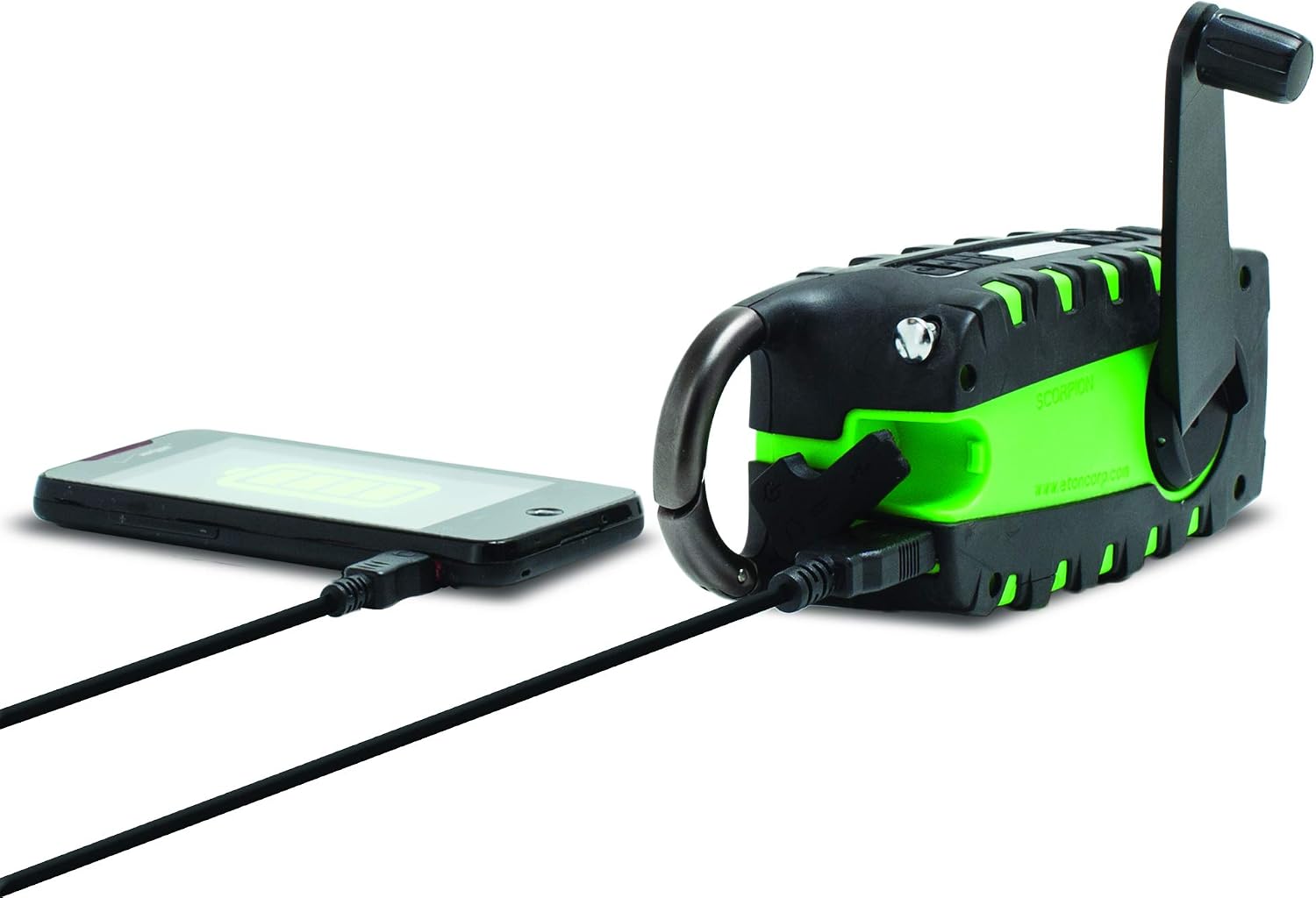
The unit features a USB output port to charge compatible smartphones. Connect your smartphone's charging cable to the Scorpion II's USB output. Ensure the Scorpion II has sufficient charge for this function.

Sous pouvwa
The Eton Scorpion II offers multiple ways to power the unit and charge external devices:
- Manivèl men: Extend the hand crank handle and rotate it clockwise or counter-clockwise for manual power generation. Continuous cranking will charge the internal battery and power the radio.
- Panèl solè: Place the unit with its solar panel facing direct sunlight. The solar panel will slowly charge the internal battery. This method is ideal for maintaining charge over time or for trickle charging.
- Chaje USB: Use the micro-USB input port to charge the internal battery from any standard USB power source. This is the fastest method for a full charge.

Antretyen
To ensure the longevity and optimal performance of your Eton Scorpion II, follow these maintenance guidelines:
- Netwayaj: Siye inite a avèk yon mou, damp twal. Pa sèvi ak pwodui chimik piman bouk oswa pwodui netwayaj abrazif.
- Swen batri: For best battery life, fully charge the unit at least once every 3 months, even if not in use. Avoid completely draining the battery frequently.
- Depo: Sere radyo a nan yon kote ki fre epi sèk, lwen limyè solèy dirèk ak tanperati ekstrèm.
- Rezistans dlo: The rugged exterior provides protection against splashes and dust, but the unit is not fully waterproof. Avoid submerging it in water.
Depanaj
If you encounter issues with your Eton Scorpion II, refer to the following common troubleshooting steps:
- Pa gen pouvwa: Ensure the unit is charged. Try hand cranking for a few minutes or connecting to a USB power source.
- Resepsyon radyo ki pa bon: Fully extend the telescopic antenna. Try repositioning the unit to a different location, especially near a window or outdoors.
- Smartphone Not Charging: Verify that the Scorpion II has sufficient battery charge. Ensure the smartphone's charging cable is securely connected to the unit's USB output port.
- Flach pa travay: Check if the unit is powered on and has battery charge. Press the flashlight button firmly.
Espesifikasyon
| Dimansyon pwodwi | 2.2 x 3.6 x 7.2 pous |
| Pwa atik | 10.6 ons |
| Nimewo Modèl Atik | NSP101WXGR |
| Batri | 2 Lithium Ion batteries required (internal) |
| Koneksyon Teknoloji | USB |
| Sous pouvwa | Manyen ak enèji solè, manivèl, USB |
| Bann Radyo Sipòte | AM, FM, NOAA Weather |
| Karakteristik espesyal | Portable, LED Flashlight, Smartphone Charger |
Ki sa ki nan bwat la
- Eton Scorpion II Rugged Multipowered Portable Emergency Weather Radio & Flashlight Green
- USB Chaje Kab
Garanti ak sipò
For warranty information, technical support, or service inquiries, please refer to the documentation included with your product or visit the official Eton websit. Kenbe resi acha ou pou reklamasyon garanti.