
1. Entwodiksyon
This manual provides detailed instructions for the safe and efficient operation of your Crenova XPE350 Mini Portable Projector. Please read this manual thoroughly before using the projector and retain it for future reference. The Crenova XPE350 is designed for home and backyard theater use, offering a compact and portable solution for displaying media from various sources.
2. Pwodwi souview
The Crenova XPE350 is a mini portable projector featuring a 480x320 resolution and 150 lumens brightness. Its compact design makes it suitable for various environments. Below are key components and features.
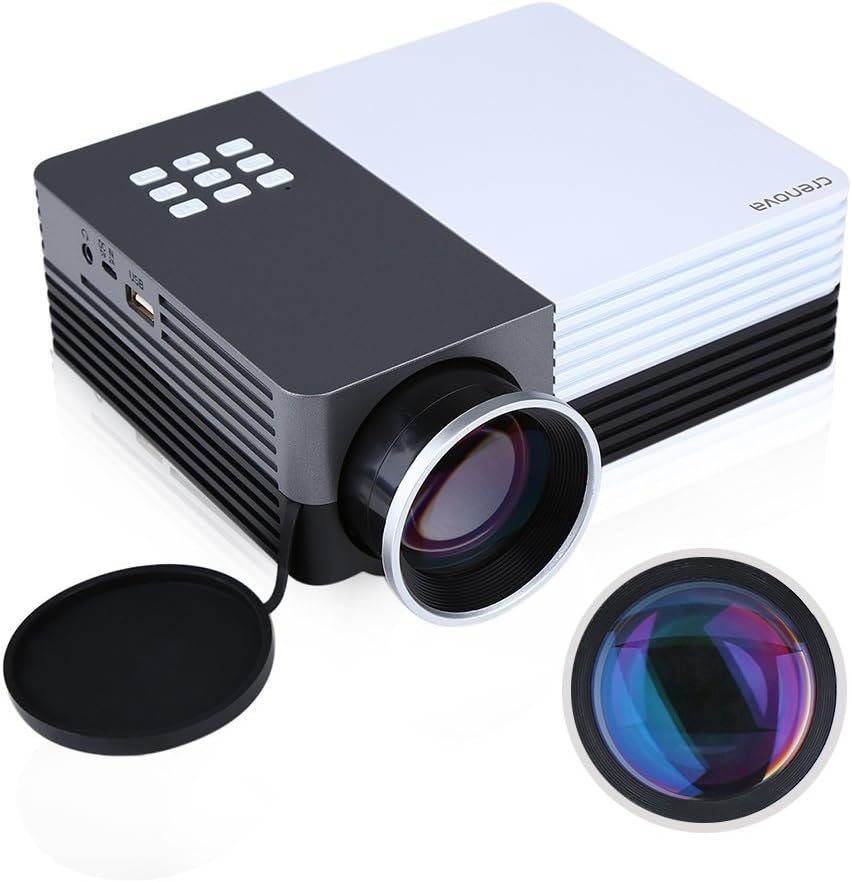
Figi 2.1: Crenova XPE350 Mini Portable Projector. This image shows the overall design of the projector, highlighting its compact form factor and front lens.

Figi 2.2: The Crenova XPE350 projector held in a hand, demonstrating its compact and portable size. A close-up inset highlights the glass lens, indicating clear image projection.
2.3 Kontni pake a
Lè w ap debale, verifye si tout atik ki nan lis anba a yo la epi yo an bon eta:
- Crenova XPE350 Mini Portable Projector
- Kontwòl Remote
- AC pouvwa adaptè
- AV Kab
- Manyèl Itilizatè (dokiman sa a)

Figi 2.3: Contents of the Crenova XPE350 Projector package. This image displays the projector, remote control, power adapter, AV cable, and the printed user manual.
2.4 Konpozan Pwojektè yo
Familyarize w ak diferan pati pwojektè w la:
- Lantiy: Pwojte imaj la sou ekran an.
- Bouton Fonksyon: Control basic projector functions.
- Vantilasyon: For heat dissipation. Ensure they are not obstructed.
- Pò Antre: VGA, HDMI, AV, USB, SD Card Slot.
- Sòti odyo: Jack kas ekoutè.
- Ajisteman Keystone: Korije distòsyon imaj trapezoidal la.
- Entèfas pouvwa: Konekte ak adaptè pouvwa AC.

Figi 2.4: Fèmen view of the projector's function buttons, lens, and ventilation vents. These are essential for basic control and maintaining optimal operating temperature.

Figi 2.5: Detaye view of the Crenova XPE350 projector's various input and output ports, including VGA, HDMI, AV, USB, headphone jack, mobile power input, SD card slot, and power interface. Also visible is the keystone adjustment dial.
3. Enstalasyon
3.1 Koneksyon pouvwa
- Connect the AC power adapter to the "Power Interface" port on the projector.
- Plug the other end of the power adapter into a suitable electrical outlet.
- Limyè endikatè pouvwa a sou pwojektè a ap limen.
3.2 Konekte Sous Antre yo
The Crenova XPE350 supports various input sources. Choose the appropriate connection method for your device:

Figi 3.1: Diagram illustrating various devices that can be connected to the Crenova XPE350 projector, including laptops, desktop computers, DVD players, game consoles, speakers, mobile hard disks, USB drives, SD cards, digital cameras, tablet PCs, and TV set-top boxes.
- HDMI: For high-definition digital video and audio from devices like laptops, game consoles, or streaming sticks.
- VGA: For connecting to computers with a VGA output.
- DE: For connecting older devices using the included AV cable (e.g., DVD players, some game consoles).
- USB: Pou jwe medya files dirèkteman nan yon kondwi flash USB.
- Kat SD: Pou jwe medya files directly from an SD memory card.
- MHL (Mobile High-Definition Link): Some smartphones and tablets with MHL-out function can connect via HDMI for screen mirroring. Note: Most Android smartphones do not support MHL function.

Figi 3.2: Illustration of the MHL (Mobile High-Definition Link) feature, showing how a tablet and smartphone can mirror their screens to the projector. This feature requires the source device to support MHL-out.
3.3 Pozisyonman Pwojektè a
Place the projector on a stable, flat surface. Ensure there is adequate ventilation around the projector to prevent overheating. The distance from the screen will determine the image size.
4. Operasyon Enstriksyon
4.1 Limen/Etenyen
- Pou limen: Press the power button on the projector or the remote control. The projector lamp pral eklere.
- Pou etenn: Peze bouton pouvwa a ankò. Pwojektè a ap fèmen.
4.2 Ajiste Kalite Imaj
- Ajisteman konsantre: Rotate the lens ring (refer to Figure 2.4) until the projected image is clear and sharp.
- Koreksyon Keystone: Use the keystone adjustment dial (refer to Figure 2.5) to correct trapezoidal distortion if the projector is not perfectly perpendicular to the screen.
4.3 Chwazi Sous Antre
After connecting your desired input device, press the "Source" button on the remote control or the projector's function panel to cycle through available input options (HDMI, VGA, AV, USB, SD Card) and select the correct one.
4.4 Media Playback (USB/SD Card)
Insert a USB flash drive or SD card into the respective port. The projector's interface will typically prompt you to select the media type (e.g., Photo, Music, Movie, Text) for playback. Navigate using the remote control's arrow keys and "OK" button.
5. Antretyen
5.1 Netwaye Lantiy la
Siye lantiy pwojektè a dousman avèk yon twal mou ki pa gen pousyè, espesyalman fèt pou sifas optik. Pa sèvi ak pwodui netwayaj abrazif oswa fòs twòp, paske sa ka grate lantiy la.
5.2 Vantilasyon
Ensure the projector's ventilation vents (refer to Figure 2.4) are clear of obstructions to allow for proper airflow. Blocked vents can lead to overheating and reduced lamp lavi.
5.3 Lamp Lavi
The Crenova XPE350 projector features a long-life lamp, estimated at 20,000 hours under normal operating conditions, thanks to its SmartEco technology.

Figi 5.1: Illustration highlighting the Crenova XPE350 projector's long lamp life of 20,000 hours, supported by SmartEco technology, indicating energy efficiency and durability.
NAN. Depanaj
- Pa gen pouvwa:
- Asire w adaptè kouran an byen konekte ak pwojektè a ak yon priz elektrik ki fonksyone.
- Check if the power indicator light is on.
- Pa gen imaj:
- Verify that the correct input source is selected (HDMI, VGA, AV, USB, SD).
- Tcheke tout koneksyon kab ant pwojektè a ak aparèy sous la.
- Asire w ke aparèy sous la limen epi li ap bay yon siyal.
- Imaj flou:
- Ajiste bag konsantre a sou lantiy la jiskaske imaj la byen file.
- Ensure the projection surface is flat and the projector is at an optimal distance.
- Imaj la se trapezoidal:
- Use the keystone adjustment dial to correct the image shape.
- Position the projector as perpendicular to the screen as possible.
- Pa gen son:
- Tcheke paramèt volim yo sou pwojektè a ak aparèy sous la.
- If using external speakers, ensure they are properly connected to the headphone jack and powered on.
- For HDMI connections, ensure the source device is sending audio.
- Kontwòl Remote pa travay:
- Asire w pa gen okenn obstak ant telekòmand lan ak reseptè IR pwojektè a.
- Ranplase pil yo nan kontwòl remote la.
7. Espesifikasyon
| Karakteristik | Spesifikasyon |
|---|---|
| Modèl | XPE350 |
| Mak | Crenova |
| Rezolisyon | 480x320 |
| Klète | 150 Lumen |
| Lamp Lavi | 20,000 hours (SmartEco) |
| Karakteristik espesyal | Pòtab |
| Faktè fòm | Pòtab |
| Kalite aliye | Tabletop mòn |
| Pwa atik | 2.45 liv |
| Dimansyon pake | 11.2 x 7.1 x 4.4 pous |
| Koulè | 150 Lumens-Black |
8. Garanti ak sipò
For warranty information or technical support, please refer to the documentation included with your purchase or contact Crenova customer service. Keep your purchase receipt as proof of purchase for warranty claims.
For further assistance, please visit the official Crenova websit la oubyen kontakte chanèl sipò yo.