
1. Entwodiksyon
This manual provides detailed instructions for the Sharp EL1750V EL-1750V Two-Color Printing Calculator. This device is designed for efficient financial and general calculations, featuring a two-color printing mechanism for clear record-keeping. It includes functions such as automatic tax keys, a change calculation feature, and a large display for enhanced usability.
Karakteristik kle yo enkli:
- Two-color printing (positive numbers in black, negative in red) at 2.2 lines per second.
- 12-digit LCD display for large calculations.
- Built-in antimicrobial protection.
- Change calculation feature.
- Automatic Tax Keys (TAX+, TAX-).
- Rounding and Decimal Switches.
- Grand Total (GT) function.
- 4-key memory.
- Cost, Sell, Margin (CSM) keys.
2. Pwodwi souview
Familiarize yourself with the components and key features of your Sharp EL1750V calculator.

Figi 1: Devan view of the Sharp EL1750V calculator, showing the display, keypad, and paper roll.

Figi 2: Plis paseview of key functions including Automatic Tax Keys, Rounding Switch, Decimal Switch, Grand Total Function, 4 Key Memory, Backspace Key, and Percent Key.
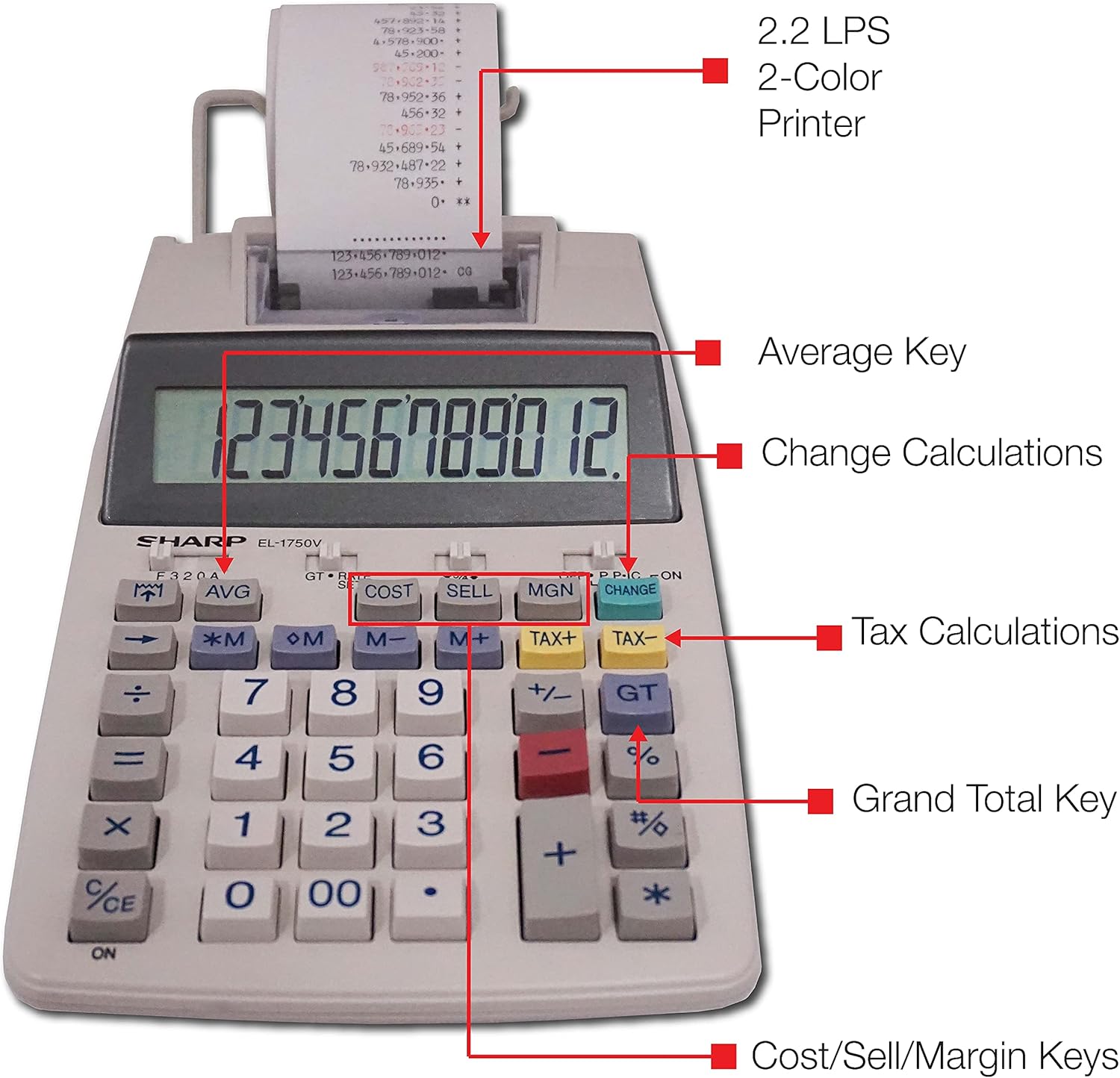
Figi 3: Detaye view highlighting the 2.2 LPS 2-Color Printer, Average Key, Change Calculations, Tax Calculations, Grand Total Key, and Cost/Sell/Margin Keys.

Figure 4: Dimensions of the Sharp EL1750V calculator, showing a width of 5.9 inches, depth of 9.1 inches, and height of 2 inches, with a 0.75 inch 12-digit LCD display.
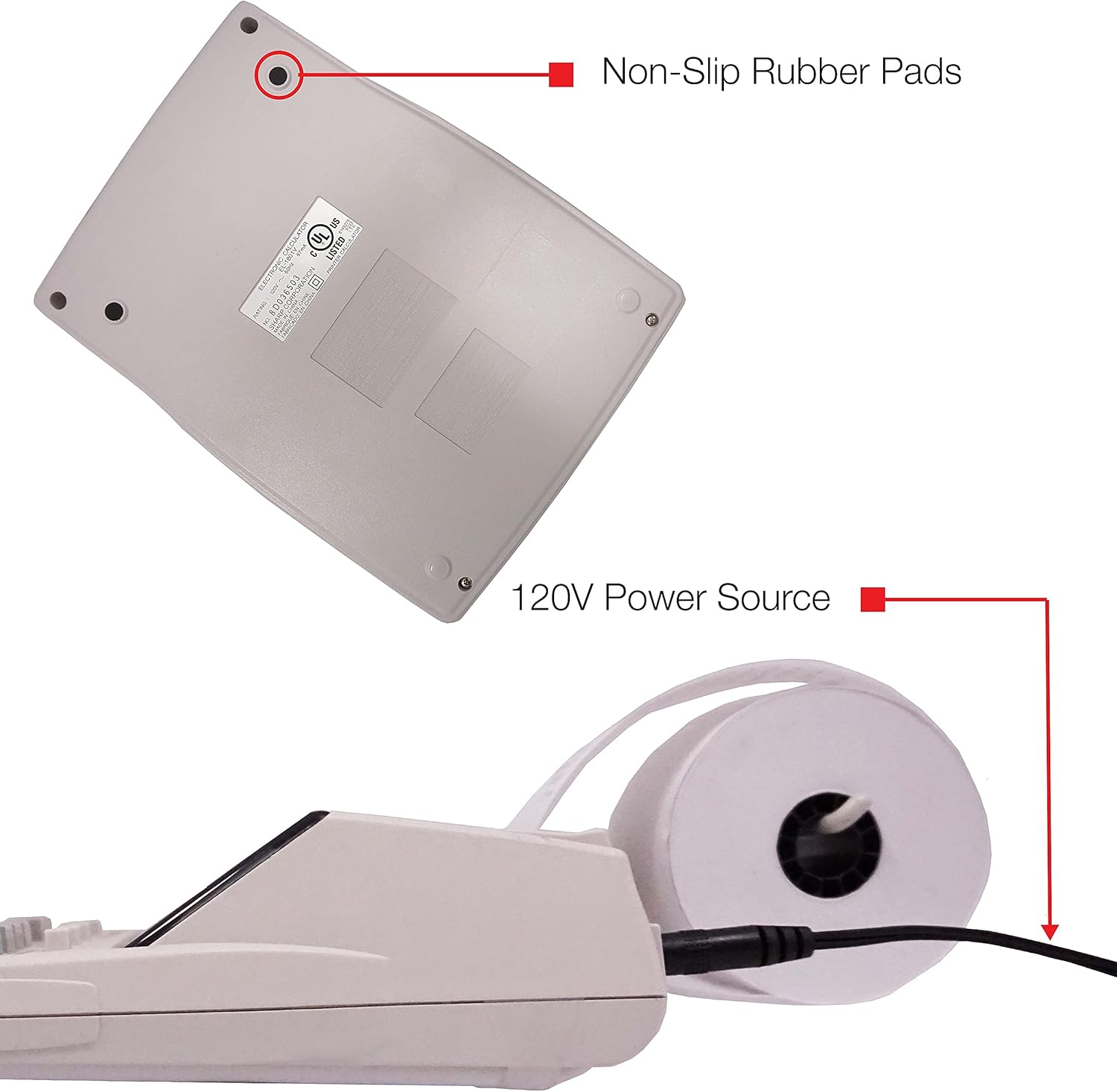
Figi 5: Anba view of the calculator, illustrating the non-slip rubber pads and the 120V power source input.
3. Enstalasyon
3.1 Sous pouvwa
The Sharp EL1750V can be powered by an AC adapter (120V) or batteries. Ensure the correct power source is connected before operation.
- AC adaptè: Connect the provided AC adapter to the power input port on the side of the calculator (refer to Figure 5) and plug it into a standard 120V electrical outlet.
- Batri: If using batteries, open the battery compartment (typically on the underside) and insert the required batteries, observing correct polarity.
3.2 Installing the Paper Roll
- Lift the printer cover to expose the paper roll compartment.
- Place a new paper roll into the compartment, ensuring the paper feeds from the bottom of the roll.
- Feed the leading edge of the paper into the printer mechanism slot until it emerges from the top.
- Fèmen kouvèti enprimant lan.
- Press the paper feed key (often marked with an arrow pointing up) to advance the paper and ensure it is properly aligned.
4. Operasyon Enstriksyon
4.1 Kalkil debaz
Fè operasyon aritmetik estanda yo:
- Adisyon (+): Antre premye nimewo a, peze +, antre dezyèm nimewo a, peze =.
- Soustraksyon (-): Antre premye nimewo a, peze -, antre dezyèm nimewo a, peze =.
- Miltiplikasyon (x): Antre premye nimewo a, peze x, antre dezyèm nimewo a, peze =.
- Divizyon (÷): Antre premye nimewo a, peze ÷, antre dezyèm nimewo a, peze =.
- Antre Klè (CE/C): Efase dènye nimewo ki te antre a.
- Tout klè (AC): Clears all entries and calculations.
4.2 Fonksyon espesyal
- Kalkil taks (TAKS+, TAKS-):
- Set the tax rate using the appropriate function (refer to the calculator's specific tax rate setting procedure, usually involving a dedicated key or mode).
- Antre kantite lajan an, epi peze TAX+ pou ajoute taks oubyen TAX- pou retire taks.
- Change Calculation (CHANGE):
- Enter the total amount of the sale.
- Peze a CHANJMAN kle.
- Enter the amount received from the customer.
- Peze = to display the change due.
- Gran Total (GT): Peze GT to recall the grand total of all previous calculations.
- Memory Functions (M+, M-, RM/CM):
- M+: Ajoute valè ki parèt la nan memwa.
- M-Soustrè valè ki parèt la nan memwa.
- RM/CM: Recalls memory content (first press) or clears memory (second press).
- Cost, Sell, Margin (COST, SELL, MGN): These keys are used for profit margin calculations.
- Enter two of the three values (Cost, Selling Price, Margin Percentage) and press the key for the unknown value to calculate it.
- Rounding and Decimal Switches: Adjust these switches (typically located above the keypad) to control the number of decimal places and rounding method for calculations.
5. Antretyen
5.1 Netwayaj
To maintain the calculator's performance and appearance:
- Siye eksteryè a ak yon twal mou, sèk.
- Pou pousyè tè ki difisil pou retire, yon ti kras dampht twal la ak dlo oswa yon pwodui netwayaj dou, ki pa abrazif.
- Do not use strong solvents or abrasive cleaners, as these can damage the surface or display.
- Avoid spraying liquids directly onto the calculator.
5.2 Paper Roll Replacement
Replace the paper roll when it runs out or the print becomes faint. Refer to Section 3.2 for installation instructions.
5.3 Ranplasman Woulo Lank
When the print becomes faint or incomplete, the ink roller needs to be replaced. Consult your calculator's specific instructions for ink roller replacement, as the procedure may vary slightly.
NAN. Depanaj
| Pwoblèm | Kòz posib | Solisyon |
|---|---|---|
| Kalkilatris la pa limen. | No power, AC adapter not connected, or batteries depleted/incorrectly installed. | Ensure AC adapter is securely plugged in. If using batteries, check battery installation and replace if necessary. |
| Pa gen okenn enprime oswa enprime ki fèb. | Paper roll empty or incorrectly installed; ink roller needs replacement. | Replace paper roll (Section 3.2). Replace ink roller (Section 5.3). |
| Display shows "E" or error message. | Calculation overflow, division by zero, or incorrect operation sequence. | Peze AC to clear the error. Re-enter the calculation carefully. |
| Papye bloke. | Paper roll not installed correctly or paper is creased. | Open printer cover, remove jammed paper, and re-install paper roll correctly (Section 3.2). |
7. Espesifikasyon
- Modèl: Sharp EL1750V
- Ekspozisyon: LCD 12 chif
- Vitès enprime: 2.2 liy pou chak segonn
- Printing Colors: 2 (Black for positive, Red for negative)
- Sous pouvwa: AC Adapter (120V) or Battery Powered
- Dimansyon (apeprè): 5.9 pous (W) x 9.1 pous (D) x 2 pous (H)
- Pwa (Apeprè): 0.16 ounces (Note: This weight seems unusually low for a printing calculator, likely an error in source data. User should refer to product packaging for accurate weight.)
- Materyèl: Plastik
- Karakteristik espesyal: Antimicrobial protection, Change calculation, Tax functions, Cost/Sell/Margin functions, Grand Total, 4-key memory.
8. Garanti ak sipò
For warranty information and technical support, please refer to the documentation included with your purchase or visit the official Sharp websit la. Kenbe resi acha ou kòm prèv acha pou reklamasyon garanti.
Manifakti: Sharp
Websit: www.sharpusa.com