
1. Entwodiksyon
The PowerDrive PD3000 is a 3000 Watt power inverter designed to convert 12V DC power from your vehicle's battery into 115V AC household power. This unit provides 3000 Watts of continuous AC power and has a high surge capacity of up to 6000 Watts to accommodate devices with high starting power requirements. It features integrated Bluetooth wireless technology for remote monitoring and control via a mobile application, along with a removable control panel for flexible placement. This manual provides essential information for the safe and efficient operation of your PowerDrive PD3000 inverter.
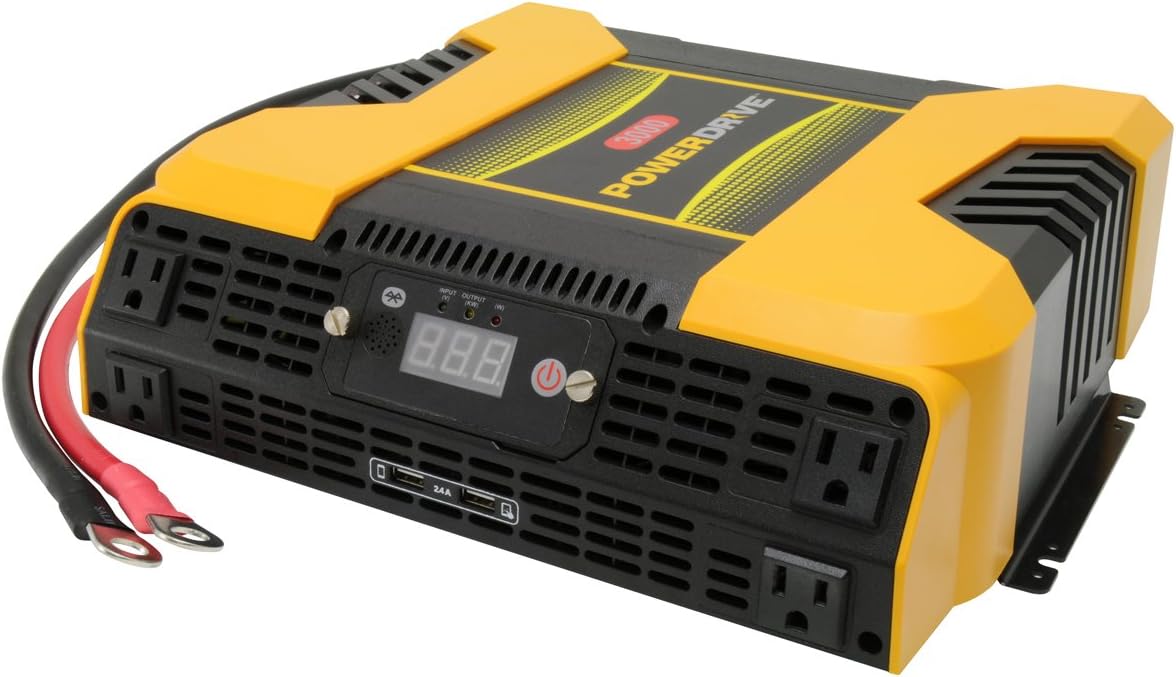
Figure 1.1: PowerDrive PD3000 3000 Watt Power Inverter, front view with outlets and display.
2. Enfòmasyon sou Sekirite
Please read and understand all safety instructions before installing or operating the inverter. Failure to follow these instructions may result in electrical shock, fire, serious injury, or property damage.
- Danje chòk elektrik: Pa louvri envèstisè c laasing. Pa gen pyès ki ka sèvi ak men itilizatè a anndan an. Konfye tout antretyen bay pèsonèl sèvis kalifye.
- Danje dife: Do not operate the inverter near flammable materials, gases, or vapors. Ensure adequate ventilation around the inverter.
- Sekirite batri: Connect the inverter only to a 12V DC battery system. Ensure battery terminals are clean and connections are secure. Wear eye protection and gloves when working with batteries.
- Vantilasyon: Asire w ke envèstisè a enstale nan yon zòn ki byen ayere. Pa bloke ouvèti vantilasyon yo.
- Pwoteksyon Surcharge: Do not exceed the inverter's continuous power rating of 3000 Watts. Overloading can damage the inverter and connected devices.
- Imidite: Do not expose the inverter to rain, moisture, or spray.
3. Pake kontni
Verifye ke tout atik yo prezan lè w ap debale yo:
- PowerDrive PD3000 Power Inverter Unit
- Manyèl Enstriksyon
- Kab Batri (Wouj ak Nwa)
- Removable Control Panel with Cable
4. Pwodwi Features
The PowerDrive PD3000 inverter offers a range of features for versatile power conversion:
- Segondè pwodiksyon pouvwa: Delivers 3000 Watts of continuous AC power with a 6000 Watt surge capacity.
- Plizyè priz kouran AC: Equipped with four (4) 3-prong AC outlets to support various devices.
- USB chaje pò: Includes two (2) USB power ports (shared 2400mA total output) for charging mobile devices.
- Koneksyon Bluetooth: Allows remote access to features and settings via a free downloadable mobile application.
- Panèl kontwòl detachable: Detachable control panel enables remote monitoring and testing, offering installation flexibility.
- Konstriksyon dirab: Features a robust ABS PVC composite housing designed to protect internal electronic components.
- Pwoteksyon Sekirite: Incorporates audible alarms and automatic shut-off triggers for low battery, high battery, and overload conditions.

Figure 4.1: Front panel of the PowerDrive PD3000 showing AC outlets, USB ports, and digital display.
5. Enstalasyon ak Enstalasyon
Proper installation is crucial for the safe and efficient operation of your inverter.
5.1 Monte varyateur la
- Choose a dry, well-ventilated location away from direct sunlight, heat sources, and flammable materials.
- Ensure there is sufficient space around the inverter for air circulation, especially around the cooling fans.
- Mount the inverter securely using appropriate hardware (not included) to prevent movement during operation.
5.2 Konekte ak yon sous kouran 12V DC
Enpòtan: Asire w ke envèstisè a etenn anvan ou fè nenpòt koneksyon.
- Konekte a WOUJ (positive) battery cable to the WOUJ (positive) terminal on the inverter. Tighten securely.
- Konekte lòt bout la WOUJ (positive) battery cable to the pozitif (+) terminal of your 12V DC battery. Tighten securely.
- Konekte a NWA (negative) battery cable to the NWA (negative) terminal on the inverter. Tighten securely.
- Konekte lòt bout la NWA (negative) battery cable to the negatif (-) terminal of your 12V DC battery. Tighten securely.
- Verify all connections are tight and free from corrosion. Loose connections can cause overheating and damage.

Figure 5.1: PowerDrive PD3000 Inverter showing battery cable connections.

Figi 5.2: Dèyè view of the PowerDrive PD3000 showing cooling fans and battery terminals.
5.3 Removable Control Panel Installation
The control panel can be used directly on the inverter or detached for remote operation.
- To use remotely, gently pull the control panel from the inverter.
- Connect the provided cable to the port on the back of the detached control panel and to the corresponding port on the inverter.
- Mount the control panel in a convenient location for monitoring and control.

Figure 5.3: PowerDrive PD3000 Inverter with its control panel detached for remote use.
6. Operasyon Enstriksyon
6.1 Limen/Etenyen
- After ensuring all battery connections are secure, press and hold the power button on the inverter or the remote control panel for approximately 1-2 seconds.
- The digital display will illuminate, and the inverter will begin providing AC power.
- To turn off, press and hold the power button again until the display turns off.
6.2 Connecting AC Devices
- Plug your 115V AC devices into the 3-prong AC outlets on the front of the inverter.
- Asire w total latage of all connected devices does not exceed 3000 Watts.
- For devices with high starting loads (e.g., motors, compressors), ensure their surge wattage is within the inverter's 6000 Watt surge capacity.
6.3 Itilizasyon pò chaje USB yo
- Connect your USB-powered devices (e.g., smartphones, tablets) to the USB ports.
- The two USB ports share a total output of 2400mA (2.4A).
6.4 Understanding the Digital Display and Indicators
The digital display shows real-time information such as input voltage or output wattage. Indicator lights provide status feedback:
- Antre ki ap dirije: Indicates the status of the DC input power.
- Sòti ki ap dirije: Indicates the status of the AC output power.
- Fòt dirije: Illuminates to indicate an error condition (e.g., overload, low/high voltagak).
7. Bluetooth Koneksyon
The PowerDrive PD3000 features Bluetooth wireless technology, allowing you to monitor and control the inverter using a compatible smartphone application.
7.1 Downloading the Mobile App
- Chèche pou the official PowerDrive inverter app on your smartphone's app store (e.g., Apple App Store, Google Play Store).
- Telechaje epi enstale aplikasyon an.
7.2 Pairing with Your Inverter
- Asire w ke Bluetooth aktive sou smartphone ou.
- Turn on the PowerDrive PD3000 inverter.
- Open the PowerDrive mobile app. The app should automatically detect nearby PowerDrive inverters.
- Follow the on-screen prompts within the app to pair with your PD3000 inverter.
7.3 Karakteristik aplikasyon an
Once paired, the app allows you to:
- Monitè opinyon voltage ak pwodiksyon wattage.
- View inverter status and fault codes.
- Remotely turn the inverter on or off.
- Adjust certain settings (refer to the app's help section for details).

Figure 7.1: Smartphone displaying the PowerDrive mobile application interface.
8. Antretyen
Antretyen regilye asire pèfòmans optimal ak lonjevite envèstisè ou a.
- Netwayaj: Netwaye deyò envèstisè a detanzantan avèk yon twal sèk epi mou. Pa sèvi ak pwodui netwayaj likid oswa solvan.
- Vantilasyon: Ensure the cooling fans and ventilation openings are free from dust and debris. Use compressed air to clear blockages if necessary.
- Koneksyon: Regularly check battery cable connections for tightness and corrosion. Clean terminals with a wire brush if corrosion is present.
- Depo: Si w ap sere envèstisè a pou yon peryòd tan pwolonje, dekonekte li nan batri a epi sere l nan yon kote ki fre epi sèk.
NAN. Depanaj
This section addresses common issues you might encounter with your PowerDrive PD3000 inverter.
9.1 Pwoblèm komen ak solisyon
- Envèstisè a pa limen:
- Check battery connections for tightness and proper polarity.
- Asire vol batri atage is above 10.5V DC (Low Battery Shut Down Point).
- Verifye ke bouton pouvwa a byen peze epi kenbe l pou dire ki nesesè a.
- Pa gen pwodiksyon AC:
- Check if the inverter is powered on and the Output LED is illuminated.
- Ensure the connected AC device is functioning correctly.
- Check for an overload condition (Fault LED illuminated). Reduce the load.
- Audible Alarm / Fault LED On:
- Alam batri ki ba: Activates at 11 ± 0.3V DC. Recharge or replace the battery. The inverter will shut down at 10.5 ± 0.3V DC.
- High Battery Shut Down: Occurs at 15.5 ± 0.5V DC. Check the charging system of your vehicle.
- Surcharge: Wat total latage of connected devices exceeds 3000 Watts. Disconnect some devices.
- Tanperati depase: Inverter is overheating. Ensure proper ventilation and reduce load.
- Pwoblèm koneksyon Bluetooth:
- Ensure Bluetooth is enabled on your smartphone and the inverter is powered on.
- Restart the mobile app and try pairing again.
- Ensure your smartphone is within range of the inverter.
10. Espesifikasyon
| Spesifikasyon | Valè |
|---|---|
| Modèl | PD3000 |
| Continuous AC Power Output | 3000 Watts |
| Pik pouvwa vag | 6000 Watts |
| DC Antre Voltage | 12.8V |
| AC Sòti Voltage | 115V |
| AC Frekans Sòti | 58Hz-62Hz |
| USB Sòti | 5V / 2 (Shared 2400mA) |
| Efikasite (maksimòm) | >88% |
| Efikasite (chaj konplè) | >84% |
| Battery Drain (No AC Load) | <0.6A |
| Low Battery Alarm Trigger | 11 ± 0.3V DC |
| Low Battery Shut Down Point | 10.5 ± 0.3V DC |
| High Battery Shut Down Point | 15.5 ± 0.5V DC |
| Recovering Voltage after Under Voltage Turn-off | 12 ± 0.3V DC |
| Pwa atik | 12.14 liv |
| Dimansyon pwodwi | 16.2 x 16.3 x 7.6 pous |
11. Garanti ak sipò
For warranty information or technical support, please refer to the documentation included with your purchase or visit the official PowerDrive websit la. Kenbe prèv acha ou a pou nenpòt reklamasyon garanti.