
Entwodiksyon
This manual provides essential information for the safe and efficient operation of your VIZIO SB3851-C0 38-Inch 5.1 Channel Sound Bar System. Please read these instructions thoroughly before using your product and retain them for future reference. This system includes a 38-inch sound bar, a wireless subwoofer, and two satellite speakers, designed to deliver a comprehensive 5.1 channel surround sound experience.
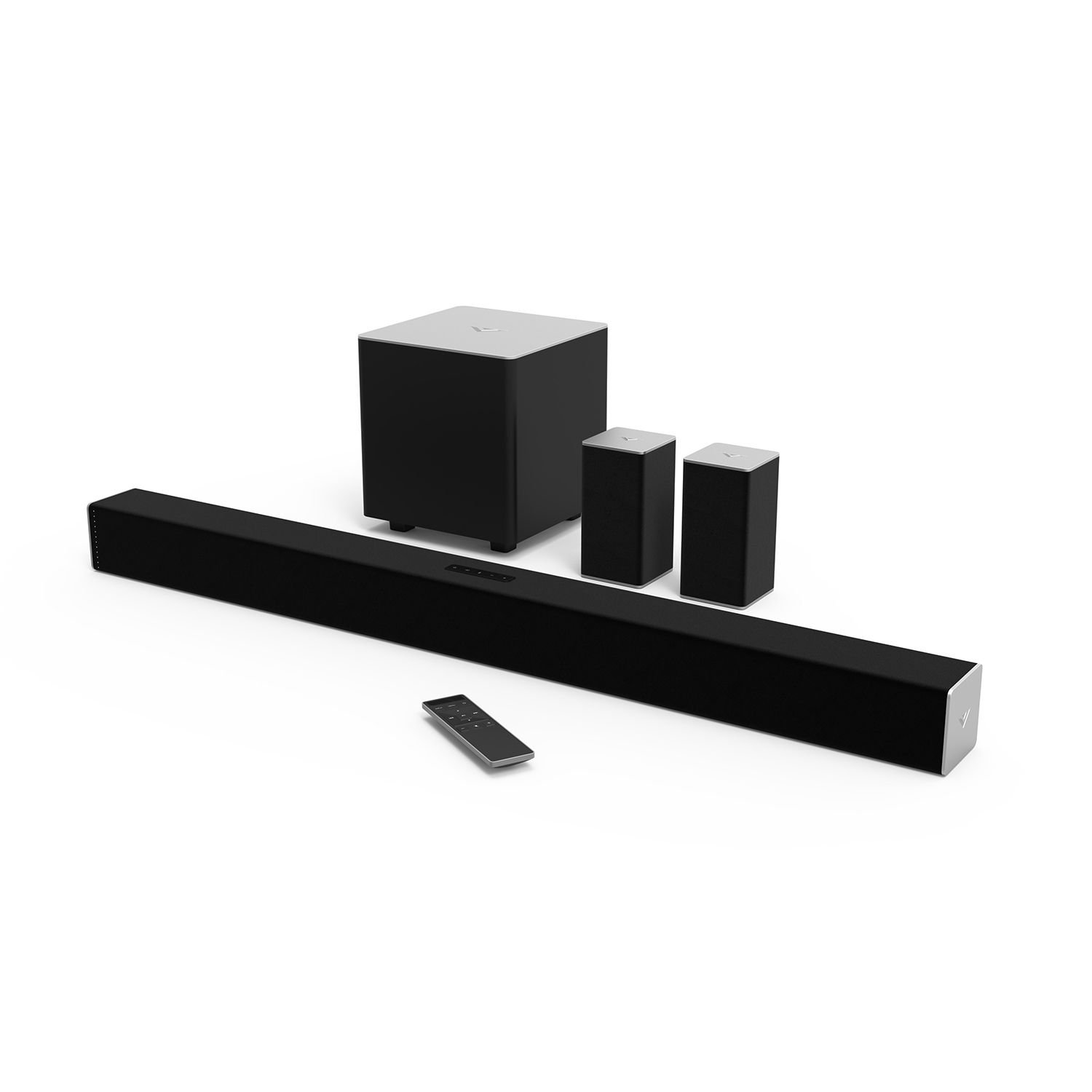
Figure 1: VIZIO SB3851-C0 38-Inch 5.1 Channel Sound Bar System. This image displays the main sound bar unit, the wireless subwoofer, and the two satellite speakers.
1. Enstalasyon
1.1 Debalaj ak Verifikasyon Konpozan
Retire tout konpozan yo nan anbalaj la avèk prekosyon. Asire w ke tout atik ki nan lis anba a yo la:
- VIZIO 38-Inch Sound Bar (SB3851-C0)
- Wireless subwoofer
- De Oratè Satelit
- Kontwòl Remote ak pil
- Power Cables (for Sound Bar and Subwoofer)
- RCA to RCA Audio Cable (for Satellite Speakers)
- Digital Optical Kab
- Stereo RCA pou 3.5mm Audio kab
- Wall Mount Brackets and Screws
- Gid demaraj rapid (manyèl sa a bay enstriksyon detaye)
1.2 Plasman Oratè
Optimal placement is crucial for the best surround sound experience.
- Son Bar: Place the sound bar centrally below your TV. Ensure it is not obstructed.
- Subwoofer san fil: Position the subwoofer anywhere in the room. For best bass response, try placing it in a corner or near a wall. The subwoofer connects wirelessly to the sound bar.
- Oratè satelit: Connect the satellite speakers to the wireless subwoofer using the provided RCA cables. Place the satellite speakers behind your primary listening position, one to the left and one to the right, facing towards the listening area.
Figi 2: Egzample of optimal speaker placement. (Image not available, refer to diagram in Quick Start Guide for visual reference).
1.3 Koneksyon Audio
Connect your audio source (TV, Blu-ray player, game console) to the sound bar. Only one audio connection type is typically needed.
- Digital Optical (Recommended): Connect one end of the Digital Optical Cable to the OPTICAL OUT port on your TV and the other end to the OPTICAL IN port on the sound bar. This provides the best audio quality and supports Dolby Digital and DTS Digital Surround.
- RCA (Analog): Connect the Stereo RCA to 3.5mm Audio Cable from your TV's audio output (usually red and white RCA jacks) to the AUX IN (3.5mm) port on the sound bar.
- Bluetooth: For wireless audio streaming from mobile devices, refer to Section 2.3 for Bluetooth pairing instructions.
Figure 3: Sound bar rear panel connections. (Image not available, refer to diagram in Quick Start Guide for visual reference).
1.4 Koneksyon pouvwa
- Connect the power cable to the AC IN port on the sound bar, then plug the other end into a wall outlet.
- Connect the power cable to the AC IN port on the wireless subwoofer, then plug the other end into a wall outlet.
- The subwoofer and sound bar will automatically pair. The LED indicator on the back of the subwoofer will turn solid white when connected.
2. Operasyon Enstriksyon
2.1 Power On/Off
- Peze a POUVWA bouton sou ba son an oswa sou kontwòl remote la pou limen oswa etenn sistèm nan.
- The sound bar will automatically enter standby mode after a period of inactivity.
2.2 Seleksyon Antre
Peze a Antre button on the sound bar or the remote control repeatedly to cycle through available audio inputs (Optical, AUX, Bluetooth).
Figure 4: Remote control layout. (Image not available, refer to diagram in Quick Start Guide for visual reference).
2.3 Bluetooth Pairing
- Peze epi kenbe la BLUETOOTH button on the sound bar or remote control for 3 seconds. The LED indicators on the sound bar will begin to flash.
- On your mobile device, enable Bluetooth and search for new devices. Select "VIZIO SB3851-C0" from the list.
- Once paired, the LED indicators on the sound bar will stop flashing and glow solid. You can now stream audio from your device.
2.4 Volume Control and Audio Settings
- Volim: Sèvi ak la VOLIM MONTE/BA bouton ki sou telekòmand lan oswa sou ba son an.
- Nivo subwoofer: Sèvi ak la SUBWOOFER +/- buttons on the remote to adjust bass intensity.
- Antoure Son: The system supports Dolby Digital and DTS Digital Surround. Ensure your audio source is configured to output these formats for the best experience.
- DTS TruVolume: This feature helps maintain a consistent volume level, preventing sudden jumps in sound. Activate/deactivate via the remote.
- Son DTS Studio: Enhances audio for a wider soundstage and clearer dialogue. Activate/deactivate via the remote.
- DTS Circle Surround: Creates a virtual surround sound experience from stereo sources. Activate/deactivate via the remote.
3. Antretyen
- Netwayaj: Disconnect the power before cleaning. Use a soft, dry, lint-free cloth to wipe the surfaces of the sound bar, subwoofer, and satellite speakers. Do not use liquid cleaners or abrasive materials.
- Depo: Si w ap sere aparèy la pou yon bon bout tan, dekonekte l nan kouran an epi sere l nan yon kote ki fre epi sèk, lwen limyè solèy dirèk ak tanperati ekstrèm.
NAN. Depanaj
Si ou rankontre pwoblèm, gade pwoblèm ak solisyon komen sa yo:
4.1 Pa gen pouvwa
- Ensure all power cables are securely connected to the sound bar, subwoofer, and wall outlets.
- Verifye si priz miray la fonksyone byen lè w branche yon lòt aparèy.
4.2 Pa gen son
- Tcheke si ba son an limen epi li pa muet.
- Verify the correct input source is selected on the sound bar (e.g., Optical, AUX, Bluetooth).
- Ensure the audio cable (Optical, RCA) is securely connected between the sound bar and your audio source.
- If using Optical, check your TV's audio output settings to ensure it's set to "PCM" or "Bitstream" and not "TV Speakers."
- Increase the volume on both the sound bar and your audio source.
4.3 Subwoofer / Satellite Speakers Not Working
- Ensure the subwoofer is powered on and its LED indicator is solid white, indicating a successful wireless connection to the sound bar.
- Check that the satellite speakers are securely connected to the subwoofer's RCA ports.
- Ajiste nivo subwoofer la avèk kontwòl remote la.
4.4 Pwoblèm Koneksyon Bluetooth
- Ensure the sound bar is in Bluetooth pairing mode (flashing LEDs).
- Make sure your mobile device's Bluetooth is enabled and within range (approximately 30 feet).
- Eseye dekonekte epi konekte aparèy la ankò.
- Clear any previous "VIZIO SB3851-C0" entries from your device's Bluetooth list.
5. Espesifikasyon
| Karakteristik | Deskripsyon |
|---|---|
| Modèl | SB3851-C0 |
| Kalite sistèm | 5.1 Channel Sound Bar System |
| Sound Bar Size | 38 pous |
| Pèfòmans Audio | Up to 100 dB SPL, less than 1% Total Harmonic Distortion |
| Repons Frekans | 50 Hz (System) |
| Koneksyon | Bluetooth, Digital Optical, RCA (3.5mm AUX) |
| Dekodaj odyo | Dolby Digital, DTS Digital Surround |
| Audio Post Processing | DTS TruVolume, DTS Studio Sound, DTS Circle Surround |
| Kalite aliye | Mòn Ba (Ka Monte Sou Miray) |
6. Garanti ak sipò
For warranty information, please refer to the warranty card included with your product or visit the official VIZIO website. For technical support, product registration, or to download the latest version of this manual, please visit www.vizio.com/sipò or contact VIZIO customer service.