
1. Entwodiksyon
This manual provides essential instructions for the setup, operation, maintenance, and troubleshooting of your IBM Lenovo Preferred Pro USB Wired Keyboard and Mouse Set. Please read this manual thoroughly before using the product to ensure proper functionality and longevity.
2. Pwodwi souview
The IBM Lenovo Preferred Pro USB Wired Keyboard and Mouse Set offers a reliable input solution for your computer. The keyboard features a standard layout with a numeric keypad, while the mouse is a 2-button optical mouse with a scroll wheel. Both devices connect via a standard USB interface, providing plug-and-play compatibility with most operating systems.

Figi 2.1: Top view of the IBM Lenovo Preferred Pro USB Wired Keyboard.
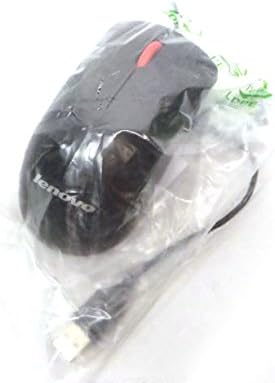
Figi 2.2: Top view of the Lenovo USB 2-Button Optical Mouse.
Karakteristik kle:
- USB Wired Connectivity: Ensures a stable and reliable connection.
- Plug-and-Play: No additional drivers typically required for basic functionality.
- Standard Keyboard Layout: Full-size keyboard with numeric keypad.
- Optical Mouse: Precise tracking with a scroll wheel for easy navigation.
3. Enstalasyon
Follow these steps to connect your keyboard and mouse to your computer.
- Depakete Aparèy yo: Retire klavye a ak sourit la nan anbalaj yo avèk prekosyon.
- Identify USB Connectors: Locate the USB connectors at the end of the keyboard and mouse cables.
- Konekte ak òdinatè: Insert the USB connector of the keyboard into an available USB port on your computer. Repeat this step for the mouse.
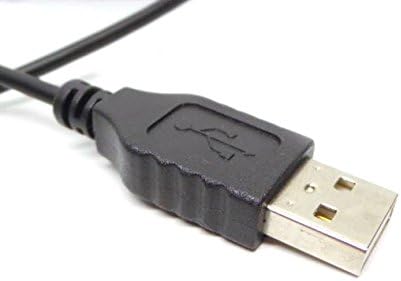
Figure 3.1: Close-up of a standard USB Type-A connector, used for connecting the keyboard and mouse.
Your computer should automatically detect and install the necessary drivers for the keyboard and mouse. No additional software installation is typically required for basic functionality.
4. Operasyon Enstriksyon
4.1 Itilizasyon Klavye
- Sezisman: Sèvi ak kle alfanimerik yo pou antre tèks.
- Kle Fonksyon (F1-F12): These keys perform various functions depending on the application or operating system.
- Klavye nimerik: Use the dedicated numeric keypad for efficient data entry. Ensure the "Num Lock" indicator light is on.
- Kle espesyal: Utilize keys like "Print Screen", "Scroll Lock", "Pause/Break", "Insert", "Home", "Page Up", "Delete", "End", and "Page Down" for their respective functions.
4.2 Itilizasyon Sourit
- Mouvman: Move the mouse across a flat surface to control the cursor on the screen.
- Klike Goch: Peze bouton gòch la pou chwazi atik, ouvri lyen, oswa aktive fonksyon.
- Klike sou dwa: Peze bouton dwat la pou ouvri meni kontèks yo.
- wou woulo liv: Woule wou woulo a monte oswa desann pou navige nan dokiman yo oubyen web paj yo. Rou defile a kapab fonksyone tou kòm yon bouton klike nan mitan an.
5. Antretyen
Proper care and maintenance will extend the life of your keyboard and mouse.
- Netwayaj:
- Disconnect devices from the computer before cleaning.
- Sèvi ak yon mou, damp cloth with a mild cleaning solution (e.g., water or isopropyl alcohol) to wipe surfaces.
- Avoid excessive moisture, especially near keycaps and optical sensors.
- Use compressed air to remove dust and debris from between keyboard keys.
- Depo: Store the devices in a clean, dry environment away from extreme temperatures and direct sunlight.
- Evite devèsman: Keep liquids away from the keyboard and mouse to prevent damage.
NAN. Depanaj
If you encounter issues with your keyboard or mouse, refer to the following common problems and solutions:
| Pwoblèm | Kòz posib | Solisyon |
|---|---|---|
| Klavye/Sourit pa reponn | Koneksyon USB ki lach, pò USB ki defektye, pwoblèm chofè. |
|
| Keys not working or typing incorrectly | Debris under keys, software conflict, keyboard settings. |
|
| Kisè sourit la pa deplase oswa li pa deplase | Dirty optical sensor, unsuitable surface, software issue. |
|
If the problem persists after trying these solutions, contact customer support or your reseller for further assistance.
7. Espesifikasyon
| Karakteristik | Detay |
|---|---|
| Keyboard Model Numbers | 54Y9400, 41A5289, SK-8825, KB1021 |
| Mouse Model Numbers | 45J4888, 25011476, 45J4889, M-U0025-O |
| Mak | IBM / Lenovo |
| Koulè | Nwa |
| Koneksyon Teknoloji | USB filaire |
| Kalite klavye | Preferred Pro USB Wired Keyboard |
| Kalite sourit | 2-Button Black Red Scroll Wheel Optical Mouse |
| Dimansyon pake | 22 x 10.2 x 4.7 pous (apeprè) |
| Pwa atik | 1 liv (apeprè) |
| Manifakti | Lenovo |
8. Garanti ak sipò
For warranty information, please refer to the documentation provided at the time of purchase or contact your reseller. IBM and Lenovo products typically come with a standard manufacturer's warranty.
For technical support or further inquiries, please contact the product's manufacturer or the authorized reseller from whom you purchased the item. Keep your purchase receipt and product model numbers handy for faster service.