
Pwodwi souview
The PORTER-CABLE PC60THP 6-Amp Hand Planer is designed for smooth and efficient material removal in various woodworking applications. Its robust 6-Amp motor delivers up to 16,500 RPM for clean cuts in hard materials. Key features include dual-side dust extraction, a depth adjustment knob with 10 positive steps, and an 11.5-inch cast aluminum shoe for enhanced control and finish quality.
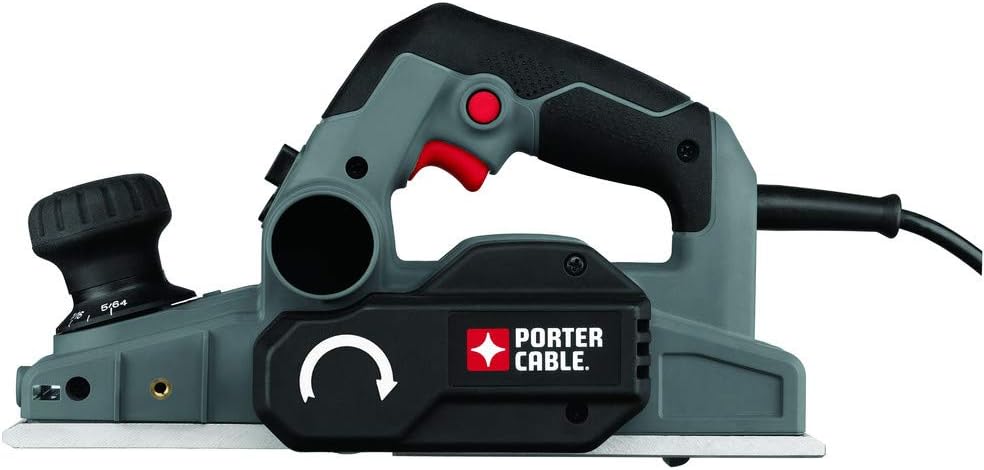
Image: The PORTER-CABLE PC60THP 6-Amp Hand Planer, showcasing its ergonomic design and dust collection port.
Enfòmasyon enpòtan sou sekirite
WARNING: Read all safety warnings and instructions before operating this power tool. Failure to follow the warnings and instructions may result in electric shock, fire, and/or serious injury.
- Toujou mete pwoteksyon pou je ak pwoteksyon pou tande.
- Kenbe men ou lwen zòn koupe a ak lam la.
- Asire w ke pyès travay la byen klèamped anvan planifikasyon.
- Dekonekte ploge kouran an nan sous kouran an anvan ou fè nenpòt ajisteman, chanje akseswa, oswa sere zouti a.
- Kenbe zòn travay la pwòp epi byen limen. Zòn ankonbre oswa nwa yo envite aksidan.
- Pa opere zouti elektrik nan atmosfè eksplozif, tankou nan prezans likid ki ka pran dife, gaz, oswa pousyè.
Enstalasyon ak Asanble
1. Mete sak pousyè a an plas
The planer features a dual-side dust extractor. Attach the included dust bag to either of the dust ports. Ensure the bag is securely fastened to collect wood shavings and maintain a cleaner work area. The direction of dust expulsion can be adjusted via a switch on the tool.
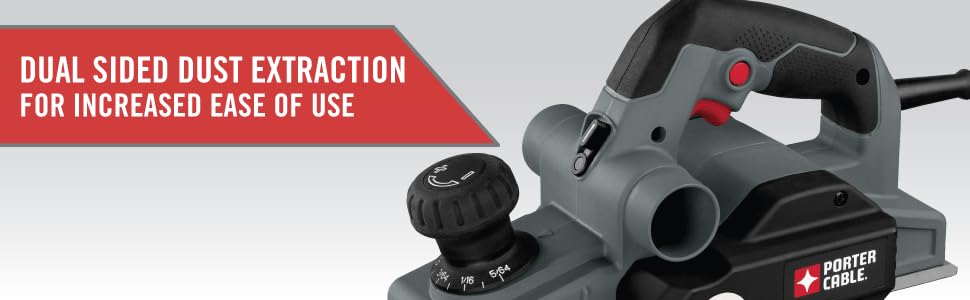
Image: The planer highlighting its dual-sided dust extraction system for user convenience.
2. Ajiste pwofondè koupe a
The planer is equipped with an overmold depth knob offering 10 positive steps for precise depth control. Rotate the knob to select the desired cutting depth. For initial passes, it is recommended to start with a shallower depth and gradually increase as needed.

Image: Close-up of the depth adjustment knob, showing the various settings for precise material removal.
3. Safety Foot Stand
The planer features an automatic foot stand that deploys when the tool is lifted from the workpiece. This prevents the blades from contacting the work surface or workbench when not in use, protecting both the blades and the surface.
Enstriksyon Operasyon
1. General Planing Technique
Ensure the workpiece is stable. Place the front shoe of the planer flat on the workpiece, ensuring the blades are not touching. Start the planer, then slowly and steadily move it forward across the material. Apply even pressure throughout the pass. For best results, make multiple shallow passes rather than one deep pass.
2. Using Chamfering Grooves
The front shoe of the planer includes three chamfering grooves. These grooves allow for easy and consistent chamfering of edges. Select the appropriate groove size for your desired chamfer and guide the tool along the edge of the workpiece.
3. Trigger Lock Feature
For extended use, the planer includes a trigger lock button. Press the trigger to start the tool, then press the lock button to keep the tool running without continuously holding the trigger. To release, simply press the trigger again.
4. Operational Demonstration
Video: An official demonstration of the PORTER-CABLE PC60THP Hand Planer in use, showcasing karakteristik ak operasyon li yo.
Antretyen
1. Netwayaj
Regularly empty the dust bag and clean the dust ports to ensure efficient dust extraction. Use a soft brush or compressed air to remove any accumulated sawdust from the tool's vents and moving parts. Ensure the tool is unplugged before cleaning.
2. Enspeksyon ak Ranplasman Lam
Inspect the planer blades regularly for sharpness and damage. Dull or chipped blades can lead to poor finish quality and increased strain on the motor. The blades are replaceable; refer to the full product manual for detailed instructions on how to safely replace them. Always use genuine PORTER-CABLE replacement blades.
3. Swen Jeneral
Store the planer in a dry, clean environment. Avoid exposing it to moisture or extreme temperatures. Periodically check all screws and fasteners for tightness and tighten as necessary.
Depanaj
If you encounter issues with your PORTER-CABLE PC60THP Hand Planer, consider the following common solutions:
- Zouti a pa kòmanse: Check if the power cord is securely plugged in. Ensure the trigger lock is disengaged. Verify power supply.
- Pèfòmans koupe ki pòv: Inspect blades for dullness or damage and replace if necessary. Ensure the cutting depth is set correctly.
- Excessive dust: Empty the dust bag. Clear any blockages in the dust ports. Ensure the dust bag is properly attached.
- Uneven planing: Ensure the workpiece is stable and flat. Check for debris on the planer's shoe. Adjust planing technique for even pressure.
For more complex issues, please refer to the detailed troubleshooting section in the complete user manual or contact PORTER-CABLE customer support.
Espesifikasyon teknik
| Karakteristik | Spesifikasyon |
|---|---|
| Mak | PORTER-CABLE |
| Nimewo Modèl | PC60THP |
| Ampepòk | 6 Amps |
| Maksimòm vitès wotasyon | 16500 RPM |
| Koupe Pwofondè | 0.47 Inches (Max Rabbit Depth) |
| Dimansyon pwodwi | 14.63"L x 7.75"L x 8.25"H |
| Pwa atik | 8.19 liv |
| Sous pouvwa | Fil elektrik |
| Konpozan ki enkli | 2 Carbide Cutting Blades, Wrench, Dust bag |
Enfòmasyon sou Garanti
This PORTER-CABLE product comes with a Garanti manifakti limite pou 3 an. This warranty covers defects in material or workmanship. For full details regarding warranty coverage, limitations, and how to make a claim, please refer to the official warranty document included with your product or visit the PORTER-CABLE websit.
Sipò pou Kliyan
For technical assistance, replacement parts, or service information, please contact PORTER-CABLE customer support. You can typically find contact details on the official PORTER-CABLE websit la oubyen nan manyèl konplè pwodwi a.
Resous sou entènèt: Vizite ofisyèl la PORTER-CABLE Store on Amazon pou plis enfòmasyon sou pwodwi a ak akseswa.