
Entwodiksyon
The Gear Head CR7500H is a versatile 58-in-1 USB 2.0 Flash Card Reader and USB Hub Combo device designed to provide convenient access to various memory card formats and expand your computer's USB connectivity. This manual provides instructions for setting up, operating, maintaining, and troubleshooting your device.
Kontni pake
Tanpri verifye ke tout atik yo prezan nan pakè a:
- Gear Head CR7500H 58-in-1 USB 2.0 Flash Card Reader/USB Hub Combo
- USB kab
- Manyèl Itilizatè a (dokiman sa a)
- Enfòmasyon sou Garanti
Pwodwi souview
The CR7500H features multiple slots for various memory card types and additional USB ports for connecting peripherals. Familiarize yourself with the device's layout before proceeding with setup.
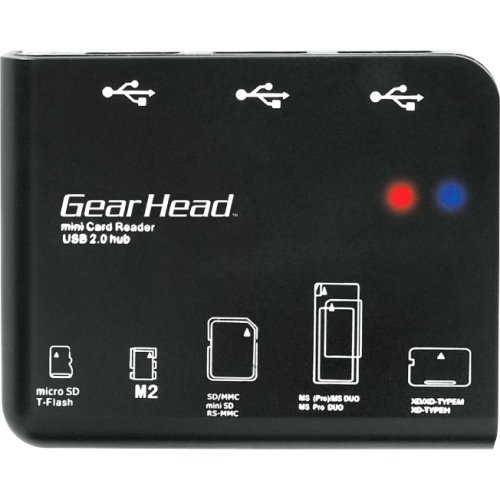
An image showing the Gear Head CR7500H device, a compact black unit with multiple card slots and USB ports visible on its front and sides.
The device typically includes slots for SD, microSD, Memory Stick, and xD-Picture cards, along with several USB 2.0 ports.
Enstalasyon
- Konekte kab USB a: Plug one end of the included USB cable into the mini-USB port on the CR7500H device.
- Konekte ak òdinatè: Plug the other end of the USB cable into an available USB 2.0 port on your computer.
- Enstalasyon chofè (si sa nesesè): The CR7500H is typically a plug-and-play device and should be automatically recognized by most operating systems (Windows, macOS, Linux) without requiring additional drivers. If prompted, follow the on-screen instructions for driver installation.
- Verifikasyon: Once connected, your computer should detect the device. You may see new removable disk drives appear in 'My Computer' or 'File Explorer' (Windows) or on your desktop (macOS), representing the various card reader slots.
Enstriksyon Operasyon
Using the Card Reader Function
- Identify Card Type: Determine the type of memory card you wish to use (e.g., SD, microSD, Memory Stick).
- Mete kat memwa: Carefully insert the memory card into the corresponding slot on the CR7500H. Ensure the card is inserted correctly, usually with the metal contacts facing down or as indicated by a diagram on the device. Do not force the card.
- Done Aksè: Once inserted, the memory card will appear as a removable drive on your computer. You can then open it to view, copy, or move files.
- Ejete san danje: Before removing the memory card, always safely eject it from your operating system to prevent data corruption. For Windows, right-click the drive in 'File Explorer' and select 'Eject'. For macOS, drag the drive icon to the Trash or click the Eject button next to the drive in Finder.
- Retire kat: After safe ejection, gently pull the memory card out of its slot.
Sèvi ak fonksyon USB Hub la
- Konekte aparèy USB: Plug any USB 2.0 compatible device (e.g., flash drive, mouse, keyboard, printer) into the available USB ports on the CR7500H.
- Rekonesans aparèy: Your computer should automatically detect and install necessary drivers for the connected USB device.
- Fonksyonalite: The connected USB device will function as if it were plugged directly into your computer's USB port.
Antretyen
- Netwayaj: Sèvi ak yon twal mou epi sèk pou netwaye deyò aparèy la. Evite itilize pwodui netwayaj likid oswa solvan.
- Depo: Sere aparèy la nan yon kote ki fre epi sèk, lwen limyè solèy dirèk ak tanperati ekstrèm lè w pa ap itilize li.
- Manyen: Handle the device with care. Avoid dropping it or exposing it to excessive force, which could damage internal components or card slots.
Depanaj
- Aparèy pa rekonèt:
- Ensure the USB cable is securely connected to both the CR7500H and your computer.
- Try connecting the device to a different USB port on your computer.
- Rekòmanse òdinatè w lan.
- Check your computer's Device Manager (Windows) or System Information (macOS) to see if the device is listed.
- Memory Card Not Detected:
- Ensure the memory card is inserted correctly and fully into the appropriate slot.
- Try the memory card in another device to confirm it is functional.
- Ensure the memory card is not locked (some SD cards have a small lock switch).
- Transfè Done Ralanti:
- Ensure you are connected to a USB 2.0 port on your computer. While the device is USB 2.0, connecting to an older USB 1.1 port will result in slower speeds.
- The speed of data transfer can also depend on the speed class of your memory card.
Espesifikasyon
| Nimewo Modèl | CR7500H |
| Entèfas | USB 2.0 |
| Kalite medya sipòte yo |
|
| Entèfas hôte | USB |
| Kalite pwodwi | Flash Reader/USB Hub Combo |
| Manifakti | Gear Head, LLC |
| UPC | 878260004126 |
Garanti ak sipò
This product comes with a limited warranty. Please refer to the separate 'Warranty Information' document included in your package for details regarding warranty coverage, terms, and conditions. For technical support or further assistance, please contact Gear Head customer service through their official websit la oswa enfòmasyon kontak ki nan dokiman garanti ou a.