
1. Entwodiksyon
Mèsi pou acha aasing the Mastech MS8230B Digital Multimeter. This device is a compact, battery-operated, handheld digital multimeter designed for measuring DC and AC voltage, DC current, resistance, diode, and transistor (hFE) tests. It features a large LCD display for easy reading and is built to international safety standards.
Please read this instruction manual thoroughly before using the multimeter to ensure safe and proper operation. Keep this manual for future reference.
2. Enfòmasyon sou Sekirite
This multimeter is designed according to IEC 1010-1 international safety standards for electronic measuring instruments. It complies with CAT III 600V and CAT II 1000V overvoltage categories. Always adhere to the following safety precautions:
- Never exceed the maximum input limits for any function.
- Do not use the meter if the case is damaged or open.
- Asire w ke fil tès yo an bon kondisyon, san okenn izolasyon domaje.
- Always turn off the circuit power and discharge all high-voltage capacitors before measuring resistance, diodes, or hFE.
- Pran anpil prekosyon lè w ap travay ak voltagki pi wo pase 60V DC oswa 30V AC RMS, paske sa yo poze yon danje pou elektwo-elektwonik.
- Remove test leads from the circuit before changing functions or ranges.
- Ranplase pil la imedyatman lè endikatè pil ki fèb la parèt pou asire lekti ki egzak.
- Pa sèvi ak mèt la nan anviwònman ki gen gaz, vapè, oswa pousyè ki ka eksploze.
3. Pake kontni
Verify that all items listed below are present and undamaged:
- Mastech MS8230B Digital Multimeter
- Fil tès (yon pè)
- Pil 9V (pre-enstale oswa enkli separeman)
- Manyèl itilizatè
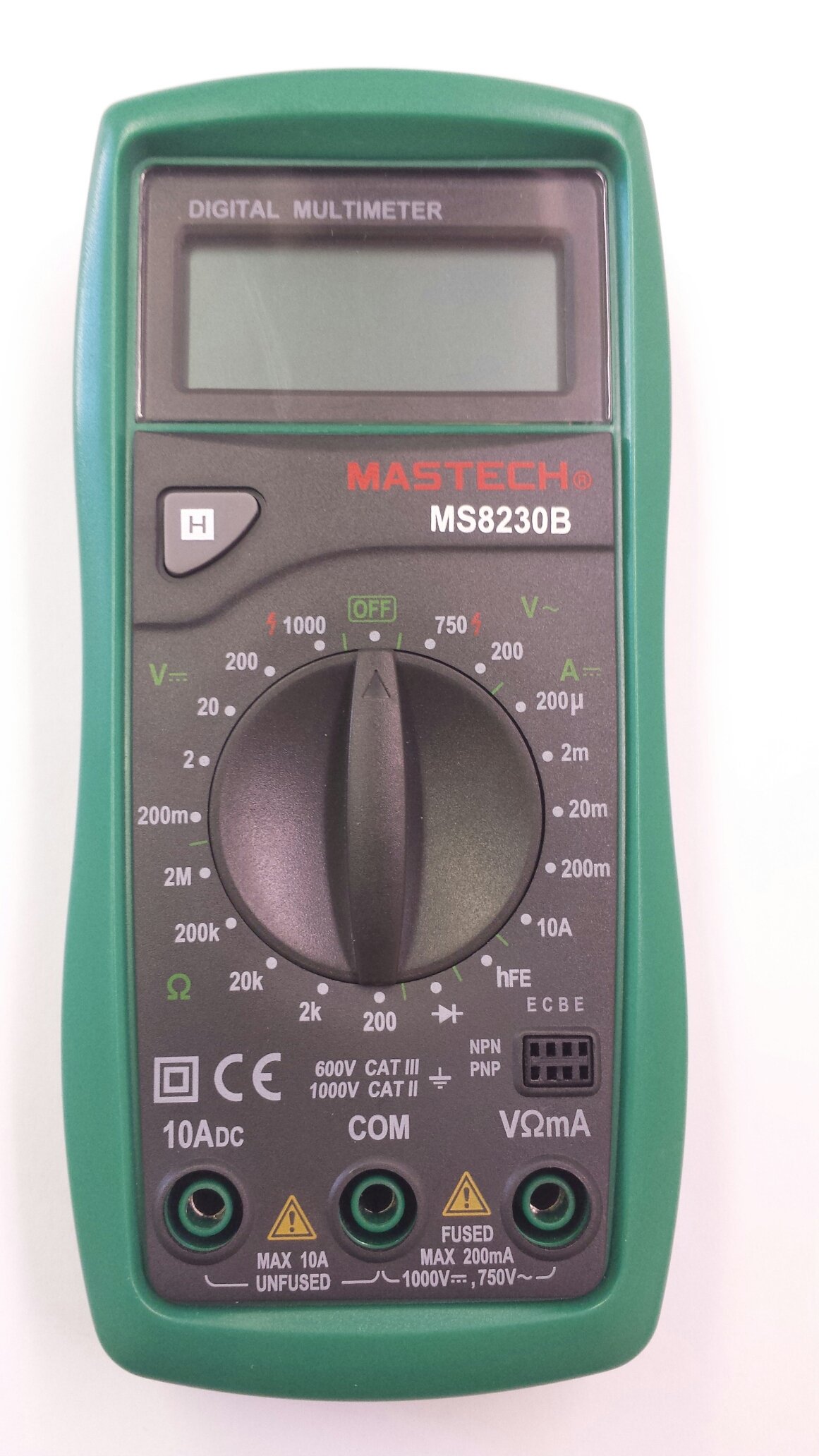
Image 1: Contents of the Mastech MS8230B package, including the multimeter, test leads, batteries, and user manual.
4. Enstalasyon
4.1 Enstalasyon batri
The MS8230B multimeter requires one 9V battery for operation. If the battery is not pre-installed or needs replacement:
- Asire w ke miltimèt la etenn epi dekonekte tout fil tès yo.
- Jwenn kouvèti konpatiman batri a sou dèyè aparèy la.
- Loosen the screw(s) on the battery cover and remove the cover.
- Connect the 9V battery to the battery connector, observing correct polarity.
- Mete pil la nan konpatiman an epi remete kouvèti a, byen sere l ak vis(yo).
4.2 Konekte fil tès yo
Always connect the test leads correctly for the desired measurement:
- Insert the red test lead into the "VΩmA" jack for voltage, resistance, and low current measurements.
- Insert the red test lead into the "10ADC" jack for high DC current measurements (up to 10A).
- Always insert the black test lead into the "COM" (common) jack.
5. Operasyon Enstriksyon
Before taking any measurement, ensure the test leads are correctly connected and the function switch is set to the appropriate range.
5.1 DC Voltage Mezi (DCV)
- Connect the red test lead to the "VΩmA" jack and the black test lead to the "COM" jack.
- Set the rotary switch to the desired DCV range (e.g., 200mV, 2V, 20V, 200V, 1000V). If the voltage se enkoni, kòmanse ak entèval ki pi wo a epi diminye jan sa nesesè.
- Connect the test leads across the component or circuit to be measured.
- Li voltage value on the LCD display. Observe the polarity indication.
5.2 AC Voltage Mezi (ACV)
- Connect the red test lead to the "VΩmA" jack and the black test lead to the "COM" jack.
- Set the rotary switch to the desired ACV range (e.g., 200V, 750V). Start with the highest range if the voltage se enkoni.
- Connect the test leads across the component or circuit to be measured.
- Li voltage valè sou ekspozisyon LCD a.
5.3 DC Current Measurement (DCA)
Atansyon: Never attempt to measure current on a circuit with voltage present by connecting the meter in parallel. Always connect the meter in series with the load.
- Determine the expected current. For currents up to 200mA, connect the red lead to "VΩmA". For currents up to 10A, connect the red lead to "10ADC". The black lead always goes to "COM".
- Set the rotary switch to the appropriate DCA range (e.g., 200µA, 2mA, 20mA, 200mA, 10A).
- Turn off the power to the circuit. Open the circuit where the current is to be measured.
- Konekte miltimèt la an seri ak sikwi a.
- Mete kouran nan sikwi a epi li valè aktyèl la sou ekran LCD a.
5.4 Mezi rezistans
Atansyon: Ensure the circuit under test is completely de-energized and all capacitors are discharged before measuring resistance.
- Connect the red test lead to the "VΩmA" jack and the black test lead to the "COM" jack.
- Set the rotary switch to the desired Resistance (Ω) range (e.g., 200Ω, 2kΩ, 20kΩ, 200kΩ, 2MΩ).
- Konekte fil tès yo atravè konpozan ou vle mezire a.
- Li valè rezistans lan sou ekran LCD a.
5.5 Tès Dyòd
Atansyon: Ensure the circuit under test is completely de-energized and all capacitors are discharged before performing a diode test.
- Connect the red test lead to the "VΩmA" jack and the black test lead to the "COM" jack.
- Set the rotary switch to the Diode symbol (→|).
- Connect the red test lead to the anode and the black test lead to the cathode of the diode. The display will show the forward voltage drop (typically 0.5V to 0.8V for silicon diodes).
- Reverse the test leads. The display should show "OL" (Open Loop) for a good diode. A reading in both directions or "0" indicates a shorted diode.
5.6 Transistor hFE Test
Atansyon: Ensure the transistor is not connected to a live circuit.
- Set the rotary switch to the "hFE" position.
- Idantifye si tranzistò a se NPN oubyen PNP.
- Insert the transistor's emitter, base, and collector leads into the corresponding holes in the hFE socket on the multimeter.
- Read the hFE (DC current gain) value on the LCD display.
5.7 Fonksyon kenbe done
Press the "H" button to hold the current reading on the display. Press it again to release the hold function and resume live readings.
6. Antretyen
6.1 Netwayaj
Siye ka a ak anonsamp cloth and mild detergent. Do not use abrasives or solvents. Keep the jacks free of dust and debris.
6.2 Ranplasman batri
When the battery symbol appears on the LCD, the 9V battery needs to be replaced. Refer to section 4.1 for battery installation instructions.
6.3 Ranplasman Fuse
The multimeter is protected by a fuse. If the current measurement function stops working, the fuse may need replacement. This should only be performed by qualified personnel. The fuse specifications are typically printed near the fuse holder or in the specifications section.
NAN. Depanaj
If the multimeter does not function correctly, check the following:
- Pa gen ekspozisyon oswa ekspozisyon an fèb: Tcheke batri a. Ranplase li si sa nesesè.
- Lekti ki pa kòrèk: Ensure the test leads are properly connected, the function switch is on the correct range, and the battery is not low.
- "OL" (Surcharge) parèt: Valè mezire a depase limit ki chwazi a. Chanje nan yon limit ki pi wo.
- Mezi aktyèl la pa fonksyone: Tcheke fuse a.
Si pwoblèm pèsiste, kontakte sipò kliyan.
8. Espesifikasyon
The Mastech MS8230B Digital Multimeter offers the following technical specifications:

Image 2: Detailed specifications for the Mastech MS8230B Multimeter, including display, range, and accuracy.
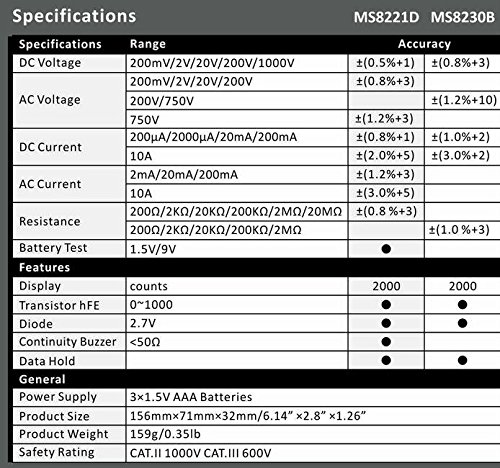
Image 3: Comparison table of specifications for Mastech MS8230B and MS8221D multimeters.
| Spesifikasyon | Valè |
|---|---|
| Ekspozisyon | 1999 counts, 15mm digit height |
| DC Voltage (DCV) | 200mV, 2V, 20V, 200V, 1000V (Accuracy: 0.5% to 0.8%) |
| AC Voltage (ACV) | 200V, 750V (Accuracy: 1.2%) |
| DC aktyèl (DCA) | 200µA, 2mA, 20mA, 200mA, 10A (Accuracy: 1.0% to 2.0%) |
| Rezistans (Ω) | 200Ω, 2kΩ, 20kΩ, 200kΩ, 2MΩ (Accuracy: 0.8% to 1.0%) |
| Tès dyòd | Pi devan voltage gout |
| Tès hFE tranzistò | 1 a 1000 |
| Done kenbe | Wi |
| Endikasyon batri ki ba | Wi |
| Pwoteksyon Surcharge | Wi |
| Sous pouvwa | 1 x 9V batri |
| Dimansyon (L x W x H) | 15.2 x 7.6 x 2.5 cm (apeprè 6 x 3 x 1 pous) |
| Pwa | Apeprè. 158.76 g (5.6 ons) |
| Rating sekirite | IEC 1010-1 CAT III 600V, CAT II 1000V |
| Tanperati Fonksyònman | 0°C a 40°C (32°F a 104°F) |
| Tanperati Depo | -10 ° C a 50 ° C (14 ° F a 122 ° F) |
9. Garanti ak sipò
Mastech products are designed for reliability and performance. For specific warranty details, please refer to the warranty card included with your product or contact your local Mastech distributor.
For technical support or service inquiries, please contact Mastech customer service through their official websit la oswa enfòmasyon kontak yo bay ak dokiman acha ou a.