
1. Entwodiksyon
This manual provides instructions for the safe and effective use of your Westcott E-14216 00 Manual Pencil Sharpener. This device is designed to sharpen pencils with a diameter ranging from 7mm to 12mm. It features a durable construction and includes a tension clamp for secure table fixture, ensuring stability during operation.

Figure 1: Westcott E-14216 00 Manual Pencil Sharpener, showing the main unit with a pencil inserted.
2. Enstalasyon
- Debake: Carefully remove the pencil sharpener from its packaging. Inspect for any damage.
- Table Fixture (Optional): For enhanced stability, the sharpener can be secured to a table or desk using the integrated tension clamp.
- Locate the tension clamp on the sharpener's base.
- Rale cl laamp lever outwards to open the clamp.
- Position the sharpener on the edge of a table.
- Pouse cl laamp lever inwards to secure the sharpener firmly to the table surface. Ensure it is stable before use.
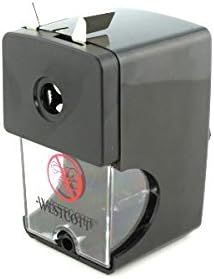
Figi 2: Side view of the sharpener, illustrating the table tension clamp mekanis.
3. Operasyon Enstriksyon
Follow these steps to sharpen your pencils:
- Select Pencil Diameter: The sharpener accommodates pencils with diameters from 7mm to 12mm. Ensure your pencil fits comfortably into the sharpening aperture.
- Mete kreyon: Gently insert the pencil into the sharpening hole on the front of the unit. Push the pencil firmly until it engages with the internal sharpening mechanism.
- File: While holding the pencil steady, turn the crank handle clockwise. Continue turning until you feel less resistance and the pencil is sharpened to your desired point. The sharpener is designed to stop cutting when the pencil reaches an optimal point, preventing over-sharpening.
- Retire kreyon: Pull the pencil straight out from the sharpening hole.

Figure 3: The pencil sharpener positioned on a desk, demonstrating typical usage with various pencils.
4. Antretyen
Regular maintenance ensures optimal performance and longevity of your sharpener.
- Emptying Shavings Tray: The transparent shavings tray should be emptied regularly to prevent clogging.
- Gently pull the transparent tray located at the bottom front of the sharpener to remove it.
- Discard the pencil shavings into a waste bin.
- Slide the tray back into its position until it clicks securely.
- Netwayaj: Wipe the exterior of the sharpener with a soft, dry cloth. Do not use abrasive cleaners or immerse the unit in water.

Figi 4: Devan view of the sharpener, highlighting the transparent shavings collection tray.
NAN. Depanaj
| Pwoblèm | Kòz posib | Solisyon |
|---|---|---|
| Pencil not sharpening or sharpening poorly. |
|
|
| Pencil lead breaks frequently. |
|
|
| Sharpener slides on table during use. | Tablo clamp not properly secured. | Ensure the tension clamp is fully engaged and tightened to the table surface. |
6. Espesifikasyon
- Modèl: E-14216 00
- Mak: Westcott
- Kreyon dyamèt konpatibilite: 7mm a 12mm
- Koulè: Nwa
- Sous pouvwa: Manyèl
- Materyèl: Durable plastic (Note: 'Papel' in source data appears to be an error; product is typically plastic)
- Pwa atik: 3.17 ons (apeprè 90 gram)
- Dimansyon pwodwi: 4.61 x 4.37 x 2.56 pous (apeprè 11.7 x 11.1 x 6.5 cm)
- Manifakti: Acme United
7. Garanti ak sipò
Pou enfòmasyon sou garanti a oswa sipò teknik, tanpri al gade nan adrès ofisyèl manifakti a. websit la oubyen kontakte depatman sèvis kliyan yo. Kenbe resi acha ou a pou nenpòt reklamasyon garanti.
Manifakti: Acme United
Mak Websit: Visit the Westcott Store on Amazon