
1. Entwodiksyon
This manual provides essential information for the proper setup, operation, and maintenance of your Sony SLV-FT5 VHS Video Cassette Recorder (VCR). Please read these instructions thoroughly before using the unit to ensure optimal performance and safety.
2. Enfòmasyon sou Sekirite
Toujou swiv prekosyon sekirite debaz yo lè w ap itilize pwodui sa a pou diminye risk dife, chòk elektrik, ak blesi.
- Pa ekspoze aparèy la a lapli oswa imidite.
- Pa louvri kabinè a. Refere sèvis yo bay pèsonèl ki kalifye sèlman.
- Asire bon vantilasyon; pa bouche ouvèti vantilasyon yo.
- Sèvi sèlman ak ekipman pou pouvwa ki espesifye pou aparèy sa a.
- Kenbe inite a lwen sous chalè ak limyè solèy la dirèk.
3. Enstalasyon
3.1 Debake
Carefully remove the VCR and all accessories from the packaging. Verify that all components are present: the SLV-FT5 VCR unit, remote control, and necessary connection cables (e.g., RCA audio/video cables).
3.2 Konekte ak yon Televizyon
To connect the VCR to your television, use the provided RCA audio/video cables. Match the colored plugs to the corresponding colored jacks on both the VCR and your TV (Yellow for Video, White for Left Audio, Red for Right Audio).

Figi 1: Rear panel of the Sony SLV-FT5 VCR. This image displays the various input and output ports, including RCA jacks for audio and video, and the power input. The product label with model number SLV-FT5 and power specifications (100V 18W 50/60Hz) is also visible.
3.3 Koneksyon pouvwa
Plug the VCR's power cord into a standard electrical outlet (AC 100V, 50/60Hz). Ensure the power outlet is easily accessible.
3.4 Enstalasyon kontwòl remote
Open the battery compartment on the back of the remote control and insert two AA batteries, observing the correct polarity (+/-). Close the compartment securely.

Figi 2: The Sony RMT-V219 remote control, designed for the SLV-FT5 VCR. This image also shows the included RCA audio/video cables, which are typically used for connecting the VCR to a television.
4. Operating the VCR
4.1 Limen/Etenyen
Peze a POUVWA button on the VCR's front panel or the remote control to turn the unit on or off.
4.2 Loading and Unloading a VHS Tape
- Chaje: Insert a VHS cassette into the tape slot on the front of the VCR with the tape window facing forward. The VCR will automatically pull the tape in.
- Dechaje: Peze a EJECT button on the VCR or remote control. The tape will be ejected.
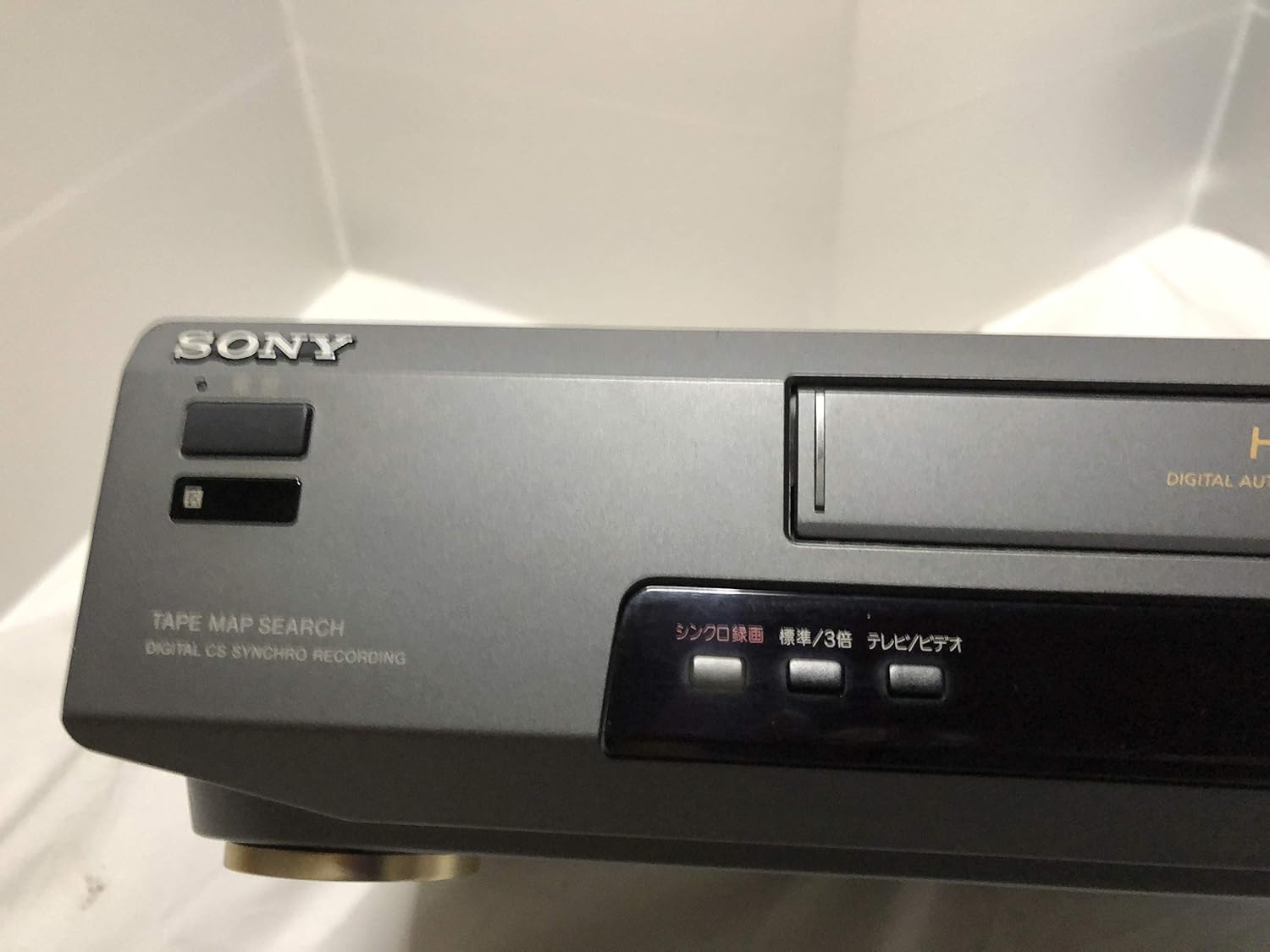
Figi 3: Front left section of the Sony SLV-FT5 VCR. This view highlights the tape loading slot and the 'TAPE MAP SEARCH' feature, which assists in navigating recorded content on a tape.
4.3 Lektur
After loading a tape, press the JWE button (►) on the VCR or remote control to begin playback. Use the POZ (∥), SISPANN (■), RETIRE (◀◀), and VIT VANSE (►►) buttons to control playback.

Figi 4: Front right section of the Sony SLV-FT5 VCR. This image displays the main playback controls (Play, Stop, Rewind, Fast Forward, Pause) and additional buttons for 'Quick Timer' and 'Tracking' adjustments.
4.4 Anrejistreman
To record, ensure a blank or recordable tape is inserted. Select the desired input source (e.g., TV channel). Press the REC (●) button on the VCR or remote control. Press SISPANN (■) to end recording.
4.5 Tracking Adjustment
If the picture quality during playback is poor (e.g., horizontal lines or noise), use the SWIKI buttons on the front panel or remote control to fine-tune the tape's alignment with the VCR's heads.
5. Antretyen
5.1 Netwaye inite a
Wipe the exterior of the VCR with a soft, dry cloth. For stubborn stains, use a cloth lightly dampened with a mild detergent solution, then wipe dry. Do not use abrasive cleaners or solvents.
Netwayaj 5.2 tèt
Over time, VCR heads can accumulate dirt, leading to poor picture and sound quality. Use a commercially available dry-type VHS head cleaning cassette according to its instructions. Avoid wet-type cleaners as they can damage the heads.
5.3 Depo
When not in use for extended periods, disconnect the VCR from the power outlet. Store the unit in a cool, dry place, away from dust and direct sunlight.
NAN. Depanaj
If you encounter issues with your VCR, refer to the following common problems and solutions before seeking professional service.
| Pwoblèm | Kòz posib | Solisyon |
|---|---|---|
| Pa gen pouvwa | Kòd kouran an dekonekte; pwoblèm priz kouran | Tcheke koneksyon kòd kouran an; eseye yon lòt priz kouran. |
| Pa gen foto/son | Incorrect TV input; loose A/V cables | Select correct TV input (e.g., Video 1, AV); ensure A/V cables are securely connected. |
| Poor picture quality (snowy, lines) | Dirty VCR heads; tracking issue; old/damaged tape | Clean VCR heads; adjust tracking; try a different tape. |
| Tape won't eject | Power issue; mechanical malfunction | Ensure power is on; try pressing EJECT multiple times. If issue persists, seek service. |
| Remote kontwòl pa travay | Dead batteries; obstructed sensor | Replace batteries; ensure no obstacles between remote and VCR sensor. |
7. Espesifikasyon
| Karakteristik | Spesifikasyon |
|---|---|
| Mak | Sony |
| Nimewo Modèl | SLV-FT5 |
| Kalite Medya | VHS |
| Rezolisyon | 720 x 480 piksèl |
| Pwa pwodwi | 4160 gram |
| Audio Sòti Mode | Stereo |
| Fòma odyo sipòte | Monaural, Stereo |
| Kodaj videyo | Analòg |
| Aparèy konpatib | Televizyon |
| Konpatibilite Videyo Antre | NTSC |
| Kondisyon pou pouvwa | 100V, 18W, 50/60Hz |
8. Garanti ak sipò
For warranty information and customer support, please refer to the documentation included with your purchase or visit the official Sony websit la. Kenbe prèv acha ou pou reklamasyon garanti.