
Entwodiksyon
The TC Electronic T2 Reverb effects pedal provides a diverse range of reverb effects for guitar and other instruments. This manual details the pedal's features, setup procedures, operational guidelines, maintenance tips, troubleshooting steps, and technical specifications to ensure optimal performance.
Pwodwi souview
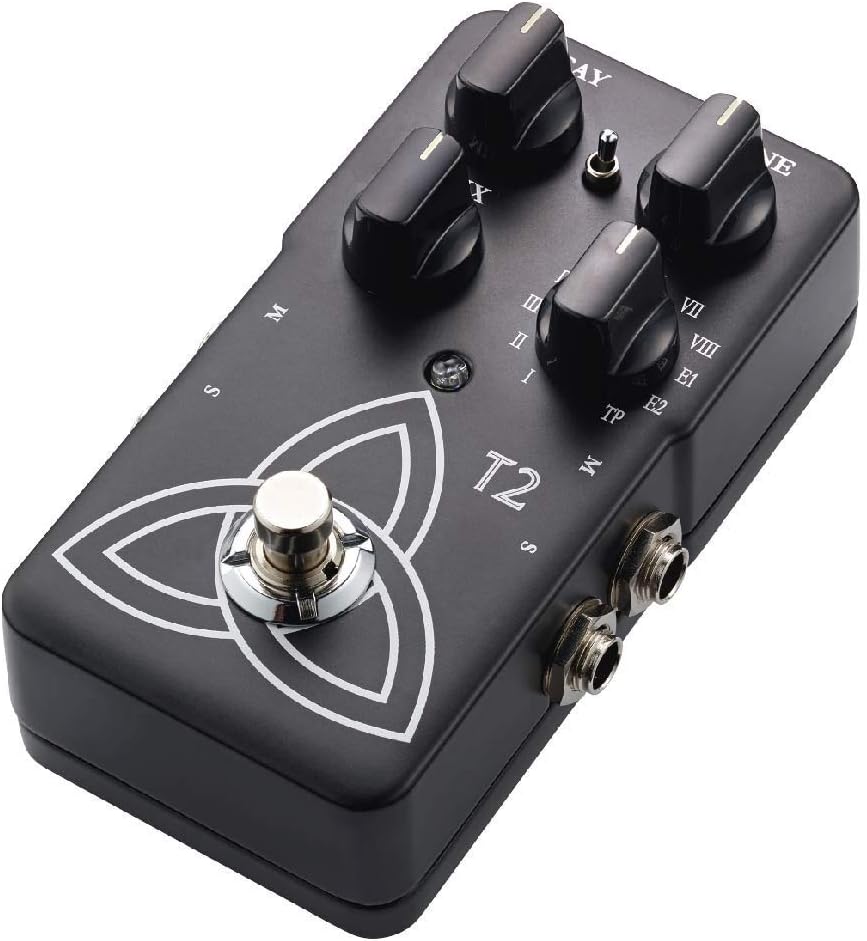
The T2 Reverb pedal features intuitive controls for shaping your sound and a robust design for reliable use. Familiarize yourself with the pedal's components:
- Bouton DECAY: Controls the length of the reverb tail.
- Bouton TONE: Adjusts the brightness or darkness of the reverb.
- Bouton MIX: Balances the ratio between the dry (unaffected) signal and the wet (effected) signal.
- Reverb Type Selector: A rotary switch to select from various reverb algorithms (I-VIII, E1, E2, TP).
- Footswitch: Angaje oswa kontourne efè a.
- Antre / Sòti krik: For connecting your instrument and amplifier.
- Antre pouvwa: For connecting a 9V DC power supply.

Enstalasyon
- Koneksyon pouvwa: Connect a 9V DC power adapter (center negative, not included) to the power input jack. Alternatively, the pedal can be powered by a 9V battery (not included) by opening the battery compartment.
- Koneksyon Enstriman: Connect your instrument (e.g., guitar) to the input jack on the right side of the pedal using a standard 1/4-inch instrument cable.
- AmpKoneksyon lifier: Konekte Jack pwodiksyon an sou bò gòch pedal la ak ou ampantre lifijè a lè l sèvi avèk yon kab enstriman estanda 1/4-pous.
- Stereo Operation (Optional): For stereo output, connect the second output jack to a second amplifier or stereo input device.
Asire w tout koneksyon yo byen fèm anvan ou limen aparèy ou an. amplifyè ak pedal.
Enstriksyon Operasyon
Operasyon debaz
- Pouvwa sou: Once connected, press the footswitch to engage the effect. The LED indicator will illuminate. Press again to bypass the effect.
- Selecting Reverb Type: Rotate the Reverb Type Selector knob to choose from the available reverb algorithms (I through VIII, E1, E2). Each setting offers a distinct reverb character.
- Adjusting Reverb Parameters:
- Sèvi ak la pouri knob to control the duration of the reverb.
- Sèvi ak la TON knob to adjust the frequency content of the reverb, making it brighter or darker.
- Sèvi ak la MIX knob to blend the dry signal with the reverb effect. A higher setting increases the effect's prominence.
TonePrint Feature
The "TP" setting on the Reverb Type Selector activates the TonePrint feature. TonePrint allows you to upload custom-tuned reverb sounds created by artists or design your own using the TC Electronic TonePrint app. Connect your pedal to a computer via USB (cable not included) or beam TonePrints wirelessly from your smartphone to the pedal's pickup.
Antretyen
- Netwayaj: Sèvi ak yon twal mou epi sèk pou netwaye deyò pedal la. Evite pwodui netwayaj abrazif oswa solvan.
- Ranplasman batri: If using battery power, replace the 9V battery when the LED indicator dims or the effect performance degrades. To replace, open the battery compartment on the underside of the pedal.
- Depo: Store the pedal in a dry environment, away from extreme temperatures and direct sunlight, when not in use. Disconnect power and remove the battery if storing for extended periods.
Depanaj
| Pwoblèm | Kòz posib | Solisyon |
|---|---|---|
| Pa gen son oswa siyal fèb | Incorrect cable connections, dead battery, faulty power supply, volume knobs on instrument/amp vire desann. | Check all cable connections. Replace battery or verify power supply. Ensure instrument and amplifier volumes are set appropriately. |
| Bri oswa ron ki pa vle | Ground loop, faulty cables, interference from other electronics, improper power supply. | Use shielded cables. Try a different power outlet or isolated power supply. Move pedal away from other electronic devices. |
| Effect not engaging (LED off) | No power, faulty footswitch. | Verify power connection and battery status. If problem persists, contact support. |
| TonePrint not loading | Incorrect app usage, connection issues. | Ensure the TonePrint app is updated and the pedal is correctly connected (USB or beaming). Refer to the TonePrint app's instructions for detailed guidance. |
Espesifikasyon
- Modèl: T2
- Pwa atik: 1 pound (approximately 454 grams)
- Dimansyon pwodwi: 4.61 x 2.48 x 2.91 pous (11.7 x 6.3 x 7.4 cm)
- Sous pouvwa: 9V DC (center negative) power adapter or 9V battery
- Voltage: 9 Volts
- Fòma siyal: Analòg
- Entèfas pyès ki nan konpitè: HP-HSC
Garanti ak sipò
TC Electronic products are covered by a limited warranty. For detailed warranty information, product support, or service inquiries, please visit the official TC Electronic websit la oubyen kontakte sèvis kliyan yo dirèkteman. Kenbe prèv acha ou pou reklamasyon garanti.
Ofisyèl Websit: www.tcelectronic.com