
1. Entwodiksyon
This manual provides detailed instructions for the proper use, setup, and maintenance of your Genius HS-920BT Bluetooth Headset. Please read this manual thoroughly before using the device to ensure optimal performance and longevity.
The Genius HS-920BT is a versatile Bluetooth headset designed for wireless audio streaming and hands-free communication with compatible devices such as smartphones, tablets, and PCs.
2. Pake kontni
Verifye ke tout atik yo prezan nan pakè ou a:
- Genius HS-920BT Bluetooth Headset
- USB Chaje Kab
- Multi-language User Manual (this document)
3. Pwodwi souview
The HS-920BT headset features an adjustable headband and comfortable earcups, integrating controls for audio playback and call management.
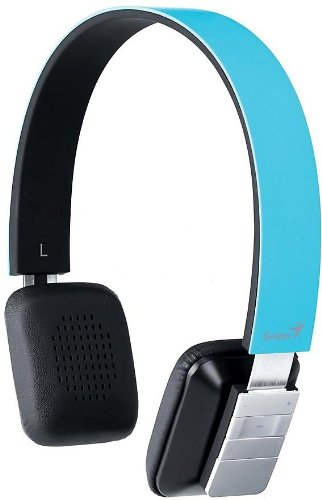
Figure 1: Genius HS-920BT Bluetooth Headset (Blue)
This image displays the Genius HS-920BT Bluetooth Headset in blue, viewed from an angle, highlighting its adjustable headband and earcup design.
Karakteristik kle:
- Wireless Bluetooth connectivity for audio and calls (A2DP support)
- Integrated rechargeable Lithium-Ion battery
- Mikwofòn entegre pou kominikasyon men-gratis
- On-ear controls for volume adjustment, track skipping (AVRCP support)
- Band reglabl pou anfòm konfòtab
- 40 mm driver units for clear sound
4. Enstalasyon
4.1 Chaje kas ekoutè a
Before initial use, fully charge the headset. Use the provided USB charging cable.
- Konekte ti bout kab chaje USB a nan pò chaje ki sou kas ekoutè a.
- Konekte pi gwo bout kab USB a nan yon pò USB ki gen kouran (pa egzanp, òdinatè, adaptè USB nan miray).
- The LED indicator on the headset will illuminate during charging and change color or turn off when fully charged. Refer to the headset's LED behavior for specific indications.
Yon chaj konplè pran apeprè 2-3 èdtan anjeneral.
4.2 Konekte ak yon aparèy Bluetooth
To use the HS-920BT wirelessly, you must pair it with your Bluetooth-enabled device.
- Pouvwa sou: Press and hold the Power button on the headset until the LED indicator flashes, usually alternating blue and red, indicating pairing mode.
- Aktive Bluetooth: On your smartphone, tablet, or PC, enable Bluetooth functionality.
- Chèche pou Aparèy: In your device's Bluetooth settings, search for available devices. The headset should appear as "HS-920BT".
- Chwazi epi Pè: Select "HS-920BT" from the list. If prompted for a passcode, enter "0000" (four zeros).
- Konfimasyon: Once paired, the headset's LED indicator will typically flash blue slowly, and your device will confirm the connection.
Kas ekoutè a ap eseye otomatikman rekonekte ak dènye aparèy ki konekte a lè li limen, si Bluetooth aparèy sa a aktif epi li nan zòn li.
5. Operasyon Enstriksyon
The HS-920BT features intuitive controls located on the earcup.

Figure 2: Earcup Controls of HS-920BT
This image shows a close-up of the right earcup of the Genius HS-920BT Bluetooth Headset, detailing the control buttons for power, volume, and track navigation.
5.1 Power On/Off
- Pouvwa sou: Peze epi kenbe bouton Power la pou apeprè 3 segonn jiskaske endikatè LED la flache an ble.
- Pouvwa Off: Peze epi kenbe bouton Power la pou apeprè 3 segonn jiskaske endikatè LED la etenn.
5.2 Mizik lèktur
- Jwe/Poz: Peze bouton Jwe/Paz la yon fwa.
- Pwochen Track: Press the "Next Track" button (usually marked with a forward arrow).
- Track Previous: Press the "Previous Track" button (usually marked with a backward arrow).
5.3 Jesyon Apèl
- Reponn/Fen Apèl: Press the Multi-function button (often the same as Play/Pause) once during an incoming call to answer, or once during a call to end it.
- Rejte apèl: Peze epi kenbe bouton milti-fonksyon an pou apeprè 2 segonn pandan yon apèl k ap antre.
- Recomposition Dènye Nimewo: Peze bouton milti-fonksyon an de fwa lè w pa nan yon apèl.
5.4 Kontwòl Volim
- Ogmante Volim: Peze bouton Ogmante Volim nan (+).
- Diminye Volim: Peze bouton Diminye Volim nan (-).
6. Antretyen
Proper care ensures the longevity of your headset.
- Netwayaj: Sèvi ak yon twal mou epi sèk pou netwaye kas ekoutè a. Pa sèvi ak pwodui netwayaj abrazif oswa solvan.
- Depo: Sere kas ekoutè a nan yon kote ki fre epi sèk, lwen limyè solèy dirèk ak tanperati ekstrèm.
- Swen batri: To preserve battery life, avoid fully discharging the battery frequently. Charge the headset regularly, even if not in use for extended periods.
- Ekspozisyon dlo: Kas ekoutè a pa enpèmeyab. Evite ekspoze li a dlo oswa imidite twòp.
NAN. Depanaj
If you encounter issues with your HS-920BT headset, refer to the following common solutions:
| Pwoblèm | Solisyon posib |
|---|---|
| Kas ekoutè a pa limen. | Ensure the battery is charged. Connect the headset to a power source using the USB cable. |
| Pa ka konekte kas ekoutè a ak yon aparèy. |
|
| Pa gen son oswa volim nan ba. |
|
| Kalite apèl la pa bon. |
|
8. Espesifikasyon
| Non modèl: | HS-920BT |
| Teknoloji san fil: | Bluetooth |
| Inite chofè yo: | 40 mm |
| Batri: | Batri ityòm-ion rechargeable entegre |
| Kalite kontwòl: | Volume Control, Track Navigation, Call Management |
| Mikwofòn: | Bati-an |
| Sipò pou Profiles: | A2DP, AVRCP |
| Platfòm pyès ki nan konpitè: | Odinatè, Telefòn entelijan, Tablèt |
| Pwa atik: | 110 gram |
| Dimansyon (LxWxH): | 13.6 x 17.3 x 2.9 cm |
9. Garanti ak sipò
Pou enfòmasyon sou garanti a ak sipò teknik, tanpri al gade kat garanti ki vini ak pwodwi w la oswa vizite sit entènèt ofisyèl Genius la. websit la. Kenbe resi acha ou kòm prèv acha.
For further assistance, you may contact Genius customer service through their official channels.