
Entwodiksyon
This manual provides comprehensive instructions for the setup, operation, and maintenance of your Genius SW-2.1 355 Speaker System. Please read this manual thoroughly before using the product to ensure proper functionality and to maximize your listening experience.
Enfòmasyon sou Sekirite
Obsève prekosyon sekirite sa yo pou evite domaje aparèy la oswa blese tèt ou:
- Pa ekspoze oratè yo nan dlo oswa imidite.
- Evite mete oratè yo toupre sous chalè oswa anba limyè solèy dirèk.
- Ensure proper ventilation around the subwoofer to prevent overheating.
- Sèvi ak adaptè pouvwa a sèlman ak inite a.
- Pa eseye ouvri oswa repare aparèy la tèt ou. Konfye tout antretyen bay pèsonèl kalifye.
- Kenbe soti nan atenn timoun yo.
Kontni pake
Verifye ke tout atik yo prezan nan pakè a:
- 1 x inite Subwoofer
- 2 x oratè satelit
- 1 x Kab antre odyo (jack stereo 3.5mm)
- 1 x pouvwa adaptè
- 1 x Manyèl Itilizatè (dokiman sa a)
Pwodwi souview
The Genius SW-2.1 355 Speaker System consists of a subwoofer and two satellite speakers designed to deliver clear audio and powerful bass for your multimedia needs.
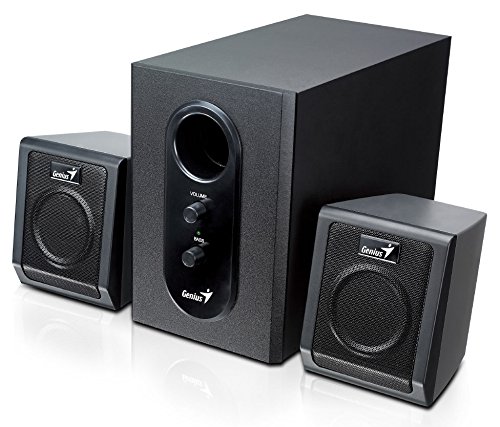
This image displays the Genius SW-2.1 355 Speaker System. It features a central, larger subwoofer unit with volume and bass control knobs on its front panel, and two smaller satellite speakers positioned on either side. All components are black.
Eleman:
- Subwoofers: The main unit housing the bass driver and control panel.
- Oratè satelit: Two compact speakers for mid-range and high-frequency audio.
- Kontwòl Panel: Located on the subwoofer, featuring Volume and Bass adjustment knobs.
Enstalasyon
- Pozisyon moun ki pale yo: Place the subwoofer on the floor or a sturdy surface. Position the satellite speakers on either side of your listening area, facing towards you for optimal stereo separation.
- Konekte Oratè Satelit yo: Connect the cables from the two satellite speakers to the corresponding output jacks on the rear of the subwoofer unit. Ensure a secure connection.
- Konekte Sous Odyo a: Connect one end of the 3.5mm audio input cable to the "Audio In" jack on the subwoofer. Connect the other end to the audio output jack (e.g., headphone jack) of your computer, MP3 player, smartphone, or other audio source.
- Konekte pouvwa: Plug the power adapter into the DC input jack on the subwoofer. Then, plug the power adapter into a standard electrical outlet.
- Pouvwa sou: Turn on the speaker system using the power switch, usually integrated with the volume knob.
Operasyon
- Power On/Off ak Kontwòl Volim: The main knob on the subwoofer controls both power and overall volume. Rotate clockwise to turn on and increase volume; rotate counter-clockwise to decrease volume and turn off.
- Ajisteman Bass: Use the "Bass" knob on the subwoofer to adjust the level of low-frequency sound. Rotate clockwise to increase bass, and counter-clockwise to decrease it, according to your preference.
- Audio Source Volume: For optimal sound quality, set the volume on your audio source (computer, phone, etc.) to about 75% and then use the speaker system's volume control for fine adjustments.
Antretyen
- Netwayaj: Use a soft, dry cloth to clean the surfaces of the speakers. Do not use liquid cleaners or abrasive materials.
- Depo: Si w ap sere oratè yo pou yon peryòd tan pwolonje, dekonekte yo nan kouran an epi sere yo nan yon kote ki fre epi sèk.
- Jesyon kab: Ensure cables are not tangled or pinched to prevent damage.
Depanaj
| Pwoblèm | Kòz posib | Solisyon |
|---|---|---|
| Pa gen son |
|
|
| Son defòme |
|
|
| Bas fèb |
|
|
Espesifikasyon
| Karakteristik | Detay |
|---|---|
| Non modèl | SW-2.1 355 |
| Kalite Oratè | 2.1 Channel Multimedia Speaker System (Bookshelf, Satellite, Subwoofer) |
| Pouvwa Sòti Total | 10 Watts RMS (5W Subwoofer + 2.5W x 2 Satellites) |
| Materyèl | Wood (Subwoofer) |
| Koneksyon Teknoloji | Filaire (antre odyo 3.5mm) |
| Aparèy konpatib | MP3 Player, Personal Computer, Smartphones, Tablets, Televisions |
| Kontwòl | Volim, Bass |
| Sous pouvwa | DC |
| Pwa atik | 2.78 kg |
| Dimansyon pake | 39.6 x 25 x 18.4 cm |
Garanti ak sipò
Genius products are designed for reliability and performance. For information regarding warranty coverage, technical support, or service inquiries, please refer to the warranty card included with your product or visit the official Genius websit la. Kenbe resi acha ou kòm prèv acha.