
Entwodiksyon
The ioSafe Solo G3 is a high-performance 4TB external hard drive designed to provide robust data protection against environmental hazards. Featuring fireproof and waterproof capabilities, along with a Data Recovery Service (DRS), this device ensures the safety of your critical digital assets. Its fanless design ensures quiet operation, making it suitable for various environments.
Kontni pake
Verifye ke tout atik ki nan lis anba a yo enkli nan pakè ou a:
- ioSafe Solo G3 External Hard Drive
- USB NAN KA
- Pwovizyon pou pouvwa
- Solo G3 Quick Start Guide
Enstriksyon Enstalasyon
Follow these steps to set up your ioSafe Solo G3 external hard drive:
- Konekte ekipman pou pouvwa a: Plug the power supply into the power input port on the back of the ioSafe Solo G3. Connect the other end of the power supply to a wall outlet.
- Connect the USB 3.0 Cable: Connect one end of the included USB 3.0 cable to the USB 3.0 port on the back of the ioSafe Solo G3. Connect the other end of the USB 3.0 cable to an available USB 3.0 port on your computer (PC or Mac).
- Pouvwa sou aparèy la: Locate the power switch on the back of the ioSafe Solo G3 and switch it to the 'ON' position. The device will power on, and your computer should detect it automatically.
- Rekonesans Inisyal: Your operating system (Windows or macOS) will recognize the new hard drive. Follow any on-screen prompts for initial setup or formatting if necessary. For optimal performance, ensure your computer's USB 3.0 drivers are up to date.
- Optional Theft Protection: For enhanced security, the ioSafe Solo G3 includes a provision for bolting the device down to a surface. Refer to the Quick Start Guide for detailed instructions on utilizing this feature.
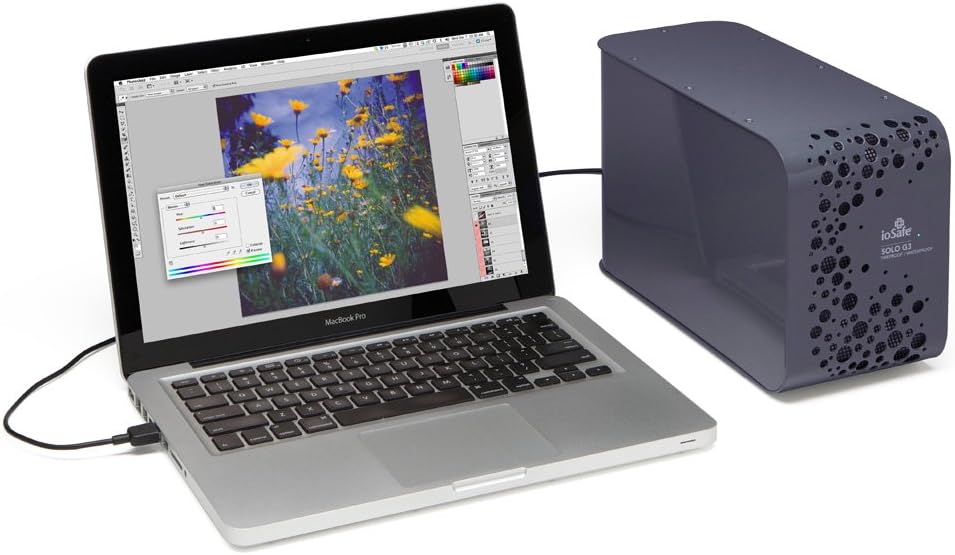
Image: The ioSafe Solo G3 external hard drive connected to a MacBook Pro laptop, demonstrating a typical setup for data backup and storage.

Imaj: Yon imaj detaye view of the rear panel of the ioSafe Solo G3, highlighting the power input, USB 3.0 port, and power switch for easy connection.
Enstriksyon Operasyon
Once connected and recognized by your computer, the ioSafe Solo G3 functions like any standard external hard drive. You can drag and drop files, use backup software, or configure it for continuous data synchronization.
- Transfè Done: Utilize the USB 3.0 connection for high-speed data transfer. The drive operates at 7200 RPM for efficient read/write operations.
- Konpatibilite: The Solo G3 is compatible with both PC and Mac operating systems.
- Operasyon trankil: The fanless design, incorporating FloSafe Vent Technology, ensures silent operation, making it ideal for noise-sensitive environments.
Videyo: Yon finiview of the ioSafe Solo G3, demonstrating its features and typical usage scenarios. (Duration: 2:37)
Video: A detailed presentation of the ioSafe Solo G3's protective capabilities and design. (Duration: 6:38)
Karakteristik kle
The ioSafe Solo G3 is engineered with advanced features to safeguard your data:
- Fireproof Protection: Protects data from loss in temperatures up to 1550°F (843°C) for 30 minutes, as per ASTM E119 standards.
- Pwoteksyon ki enpèmeyab: Safeguards data from flood damage, capable of full submersion in fresh or salt water up to 10 feet (3 meters) deep for 72 hours.
- Data Recovery Service (DRS): Includes a comprehensive Data Recovery Service for any reason, providing an additional layer of security for your valuable data.
- Pwoteksyon vòl: Designed with a bolt-down feature to secure the drive to any surface, deterring physical theft.
- Koneksyon USB 3.0: Ensures fast and reliable data transfer speeds.

Image: A visual representation of the ioSafe Solo G3's fireproof and waterproof capabilities, with fire on one side and water on the other, emphasizing its protective design.
Antretyen
To ensure the longevity and optimal performance of your ioSafe Solo G3, consider the following maintenance guidelines:
- Netwayaj: Sèvi ak yon twal mou epi sèk pou netwaye deyò aparèy la. Evite itilize pwodui netwayaj likid oswa materyèl abrazif.
- Vantilasyon: Ensure the device's vents are not obstructed to allow for proper airflow, despite its fanless design.
- Mizajou mikrolojisyèl: Periodically check the ioSafe official website for any available firmware updates for your model to ensure continued compatibility and performance.
Depanaj
If you encounter issues with your ioSafe Solo G3, refer to the following common troubleshooting steps:
- Aparèy pa detekte:
- Ensure the power supply is securely connected and the device is powered on.
- Verify the USB 3.0 cable is properly connected to both the drive and your computer.
- Eseye konekte disk la nan yon lòt pò USB sou òdinatè w la.
- Test with a different USB 3.0 cable if available.
- Check your computer's Disk Management (Windows) or Disk Utility (macOS) to see if the drive is recognized but unformatted.
- Transfè Done Ralanti:
- Ensure you are using a USB 3.0 port on your computer and the provided USB 3.0 cable. USB 2.0 ports will result in significantly slower speeds.
- Fèmen tout aplikasyon ki pa nesesè k ap fonksyone nan background nan ki ta ka konsome resous sistèm nan.
- Check for conflicting software, such as antivirus programs, that might be scanning files during transfer.
- Bwi ki pa nòmal:
- While the Solo G3 is fanless, some minimal operational sounds from the hard drive itself are normal. However, loud clicking or grinding noises may indicate a potential issue. Back up your data immediately and contact ioSafe support if such noises occur.
If these steps do not resolve your issue, please contact ioSafe customer support for further assistance.
Espesifikasyon
| Nimewo Modèl | SK4TB |
| Kapasite depo dijital | 4 TB (4000 GB) |
| Entèfas Disk Disk | USB 3.0 |
| Koneksyon Teknoloji | USB, eSATA |
| Vitès wotasyon kondwi difisil | 7200 RPM |
| Platfòm pyès ki nan konpitè | Odinatè; Mac |
| Sistèm operasyon | Odinatè; Mac |
| Dimansyon pwodwi (LxWxH) | 11 x 5 x 7.1 pous (27.9 x 12.7 x 18 cm) |
| Pwa atik | 15 liv (6.8 kg) |
| Koulè | Peltre gri |
| Sous pouvwa | 80 ~ 264 VAC at 50/60 HZ |
| Karakteristik espesyal | Fireproof, Waterproof, Data Recovery Service, Theft-proof |
Garanti ak sipò
The ioSafe Solo G3 includes a Data Recovery Service (DRS) which provides professional data recovery in the event of data loss due to fire, flood, or other covered incidents. For specific terms and conditions of the DRS and product warranty, please refer to the documentation included with your product or visit the official ioSafe websit.
For technical support, troubleshooting assistance, or inquiries regarding your Data Recovery Service, please contact ioSafe customer support through their official channels.