
Entwodiksyon
Thank you for choosing the Mount-It! MI-863 3-in-1 TV Stand. This product is designed to provide a stable and stylish solution for mounting your flat-screen television and organizing your audio/video components. This manual contains important information regarding the safe assembly, operation, and maintenance of your new TV stand. Please read these instructions thoroughly before beginning assembly and retain them for future reference.

Figure 1: Mount-It! MI-863 3-in-1 TV Stand with Mount and Glass Shelves
Enfòmasyon sou Sekirite
Tanpri obsève prekosyon sekirite sa yo pou evite blesi oswa domaj nan pwodwi ou a:
- Li tout enstriksyon yo: Ensure you understand all assembly steps before proceeding. If you have questions, contact Mount-It! customer support.
- Kapasite pwa: Do not exceed the maximum weight capacity for the TV mount or glass shelves. Refer to the Specifications section for details.
- Zouti ki apwopriye yo: Use the correct tools as specified in the assembly instructions.
- Asanble pou De Moun: For safety, it is recommended that two people assemble this product, especially when handling the TV and glass shelves.
- Sifas Nivo: Always place the TV stand on a flat, level, and stable surface to prevent tipping.
- Jesyon kab: Route all cables carefully to avoid tripping hazards and to prevent cables from being pinched or damaged.
- Timoun ak bèt kay: Keep children and pets away from the assembly area. Do not allow children to climb on or play with the TV stand.
- Tanpered Glass: Handle glass shelves with care. Avoid impacts to the edges of the glass.
Kontni pake
Verify that all components are present and undamaged before beginning assembly. If any parts are missing or damaged, do not proceed with assembly and contact Mount-It! customer support.
- Kolòn Sipò Prensipal la
- Sipò pou monte televizyon (konpatib ak VESA)
- Three (3) Tempered Glass Shelves
- Plak Baz la
- Support Pillars for Glass Shelves
- Hardware Kit (screws, washers, spacers for assembly and TV attachment)
- Zouti asanblaj (pa egzanp, kle Allen)

Figi 2: Plis paseview of TV Stand components
Enstriksyon Enstalasyon ak Asanblaj
Swiv etap sa yo ak anpil atansyon pou yon bon asanblaj. Li rekòmande pou w gen yon dezyèm moun ki ede w ak asanblaj la.
- Prepare baz la: Place the base plate on a clean, flat surface. Attach the main support column to the base plate using the provided screws and tools. Ensure it is securely fastened.
- Install Lower Glass Shelves: Attach the support pillars for the lower shelves to the main support column and the base plate. Carefully place the bottom tempered glass shelf onto these pillars, securing it with the appropriate hardware. Repeat for the middle shelf.
- Install Top Glass Shelf: Attach the remaining support pillars for the top shelf. Carefully place the top tempered glass shelf onto these pillars, securing it.
- Attach TV Mounting Bracket: Secure the TV mounting bracket to the top of the main support column using the designated screws. Ensure the bracket is oriented correctly and tightened firmly.
- Prepare televizyon an pou enstalasyon: Identify the VESA mounting holes on the back of your television. Attach the vertical TV brackets (part of the mounting bracket assembly) to your TV using the appropriate screws, washers, and spacers from the hardware kit. Ensure the brackets are centered and securely fastened to your TV.
- Monte televizyon an: With assistance, carefully lift your television and hook the attached vertical TV brackets onto the horizontal bar of the TV mounting bracket on the stand. Once hooked, gently lower the TV into place. Secure the TV to the stand by tightening the safety screws located at the bottom of the vertical TV brackets. This prevents accidental lifting or movement.
- Jesyon kab: Utilize the integrated cable management channels within the main support column to route and conceal your TV and component cables for a clean and organized appearance.

Figure 3: Detail of glass shelf and support pillar connection
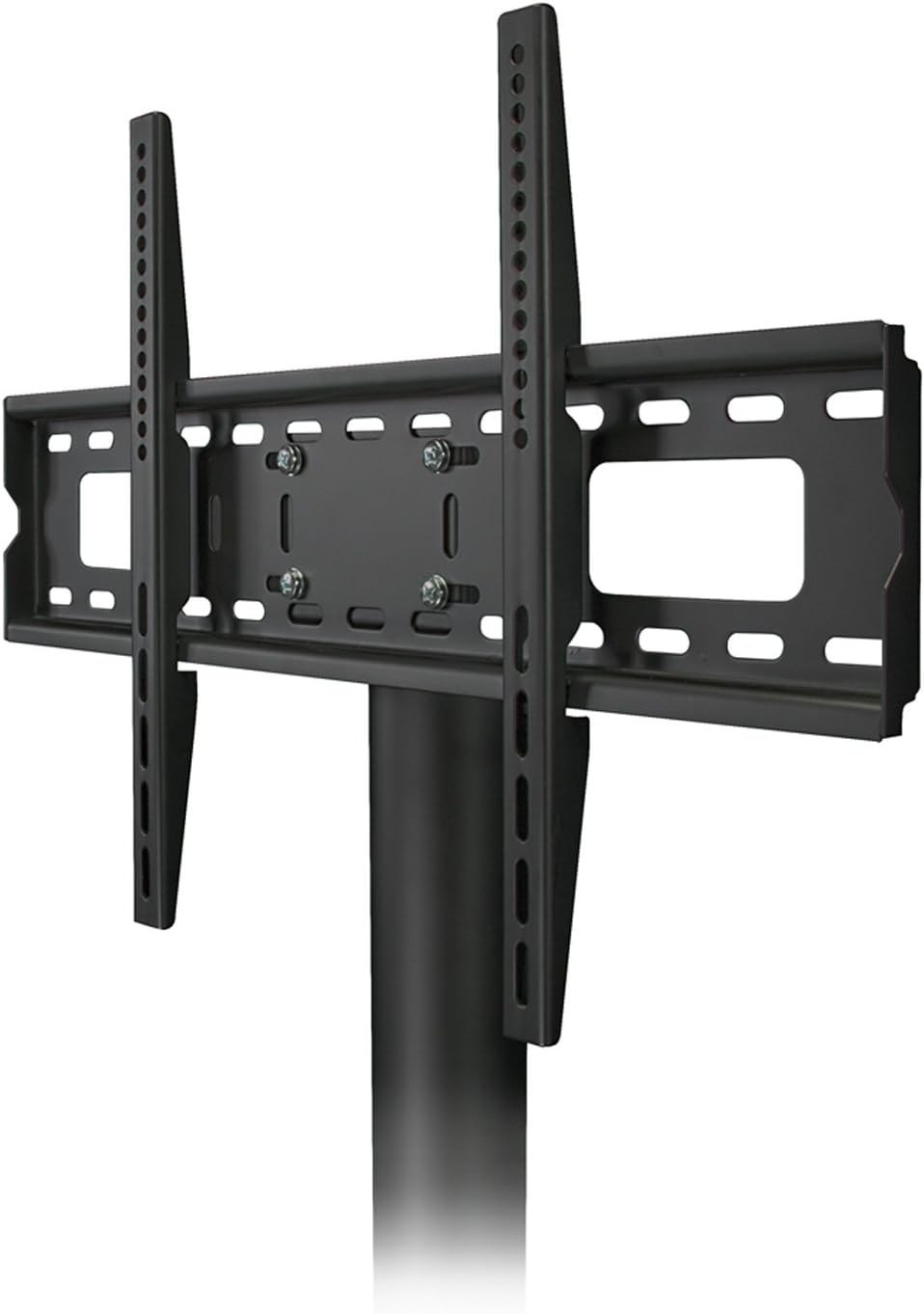
Figure 4: TV mounting bracket detail

Figure 5: Television mounted on the stand
Enstriksyon Operasyon
The Mount-It! MI-863 TV Stand is designed for straightforward use.
- Plasman televizyon: Ensure your TV is securely attached to the mounting bracket as per the assembly instructions. The mount allows for slight height adjustments during installation.
- Plasman Konpozan: Place your cable box, DVD player, gaming consoles, and other AV components on the tempered glass shelves. Distribute weight evenly across the shelves.
- Fonksyonalite pivotan: The TV mount may offer a limited swivel range. Gently rotate the TV to achieve your desired viewing angle. Do not force the TV beyond its intended swivel limits.
Antretyen
Regular maintenance will help prolong the life and appearance of your TV stand.
- Netwayaj: Sèvi ak yon mou, damp cloth to clean the steel frame. For the tempered glass shelves, use a glass cleaner and a microfiber cloth to avoid streaks. Avoid abrasive cleaners or harsh chemicals.
- Tcheke Materyèl: Tcheke tout vis ak boulon yo detanzantan pou asire yo rete byen sere. Sere yo ankò si sa nesesè, men pa sere yo twòp.
- Enspeksyon: Inspect the glass shelves for any chips or cracks. If damage is found, contact customer support for replacement options.
Depanaj
If you encounter issues with your Mount-It! MI-863 TV Stand, refer to the following common solutions:
- Kanpe a pa stab:
- Asire w ke kanpe a sou yon sifas plat e nivo.
- Tcheke ke tout vis asanblaj yo byen sere.
- Verify that the TV weight does not exceed the stand's capacity.
- Televizyon Pa Nivo:
- Adjust the vertical TV brackets on the back of your television before mounting.
- Ensure the main support column is straight and securely attached to the base.
- Cables are Visible/Messy:
- Utilize the cable management channels in the main support column.
- Consider using cable ties or sleeves to bundle cables neatly.
If these solutions do not resolve your issue, please contact Mount-It! customer support for further assistance.
Espesifikasyon
| Karakteristik | Detay |
|---|---|
| Nimewo Modèl | MI-863 |
| Dimansyon (L x W x H) | 52 x 21 x 8 pous (asanble) |
| Pwa atik | 58 liv |
| Materyèl | Vè apeze, Asye |
| Koulè | Nwa |
| VESA konpatibilite | 75x75, 100x100, 200x100, 200x200, 300x300, 400x200, 400x300, 400x400, 600x200, 600x400 mm |
| Konpatibilite Gwosè televizyon | Most flat panel TVs from 32" to 55" |
| Dimansyon etajè | 47.2 inches wide, 15.75 inches deep |
| Kantite etajè | 3 |
| Kalite Mouvman | Fixed (with limited swivel capability) |
| UPC | 852669498885 |
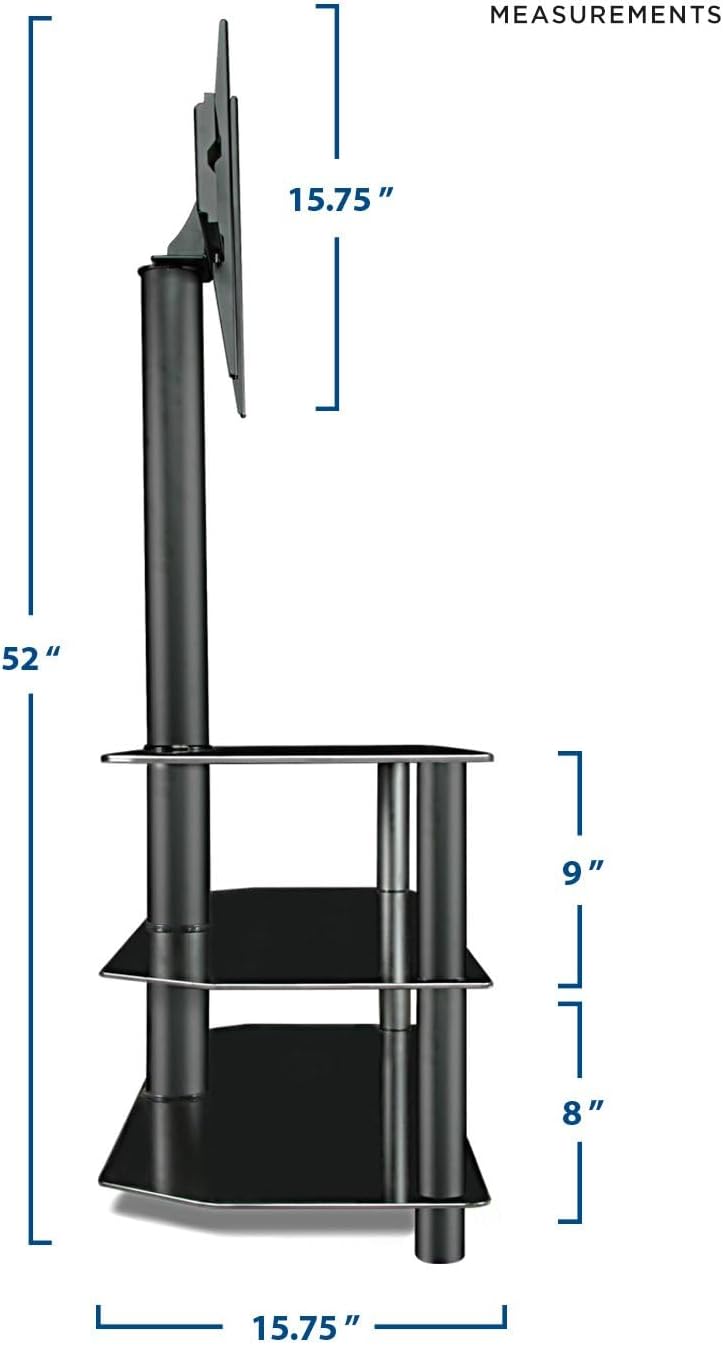
Figi 6: Dimansyon pwodwi a
Garanti ak sipò
Mount-It! stands behind its products. For warranty information, technical assistance, or any questions regarding your MI-863 TV Stand, please contact our US-Based Customer Support team. Contact details can typically be found on the Mount-It! official websit la oubyen sou anbalaj pwodwi a.