
InFocus IN126x
InFocus Projector User Manual
Model: IN126x (F321717)
Entwodiksyon
This manual provides comprehensive instructions for the setup, operation, and maintenance of your InFocus IN126x WXGA Network Projector. Designed for both business presentations and home cinema, this projector delivers 4200 lumens and excellent image quality with high contrast and BrilliantColor technology. Its compact and lightweight design ensures portability while maintaining powerful performance.

Figure 1: InFocus IN126x Projector Front View
This image displays the InFocus IN126x projector from a front-right angle, highlighting its main lens and the sleek black casing. The top panel features control buttons and the InFocus logo.
Enfòmasyon enpòtan sou sekirite
Please read all safety instructions carefully before operating the projector. Failure to follow these instructions may result in fire, electric shock, or other injuries.
- Sous pouvwa: Use only the power adapter supplied with the projector. Ensure the power outlet matches the voltage kondisyon.
- Vantilasyon: Do not block ventilation openings. Adequate airflow is essential to prevent overheating.
- Chalè: Pwojektè a lamp and surrounding areas can become very hot during operation. Avoid touching these areas.
- Lamp Avètisman: L laamp contains mercury. Dispose of lamps according to local regulations. Do not open the lamp compartment until the projector has cooled down.
- Ekspozisyon likid: Pa ekspoze pwojektè a anba lapli, imidite, oswa okenn likid.
- Sèvis: Pa eseye fè sèvis pwodui sa a tèt ou. Refere tout sèvis yo bay pèsonèl sèvis kalifye.

Figure 2: Projector Bottom Panel with Warning Labels
This image shows the underside of the InFocus IN126x projector, displaying various regulatory and safety labels. Notable warnings include information about mercury in the lamp and instructions for lamp replacement, emphasizing the need to allow the unit to cool down before servicing.
Gid Enstalasyon
1. Debalaj ak Plasman
Carefully remove the projector and all accessories from the packaging. Place the projector on a stable, flat surface or mount it securely. Ensure there is adequate space around the projector for proper ventilation.

Figure 3: Projector Dimensions
This image illustrates the physical dimensions of the InFocus IN126x projector. The measurements are approximately 29.2 cm (length), 22.1 cm (width), and 9.8 cm (height), providing a clear understanding of its compact size for placement considerations.
2. Konekte pouvwa
Connect the power cord to the projector's power inlet and then plug the other end into a grounded electrical outlet.
3. Konekte Sous Antre yo
The InFocus IN126x projector supports various input sources. Connect your device (e.g., laptop, Blu-ray player) to the appropriate port on the projector's rear panel.
- HDMI: Pou videyo ak odyo dijital an wo definisyon.
- VGA (Computer 1/2): For analog computer video input.
- S-Video/Video: Pou videyo definisyon estanda.
- Audio In (Audio 1/2): Pou antre odyo analòg.
- USB-A/USB-B: For service or specific data transfer.
- LAN: Pou koneksyon rezo a.
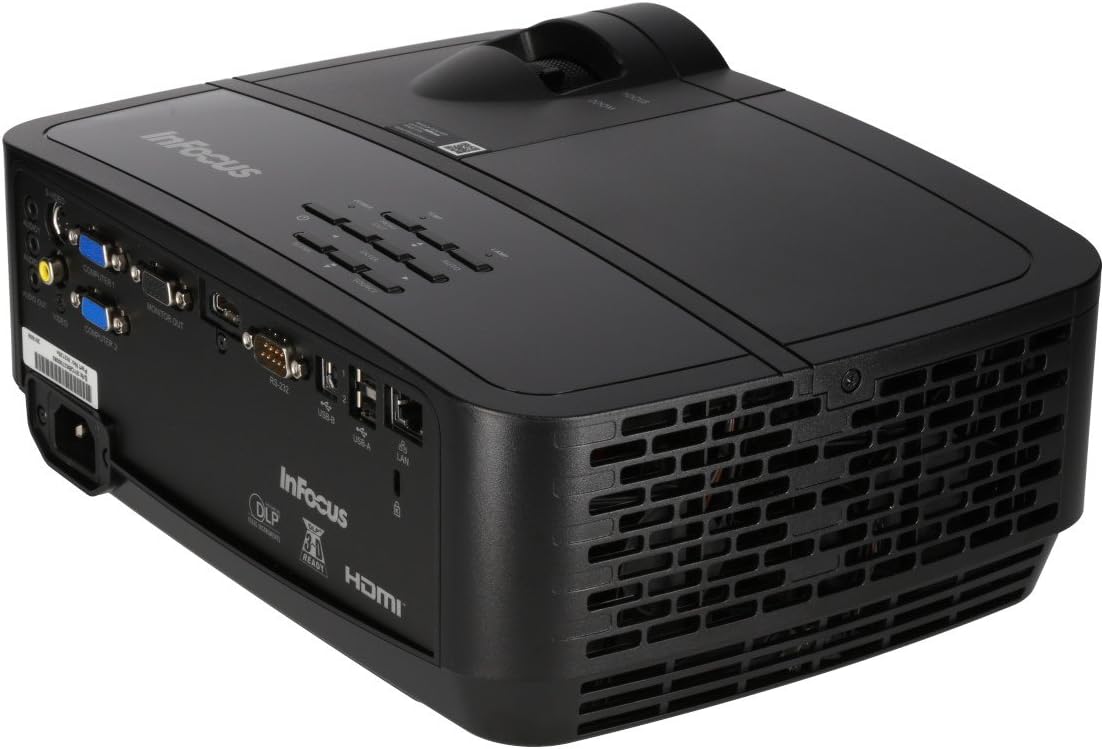
Figure 4: Projector Rear Panel Connectivity
Imaj sa a bay yon detay view of the rear panel of the InFocus IN126x projector, clearly showing all available input and output ports. These include HDMI, VGA (Computer 1 and 2), S-Video, Video, Audio In (Audio 1 and 2), Monitor Out, RS-232, USB-B, USB-A, and LAN ports, facilitating diverse connectivity options.
4. Initial Power On and Adjustment
Press the power button on the projector or remote control. The projector will power on and display the input source. Use the focus and zoom rings on the lens to adjust the image clarity and size to your desired projection area.

Figi 5: Kontwòl Panèl Anlè Pwojektè a
This image shows the top surface of the InFocus IN126x projector, highlighting the control panel with various buttons for navigation and settings adjustment. The focus and zoom rings on the lens are also visible, used for fine-tuning the projected image.
Enstriksyon Operasyon
Kontwòl debaz yo
The projector can be operated using the control panel on the top of the unit or the included remote control.
- Bouton pouvwa: Limen oswa etenn pwojektè a.
- Sous bouton: Cycles through available input sources (HDMI, VGA, etc.).
- Bouton meni: Ouvri meni Afichaj sou ekran (OSD) la.
- Bouton Navigasyon: Itilize pou navige nan opsyon meni yo epi ajiste paramèt yo.
- Bouton Antre: Konfime seleksyon yo nan meni an.
Navigasyon meni ak Anviwònman
Press the Menu button to access the OSD. Use the navigation buttons to select categories such as Picture, Display, Setup, and Advanced. Within each category, you can adjust settings like:
- Klate ak kontras: Optimize image visibility.
- Color & Tint: Fine-tune color accuracy.
- Rapò aspè: Select between 4:3, 16:9, or other ratios to match your content.
- Koreksyon Keystone: Adjust image shape if the projector is not perfectly perpendicular to the screen.
- BrilliantColor Technology: Enhance color vibrancy and detail.
Karakteristik avanse
The IN126x supports a superior viewing experience, including 3D home cinema (3D Glasses sold separately). For enhanced connectivity, the projector can easily connect to your phone or iPad with a LightCast Key (sold separately).
Antretyen
Lamp Ranplasman
Pwojektè a lamp has a lifespan of over 5,000 hours. When the lamp reaches the end of its life, a warning message may appear, or the lamp indicator light may illuminate. Always allow the projector to cool down completely (at least 60 minutes) before attempting to replace the lamp. Refer to the safety information on the bottom of the projector for specific warnings regarding mercury content and replacement procedures.
Netwayaj
- Lantiy: Sèvi ak yon twal mou ki pa gen pousyè, espesyalman fèt pou lantiy optik. Pa sèvi ak pwodui netwayaj abrazif.
- Pwojektè Casing: Siye ak yon mou, damp twal. Evite pwodwi chimik piman bouk yo.
- Vant lè: Regularly check and clean the air vents to ensure proper airflow and prevent overheating. Use a soft brush or compressed air to remove dust.

Figi 6: Vantilasyon bò kote pwojektè a
This image displays the side of the InFocus IN126x projector, prominently featuring the ventilation grilles. These grilles are crucial for dissipating heat generated during operation, and keeping them clear of obstructions is vital for the projector's longevity and performance.
Depanaj
| Pwoblèm | Kòz posib | Solisyon |
|---|---|---|
| Pa gen imaj sou ekran an |
|
|
| Image is dim or poor quality |
|
|
| Pa gen son |
|
|
Espesifikasyon
| Karakteristik | Detay |
|---|---|
| Mak | Enfocus |
| Nimewo Modèl | F321717 (IN126x) |
| Dimansyon pwodwi | 18.58 x 20.67 x 7.44 pous |
| Pwa atik | 5.5 liv |
| Rezolisyon ekspozisyon | 1280 x 800 (WXGA) |
| Koneksyon Teknoloji | HDMI, VGA, S-Video, USB, LAN |
| Lamp Lavi | Plis pase 5,000 èdtan |
| Karakteristik espesyal | Pòtab |
| Premye Dat ki disponib | 7 out 2016 |
Enfòmasyon sou Garanti
The InFocus IN126x Projector comes with a 2-ane garanti. InFocus stands behind its products and provides customer service for any issues you may encounter. Please retain your proof of purchase for warranty claims.
Sipò pou Kliyan
For technical assistance, troubleshooting beyond this manual, or warranty inquiries, please contact InFocus customer support. Visit the official InFocus websit la pou jwenn enfòmasyon kontak ki pi ajou yo, tankou nimewo telefòn ak resous sipò sou entènèt.
You can also refer to the official InFocus websit pou plis resous ak FAQ: www.infocus.com
Ask a question about this manual
Ask about setup, troubleshooting, compatibility, parts, safety, or missing instructions. Manuals+ will review the question and use this page’s manual context to help answer it.