
Entwodiksyon
This manual provides essential instructions for the proper setup, operation, and maintenance of your Onkyo RC-541S Audio Remote Control. Please read this guide thoroughly before using the remote control to ensure optimal performance and longevity. The Onkyo RC-541S is designed to provide convenient control over compatible Onkyo audio devices.
Enstalasyon
Enstalasyon batri
The Onkyo RC-541S remote control requires two AA (LR6) alkaline batteries for operation. Follow these steps to install the batteries correctly:
- Jwenn kouvèti lòj batri a sou do kontwòl remote la.
- Slide the cover downwards or press the latch (if present) and lift to remove it.
- Insert two new AA (LR6) alkaline batteries, ensuring that the positive (+) and negative (-) terminals align correctly with the markings inside the compartment. Incorrect battery orientation can prevent the remote from functioning.
- Remèt kouvèti konpatiman batri a lè w glise l tounen nan plas li jiskaske li fè yon klik byen fèm.
This image displays the back of the Onkyo RC-541S remote control with the battery cover removed, revealing the two compartments for AA-size alkaline batteries. Observe the positive (+) and negative (-) terminals for correct battery insertion.
Nòt: Toujou sèvi ak pil nèf epi ranplase tou de pil yo an menm tan. Pa melanje pil fin vye granmoun ak pil nèf oubyen diferan kalite pil.
Enstriksyon Operasyon
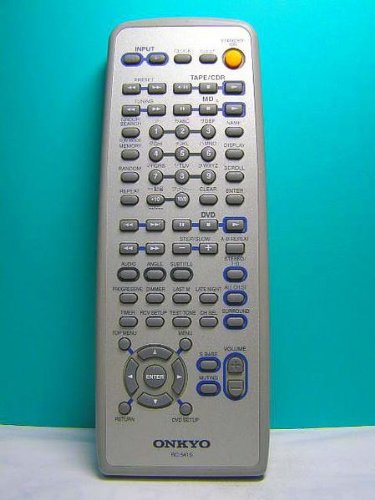
The Onkyo RC-541S remote control is designed for intuitive operation of your compatible Onkyo audio components. Point the remote control directly at the infrared sensor on your audio device.
- Bouton pouvwa: Press to turn the connected audio component on or off.
- Input Selector Buttons: Use these buttons to switch between different audio input sources (e.g., CD, Tuner, AUX).
- Kontwòl Volim: Sèvi ak la VOL+ epi VOLIM - buttons to adjust the audio output level.
- Bouton bèbè: Press to temporarily silence the audio output. Press again to restore sound.
- Kontwòl Lekti: If controlling a compatible player (e.g., CD player), use buttons like Play, Pause, Stop, Fast Forward, and Rewind.
- Bouton Navigasyon: For menu navigation or track selection, use the directional arrows and Enter/OK button.
Refer to your specific Onkyo audio component's user manual for detailed functions controlled by the RC-541S.
Antretyen
Proper care will ensure the longevity and reliable performance of your remote control.
- Netwayaj: Siye kontwòl remote la ak yon twal mou epi sèk. Pou pousyè tè ki difisil pou retire, siye l yon ti kras.ampen the cloth with water or a mild, non-abrasive cleaner. Do not use strong chemicals or solvents.
- Ranplasman batri: Replace batteries when the remote control becomes unresponsive or its range decreases significantly. Remove batteries if the remote will not be used for an extended period to prevent leakage.
- Depo: Sere kontwòl remote la nan yon kote ki fre, sèk lwen limyè solèy la dirèk ak tanperati ekstrèm.
- Evite gout: Pwoteje telekòmand lan kont enpak fizik, paske si li tonbe, li ka domaje konpozan entèn yo.
Depanaj
If you experience issues with your Onkyo RC-541S remote control, try the following troubleshooting steps:
- Remote pa reponn:
- Tcheke si pil yo byen mete ak polarite ki kòrèk la (+/-).
- Replace old batteries with new AA alkaline batteries.
- Ensure there are no obstructions between the remote control and the audio component's infrared sensor.
- Konfime ou nan zòn fonksyònman efektif la epi ou ap pwente telekòmand lan dirèkteman nan aparèy la.
- Fonksyon espesifik ki pa fonksyone:
- Verify that the audio component is powered on and set to the correct input.
- Some functions may be specific to certain models or modes. Refer to your audio component's manual.
- Entèferans:
- Bright light sources, such as direct sunlight or fluorescent lamps, can interfere with infrared signals. Try operating the remote in a different lighting condition.
If the problem persists after trying these steps, contact Onkyo customer support or refer to the service information provided with your audio component.
Espesifikasyon
| Mak | Onkyo |
| Nimewo Modèl | RC-541S |
| Kalite kontwolè | Kontwòl Remote |
| Kalite batri | AA (LR6) Alkaline |
| ASIN | B00IXFPS4W |
Garanti ak sipò
This product is typically sold as a replacement part or accessory. Specific warranty information for the RC-541S remote control may be included with the original audio component it was designed for, or it may be covered under a limited warranty by Onkyo. Please refer to the documentation that came with your primary Onkyo audio device for warranty details.
For further support or inquiries, please visit the official Onkyo website or contact their customer service department. You can also find more information about Onkyo products on their Amazon store page: Onkyo Amazon Store.