
1. Entwodiksyon
This manual provides essential information for the safe and efficient operation of your InFocus IN2126a WXGA Network Projector. Please read this manual thoroughly before using the projector and retain it for future reference. The InFocus IN2126a is designed for versatile use in various environments, offering high brightness and network capabilities.
2. Enfòmasyon sou Sekirite
Obsève prekosyon sekirite sa yo pou evite domaje pwojektè a epi asire sekirite itilizatè a:
- Pa bloke ouvèti vantilasyon yo. Asire w ke gen ase sikilasyon lè toutotou pwojektè a.
- Pa gade dirèkteman nan lantiy pwojektè a lè l ap limen.amp Limyè klere a ka lakòz domaj nan je yo.
- Avoid placing the projector in direct sunlight, near heat sources, or in environments with high humidity or excessive dust.
- Sèvi sèlman ak kòd kouran ki vini ak pwojektè a.
- Konfye tout sèvis bay pèsonèl sèvis kalifye. Pa eseye louvri oswa repare pwojektè a tèt ou.
3. Pwodwi souview
Familiarize yourself with the components and features of your InFocus IN2126a projector.
3.1 Konpozan Pwojektè yo
Figi 1: Devan view of the InFocus IN2126a projector, showing the lens and ventilation.

Figi 2: Side view of the InFocus IN2126a projector, highlighting the ventilation grilles.
3.2 Koneksyon Panèl Dèyè
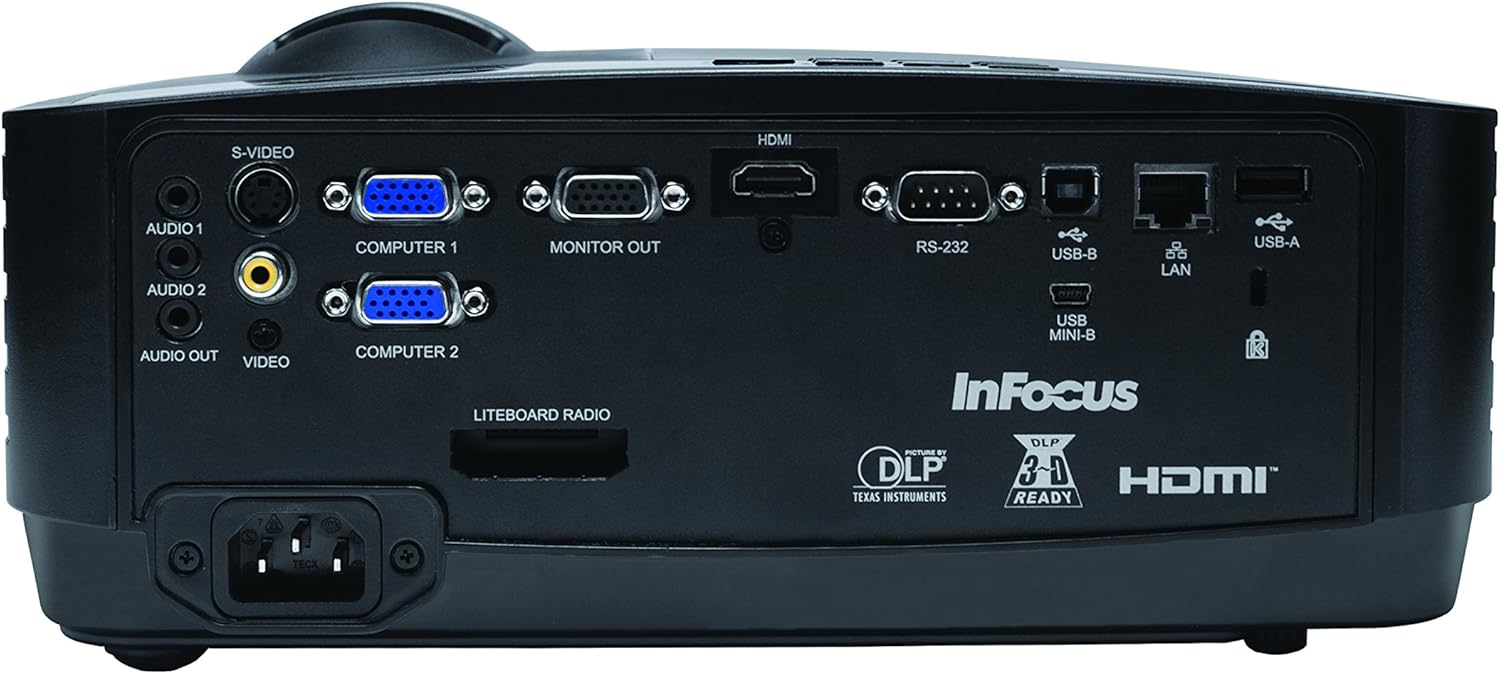
The rear panel provides various input and output ports for connecting external devices.
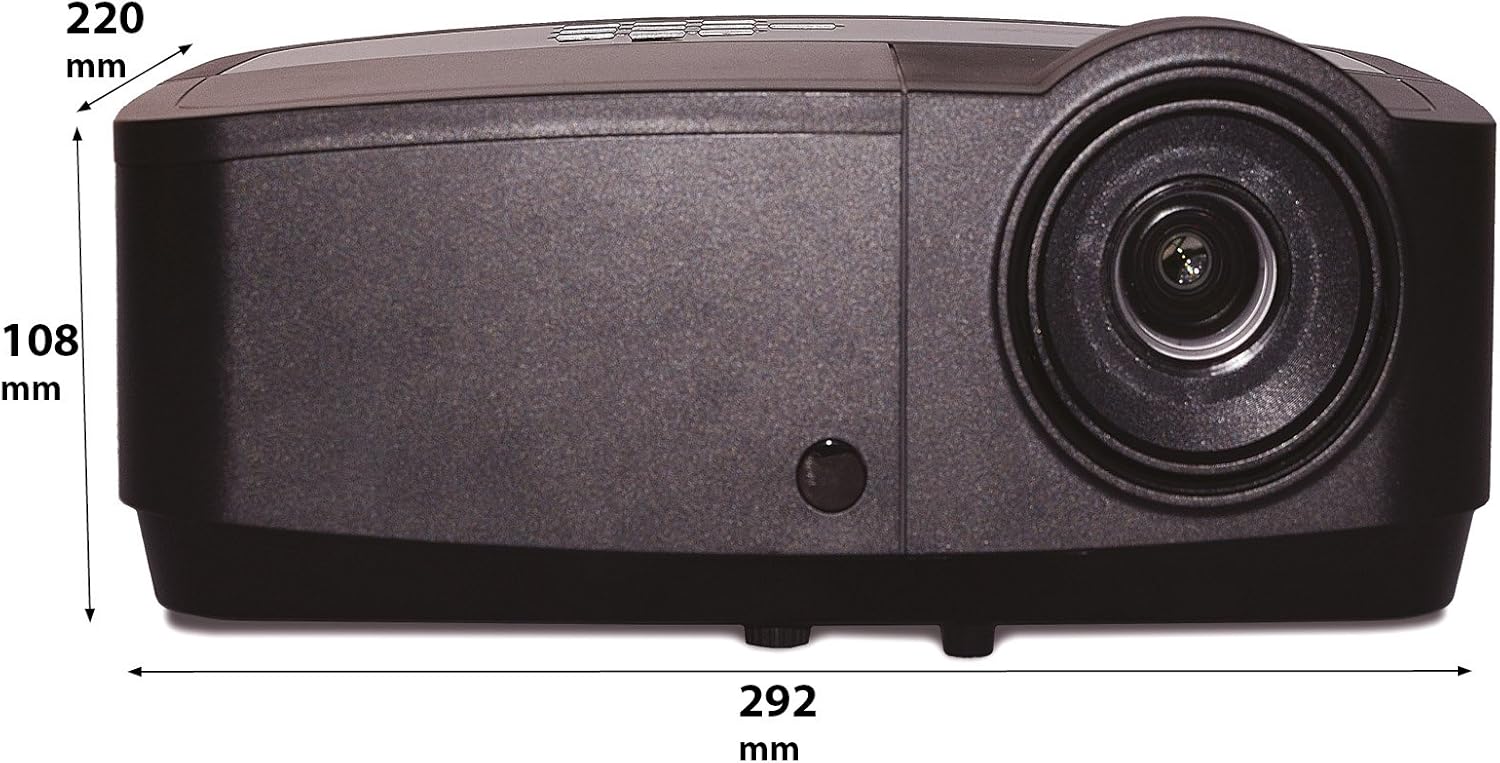
Figure 3: Rear panel of the InFocus IN2126a projector, displaying various connectivity ports including HDMI, VGA, USB, and LAN.
- HDMI: Pou antre videyo ak odyo dijital.
- COMPUTER 1 / COMPUTER 2 (VGA): For analog video input from computers.
- MONITOR OUT (VGA): For connecting an external monitor.
- USB-B / USB Mini-B: For service or specific USB functions.
- USB-A: For connecting USB devices, such as a wireless adapter.
- LAN (RJ45): Pou koneksyon rezo a.
- AK-232-RS Pou kontwòl seri.
- AUDIO 1 / AUDIO 2 (RCA): Pou opinyon odyo.
- ODYO SOTI: Pou konekte sistèm odyo ekstèn yo.
- VIDEO (RCA): For composite video input.
- S-VIDEO: For S-Video input.
- Pouvwa Inlet: Pou konekte kòd elektrik la.
3.3 Kontwòl Panèl Anlè a
The top panel features controls for basic projector functions and image adjustments.

Figure 4: Top panel of the InFocus IN2126a projector, showing the control buttons and focus/zoom rings.
- Bouton pouvwa: Limen oswa etenn pwojektè a.
- Menu/Exit Button: Accesses or exits the on-screen display (OSD) menu.
- Bouton Navigasyon (Anwo, Anba, Agoch, Adwat): Navige nan opsyon meni yo.
- Bouton Antre: Konfime seleksyon yo nan meni an.
- Sous bouton: Chwazi sous antre.
- Blank Button: Temporarily blanks the screen.
- Bouton Auto: Otomatikman ajiste anviwònman imaj.
- Bag konsantre: Ajiste netteté imaj la.
- Zoom Ring: Ajiste gwosè imaj.
3.4 Dimansyon
Understanding the physical dimensions is important for installation and placement.

Figure 5: Diagram illustrating the dimensions of the InFocus IN2126a projector (292mm length, 220mm width, 108mm height).
4. Enstalasyon
4.1 Plasman Pwojektè
Place the projector on a stable, flat surface or mount it securely. Ensure the projector is positioned at an appropriate distance from the screen to achieve the desired image size. Maintain sufficient space around the projector for proper ventilation.
4.2 Konekte Aparèy
- Koneksyon pouvwa: Konekte kòd kouran an nan priz kouran pwojektè a epi answit nan yon priz elektrik ki gen tè.
- Sous Videyo:
- For digital sources (e.g., Blu-ray player, laptop), use an HDMI cable to connect to the HDMI port.
- For analog computer sources, use a VGA cable to connect to the COMPUTER 1 or COMPUTER 2 port.
- For other video sources, use the appropriate S-VIDEO or VIDEO (RCA) connections.
- Sous odyo: If your video source does not transmit audio via HDMI, connect audio cables to the AUDIO 1 or AUDIO 2 ports.
- Rezo Koneksyon: For wired network access, connect an Ethernet cable to the LAN port.
- Koneksyon Wireless: If using a compatible wireless adapter (sold separately), insert it into the USB-A port.
4.3 Limen/Etenyen
- Pou limen: Press the Power button on the projector's top panel or the remote control. The power indicator light will illuminate.
- Pou etenn: Press the Power button again. The projector will enter a cooling cycle before shutting down completely. Do not unplug the projector during the cooling cycle.
5. Itilizasyon Pwojektè a
5.1 Seleksyon Sous
After powering on, the projector may automatically detect an active input source. If not, or to switch sources:
- Peze a Sous bouton sou pwojektè a oswa kontwòl remote.
- Use the navigation buttons to highlight the desired input source (e.g., HDMI, Computer 1, Video).
- Peze Antre pou chwazi sous la.
5.2 Ajisteman Imaj
- Konsantre: Vire a Konsantre ring on the projector lens until the image appears sharp and clear.
- Zoom: Vire a Zoom ring on the projector lens to adjust the image size to fit your screen.
- Koreksyon Keystone: If the image appears trapezoidal, use the keystone correction feature in the OSD menu to square the image.
5.3 Meni OSD (On-Screen Display).
The OSD menu allows you to configure various projector settings.
- Peze a Menu bouton an pou ouvri meni OSD a.
- Sèvi ak la Leve/Desann navigation buttons to select a menu category.
- Sèvi ak la Goch/Dwat navigation buttons to adjust settings or enter sub-menus.
- Peze Antre pou konfime chanjman yo.
- Peze Sòti to close the OSD menu.
5.4 Koneksyon san fil
The IN2126a is wireless-ready. To enable wireless display, a compatible InFocus wireless adapter (sold separately) must be connected to the USB-A port. Refer to the wireless adapter's specific instructions for setup and connection procedures.
5.5 Fonksyonalite 3D
Pwojektè a sipòte kontni 3D. Pou view 3D content, you will need a compatible 3D source, 3D glasses, and appropriate 3D content. Refer to the projector's OSD menu for 3D settings and ensure your source device is configured for 3D output.
6. Antretyen
Antretyen regilye asire pèfòmans optimal epi pwolonje lavi pwojektè ou a.
6.1 Lamp Ranplasman
Pwojektè a lamp has a limited lifespan (approximately 4000 hours). When the lamp indicator illuminates or the image brightness significantly decreases, the lamp needs replacement. Always use an authorized InFocus replacement lamp. Refer to the full service manual for detailed lamp replacement instructions or contact customer support.
6.2 Netwayaj filtè
Dust accumulation on the air filter can impede airflow and cause overheating. Regularly clean the air filter to maintain proper ventilation. Turn off and unplug the projector before cleaning. Use a soft brush or vacuum cleaner to remove dust from the filter cover.
6.3 Netwayaj jeneral
- Pwojektè Casing: Sèvi ak yon twal mou, ki san pèl dampened with a mild, non-abrasive cleaner. Do not use harsh chemicals.
- Lantiy: Use a lens cleaning cloth and specialized lens cleaning solution. Avoid touching the lens surface with your fingers.
NAN. Depanaj
Si ou rankontre pwoblèm ak pwojektè ou a, gade pwoblèm ak solisyon komen sa yo:
| Pwoblèm | Kòz posib | Solisyon |
|---|---|---|
| Pa gen imaj sou ekran an | Incorrect input source selected; Loose cable connection; Projector in standby mode. | Verify input source; Check all cable connections; Press power button to wake from standby. |
| Imaj la twoub | Fokus la pa ajiste; Pwojektè a twò pre/lwen ekran an. | Adjust the focus ring; Reposition the projector and adjust zoom. |
| Imaj la se trapezoidal | Pwojektè a pa pèpandikilè ak ekran an. | Use keystone correction in the OSD menu. |
| Pa gen odyo | Audio cables not connected; Volume too low; Muted. | Check audio cable connections; Adjust volume; Unmute projector. |
| Pwojektè a chofe twòp epi li fèmen | Blocked ventilation; Dirty air filter. | Ensure clear airflow around projector; Clean the air filter. |
For more detailed troubleshooting, consult the complete user manual or contact InFocus customer support.
8. Espesifikasyon
Key technical specifications for the InFocus IN2126a WXGA Network Projector:
- Non modèl: IN2126a
- Kalite ekspozisyon: DLP
- Rezolisyon natif natal: 1280 x 800 (WXGA)
- Klate: 3500 Lumen
- Pwopòsyon kontras: 15000:1
- Repwodiksyon koulè: 1.07 Bilyon Koulè (30-bit)
- Lavi opere sous limyè: 4000 èdtan
- Koneksyon Teknoloji: Wireless-ready, HDMI 1.4, VGA (x2), USB (Type-A, Mini-B, Type-B), LAN (RJ45), RS-232, Audio In (x2), Audio Out, Video (RCA), S-Video
- Karakteristik espesyal: 3D-Ready, Network Projector
- Faktè fòm: Pòtab
- Kalite montaj: Tabletop mòn
- Pwa atik: 7.1 liv
9. Garanti ak sipò
For information regarding your product's warranty, please refer to the warranty card included with your purchase or visit the official InFocus website. For technical support, service, or to purchase accessories, please contact InFocus customer service through their official channels.