
Entwodiksyon
This manual provides essential information for the safe and efficient operation of your InFocus IN124a XGA Wireless-Ready Projector. Please read this manual thoroughly before using the projector and retain it for future reference. This projector is designed for displaying content with XGA (1024 x 768) native resolution, offering 3500 lumens of brightness and a 15000:1 contrast ratio.
Enfòmasyon sou Sekirite
- Sekirite elektrik: Always connect the projector to a grounded power outlet. Do not use damaged power cords. Disconnect power before cleaning or servicing.
- Chalè ak vantilasyon: Asire w ke gen ase vantilasyon toutotou pwojektè a. Pa bloke ouvèti vantilasyon yo. Evite mete pwojektè a toupre sous chalè.
- Lamp Sekirite: Pwojektè a lamp operates at high temperatures and pressures. Allow the projector to cool down before moving or replacing the lamp. Do not look directly into the lens when the lamp se sou.
- Manyen: Manyen pwojektè a avèk prekosyon. Evite lage l oswa sibi gwo chòk.
- Imidite: Pa ekspoze pwojektè a anba lapli, imidite, oswa imidite twòp.
Kontni pake
Verifye ke tout atik yo prezan nan pakè a:
- InFocus IN124a Projector
- HDMI kab
- VGA kab
- Kòd pouvwa
- Remote Control (not explicitly listed but standard)
- Optional USB adapter for wireless connectivity (if purchased separately)
Pwodwi souview
Familiarize yourself with the physical components and connections of your InFocus IN124a projector.

This image displays the rear panel of the InFocus IN124a projector, highlighting various connectivity options including HDMI, VGA (Computer 1 and 2), Monitor Out, S-Video, Video, Audio In (1 and 2), Audio Out, RS-232, USB-B, USB Mini-B, and USB-A ports. The power input is located on the lower left.

The top panel of the InFocus IN124a projector is shown, featuring the control buttons for power, menu navigation (up, down, left, right, enter), source selection, blank screen function, and indicators for temperature and lamp status. The focus and zoom adjustment rings are also visible.

Yon devan view of the InFocus IN124a projector, showing the main projection lens and the power indicator light. The focus and zoom rings are visible near the lens.

Imaj sa a prezante yon bò view of the InFocus IN124a projector, emphasizing the ventilation grilles designed for heat dissipation, crucial for maintaining optimal operating temperature.
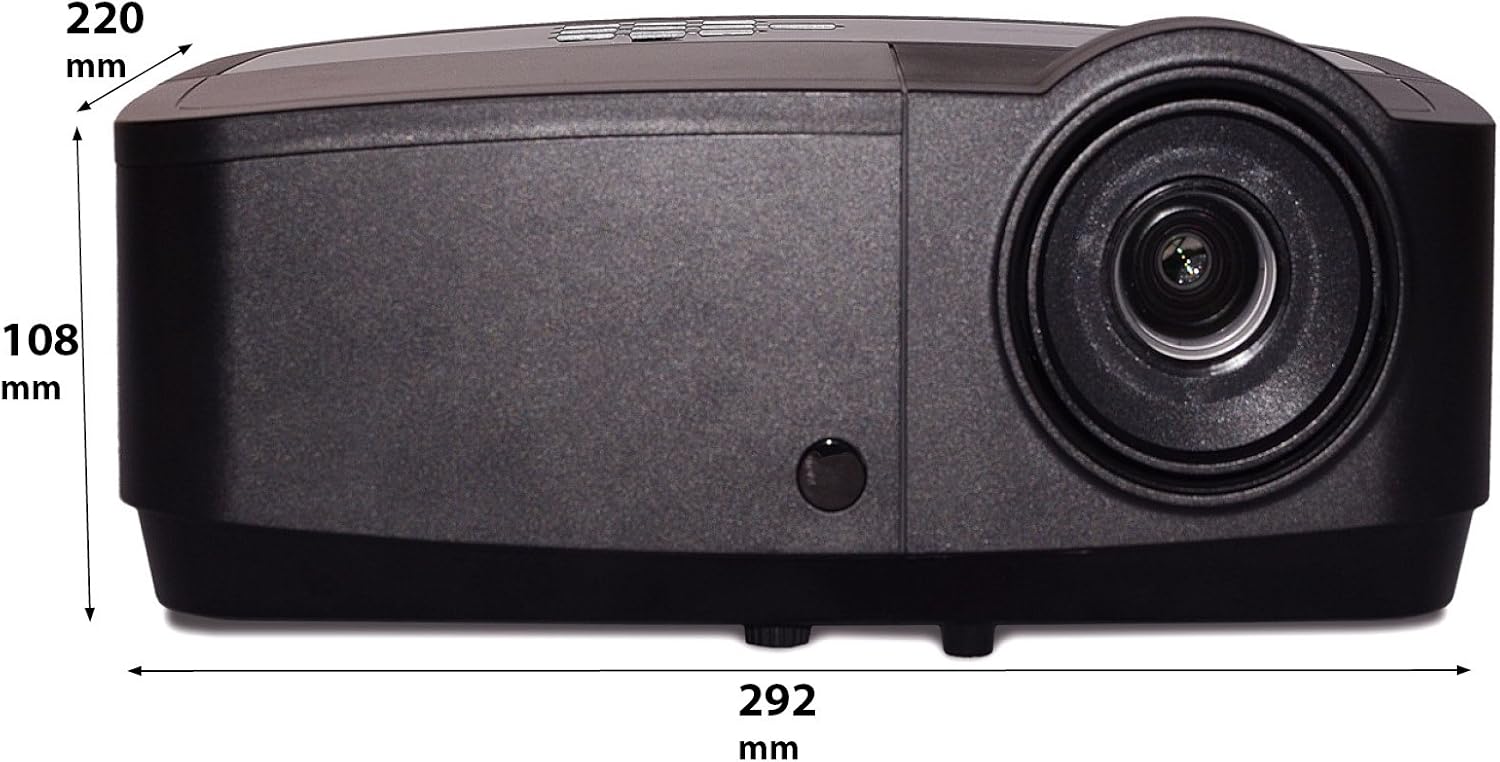
Imaj sa a montre yon bò pwofesyonèl.file of the InFocus IN124a projector, illustrating its physical dimensions: approximately 292 mm in length, 108 mm in height, and 220 mm in width.
Enstalasyon
1. Plasman
Position the projector on a stable, flat surface or mount it securely. Ensure the projector is at an appropriate distance from the screen to achieve the desired image size. Avoid direct sunlight or strong ambient light on the screen for optimal viewing.
2. Konekte pouvwa
- Konekte kòd kouran an nan priz kouran pwojektè a.
- Ploge lòt pwent fil kouran an nan yon priz elektrik ki chita.
3. Konekte Sous Videyo
The IN124a offers multiple connectivity options:
- HDMI: Connect an HDMI cable from your source device (e.g., laptop, Blu-ray player) to the HDMI port on the projector.
- VGA (Computer 1/2): Use a VGA cable to connect your computer to either the 'COMPUTER 1' or 'COMPUTER 2' port.
- S-Video/Video: For older devices, connect S-Video or composite video cables to the respective ports.
- USB: The USB-A port can be used for displaying content directly from a USB drive. The USB-B port supports USB display functionality.
- Odyo: Connect external audio sources to 'AUDIO 1' or 'AUDIO 2' inputs, and use 'AUDIO OUT' for external speakers if needed.
4. Wireless Setup (Optional)
For wireless connectivity, an optional USB adapter is required. Insert the wireless USB adapter into the designated USB port on the projector. Refer to the adapter's specific instructions for software installation and connection procedures on your source device.
Opere
1. Powering On / Off
- Pouvwa sou: Press the 'Power' button on the projector's control panel or remote control. The power indicator light will turn steady blue.
- Pouvwa Off: Press the 'Power' button again. A confirmation message may appear. Press 'Power' a second time to confirm shutdown. The fan will continue to run briefly to cool the lamp before shutting down completely.
2. Adjusting Image
- Konsantre: Rotate the focus ring around the lens until the image appears sharp and clear.
- Zoom: Rotate the zoom ring around the lens to adjust the image size without moving the projector.
- Koreksyon Keystone: If the image appears trapezoidal, use the keystone correction function in the projector's menu to square the image.
3. Seleksyon Sous
Press the 'Source' button on the control panel or remote control repeatedly to cycle through available input sources (HDMI, Computer 1, Computer 2, S-Video, Video, USB). The projector will automatically detect an active signal.
4. Navigasyon meni
Press the 'Menu' button to access the On-Screen Display (OSD) menu. Use the arrow buttons to navigate through options and 'Enter' to select. Press 'Menu' or 'Exit' to close the OSD.
5. 3D mòd
The InFocus IN124a is 3D-Ready. To utilize 3D functionality, you will need compatible 3D content, a 3D-capable source device, and active 3D glasses. Refer to your 3D source device's manual for specific setup instructions. The projector will automatically detect a 3D signal when available.
Antretyen
1. Lamp Ranplasman
Pwojektè a lamp has a lifespan of up to 7,000 hours. When the lamp lavi a prèt pou fini, yon mesaj avètisman ka parèt, oubyen l laamp indicator light will illuminate. Only replace the lamp with an authorized InFocus replacement lamp. Always allow the projector to cool completely before attempting lamp ranplasman.
2. Netwayaj
- Pwojektè Casing: Sèvi ak yon twal mou, ki san pèl dampened with a mild, non-abrasive cleaner. Do not use harsh chemicals.
- Lantiy: Gently wipe the lens with a lens cleaning cloth or lens tissue. Avoid touching the lens surface with your fingers.
- Vant lè: Periodically check and clean the air vents to prevent dust buildup, which can lead to overheating. Use a soft brush or compressed air to clear obstructions.
Depanaj
Si ou rankontre pwoblèm ak pwojektè ou a, gade pwoblèm ak solisyon komen sa yo:
| Pwoblèm | Kòz posib | Solisyon |
|---|---|---|
| Pa gen imaj ki parèt | Power not connected; Incorrect input source; Source device not active. | Check power connection; Select correct input source; Ensure source device is on and outputting signal. |
| Imaj la twoub oswa li pa byen konsantre | Lens focus not adjusted; Projector too close/far from screen. | Adjust the focus ring on the lens; Adjust projector distance or use zoom ring. |
| Remote kontwòl pa travay | Batteries depleted; Obstruction between remote and projector; Remote sensor blocked. | Replace batteries; Remove obstructions; Ensure remote sensor on projector is clear. |
| Pwojektè a chofe twòp epi li fèmen | Blocked ventilation; Dusty air filter. | Ensure vents are clear; Clean air filter (if applicable) and vents. |
Espesifikasyon
| Karakteristik | Spesifikasyon |
|---|---|
| Rezolisyon natif natal | XGA (1024 x 768) |
| Klète | 3500 Lumen |
| Pwopòsyon kontras | 15000:1 |
| Lamp Lavi | Jiska 7,000 èdtan (Mòd ekolojik) |
| Koneksyon Teknoloji | Wireless (with optional adapter), HDMI, USB video |
| Karakteristik espesyal | 3D-pare |
| Dimansyon pwodwi | 14.25 x 12 x 7.75 pous (36.2 x 30.5 x 19.7 cm) |
| Pwa atik | 5.4 liv (2.45 kg) |
| Itilizasyon Rekòmande | Andedan kay la / Deyò |
Garanti ak sipò
Pou enfòmasyon sou garanti a ak sipò teknik, tanpri gade kat garanti ki vini ak pwodwi w la oswa vizite sit ofisyèl InFocus la. websit la. Kenbe resi acha ou kòm prèv acha pou reklamasyon garanti.