
1. Entwodiksyon
Mèsi pou acha aasing the BigBen TD99 USB Turntable. This device allows you to enjoy your vinyl record collection, listen to FM radio, and connect via USB. This manual provides essential information for safe operation, setup, and maintenance of your turntable.
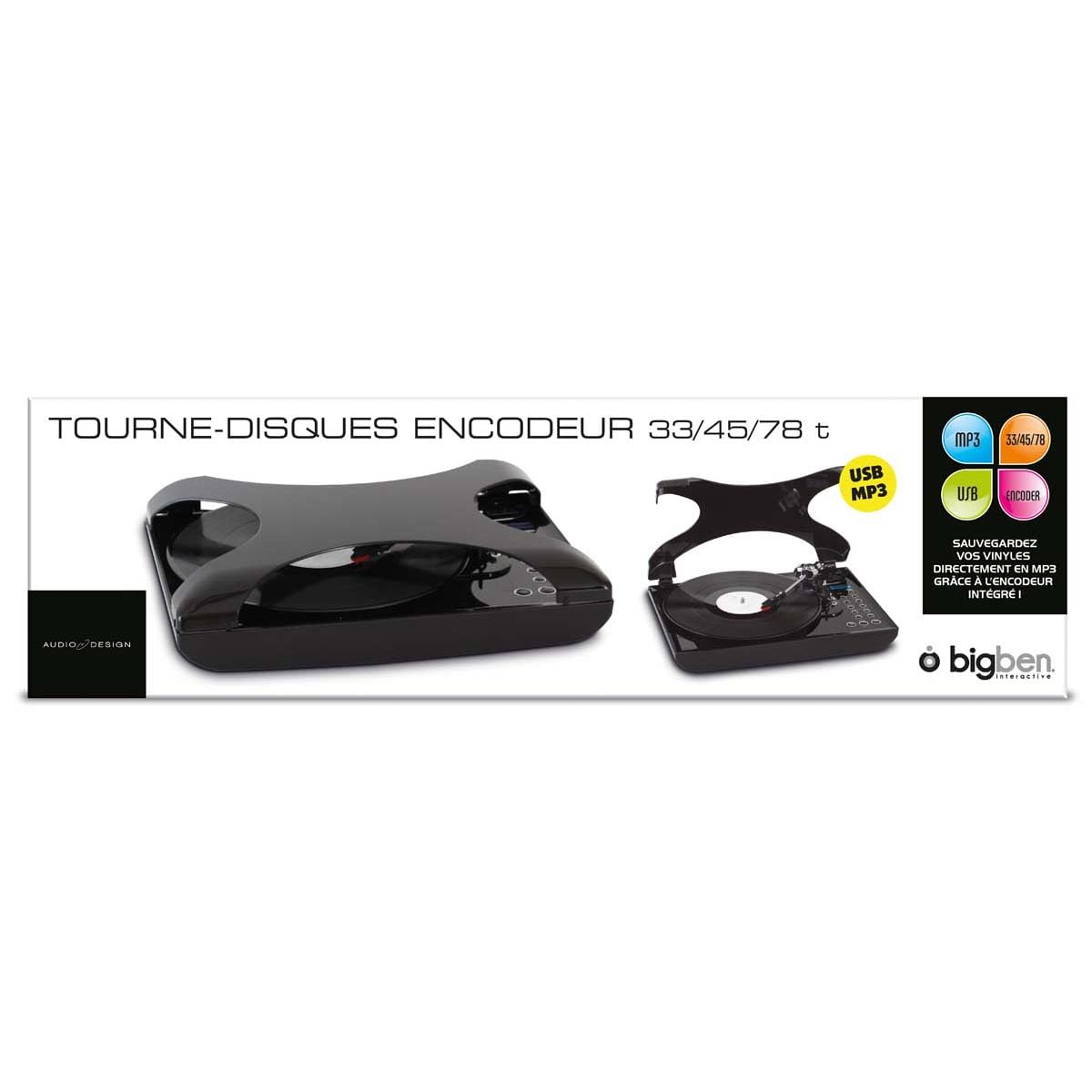
Imaj 1.1: Devan view of the BigBen TD99 USB Turntable. This image shows the main unit with the platter, tone arm, and control panel.
2. Enstriksyon Sekirite Enpòtan
Please read these instructions carefully before using the device and retain them for future reference. Failure to follow these instructions may result in electric shock, fire, or other hazards.
- Sous pouvwa: Connect the device only to an AC power outlet with the specified voltage (220 Volts).
- Dlo ak imidite: Do not expose the device to rain, moisture, or place objects filled with liquids, such as vases, on or near the device.
- Vantilasyon: Asire bon vantilasyon. Pa bloke okenn ouvèti vantilasyon.
- Chalè: Pa mete aparèy la tou pre sous chalè tankou radyatè, rejis chalè, recho, oswa lòt aparèy (tankou amplifiers) ki pwodui chalè.
- Netwayaj: Unplug the device from the wall outlet before cleaning. Use a dry cloth for cleaning.
- Sèvis: Pa eseye fè sèvis pwodui sa a tèt ou. Refere tout sèvis yo bay pèsonèl sèvis kalifye.
- Timoun: Kenbe aparèy la ak Pwodwi pou Telefòn li yo pa rive jwenn timoun yo.
3. Pake kontni
Carefully unpack your BigBen TD99 Turntable and ensure all items are present and in good condition. If any items are missing or damaged, contact your retailer.
- BigBen TD99 USB Turntable Unit
- Adaptè pouvwa
- Kontwòl Remote
- Manyèl Itilizatè (dokiman sa a)
4. Pwodwi souview
Familiarize yourself with the components of your BigBen TD99 Turntable:
4.1 Front Panel / Top View
- Kouvèti pousyè: Protects the platter and tone arm from dust.
- Plato: Where the record is placed.
- Axe: Holds the record in place on the platter.
- Bra ton: Kenbe katouch la ak dyaman.
- Stylus (Zegwi): Li siyon yo nan disk la.
- Replik levye: Leve epi desann bra ton an.
- Seleksyon vitès: Pèmèt seleksyon 33, 45, oswa 78 RPM.
- Bouton Fonksyon: For mode selection (Phono, FM, USB) and playback control.
- Ekspozisyon: Montre mòd aktyèl la, nimewo tras la, oswa frekans FM lan.
- Kontwòl Volim: Ajiste nivo pwodiksyon odyo a.
- Bouton pou ranfòse bas: Aktive oswa dezaktive fonksyon amelyorasyon bas la.
4.2 Panèl dèyè
- Antre pouvwa: Konekte ak adaptè pouvwa a.
- Pò USB: For connecting to a computer or USB storage device.
- Sòti Odyo (RCA): Pou konekte ak oratè ekstèn oswa yon amplifier (si disponib).
- Antèn FM: Pou amelyore resepsyon radyo FM.
5. Enstalasyon
5.1 Debalaj ak plasman
- Remove all packaging materials and protective inserts.
- Place the turntable on a stable, level surface away from direct sunlight, heat sources, and excessive dust or vibrations.
- Ensure adequate space around the unit for ventilation.
5.2 Koneksyon pouvwa
- Connect the power adapter cable to the Power Input port on the rear of the turntable.
- Plug the power adapter into a standard 220V AC wall outlet.
5.3 Initial Tone Arm Setup
- Remove the stylus protector from the needle.
- Lage seri a bra ton.
6. Operasyon Enstriksyon
6.1 Jwe yon Disk Vinil
- Louvri kouvèti pousyè tè a.
- Mete yon dosye sou plato a.
- Select the appropriate speed (33, 45, or 78 RPM) using the speed selector switch. For 45 RPM records, place the included adapter on the spindle first.
- Press the "MODE" button until "PHONO" is displayed.
- Lift the tone arm using the cue lever.
- Manually position the tone arm over the desired starting groove of the record.
- Gently lower the tone arm onto the record using the cue lever. The record will begin to play.
- Ajiste volim nan lè l sèvi avèk bouton kontwòl volim la.
- To stop playing, lift the tone arm using the cue lever, return it to its rest, and engage the tone arm lock.
6.2 Using the FM Radio
- Press the "MODE" button until "FM" is displayed.
- Lonje antèn FM lan pou yon pi bon resepsyon.
- Use the "TUNE" buttons (or corresponding buttons on the remote control) to scan for radio stations.
- The display will show the current frequency.
- Ajiste volim la jan ou vle.
- The device supports program and repeat functions for FM radio, allowing you to save favorite stations or repeat playback. Refer to the remote control section for specific button functions.
6.3 USB Koneksyon
The BigBen TD99 features a USB port for various functions, including playback from USB storage devices or connecting to a computer for recording (software not included).
- USB lèktur: Insert a USB flash drive into the USB port. Press the "MODE" button until "USB" is displayed. Use the playback controls (Play/Pause, Next/Previous) to navigate and play audio files.
- Anrejistreman USB: Connect the turntable to a computer using a USB cable (not included). You will need third-party audio recording software on your computer to digitize your vinyl records. Follow the instructions provided with your chosen software.
6.4 Sèvi ak kontwòl remote la
The included remote control allows for convenient operation of the turntable from a distance. Functions typically include:
- Power On/Off
- Mode Selection (Phono, FM, USB)
- Volim monte/desann
- Play/Pause, Stop, Next/Previous Track (for USB)
- Tuning/Scanning (for FM radio)
- Program/Repeat functions
- Bass Boost activation
6.5 Bass Boost Function
Press the "BASS BOOST" button on the unit or remote control to enhance the low-frequency audio output. Press it again to deactivate the function.
7. Antretyen ak Swen
7.1 Netwaye inite a
- Toujou deploge aparèy la nan priz kouran anvan w netwaye.
- Sèvi ak yon twal mou epi sèk pou siye sifas ekstèn yo. Pa sèvi ak pwodui netwayaj abrazif, sir, oswa solvan.
- The dust cover can be cleaned with a soft, damp twal.
7.2 Swen Stylus
- The stylus is delicate. Handle it with care.
- Netwaye stylus la detanzantan avèk yon bwòs mou, fwote dousman soti dèyè pou rive devan.
- A worn stylus can damage records and degrade sound quality. Replace the stylus when necessary.
7.3 Swen Dosye
- Keep records clean and free of dust. Use a record brush before each play.
- Store records vertically in their sleeves, away from heat and direct sunlight.
NAN. Depanaj
If you experience problems with your turntable, consult the following table for possible solutions:
| Pwoblèm | Kòz posib | Solisyon |
|---|---|---|
| Pa gen pouvwa | Kòd kouran an pa konekte; priz la pa aktif. | Ensure power cord is securely plugged in; test outlet with another device. |
| Pa gen son ki soti nan moun kap pale | Volume too low; incorrect mode selected; external speakers not connected/powered. | Increase volume; select correct mode (PHONO, FM, USB); check external speaker connections and power. |
| Turntable speed incorrect | Move vitès chwazi. | Ajiste selektè vitès la pou l koresponn ak RPM disk la (33, 45, oubyen 78). |
| Son ki sote oswa ki defòme | Dirty record; worn stylus; turntable not level. | Netwaye disk la; ranplase stylus la; asire w ke platin an sou yon sifas ki plat. |
| Pòv resepsyon FM | Antèn nan pa lonje; siyal la fèb. | Fully extend the FM antenna; try repositioning the unit or antenna. |
9. Espesifikasyon
- Mak: Bigben
- Non modèl: TD99
- Nimewo Modèl: AU313635
- Koulè: Nwa
- Materyèl: Plastik
- Pwa atik: 2 Kilogram
- Voltage: 220 Volts
- Koneksyon: USB (1 port)
- Vitès dosye: 33, 45, 78 RPM
- Karakteristik: FM Radio, Program/Repeat Function, Bass Boost, Remote Control
- International Article Code (EAN/UPC): 03499550313635
10. Garanti ak sipò
This BigBen TD99 USB Turntable comes with a Garanti manifakti 1 zan apati dat acha a. Garanti sa a kouvri domaj fabrikasyon anba itilizasyon nòmal.
Garanti a pa kouvri:
- Damage caused by misuse, accident, modification, or unauthorized repair.
- Normal wear and tear, including stylus wear.
- Damage caused by improper installation or operation.
For warranty claims or technical support, please contact your retailer or the Bigben customer service department. Please have your proof of purchase and model number (AU313635) ready.