
1. Entwodiksyon
This manual provides instructions for the installation, programming, and operation of the Galcon 7101D 1-Station Battery Operated Irrigation Controller with a 3/4-inch waterproof valve. The 7101D controller is designed for automated operation of drip and sprinkler systems. It is completely waterproof and can be installed above or below ground, including in valve boxes or areas where it may be submerged up to 3 feet. The controller operates on a single 9V alkaline battery.
2. Enfòmasyon sou Sekirite
- Li tout enstriksyon yo ak anpil atansyon anvan enstalasyon ak operasyon.
- Use only a 9V alkaline battery. Do not use rechargeable batteries.
- Ensure proper sealing of the battery compartment to maintain waterproofing.
- This product is designed for use only in the USA and Canada.
- Pa eseye demonte oswa repare aparèy la tèt ou. Kontakte sèvis kliyan pou jwenn asistans.
3. Pake kontni
Verifye ke tout konpozan yo prezan nan pake a:
- Galcon 7101D 1-Station Battery Operated Controller
- 3/4-inch Inline Irrigation Valve
- Manyèl Itilizatè (dokiman sa a)
4. Pwodwi Features
- Controller, solenoid, and 3/4" valve integrated into one unit.
- Easy programming with 6 large buttons.
- Manual operation and rain delay functions.
- Weekly or Cyclic programming options.
- Completely waterproof and UV resistant construction.
- Designed for use in the USA and Canada.
5. Enstalasyon ak Enstalasyon
5.1 Enstalasyon batri
- Locate the battery compartment on the controller.
- Louvri kouvèti lòj batri a.
- Insert one new 9V alkaline battery, ensuring correct polarity.
- Fèmen kouvèti konpatiman batri a byen fèm pou kenbe sele ki enpèmeyab la.
5.2 Controller and Valve Installation
The Galcon 7101D integrates the controller and valve into a single unit.
- Identify the water flow direction. The valve has an arrow indicating the correct flow.
- Connect the inlet side of the valve to your main water supply line.
- Connect the outlet side of the valve to your irrigation system (drip or sprinkler lines).
- Asire ke tout koneksyon yo sere pou anpeche koule.
- The unit can be installed above ground or submerged in a valve box up to 3 feet deep.

Figi 1: Galcon 7101D Controller and Valve Assembly. This image shows the integrated controller and valve unit, highlighting its compact design.
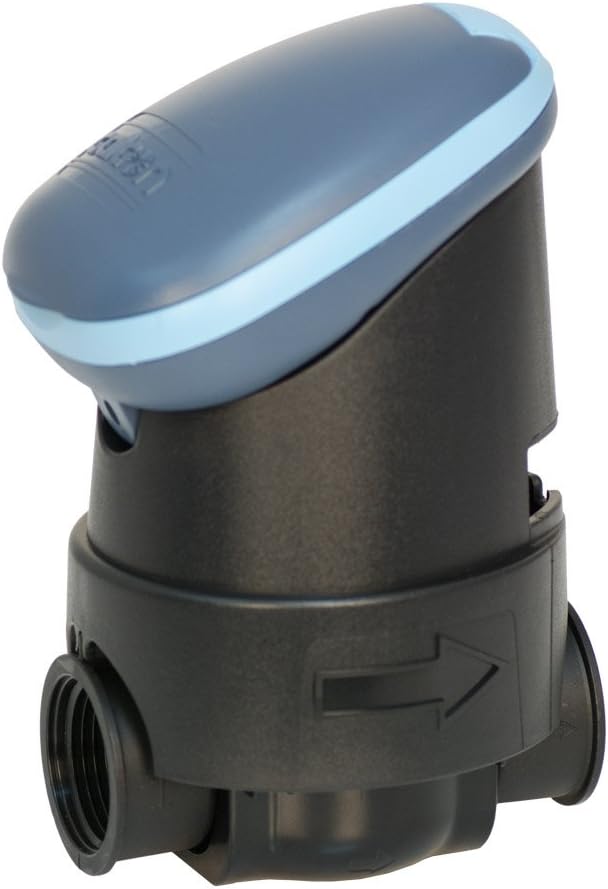
Figi 2: Galcon 7101D Valve with Flow Direction Arrow. This image illustrates the valve component, showing the arrow indicating the correct water flow direction for installation.
6. Operasyon Enstriksyon
The Galcon 7101D features 6 large buttons for programming and operation. Refer to the on-screen prompts for specific settings.
6.1 Mete lè ak jou aktyèl la
Follow the on-screen instructions to set the current time and day of the week. This is crucial for accurate scheduling.
6.2 Programming Irrigation Schedules
The controller supports two main programming modes:
- Pwogramasyon chak semèn: Set specific days of the week for irrigation.
- Cyclic Programming: Set an irrigation cycle (e.g., every 2 days) regardless of the day of the week.
Use the programming buttons to navigate through the menu and set:
- Start Time(s)
- Duration of watering (in minutes)
- Frequency (specific days or cycle interval)
6.3 Operasyon manyèl
To manually turn the water on or off, use the dedicated manual operation button. This allows for immediate watering outside of the programmed schedule.
6.4 Fonksyon reta lapli
Activate the rain delay function to temporarily suspend irrigation for a set period (e.g., 24, 48, 72 hours) after rainfall. This conserves water and prevents overwatering.
7. Antretyen
- Ranplasman batri: Replace the 9V alkaline battery annually, or when the low battery indicator appears on the display.
- Netwayaj: Clean the exterior of the controller with a damp twal. Pa sèvi ak pwodui netwayaj abrazif oswa solvang.
- Winterization: In freezing climates, remove the controller and valve from the irrigation system and store indoors to prevent freeze damage.
NAN. Depanaj
| Pwoblèm | Kòz posib | Solisyon |
|---|---|---|
| Ekran kontwolè a vid. | Batri ki mouri oswa mal enstale. | Replace the 9V alkaline battery, ensuring correct polarity. |
| Valve does not open/close. | Low battery, incorrect programming, or debris in valve. | Check battery, verify programming, or inspect valve for obstructions. |
| Dlo ap koule nan koneksyon yo. | Koneksyon ki lach oswa sele ki domaje. | Tighten connections. If leaks persist, check for damaged O-rings or seals. |
| Irrigation does not start at scheduled time. | Incorrect time/day setting, rain delay active, or programming error. | Verify current time and day, check if rain delay is active, review irrigation program. |
9. Espesifikasyon
- Modèl: 7101D
- Nimewo Pati: GAR6S2312P0
- Valv Size: 3/4 pous
- Sous pouvwa: 1 x 9V Alkaline Battery (required)
- Evalyasyon ki enpèmeyab: IP-68 (submersible up to 3 feet)
- Opsyon pwogramasyon: Weekly or Cyclic
- Dimansyon: 4.4 x 3.9 x 7.4 pous (Pwodwi)
- Pwa: 3.2 ons
- Manifakti: Galcon USA, LTD
- Operating Region: USA ak Kanada
10. Garanti ak sipò
For warranty information or technical support, please contact Galcon customer service. Refer to the product packaging or the official Galcon websit la pou jwenn enfòmasyon kontak aktyèl yo.
Nòt: Unauthorized disassembly or modification of the product may void the warranty.