
Sagemcom Sixty
Sagemcom Sixty Cordless Telephone and Answer Machine
Model: Sixty
Mak: Sagemcom
Pwodwi souview
The Sagemcom Sixty Cordless Telephone and Answer Machine combines modern technology with a classic design. Its unique aesthetic, smooth finish, and touchscreen functionality make it a distinctive addition to any environment. Designed for user comfort, the Sixty offers a range of features including hands-free mode, extended battery life, and an intuitive interface for easy communication.
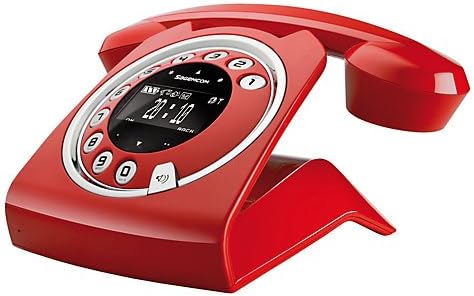
Image: The Sagemcom Sixty Cordless Telephone and Answer Machine in red, showcasing its unique retro-modern design with a circular dial and digital display.

Imaj: Bò kote view of the Sagemcom Sixty Cordless Telephone, highlighting its sleek profile and the cradle design.
Gid Enstalasyon
1. Debake
Carefully remove all components from the packaging. Ensure you have the base unit, handset, power adapter, and telephone line cord.
2. Konekte Inite Baz la
- Connect the power adapter to the 'DC IN' port on the back of the base unit and plug the other end into a wall outlet.
- Connect one end of the telephone line cord to the 'LINE' port on the base unit and the other end to your telephone wall jack.
3. Enstalasyon ak Chaje Batri
- Louvri lòj batri a sou aparèy la.
- Insert the supplied rechargeable batteries, observing the correct polarity (+ and -).
- Fèmen lòj batri a.
- Place the handset on the base unit. The display will indicate charging. Allow the handset to charge for at least 16 hours before first use to ensure optimal battery performance.
Enstriksyon Operasyon
Fè ak Resevwa Apèl
- Pou fè yon apèl: Leve appareil a oswa peze la Rele button. Dial the number using the touchscreen keypad.
- Pou resevwa yon apèl: Leve appareil a oswa peze la Rele bouton an lè telefòn nan sonnen.
- Pou fini yon apèl: Mete aparèy la tounen sou inite baz la oubyen peze bouton an. Fini apèl bouton.
Sèvi ak Touchscreen la
The Sixty features a responsive touchscreen for navigation and input. Tap icons or numbers to select functions or dial. Swipe to scroll through lists or menus.
Mòd men-gratis
Pandan yon apèl, peze la Oratè button to activate hands-free mode. Press it again to return to handset mode.
Jesyon Anyè telefòn
- Ajoute yon Kontak: Navigate to the Phonebook menu, select 'Add New Contact', enter the name and number using the touchscreen, and save. The phonebook can store up to 150 names.
- Ap chèche yon kontak: Access the Phonebook and use the search function or scroll through the list.
- Editing/Deleting a Contact: Select the desired contact from the Phonebook and choose the 'Edit' or 'Delete' option.
Answering Machine Functions
The integrated answering machine has a recording capacity of 10 minutes.
- Aktivasyon/Dezaktivasyon: Access the Answering Machine menu to turn it on or off.
- Ap jwe mesaj: Select 'Play Messages' from the Answering Machine menu.
- Anrejistreman mesaj sortan: Follow the prompts in the Answering Machine menu to record a personalized outgoing message.
Antretyen
Netwaye Telefòn Ou
To clean the phone, wipe it with a soft, damp cloth. Do not use abrasive cleaners or solvents, as these can damage the surface. Ensure the phone is disconnected from power before cleaning.
Swen batri
- Toujou sèvi ak pil rechargeable yo ki vini ak yo.
- Si w pa pral itilize telefòn nan pou yon bon bout tan, retire pil yo pou anpeche likid koule.
- Jete ansyen pil yo yon fason responsab selon règleman lokal yo.
Depanaj
| Pwoblèm | Solisyon posib |
|---|---|
| Pa gen ton | Check if the telephone line cord is securely connected to both the base unit and the wall jack. Ensure the power adapter is plugged in. |
| Telefòn nan pa chaje | Ensure the handset is correctly placed on the base unit. Clean the charging contacts on both the handset and base unit with a dry cloth. Verify the power adapter is working. |
| Move son kalite | Move closer to the base unit. Check for interference from other electronic devices. Ensure the telephone line cord is not damaged. |
| Ekspozisyon an vid | Check if the handset battery is charged. If not, place it on the base unit to charge. Ensure the power adapter is connected to the base unit. |
| Pa ka fè oswa resevwa apèl | Verify that the telephone line is active. Check all cable connections. Restart the base unit by unplugging and replugging the power adapter. |
Espesifikasyon teknik
| Karakteristik | Spesifikasyon |
|---|---|
| Mak | Sagemcom |
| Modèl | Swasant |
| Koulè | Wouj |
| Kalite Telefòn | San fil |
| Tan pou pale nan telefòn | Jiska 10 èdtan |
| Tan sibstiti | Jiska 120 èdtan |
| Recording Capacity (Answering Machine) | 10 minit |
| Kapasite Anyè telefòn | 150 Non |
| ASIN | B00DX64LPI |
| Premye Dat ki disponib | 15 avril 2014 |
Garanti ak sipò
For warranty information and customer support, please refer to the documentation included with your purchase or visit the official Sagemcom websit la. Kenbe prèv acha ou a pou nenpòt reklamasyon garanti.
Ask a question about this manual
Ask about setup, troubleshooting, compatibility, parts, safety, or missing instructions. Manuals+ will review the question and use this page’s manual context to help answer it.