
Entwodiksyon
The JBL Professional LSR305 is a first-generation 5-inch 2-Way Powered Studio Monitor designed for accurate audio reproduction in professional and home studio environments. This bi-amplified monitor features a magnetically-shielded 5-inch Low Frequency Transducer and a 1-inch Soft-Dome High Frequency Transducer, complemented by an Image Control Waveguide for precise sound imaging. Each transducer is powered by a dedicated Class-D 41 Watt RMS amplifier.
Key features include flexible connectivity with balanced XLR and 1/4-inch TRS inputs, a detented level control, and adjustable HF and LF Trim controls to fine-tune the sound to your listening environment. The LSR305 is engineered to deliver a broad sweet spot and increased high-frequency detail, ensuring subtle nuances in your mix are clearly audible.
Kontni pake
- LSR305 Studio Monitor (x1)
- Fil elektrik (x1)
- Quick Set-Up Guide (x1)
- Peel-off Rubber Pads (x4)
Enstalasyon
1. Plasman
Position the LSR305 monitors to form an equilateral triangle with your listening position. The monitors should be angled inward, pointing towards your ears, to optimize the stereo image and take advantage of the broad sweet spot provided by the Image Control Waveguide. Avoid placing the monitors directly against a wall if possible, as the rear-firing Slip Stream™ port can affect bass response. Maintain some distance from walls for optimal low-frequency performance.
2. Koneksyon
The LSR305 offers balanced XLR and 1/4-inch TRS inputs for professional signal quality. Connect your audio interface, mixer, or other audio source to the appropriate input on the rear panel of each monitor. Ensure secure connections for optimal performance.
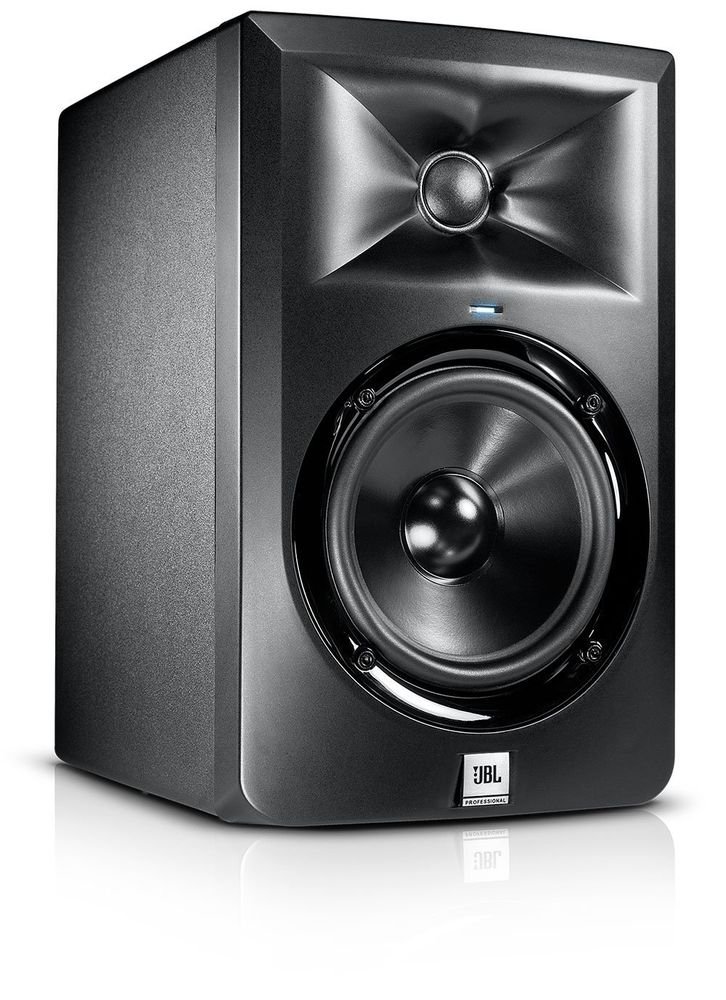
Imaj: Devan view of the JBL LSR305 Studio Monitor, showing its 5-inch woofer, 1-inch tweeter, and overall dimensions (approximately 15 inches high, 10 inches wide, and 13 inches deep).
Video: An official JBL video showcasing the features of the 3 Series Powered Studio Monitors, including the Image Control Waveguide, JBL Transducers, balanced inputs, selectable input sensitivity, HF/LF trim switches, and the patented Slip Stream™ port.
3. Koneksyon pouvwa
Connect the provided power cord to the AC inlet on the rear of the monitor and then to a suitable power outlet. Ensure the power switch is in the 'OFF' position before connecting to power.
Operasyon
1. Power On/Off
Locate the power switch on the rear panel of each monitor. Flip the switch to the 'ON' position to power on the monitor. It is recommended to power on your monitors last and power them off first to prevent any sudden pops or surges.
2. Kontwòl Volim
Adjust the volume knob on the rear panel to set the desired listening level. Start with a low volume and gradually increase it to a comfortable level. For critical listening and mixing, ensure both monitors are set to the same volume level.
3. LF and HF Trim Controls
The LSR305 features LF (Low Frequency) and HF (High Frequency) Trim switches. These allow you to adjust the bass and treble response to compensate for room acoustics or personal preference. Experiment with these settings to achieve the most accurate and balanced sound in your specific environment. Typically, a flat (0dB) setting is a good starting point.
4. Input Sensitivity Switch
The input sensitivity switch allows you to select between +4dBu (professional) and -10dBV (consumer) input levels. Use the +4dBu setting when connecting to high-output professional gear to prevent input overload and maintain signal integrity. Use the -10dBV setting for consumer-level audio equipment.
Antretyen
To ensure the longevity and optimal performance of your JBL LSR305 monitors, follow these maintenance guidelines:
- Netwayaj: Regularly wipe the exterior surfaces with a soft, dry cloth. Avoid using abrasive cleaners, solvents, or waxes, as these can damage the finish.
- Pousyè: Keep the speaker cones and ports free of dust and debris. A soft brush or compressed air can be used carefully.
- Anviwònman: Fè fonksyone monitè yo nan yon anviwònman ki estab, lwen tanperati ekstrèm, imidite, ak limyè solèy dirèk. Asire w ke gen ase vantilasyon toutotou panèl dèyè a pou anpeche yo chofe twòp.
- Manyen: Handle the monitors with care. Avoid touching the speaker cones directly, as this can cause damage.
Depanaj
- Pa gen son: Check all power connections and ensure the monitors are switched on. Verify that the audio source is active and connected correctly to the monitor inputs. Check the volume knob position.
- Bri oubyen sifle: Ensure all audio cables are balanced (XLR or TRS) and properly connected. Unbalanced cables can introduce noise. Check for ground loops or interference from other electronic devices. Adjust the input sensitivity switch if the input signal is too high or too low.
- Son defòme: Reduce the input volume from your audio source or the monitor's volume knob. Ensure the input sensitivity switch is set correctly for your equipment. Check for damaged cables.
- Son inegal: Verify that both monitors are placed symmetrically and angled correctly towards your listening position. Ensure LF and HF trim settings are identical on both monitors.
Espesifikasyon
| Karakteristik | Spesifikasyon |
|---|---|
| Mak | JBL |
| Nimewo Modèl | LSR305 |
| Kalite Oratè | 2-Way Powered Studio Monitor |
| Woofer Dyamèt | 5 pous |
| Dyamèt tweeter | 1 pous |
| Amplifier Power (LF) | 41 Watts RMS (Class-D) |
| Amplifier Power (HF) | 41 Watts RMS (Class-D) |
| Repons Frekans | Jiska 24000 Hz |
| Koneksyon Teknoloji | 1 x XLR, 1 x TRS balanse |
| Siyal-a-bwi Pwopòsyon | 75 dBA (A-Weighted), 70 dBr (unweighted) |
| Dimansyon atik (D x W x H) | 13"D x 10"W x 15"H |
| Pwa atik | 4.6 Kilogram |
| Sous pouvwa | Fil elektrik |
Garanti ak sipò
The JBL Professional LSR305 Studio Monitor comes with a 90-day limited warranty. For warranty claims, technical support, or further assistance, please refer to the official JBL Professional websit la oubyen kontakte depatman sèvis kliyan yo. Kenbe resi acha w la kòm prèv acha pou validasyon garanti a.