
Manyèl Itilizatè Kontwòl Remot DIRECTV RC71 la
Modèl: RC71
Entwodiksyon
The DIRECTV RC71 Remote Control is designed for efficient access to functions for your DIRECTV system. This remote is compatible with various DIRECTV receivers and can also control your television's volume and power functions. It supports both Infrared (IR) and Radio Frequency (RF) communication modes.
In IR mode, the RC71 is compatible with all legacy and current DIRECTV receivers. In RF mode, it is specifically designed to work with the DIRECTV HR44 Genie and Genie clients C41 and C41W. When operating in RF mode, the remote utilizes the RF4CE protocol for enhanced speed and accuracy, confirming each button press to reduce missed inputs. For TV and AV functions, the remote will still use IR communication even when in RF mode for the receiver.
Enstalasyon
1. Enstalasyon batri
The RC71 remote control requires two (2) AA alkaline batteries for operation.
- Jwenn kouvèti lòj batri a sou do kontwòl remote la.
- Glise kouvèti a anba epi retire li.
- Mete de pil AA, asire w ke tèminal pozitif (+) ak negatif (-) yo aliyen ak endikatè ki anndan konpatiman an.
- Remèt kouvèti konpatiman batri a lè w glise l tounen nan plas li jiskaske li fè yon klik byen fèm.
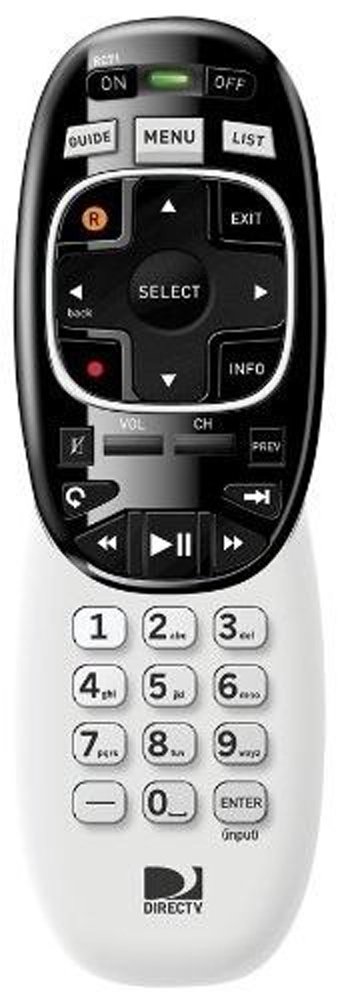
Image: The DIRECTV RC71 Remote Control, showing its ergonomic design and button layout.
2. Pairing with DIRECTV Receiver
The RC71 remote can operate in two modes: Infrared (IR) and Radio Frequency (RF).
IR Mode (for all DIRECTV receivers)
In IR mode, the remote requires a direct line of sight to the receiver. No special pairing is typically required; the remote should function immediately after battery installation.
RF Mode (for HR44 Genie, C41, C41W clients)
For RF mode functionality with compatible receivers, follow these steps:
- Ensure your DIRECTV receiver (HR44 Genie or C41/C41W client) is powered on.
- Point the RC71 remote at the receiver.
- Peze epi kenbe la BÈN epi ANTRE bouton yo an menm tan jiskaske limyè vèt ki anlè telekòmand lan flache de fwa.
- Release the buttons. The remote is now attempting to pair in RF mode.
- Follow any on-screen prompts that may appear on your television to confirm the pairing.
3. Programming for TV/AV Functions
To control your television's volume and power, the remote needs to be programmed with your TV's code. This process typically involves using the receiver's on-screen menu.
- Peze a MENI button on your RC71 remote.
- Navige nan Settings & Help, lè sa a Anviwònman, epi finalman Kontwòl Remote.
- Chwazi Pwogram Remote or a similar option.
- Follow the on-screen instructions to select your television brand and program the remote.
- Test the volume and power buttons to ensure successful programming.
Opere kontwòl remote la
The RC71 remote control features a streamlined button layout for intuitive operation.
- Bouton pouvwa: Toggles power for the DIRECTV receiver and, once programmed, for the television.
- Gid: Montre gid pwogram lan.
- Lis: Accesses your recorded programs.
- Chèn monte/desann: Chanjman chanèl yo.
- Volim monte/desann: Adjusts television volume (after programming).
- Bèbè: Mutes television audio (after programming).
- Directional Pad (Arrows) and SELECT: Navige nan meni yo epi chwazi opsyon yo.
- REW, PLAY, FWD, PAUSE, STOP, RECORD: Controls playback of recorded content.
- Numbers (0-9): Antre nimewo chanèl yo dirèkteman.
- ENFO: Montre enfòmasyon sou pwogram nan.
- Sòti: Sòti nan meni yo oswa retounen nan televizyon an dirèk.
The ergonomic design of the RC71 is intended for comfortable handling during extended use.
Antretyen
Ranplasman batri
Replace batteries when the remote's response becomes sluggish or the indicator light fails to flash. Always replace both AA batteries simultaneously with new ones to ensure optimal performance.
Netwayaj
Pou netwaye telekòmand lan, siye sifas li dousman avèk yon twal mou epi sèk. Pou pousyè tè ki difisil pou netwaye, siye yon ti kras.amp cloth can be used, followed by immediate drying. Avoid using harsh chemicals or abrasive cleaners, as these can damage the remote's finish or internal components.
Depanaj
- Remote pa reponn:
- Tcheke enstalasyon batri a epi ranplase si sa nesesè.
- Ensure a clear line of sight between the remote and the receiver/TV for IR functions.
- If in RF mode, ensure the remote is properly paired with the receiver. Repeat the pairing steps if needed.
- TV/AV functions not working:
- Verify that the remote has been correctly programmed for your television model. Re-program if unsure.
- Asire w ke telekòmand lan pwente dirèkteman nan direksyon detèktè IR televizyon an.
- Remote feels sluggish or inconsistent:
- Ranplase pil ak pil fre.
- Consider resetting the remote to factory settings (consult your DIRECTV receiver's on-screen help or DIRECTV support for specific instructions, as this process can vary).
Espesifikasyon
| Mak | DIRECTV |
| Non modèl | RC71 |
| Nimewo Modèl | RC71 |
| Koulè | Blan |
| Koneksyon Teknoloji | Enfrawouj, frekans radyo |
| Aparèy konpatib | DIRECTV Receivers (all in IR, HR44 Genie/C41/C41W in RF), Television |
| Maximum Number of Supported Devices | 1 (DIRECTV Receiver) + 1 (Television) |
| Kantite bouton | 20 |
| Kalite kontwolè | Kontwòl bouton |
| Maksimòm Range | 10 Meters (RF) |
| Kalite batri | 2 pil AA alkalin |
| Pwa atik | 3.52 ons |
| Karakteristik espesyal | Ergonomik konsepsyon |
Enfòmasyon sou Garanti
The DIRECTV RC71 Remote Control comes with a manufacturer warranty for 90 days from the date of purchase. Please retain your proof of purchase for warranty claims. For detailed terms and conditions, refer to the warranty documentation provided with your product or contact DIRECTV customer support.
Sipò
For further assistance, technical support, or to inquire about specific programming codes for your television, please contact DIRECTV customer support. You can find contact information on the official DIRECTV website or through your DIRECTV service provider.