
1. Entwodiksyon
This manual provides essential information for the safe and efficient operation of your Sharp KC-A50EU-W Air Purifier. This device is designed to improve indoor air quality by filtering dust, pollen, mold spores, and odors, while also offering humidification using Plasmacluster ion technology. Please read these instructions thoroughly before use and retain them for future reference.
Enfòmasyon enpòtan sou sekirite
- Toujou asire w ke aparèy la mete sou yon sifas ki estab e ki plat.
- Pa bloke ouvèti pou antre lè a oswa ouvèti pou sòti lè a.
- Kenbe aparèy la lwen dlo ak imidite.
- Debranche aparèy la anvan ou netwaye li oswa fè nenpòt antretyen.
- Pa eseye repare aparèy la tèt ou. Kontakte pèsonèl sèvis kalifye.
2. Pwodwi souview
The Sharp KC-A50EU-W is an advanced air purifier and humidifier designed for rooms up to 38 m². It features Plasmacluster ion technology to neutralize airborne pollutants and a multi-stage sistèm filtraj.

Figi 2.1: Devan view of the Sharp KC-A50EU-W Air Purifier, showing the main body and air outlet.
Karakteristik kle:
- Plasmacluster Ion Technology: Releases positive and negative ions to clean the air.
- Humidification Function: Adds moisture to the air for improved comfort.
- High Air Circulation: Efficiently processes air in rooms up to 38 m².
- Multi-stage Filtrasyon: Includes a HEPA filter for fine particles and an odor filter.
- Operasyon trankil: Ki fèt pou fè mwens bri.
3. Enstalasyon
3.1 Debake
- Retire pirifikatè lè a nan anbalaj li avèk prekosyon.
- Retire tout materyèl pwoteksyon yo ak sache plastik yo.
- Check for any damage during transit. If damaged, do not operate and contact your retailer.
3.2 Plasman
For optimal performance, place the air purifier in a location where air can circulate freely. Avoid placing it directly against walls or furniture. Ensure it is on a flat, stable surface. The unit is suitable for floor areas up to 24 square meters (as per specifications, though product description states 38m², use the more conservative spec for placement advice).

Figi 3.1: Side view of the air purifier, showing the air intake grille. Ensure this area is unobstructed.
3.3 Enstalasyon Filter
Before first use, ensure all filters are correctly installed and any protective plastic packaging has been removed from them. Refer to the maintenance section for detailed filter handling.
4. Operasyon Enstriksyon
The control panel allows you to manage the various functions of your air purifier.

Figi 4.1: Close-up of the control panel, showing buttons for power, fan speed, Plasmacluster, and humidification.
4.1 Power On/Off
- Branche kòd kouran an nan yon priz elektrik ki apwopriye (220V).
- Peze a ON/OFF button to turn the unit on. The unit will start in a default mode.
- Peze a ON/OFF bouton ankò pou fèmen inite a.
4.2 Ajisteman vitès vantilatè
Sèvi ak la VITÈS VANTILATÈ button to cycle through different fan settings (e.g., Low, Medium, High, Auto). The current setting will be indicated on the display or by indicator lights.
4.3 Plasmacluster Ion Operation
Peze a CLEAN ION SHOWER ON button to activate the Plasmacluster ion generator. This function helps to remove airborne viruses, bacteria, and odors. An indicator light will confirm activation.
4.4 Fonksyon Imidifikasyon
- Asire w ke tank dlo a ranpli ak dlo pwòp.
- Peze a CLEAN AIR & HUMIDIFY ON button to activate the humidification function.
- The unit will automatically maintain a comfortable humidity level.
- The humidity level may be displayed on the control panel.
4.5 Timoun Lock
To prevent accidental operation, press and hold the CHILD LOCK button for 3 seconds to activate or deactivate the child lock function.
5. Antretyen
Regular maintenance ensures optimal performance and extends the life of your air purifier. Always unplug the unit before cleaning or performing maintenance.
5.1 Netwayaj ak Ranplasman Filtè
The Sharp KC-A50EU-W uses multiple filters that require periodic cleaning or replacement.
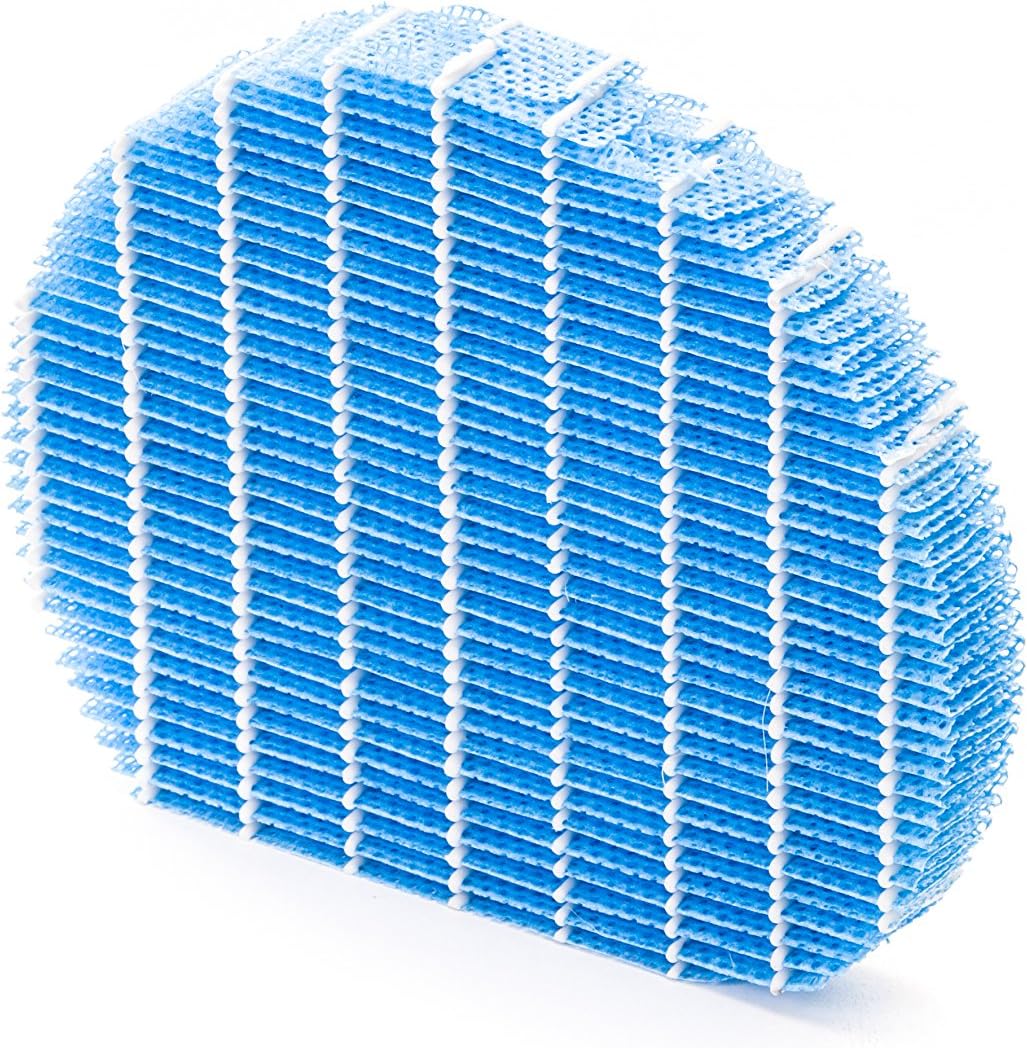
Figi 5.1: Example of a humidifying filter component, which requires regular cleaning.
- Pre-filtre: Clean regularly (e.g., monthly) by vacuuming or washing with water. Allow to dry completely before reinstallation.
- Filtè HEPA: This filter captures fine dust and allergens. It cannot be washed and must be replaced. The replacement interval can vary, but typically ranges from 2 to 5 years depending on usage and air quality. Monitor the filter's condition; if it appears significantly discolored (e.g., black instead of white), replace it immediately.
- Deodorizing Filter (Activated Carbon): This filter removes odors. It can often be washed periodically (e.g., every few months) to refresh its effectiveness. Allow to dry completely. Replace when odors persist after cleaning.
- Humidifying Filter: If using the humidification function, clean the humidifying filter and its tray at least every 4 weeks to prevent mold and bacteria growth. Use a mild detergent and rinse thoroughly.
5.2 Netwayaj Tank Dlo
For units with humidification, clean the water tank regularly (e.g., weekly) to prevent mineral buildup and bacterial growth. Use a soft brush and mild detergent, then rinse thoroughly with clean water.
5.3 Netwayaj Eksteryè
Siye eksteryè inite a ak yon mou, damp twal. Pa sèvi ak pwodui netwayaj abrazif oswa solvang.
NAN. Depanaj
If you encounter issues with your Sharp KC-A50EU-W, refer to the following common problems and solutions.
| Pwoblèm | Kòz posib | Solisyon |
|---|---|---|
| Inite pa limen. | Kòd kouran an pa byen konekte; pa gen kouran nan priz la. | Asire w kòd kouran an byen branche. Tcheke priz kouran an ak yon lòt aparèy. |
| Pòv pèfòmans pou pirifye lè a. | Filters are dirty or clogged; filters incorrectly installed. | Clean or replace filters as per maintenance instructions. Ensure filters are installed correctly. |
| Humidification not working or low output. | Water tank is empty; humidifying filter is dirty or clogged. | Refill the water tank. Clean the humidifying filter and tray. |
| Bri dwòl soti nan inite a. | Obstruction in fan; unit not on a level surface. | Check for any foreign objects near the fan. Place the unit on a stable, level surface. |
| Persistent odors. | Deodorizing filter is saturated or needs cleaning/replacement. | Clean or replace the deodorizing filter. |
Si pwoblèm nan pèsiste apre ou fin eseye solisyon sa yo, tanpri kontakte sèvis kliyan.
7. Espesifikasyon
- Nimewo Modèl: KC-A50EU-W
- Manifakti: Sharp
- Koulè: Blan
- Dimansyon pwodwi (L x W x H): 24 x 69 x 2.5 cm
- Pwa atik: 9.2 kg (9200 gram)
- Sous pouvwa: 220V
- Kalite filtre: HEPA
- Zòn etaj rekòmande: 24 mèt kare
- Nivo bri: 49 Desibèl
- Materyèl: Plastik
- Peyi orijin: Japon
8. Garanti ak sipò
For warranty information and customer support, please refer to the warranty card included with your product or visit the official Sharp websit pou rejyon ou an. Kenbe resi acha ou kòm prèv acha.