
Entwodiksyon
This manual provides essential information for setting up, operating, and maintaining your Nokia 114 Dual SIM mobile phone. Please read these instructions carefully to ensure proper use and to maximize the device's performance and longevity.
Enstalasyon
1. Enstalasyon Kat SIM
The Nokia 114 supports two Mini SIM cards. Follow these steps to install your SIM cards:
- Turn off the phone and remove the back cover.
- Locate the SIM card slots. The phone features an Easy Swap function for convenient SIM management.
- Insert your Mini SIM cards into the designated slots, ensuring the gold contacts face downwards and the cut corner aligns correctly.
- Ranplase kouvèti dèyè a.

Image: Nokia 114 with two Mini SIM cards being inserted.
2. Enstalasyon batri
Pou enstale batri a:
- With the back cover removed, align the Nokia BL-5C 1020 mAh Lithium-Ion battery with the battery compartment.
- Peze batri a dousman nan plas li jiskaske li byen chita.
- Ranplase kouvèti dèyè a.
3. Chaje batri a
Before first use, fully charge the battery using the provided Nokia Charger AC-11.
- Konekte chajè a nan pò chaje telefòn nan.
- Ploge plato a nan yon priz miray.
- Endikatè batri a sou ekran an ap montre pwogrè chaj la.
- Yon fwa konplètman chaje, dekonekte plato a.
Enstriksyon Operasyon
1. Power On/Off
- Pou limen telefòn nan, peze epi kenbe bouton Pouvwa a jiskaske telefòn nan vibre epi ekran an limen.
- To power off, press and hold the Power key, then select 'Power off' from the options.
2. Fè apèl epi voye mesaj
- Use the keypad to dial a number and press the Call key to initiate a call.
- To send a message, navigate to the 'Messages' menu, select 'Create message', type your text using the keypad, and send it to the desired recipient.
3. Ekspozisyon ak Navigasyon
The Nokia 114 features a 1.8-inch portrait QVGA LCD transmissive display with 128 x 160 pixels resolution. Navigation is primarily done using the physical keypad.
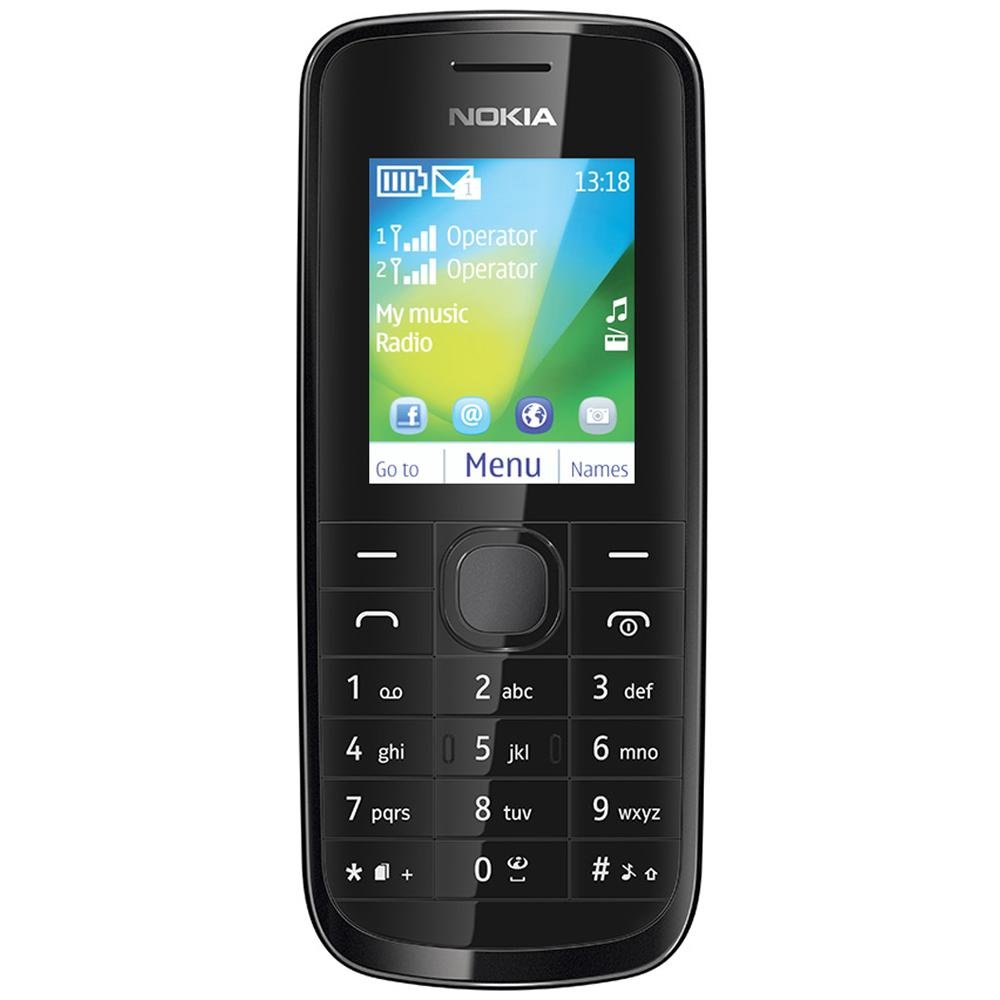
Imaj: Devan view of the Nokia 114 mobile phone.
4. Itilizasyon kamera
The phone is equipped with a 0.3 MP rear camera. It supports basic photography features:
- Editè Imaj: Basic editing functions for captured photos.
- Zoom dijital 4x: Magnify subjects before capturing.
- Konpansasyon Ekspozisyon: Ajiste nivo klète yo.
- Oryantasyon Peyizaj: Capture photos in a wider format.
- The screen acts as a full-screen viewChèche.
5. memwa ak depo
The Nokia 114 has 16 MB of internal memory and supports expandable memory up to 32 GB via a microSD card (not included). This allows for storage of photos, music, and other files.
6. Koneksyon
The device supports 2G networks for calls and basic internet access. It does not support 3G or Wi-Fi connectivity.
7. Karakteristik espesyal
- Imèl: Access your email accounts on the go.
- Radyo FM: Koute estasyon radyo ou pi renmen yo.
- Video Player & Music Player: Enjoy multimedia content.
- Internet & Facebook: Debaz web browsing and social media access.
- Jwèt: Pre-installed games for entertainment.
Antretyen
1. Swen Jeneral
- Kenbe telefòn nan sèk. Presipitasyon, imidite, ak tout kalite likid oswa imidite ka gen mineral ki ka korode sikui elektwonik yo.
- Pa sèvi ak oswa sere telefòn nan nan zòn ki gen pousyè oswa sal.
- Pa sere telefòn nan nan tanperati ki wo. Tanperati ki wo ka diminye lavi aparèy elektwonik yo, domaje pil yo, epi defòme oswa fonn sèten plastik.
- Pa sere telefòn nan nan tanperati frèt. Lè telefòn nan retounen nan tanperati nòmal li, imidite ka fòme andedan telefòn nan epi domaje sikui elektwonik yo.
- Do not attempt to open the phone other than as instructed in this manual.
- Pa lage telefòn nan, pa frape l, epi pa souke l. Si ou manyen l mal, sa ka kraze sikwi entèn yo ak mekanik amann yo.
- Pa sèvi ak pwodui chimik piman bouk, solvang netwayaj, oswa detèjan fò pou netwaye telefòn nan.
2. Swen batri
- Only use original Nokia batteries and chargers.
- Pa kout-sikwi batri a.
- Pa ekspoze batri a nan tanperati ekstrèm.
Depanaj
If you encounter issues with your Nokia 114, try the following basic troubleshooting steps:
- Telefòn nan pa limen: Ensure the battery is correctly installed and charged. Try charging the phone for at least 30 minutes before attempting to power it on again.
- Move kalite apèl: Check your network signal strength. Move to an area with better reception. Ensure the earpiece/speaker is not obstructed.
- Keypad auto-locks: This is a standard feature. To unlock, follow the on-screen instructions, usually by pressing a specific key combination.
- Dual SIM not functioning: Verify both SIM cards are correctly inserted and activated by your service provider. Check SIM settings in the phone menu.
- Phone freezing or unresponsive: Remove the battery, wait a few seconds, and then reinsert it and power on the phone.
For more complex issues, refer to the visual user guide included in the box or contact Nokia customer support.
Espesifikasyon
| Karakteristik | Detay |
|---|---|
| Mak | Nokia |
| Modèl | 114 |
| Ekspozisyon | 1.8-inch QVGA LCD (128 x 160 pixels) |
| Kamera | Kamera dèyè 0.3 MP |
| Memory (Internal) | 16 MB |
| Memwa dilatabl | Jiska 32 GB (microSD) |
| Kantite plas kat SIM | Dual SIM (Mini) |
| Teknoloji selilè | 2G (GSM) |
| Sistèm operasyon | Nokia Series 40 Asha |
| Kapasite batri | 1020 mAh Lityòm-Ion |
| Tan pale | Jiska 10.5 èdtan (630 minit) |
| Dimansyon (L x W x H) | 11 x 4.6 x 1.5 cm |
| Pwa | 80 gram |
| Entèfas imen | Klavye |
| Materyèl | Plastik |
Ki sa ki nan bwat la
Your Nokia 114 package includes the following items:
- Nokia 114 Telefòn mobil
- Nokia Charger AC-11
- Nokia Battery BL-5C 1020 mAh
- Nokia Stereo Headset WH-102
- Visual User Guide
Pwodwi souview Videyo
Gade videyo sa a pou yon ti pale rapidview of the Nokia 114's features and contents.
Videyo: Yon ti pale souview of the Nokia 114 mobile phone, highlighting its display, camera, memory, connectivity, operating system, special features, and included accessories.
Garanti ak sipò
The Nokia 114 comes with a 1-year manufacturer warranty for the device and a 6-month manufacturer warranty for in-box accessories, including batteries, from the date of purchase. For warranty claims or technical support, please refer to the contact information provided in your visual user guide or visit the official Nokia support websit.