
Jensen CD-490
JENSEN CD-490 Portable Stereo CD Player with AM/FM Radio and Aux Line-in Instruction Manual
Entwodiksyon
The JENSEN CD-490 is a portable stereo CD player equipped with an AM/FM stereo radio and an auxiliary line-in. It features a top-loading CD player with an LED track display, skip/search/repeat functions, and programmable memory. The unit includes a telescopic antenna for radio reception, a foldable carrying handle for portability, and a stereo headphone jack. An auxiliary input allows connection of external audio devices such as MP3 players.
Enfòmasyon enpòtan sou sekirite
AVÈTISMAN: Pwodwi sa a gen pwodwi chimik yo konnen nan Eta Kalifòni ki lakòz kansè ak domaj nesans oswa lòt domaj repwodiksyon.
Toujou swiv prekosyon sekirite debaz yo lè w ap itilize aparèy elektrik pou diminye risk dife, chòk elektrik, ak aksidan pèsonèl. Kenbe manyèl sa a pou referans pita.
Ki sa ki enkli
- JENSEN CD-490 Portable Stereo CD Player with AM/FM Radio
- AC pouvwa kòd
- Manyèl Pwopriyetè a
Pwodwi souview
Familiarize yourself with the controls and features of your JENSEN CD-490 unit.
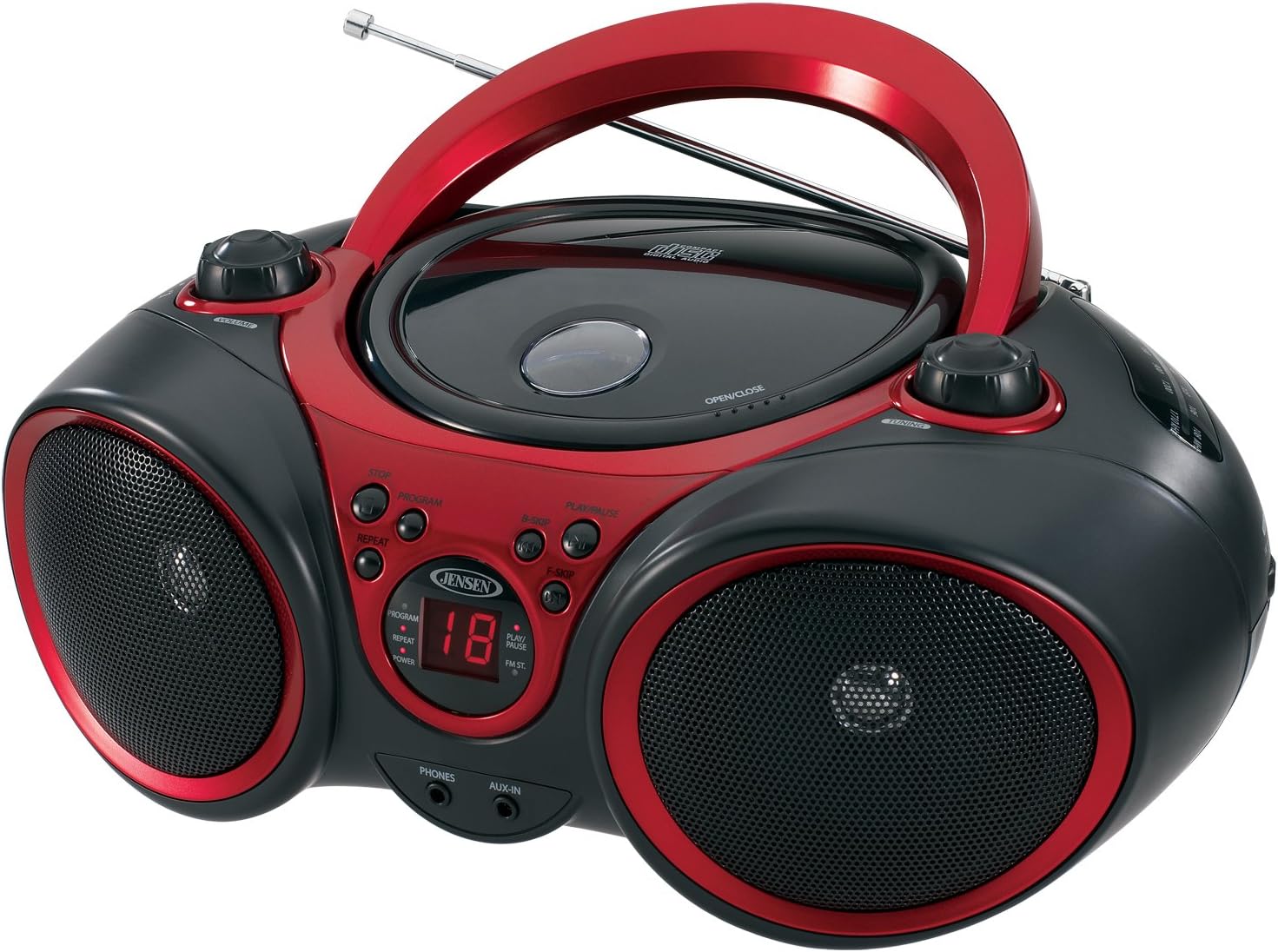
Imaj: Devan view of the JENSEN CD-490 unit, showing the CD compartment, speakers, control buttons, and display.
Kontwòl panèl devan:
- Bouton VOLIM: Ajiste nivo pwodiksyon odyo a.
- Bouton STOP: Sispann lekti CD.
- Bouton PWOGRAM: Yo itilize li pou pwograme tras CD yo.
- Bouton REPEAT: Repete tras aktyèl la oswa tout tras yo.
- B-SKIP Button: Skips backward through CD tracks.
- Bouton PLAY/PAUSE: Kòmanse oswa mete lekti CD a sou poz.
- F-SKIP Button: Skips forward through CD tracks.
- Dirije ekspozisyon: Shows CD track number and function indicators (PROGRAM, REPEAT, POWER, PLAY/PAUSE, FM ST).
- TELEFÒN Jack: Pou konekte kas ekoutè stereo.
- AUX-IN Jack: Pou konekte aparèy odyo ekstèn.
Kontwòl Panel Top:
- Konpatiman CD: Top-loading area for compact discs.
- OPEN/CLOSE Latch: Lage kouvèti konpatiman CD a.
- Bouton Akò: Adjusts AM/FM radio frequency.
Side Panel Controls:
- FUNCTION Switch: Selects between RADIO, CD/AUX IN, and OFF modes.
- Selektè Gwoup AM/FM: Chwazi ant bann radyo AM ak FM.
Karakteristik panèl dèyè:
- AC pouvwa Antre: Pou konekte kòd kouran AC a.
- Lòj batri: Holds 8 'C' (UM-2) batteries for portable operation.
- Antèn teleskopik: Antèn pwolonje pou resepsyon radyo FM.
Enstalasyon
Alimente inite a:
The CD-490 can be powered by either AC power or batteries.
AC pouvwa:
- Ensure the unit is in the OFF position using the FUNCTION switch.
- Connect the AC power cord to the AC power input on the rear of the unit.
- Plug the other end of the AC power cord into a standard AC 120V/60Hz wall outlet.
Pouvwa batri:
- Ensure the unit is in the OFF position.
- Louvri kouvèti a lòj batri ki chita sou anba a nan inite a.
- Insert 8 'C' (UM-2) size batteries (not included), ensuring correct polarity (+/-).
- Fèmen kouvèti lòj batri a byen.
Enstalasyon antèn:
For optimal FM radio reception, fully extend the telescopic antenna. For AM reception, the unit has a built-in antenna, so no adjustment is typically needed.
Operating the CD Player
The CD-490 supports standard audio CDs and CD-R/RW discs.
- Set the FUNCTION switch to the 'CD/AUX IN' position.
- Press the 'OPEN/CLOSE' latch to open the CD compartment lid.
- Place an audio CD into the compartment with the label side facing up.
- Close the CD compartment lid firmly until it clicks. The LED display will show the total number of tracks on the CD.
- Press the 'PLAY/PAUSE' button to begin playback. The current track number will appear on the LED display.
- Ajiste bouton 'VOLIM' lan selon nivo koute ou vle a.
- To pause playback, press the 'PLAY/PAUSE' button. Press it again to resume.
- To skip to the next track, press the 'F-SKIP' button. To go back to the beginning of the current track or the previous track, press the 'B-SKIP' button.
- To stop playback, press the 'STOP' button.
Fonksyon repete:
- During playback, press the 'REPEAT' button once to repeat the current track. The 'REPEAT' indicator will light up.
- Press the 'REPEAT' button a second time to repeat all tracks on the CD. The 'REPEAT' indicator will flash.
- Press the 'REPEAT' button a third time to cancel the repeat function.
Lektur pwograme:
- In STOP mode, press the 'PROGRAM' button. The 'PROGRAM' indicator will light up and '00' will flash on the display.
- Use the 'F-SKIP' or 'B-SKIP' buttons to select your desired track.
- Press the 'PROGRAM' button again to confirm the track. The display will show the next program number.
- Repete etap 2 ak 3 pou pwograme jiska 20 tracks.
- After programming, press the 'PLAY/PAUSE' button to start programmed playback.
- To cancel programmed playback, press the 'STOP' button twice.
Operating the AM/FM Radio
- Set the FUNCTION switch to the 'RADIO' position.
- Select either 'AM' or 'FM' using the AM/FM band selector switch.
- Extend the telescopic antenna for FM reception. Adjust its position for best reception.
- Rotate the 'TUNING' knob to select your desired radio station.
- Ajiste bouton 'VOLIM' lan selon nivo koute ou vle a.
Sèvi ak Antre oksilyè a
The AUX-IN jack allows you to connect an external audio device (e.g., MP3 player, smartphone) to play through the CD-490's speakers.
- Set the FUNCTION switch to the 'CD/AUX IN' position.
- Connect one end of a 3.5mm audio cable (not included) to the AUX-IN jack on the front of the CD-490.
- Connect the other end of the audio cable to the headphone jack or line-out jack of your external audio device.
- Turn on your external audio device and start playback.
- Adjust the volume on both your external device and the CD-490's 'VOLUME' knob for optimal sound.
Antretyen ak Swen
- Kenbe aparèy la lwen limyè solèy dirèk, sous chalè, ak pousyè oswa imidite twòp.
- Netwaye aparèy la avèk yon twal mou epi sèk. Pa sèvi ak pwodui netwayaj abrazif oswa solvan.
- To clean the CD lens, use a commercially available CD lens cleaner.
- Si w ap itilize pil, retire yo si w pa pral itilize aparèy la pou yon peryòd tan pwolonje pou evite flit.
Depanaj
| Pwoblèm | Kòz posib | Solisyon |
|---|---|---|
| Pa gen pouvwa | Kòd kouran altènatif la pa konekte; Pil yo fin itilize oswa yo pa byen mete. | Tcheke koneksyon kòd kouran altènatif la; Ranplase pil yo oubyen asire w polarite a kòrèk. |
| CD does not play / 'NO DISC' error | CD inserted incorrectly; CD is dirty or scratched; Unit in wrong function mode. | Re-insert CD with label side up; Clean or replace CD; Set FUNCTION switch to 'CD/AUX IN'. |
| Resepsyon radyo pòv | Antenna not extended/adjusted; Weak signal. | Extend and adjust FM telescopic antenna; Reposition the unit for better signal. |
| No sound from AUX-IN | Audio cable not connected; Volume too low on external device or unit. | Ensure audio cable is securely connected; Increase volume on both devices. |
Espesifikasyon
- Modèl: CD-490
- Sous pouvwa: AC 120V/60Hz or 8 x 'C' (UM-2) batteries (not included)
- Sòti pouvwa: 2 x 1.5W RMS
- CD konpatibilite: CD, CD-R / RW
- Gwoup Radyo: AM/FM Stereo
- Koneksyon: Jack Antre Oksilyè, Jack Kas ekoutè Stereo
- Dimansyon (L x W x H): 12.7 x 9.1 x 5.8 pous
- Pwa: 3.4 liv
- Manifakti: Spectra Merchandising International, Inc.
- Premye disponib: 14 me 2003
Garanti ak sipò
Specific warranty information and customer support contact details are typically provided with your product packaging or on the manufacturer's official website. Please refer to those resources for the most accurate and up-to-date information.
Videyo pwodwi
Gade videyo ofisyèl pwodui sa a pou yon vizyon plisview of the JENSEN CD-490 Stereo.
Videyo: Yon finiview of the JENSEN CD-490 Portable Stereo CD Player, highlighting its features and design.
Ask a question about this manual
Ask about setup, troubleshooting, compatibility, parts, safety, or missing instructions. Manuals+ will review the question and use this page’s manual context to help answer it.