
1. Entwodiksyon
This manual provides instructions for the OEM RMT-B119A remote control, designed as a replacement or secondary remote for various Sony Blu-ray player models. This remote offers full functionality for controlling your Blu-ray player's features.
Compatible Sony Blu-ray Player Models:
- BDP-BX59
- BDP-S390
- BDP-S590
- BDP-BX110
- BDP-S1100
- BDP-S3100
- BDP-BX310
2. Enstalasyon
2.1 Enstalasyon batri
Telekòmand lan bezwen de (2) pil AAA (pa enkli). Swiv etap sa yo pou enstale pil yo:
- Jwenn kouvèti lòj batri a sou do kontwòl remote la.
- Peze sou ti lang lan epi glise kouvèti a anba pou ouvri konpatiman an.
- Mete de pil AAA ladan l, asire w ke tèminal pozitif (+) ak negatif (-) yo byen aliyen ak mak ki anndan konpatiman an.
- Glise kouvèti konpatiman batri a tounen nan plas li jiskaske li fè yon klik byen fèm.
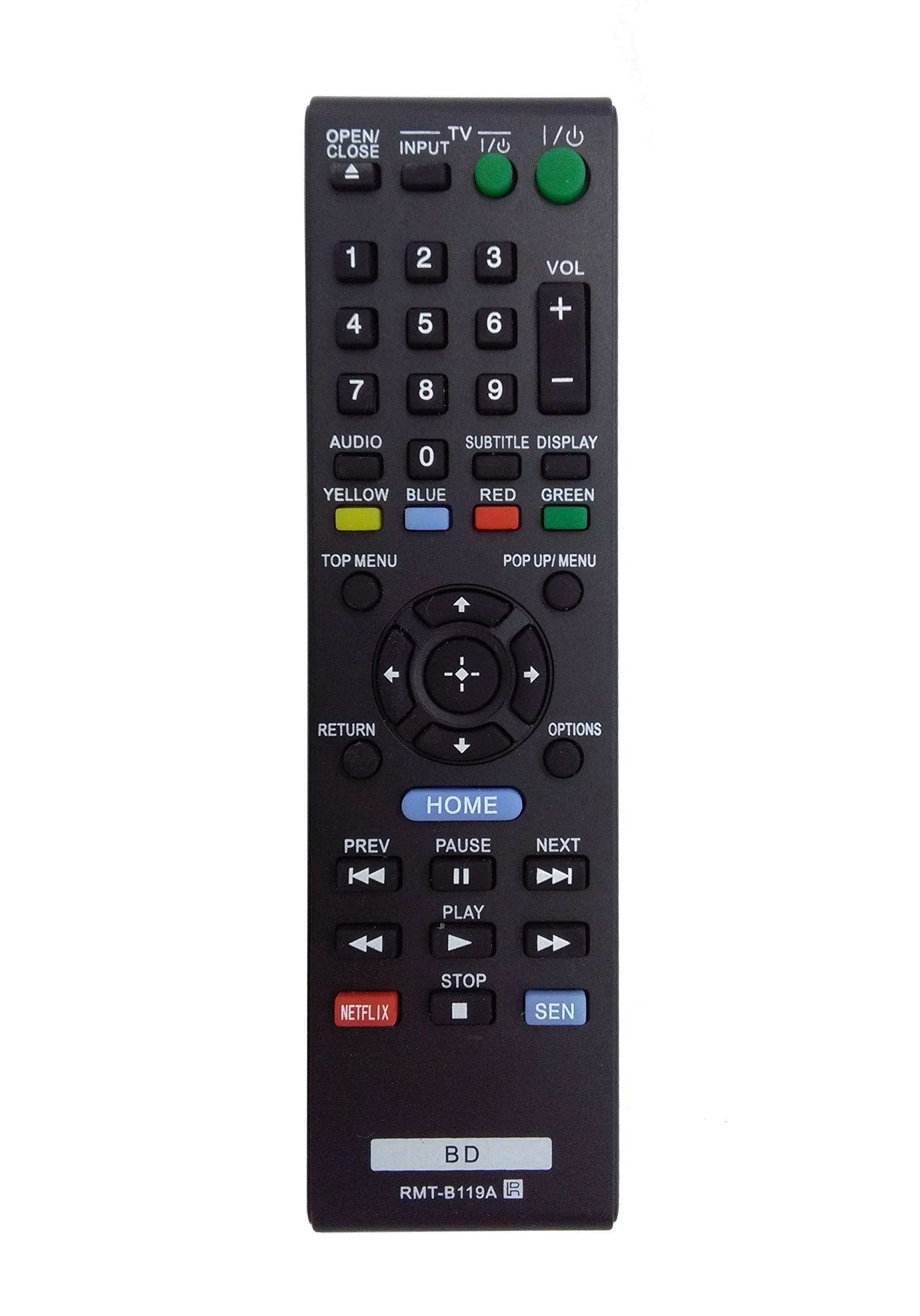
Image: The OEM RMT-B119A remote control, showing the full button layout on the front and a partial view of the open battery compartment on the back, revealing the battery terminals.
3. Operasyon Enstriksyon
3.1 Remote Control Layout and Button Functions
Familiarize yourself with the buttons on your RMT-B119A remote control. Below is a description of each button's primary function.
Image: The OEM RMT-B119A remote control, displaying all buttons and their labels.
- Power (I/O): Turns the Blu-ray player on or off.
- OPEN/CLOSE (▲): Ouvè oswa fèmen plato disk la.
- ENTRÈ: Switches the input source on the connected TV (if programmed).
- Televizyon: Switches the remote to TV control mode (if programmed).
- Pav Nimerik (0-9): Used for direct track selection, chapter selection, or entering numerical data.
- VOL (+/-): Adjusts the volume level (typically for the connected TV, if programmed).
- ODYO: Changes the audio track or language during playback.
- SUBTITLE DISPLAY: Toggles subtitle display on or off, or cycles through available subtitle languages.
- YELLOW, BLUE, RED, GREEN: Color-coded function buttons, typically used for specific features within menus or interactive content. Their function varies depending on the disc or menu.
- MENI TOP: Accesses the main menu of the Blu-ray disc.
- POP UP/MENU: Displays the pop-up menu during disc playback.
- Directional Pad (↑↓←→): Navige nan meni ak opsyon.
- Center Button (Enter/Select): Konfime yon seleksyon oswa antre nan yon atik meni.
- RETOUNEN: Retounen nan ekran oswa meni anvan an.
- OPSYON: Displays context-sensitive options or settings.
- KAY: Accesses the Blu-ray player's home menu.
- PREV (◀◀): Skips to the beginning of the current track/chapter or the previous track/chapter.
- PAUSE (▌▌): Fè yon poz lèktur.
- NEXT (▶▶): Sote nan pwochen track la oswa chapit la.
- JWE (▶): Kòmanse oswa rezime lekti.
- RETE (■): Sispann lekti.
- NETFLIX: Direct access button for the Netflix streaming service.
- SEN: Direct access button for the Sony Entertainment Network (now PlayStation Video/Music).
- BD: Likely a dedicated button for Blu-ray Disc functions or to switch to Blu-ray mode.
4. Antretyen
Pou asire bon jan fonksyonman ak lonjevite kontwòl remote ou a, swiv enstriksyon antretyen sa yo:
- Netwayaj: Siye kontwòl remote la ak yon twal mou epi sèk. Pou pousyè tè ki difisil pou retire, siye l yon ti kras.ampRense twal la avèk dlo oswa yon pwodui netwayaj dou ki pa abrazif. Evite itilize pwodui chimik oswa solvan ki agresif.
- Ranplasman batri: Replace batteries when the remote's response becomes sluggish or it stops functioning. Always replace both batteries at the same time with new ones of the same type.
- Depo: Store the remote in a cool, dry place away from direct sunlight, extreme temperatures, and high humidity. If the remote will not be used for an extended period, remove the batteries to prevent leakage.
- Evite gout: Pwoteje telekòmand lan kont enpak fizik, paske si li tonbe, li ka domaje konpozan entèn yo.
NAN. Depanaj
If you experience issues with your remote control, refer to the following table for common problems and solutions:
| Pwoblèm | Kòz posib | Solisyon |
|---|---|---|
| Remote pa travay. | Pil ki mouri oswa ki mal mete. | Ranplase pil yo ak nouvo, asire polarite ki kòrèk la (+/-). |
| Kontwòl a distans lan ap fonksyone pa tanzantan. | Batri a ba oswa gen yon obstak. | Replace batteries. Ensure no objects are blocking the remote's signal path to the Blu-ray player. |
| Telekòmand lan pa kontwole televizyon an. | Remote not programmed for TV or TV mode not selected. | This remote is primarily for Blu-ray players. TV control functionality may require specific programming not covered by this manual, or may not be supported by this OEM model. |
| Bouton yo pa reponn oswa yo kole. | Salte oswa debri anba bouton yo. | Clean the remote control surface. Avoid spilling liquids on the remote. |
6. Espesifikasyon
- Mak: OEM
- Nimewo Modèl: RMT-B119A
- Koneksyon Teknoloji: Enfrawouj (IR)
- Aparèy konpatib: Sony Blu-ray Players (specific models listed in Introduction)
- Sous pouvwa: 2 x AAA pil (pa enkli)
- Ranje maksimòm: Apeprè 10 mèt (33 pye)
- Karakteristik espesyal: Ergonomik konsepsyon
7. Garanti ak sipò
This OEM RMT-B119A remote control comes with a 30-jou garanti apati dat acha a, ki kouvri domaj fabrikasyon. Tanpri konsève prèv acha ou pou reklamasyon garanti.
For technical support or warranty inquiries, please contact the retailer or manufacturer directly. Refer to your purchase documentation for specific contact information.