
Entwodiksyon
Welcome to your new Cherub WST-620 Flip Tuner. This manual provides instructions for the proper setup, operation, and maintenance of your device. Please read it thoroughly before use. The WST-620 is a versatile clip-on tuner designed for various musical instruments, featuring an ultra-large LCD with orientation-sensing technology for optimal viewing.
Karakteristik kle
- Supports Guitar, Bass, Violin, Ukulele, and Chromatic Tuning.
- Display changes color to indicate when you are in tune.
- Ultra-large LCD with innovative orientation-sensing technology that automatically flips the display.
- Allows clipping on the front or back of the headstock for both left and right-handed instruments.
Kontni pake
- Cherub WST-620 Flip Tuner
- Pil CR2032 (pre-enstale oswa enkli)
- Manyèl Itilizatè (dokiman sa a)
Idantifikasyon pati yo
Familiarize yourself with the components of your WST-620 tuner.
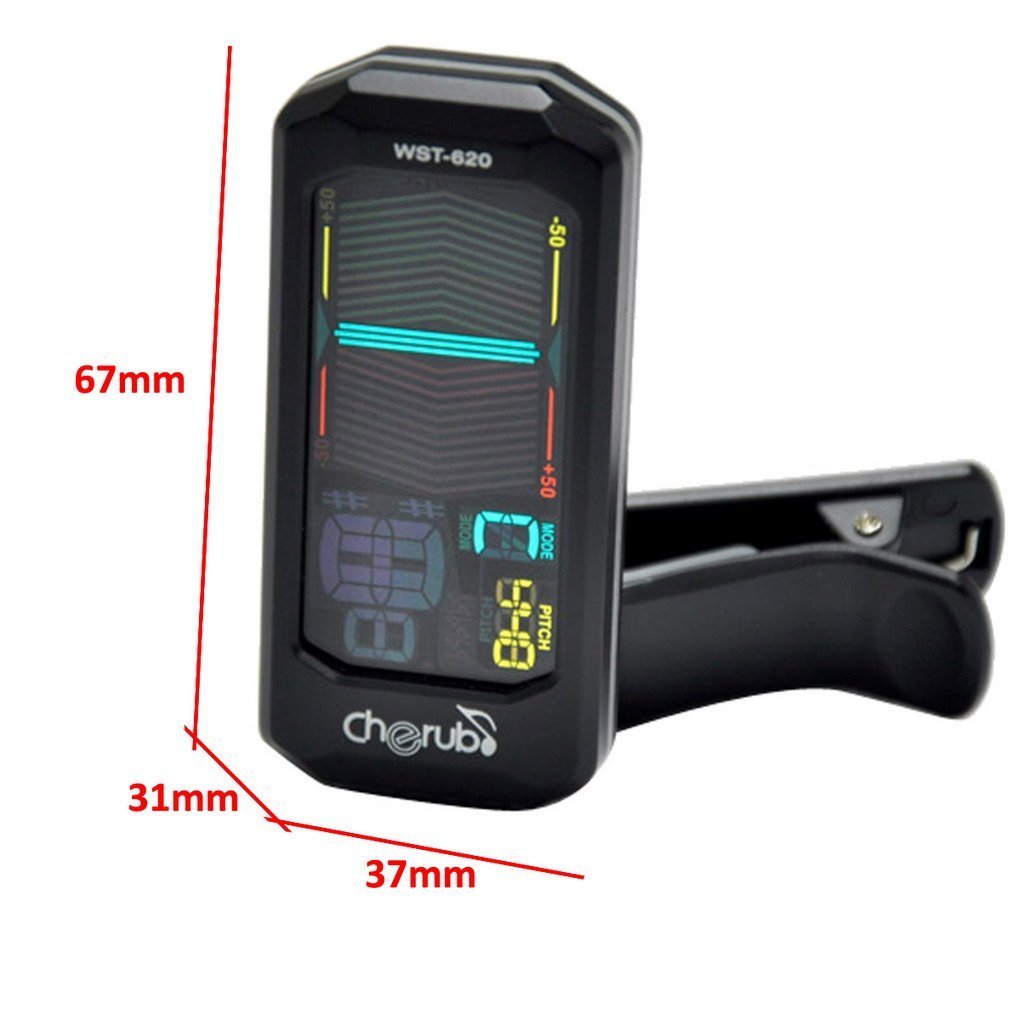
Imaj: Devan view of the Cherub WST-620 Flip Tuner with dimensions (67mm height, 37mm width, 31mm depth).

Imaj: Devan view of the Cherub WST-620 Flip Tuner, showing the LCD display with tuning indicators and pitch setting.

Imaj: Dèyè view of the Cherub WST-620 Flip Tuner, highlighting the power/mode button, pitch button, flat button, and battery compartment.

Imaj: Bò kote view of the Cherub WST-620 Flip Tuner, showing the adjustable clip mechanism.

Image: The Cherub WST-620 Flip Tuner attached to an instrument, demonstrating its flexible viewang ang.
Enstalasyon
1. Enstalasyon batri
The WST-620 uses one CR2032 battery. If the display does not light up or is dim, replace the battery.
- Jwenn konpatiman pil la sou dèyè tuner a.
- Use a coin or small screwdriver to twist the battery cover counter-clockwise to open.
- Mete yon nouvo batri CR2032 ak bò pozitif (+) anlè.
- Remèt kouvèti batri a epi vire l nan sans zegwi mont lan pou byen fèmen.
2. Attaching the Tuner
The WST-620 features a flexible clip and an orientation-sensing display.
- Open the clip and attach it firmly to the headstock of your instrument.
- Adjust the angle of the tuner for optimal viewing. The display will automatically orient itself.
Enstriksyon Operasyon
1. Power On/Off
Peze epi kenbe la POUVWA / MODE button (located on the back) for 2 seconds to turn the tuner on or off.
2. Selecting Tuning Mode
While the tuner is on, short press the POUVWA / MODE button to cycle through the available tuning modes:
- C (Chromatic): Tunes all notes.
- G (Guitar): Tunes standard guitar notes (E, A, D, G, B, E).
- B (Bass): Tunes standard bass notes (E, A, D, G).
- V (Violin): Tunes standard violin notes (G, D, A, E).
- U (Ukulele): Tunes standard ukulele notes (G, C, E, A).
3. Setting Pitch (A4 Calibration)
The default A4 pitch is 440Hz. To adjust:
- Kout peze la ANPLIKASYON button to enter pitch calibration mode.
- Peze a ANPLIKASYON button repeatedly to adjust the A4 frequency from 430Hz to 450Hz.
- The setting will be saved automatically after a few seconds of inactivity.
4. Flat Tuning (Guitar/Bass Mode)
In Guitar or Bass mode, you can set flat tuning:
- Kout peze la PLAT button to cycle through ♭, ♭♭, ♭♭♭, ♭♭♭♭, or no flat.
- This allows for tuning down by semitones.
5. Tuning Your Instrument
Once the tuner is on and the correct mode is selected:
- Pluck a single string on your instrument.
- The display will show the note name and a meter indicating pitch accuracy.
- Flat: If the needle is to the left and the display is red, the note is flat. Tighten the string.
- Sharp: If the needle is to the right and the display is red, the note is sharp. Loosen the string.
- An Mizik: When the note is in tune, the needle will be in the center, and the display will turn green.
Antretyen
1. Ranplasman batri
Refer to the "Battery Installation" section under Setup for instructions on replacing the CR2032 battery.
2. Netwayaj
Wipe the tuner with a soft, dry cloth. Do not use liquid cleaners or solvents, as they may damage the finish or internal components.
3. Depo
If the tuner will not be used for an extended period, remove the battery to prevent leakage and store the device in a cool, dry place.
Depanaj
| Pwoblèm | Kòz posib | Solisyon |
|---|---|---|
| Tuner a pa limen. | Batri mouri oswa mal enstale. | Ranplase pil CR2032 la, asire polarite ki kòrèk la (bò + anlè). |
| Ekran an fèb oswa li ap tranble. | Ba pouvwa batri. | Ranplase batri CR2032 la. |
| Tuner does not detect notes accurately. | Incorrect tuning mode selected; weak vibration from instrument; noisy environment. | Ensure the correct tuning mode (C, G, B, V, U) is selected. Pluck strings firmly. Tune in a quiet environment. Ensure tuner is securely clipped. |
| Display does not flip automatically. | Rare sensor malfunction. | Try turning the tuner off and on again. If the issue persists, contact support. |
Espesifikasyon
- Modèl: WST-620
- Mòd akor: Kwomatik, gita, bas, Vyolon, Ukulele
- A4 frekans: 430-450Hz (adjustable)
- Metòd deteksyon: Vibrasyon (Klip)
- Akor Range: A0 (27.5Hz) - C8 (4186Hz)
- Pouvwa: 3V (CR2032 Lithium Battery)
- Dimansyon: 12.7 x 7.62 x 5.08 cm (approx. 67 x 37 x 31 mm for the tuner unit)
- Pwa: 45.4 g
Garanti ak sipò
Cherub products are designed for reliability and performance. For warranty information or technical support, please refer to the official Cherub website or contact your local dealer. Keep your purchase receipt as proof of purchase.
Pou plis asistans, tanpri vizite: www.cherubtechnology.com