
1. Entwodiksyon
This manual provides detailed instructions for the safe and effective use of your Fujifilm Finepix S4800 digital camera. The Finepix S4800 is a versatile digital camera featuring a 16-megapixel CCD sensor, a powerful 30x optical zoom lens with Optical Image Stabilization (OIS), and a 3-inch LCD screen. It offers quick autofocus in 0.3 seconds and a battery life of approximately 320 photos.
2. Enfòmasyon sou Sekirite
Please read these safety instructions carefully before using your camera to prevent injury to yourself or others and to avoid damage to the product. Keep this manual in a safe place for future reference.
- Do not disassemble, repair, or modify the camera.
- Pa ekspoze kamera a ak dlo oswa imidite.
- Sèvi ak sèlman pil rekòmande ak Pwodwi pou Telefòn.
- Keep the camera away from strong magnetic fields or excessive heat.
- Clean the camera with a soft, dry cloth. Avoid using harsh chemicals.
3. Pake kontni
Verify that all the following items are included in your camera package:
- Fujifilm Finepix S4800 Kamera dijital
- USB kab
- braslè zepòl
- Lens Cap
- CD-ROM (Software/Drivers)
- Manyèl Itilizatè (dokiman sa a)
- AA Batteries (may be included depending on region)
4. Pati ak Kontwòl Kamera
Familiarize yourself with the various parts and controls of your Finepix S4800 camera.
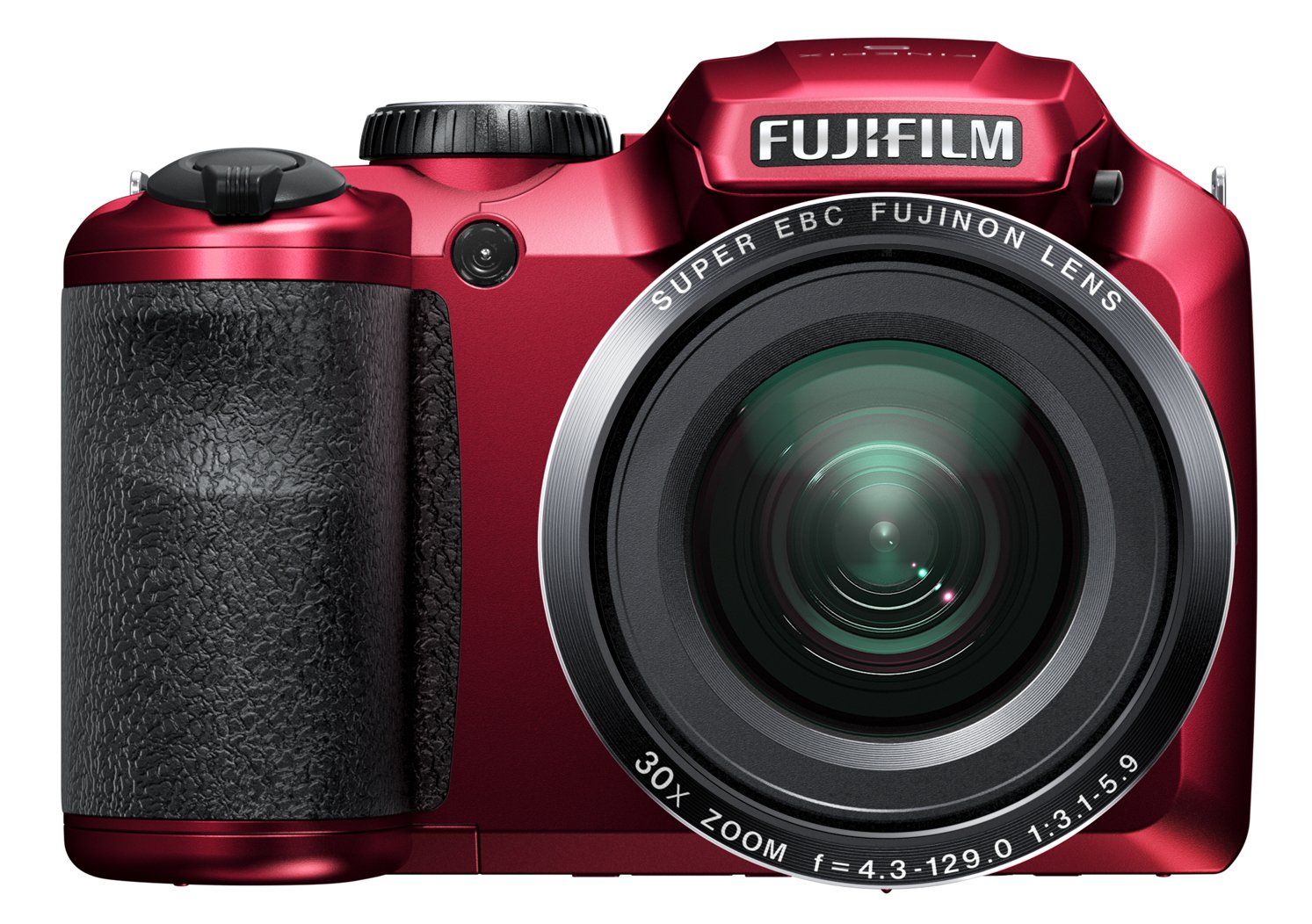
Figi 4.1: Devan view of the Fujifilm Finepix S4800 digital camera, showing the lens, flash, and ergonomic grip.
Devan View:
- Lantiy: 30x optical zoom lens.
- Flash: Flash entegre pou kondisyon ki pa twò klere.
- Grip: Priz ergonomik pou yon manyen ki estab.
Top View:
- Bouton vole: Peze mwatye pou konsantre, nèt pou pran yon foto.
- Levier Zoom: Kontwole zoom optik la.
- Dial mòd: Selects shooting modes (e.g., Auto, Program, Manual, Video).
- Bouton pouvwa: Limen oswa etenn kamera a.
Dèyè View:
- LCD ki monitè kè bebe: Ekran 3 pous pou ankadre foto ak re-pran fotoviewimaj yo.
- Elektwonik ViewChèche (EVF): For framing shots.
- bouton Lekti: Enters playback mode.
- Bouton Meni/OK: Aksè nan meni yo epi konfime seleksyon yo.
- Direksyon pad: Navige nan meni yo epi chwazi opsyon yo.
- Display/Back Button: Changes display information or returns to previous screen.
5. Enstalasyon
5.1. Enstale pil
- Louvri kouvèti konpatiman batri a ki sitiye anba kamera a.
- Insert four AA-type batteries, ensuring correct polarity (+/-) as indicated inside the compartment.
- Fèmen kouvèti lòj batri a byen.
5.2. Mete yon kat memwa
- Louvri kouvèti fant kat memwa a, ki anjeneral sitiye sou bò oswa anba kamera a.
- Insert an SD/SDHC/SDXC memory card with the label facing the correct direction until it clicks into place.
- Fèmen kouvèti emplacement kat memwa a.
5.3. Anviwònman Inisyal yo (Dat ak Lè)
- Turn on the camera using the Power button.
- The date and time setting screen will appear automatically on first use.
- Use the directional pad to set the correct date, time, and time zone.
- Peze bouton MENU/OK la pou konfime paramèt yo.
6. Itilizasyon Kamera a
6.1. Limen/Etenyen
- To turn on the camera, press the POUVWA button. The lens will extend.
- Pou fèmen kamera a, peze la POUVWA button again. The lens will retract.
6.2. Fotografi debaz (Mòd Otomatik)
- Set the Mode Dial to OTO.
- Ankadre foto ou a lè l sèvi avèk monitè LCD a oswa elektwonik la viewChèche.
- Peze bouton deklanchè a mwatye pou fè fokus. Kad fokus la ap vin vèt lè ou fin fè fokus la.
- Peze bouton deklanchè a nèt pou pran foto a.
6.3. Sèvi ak Zoom nan
The camera features a 30x optical zoom. Use the zoom lever located around the shutter button:
- Pouse levye zoom nan nan direksyon T (Teleobjektif) pou agrandi.
- Pouse levye zoom nan nan direksyon W (Gran ang) pou diminye imaj la.
6.4. Mòd Fiziyad
Rotate the Mode Dial to select different shooting modes:
- P (Pwogram AE): Kamera a ajiste ouvèti a ak vitès obturatè a pou yon ekspozisyon optimal.
- S (Priyorite-Deklanchè AE): Ou fikse vitès obturateur a, kamera a fikse ouvèti a.
- A (Aperture-Priority AE): Ou fikse ouvèti a, kamera a fikse vitès obturatè a.
- M (Manyèl): Ou fikse tou de ouvèti a ak vitès obturatè a.
- Pozisyon Sèn (SP): Chwazi nan plizyè mòd sèn (pa egzanp, Pòtrè, Peyizaj, Espò).
- Videyo: Records video clips.
6.5. Anrejistreman Videyo
- Set the Mode Dial to VIDEO.
- Press the dedicated video recording button (if available) or the shutter button to start recording.
- Peze bouton an ankò yo sispann anrejistreman.
7. Lecture ak Viewing Imaj
- Peze a LEKTI bouton pou antre nan mòd lecture.
- Use the directional pad (left/right) to scroll through your photos and videos.
- Pou view video, select a video file epi peze la MENI / OK bouton pou kòmanse lecture.
- Peze a LEKTI button again or the shutter button to return to shooting mode.
8. Connecting to a Computer or TV
8.1. Connecting to a Computer (USB)
- Etenn kamera a.
- Konekte kamera a nan òdinatè w lan lè l sèvi avèk kab USB yo bay la.
- Turn on the camera. It should be recognized as a removable disk or prompt for connection mode.
- Transfer photos and videos to your computer.
8.2. Connecting to a TV (HDMI)
The Fujifilm Finepix S4800 supports HDMI connectivity.
- Ensure both the camera and TV are turned off.
- Connect the camera's HDMI output port to an HDMI input port on your TV using an HDMI cable (sold separately).
- Turn on the TV and select the correct HDMI input.
- Turn on the camera. Images and videos will be displayed on the TV screen.
9. Antretyen ak Swen
- Netwayaj kò kamera a: Siye ak yon twal mou epi sèk. Pou pousyè tè ki difisil pou retire, sèvi ak yon twal ki mouye yon ti kras.amprense avèk dlo epi siye sèk.
- Netwaye lantiy la: Sèvi ak yon souflèt pou retire pousyè a, apresa siye dousman ak yon twal pou netwaye lantiy. Evite touche lantiy la ak dwèt ou.
- Depo: When not in use for extended periods, remove the batteries and store the camera in a cool, dry place away from direct sunlight and humidity.
- Swen batri: Do not expose batteries to heat or fire. Dispose of used batteries according to local regulations.
NAN. Depanaj
| Pwoblèm | Kòz posib | Solisyon |
|---|---|---|
| Kamera a pa limen. | Pil yo mouri oswa yo pa byen mete. | Ranplase pil yo ak nouvo oubyen mete yo tounen nan plas yo kòrèkteman. |
| Foto yo twoub. | Camera shake, subject too close, or incorrect focus. | Hold the camera steady, ensure proper distance to subject, or allow camera to focus before fully pressing shutter. |
| Flash la pa tire. | Flash mode is off or battery level is low. | Check flash settings. Replace or recharge batteries. |
| Erè kat memwa. | Kat la plen, li pèvèti, oswa li pa byen mete. | Efase pa nesesè files, format the card (this will erase all data), or reinsert the card. Try a different card. |
11. Espesifikasyon
| Karakteristik | Detay |
|---|---|
| Non modèl | Finepix S4800 |
| Capteur | 16 Megapiksèl CCD |
| Zoom optik | 30x |
| Zoom dijital | 7x |
| Focal Length (Equivalent) | 24mm - 720mm |
| Ouverture maksimòm | f/5.9 |
| Ekran LCD | 3-pous |
| Autofocus Speed | 0.3 segonn |
| Maksimòm vitès vole | 8 segonn |
| Vitès fiziyad kontinyèl | 10.00 fps |
| Self-Timer | 5 segonn |
| Koneksyon | HDMI, USB |
| Sous pouvwa | 4x AA Batteries (approx. 320 photos) |
| Dimansyon (L x W x H) | 11.43 x 7.97 x 9.7 cm |
| Pwa | 426 gram |
12. Garanti ak sipò
Pou enfòmasyon konsènan garanti a, sipò teknik, oswa sèvis, tanpri al gade kat garanti ki vini ak pwodwi w la oswa vizite sit entènèt ofisyèl Fujifilm nan. websit la. Kenbe prèv acha ou pou reklamasyon garanti.


