
Entwodiksyon
This manual provides essential instructions for the safe and effective use of your Fujifilm FinePix HS50EXR digital camera. Please read this manual thoroughly before using the camera and keep it in a safe place for future reference.

Figi 1: Devan view of the Fujifilm FinePix HS50EXR Digital Camera, showcasing konsepsyon lantiy ak kò li yo.
Enstalasyon
1. Debalaj ak premye enspeksyon
Retire tout bagay yo nan anbalaj la avèk prekosyon. Asire w ke konpozan sa yo prezan:
- Fujifilm FinePix HS50EXR Digital Camera body
- Rechargeable Li-ion batri
- Batri Charger
- braslè zepòl
- USB kab
- Lens Cap
- CD-ROM (containing software and full manual)
2. Chaje batri a
Before first use, fully charge the supplied rechargeable Li-ion battery. Insert the battery into the charger and connect the charger to a power outlet. The charging indicator will show the charging status and turn off when charging is complete.
3. Mete pil la ak kat memwa a
- Louvri kouvèti konpatiman batri/kat memwa a ki anba kamera a.
- Mete batri chaje a nan bon oryantasyon an jiskaske li fè yon klik pou l antre nan plas li.
- Insert a compatible SD or microSD memory card (sold separately) into the card slot until it clicks. Ensure the card is facing the correct direction.
- Fèmen kouvèti lòj la byen.
4. Mete senti zepòl la
Thread the shoulder strap through the strap lugs on the camera body as illustrated in the full manual on the CD-ROM. Ensure it is securely fastened to prevent accidental drops.
Opere kamera a
1. Power On/Off
To power on the camera, slide the power switch located on the top of the camera. To power off, slide the switch again.
2. Mòd Debaz pou Pran Foto
Kadran mòd ki anlè kamera a pèmèt ou chwazi plizyè mòd pou pran foto:
- OTO: For fully automatic shooting, where the camera selects optimal settings.
- P (Pwogram AE): The camera sets aperture and shutter speed for optimal exposure, while you can adjust other settings.
- A (Priyorite Ouvèti AE): You set the aperture, and the camera automatically adjusts the shutter speed.
- S (Priyorite Vitès AE): You set the shutter speed, and the camera automatically adjusts the aperture.
- M (Manyèl): You control both aperture and shutter speed for complete creative control.
- EXR: Utilizes the EXR CMOS II sensor's capabilities for enhanced image quality in various conditions.
- SÈN: Select from various scene presets (e.g., Portrait, Landscape, Sport) for specific shooting situations.
3. Operasyon Zoom
The FinePix HS50EXR features a manual Fujinon 42x optical zoom lens (24-1000mm equivalent). Rotate the zoom barrel on the lens directly to adjust the focal length. This manual control provides precise and intuitive zooming.
4. Konsantre
The camera employs an Intelligent Hybrid AF system, combining high-speed phase detection AF and contrast AF for rapid and accurate focusing. You can also switch to manual focus by rotating the focus ring on the lens.
- AF sèl (AF-S): Li fè atansyon lè ou peze bouton deklanchè a mwatye.
- AF kontinyèl (AF-C): Continuously adjusts focus for moving subjects.
- Konsantrasyon Manyèl (MF): Rotate the focus ring on the lens to adjust focus manually.
5. Estabilizasyon Imaj
The camera features lens shift optical image stabilization to reduce blur caused by camera shake, especially when shooting at longer focal lengths or in low light conditions.
6. LCD and Viewjwenn
The camera is equipped with a 3.0-inch Vari-angle LCD screen (920K-dot) that can be rotated and tilted for flexible shooting angles. It also has a high-resolution electronic viewfinder (EVF) with an eye sensor, which automatically switches between the LCD and EVF when you bring your eye to the viewChèche.
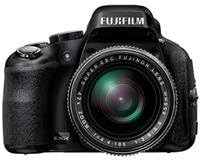
Figi 2: Side view of the Fujifilm FinePix HS50EXR Digital Camera, showing the vari-angle LCD screen extended for flexible viewing.
7. Anrejistreman Videyo
To record movies, set the mode dial to the movie icon. The camera supports Full HD (1080p) video recording at 60 frames per second (60fps) with continuous phase detection autofocus.
8. Fiziyad kontinyèl
The FinePix HS50EXR can capture images at up to 11 frames per second (fps) in full resolution, allowing you to capture fast-moving action.
9. Itilizasyon Flash
The camera has a built-in flash. Press the flash button to pop it up. Various flash modes (e.g., Auto, Fill-in, Slow Sync) can be selected via the menu.
10. Koneksyon
The camera supports HDMI and USB connectivity for transferring images and videos to a computer or displaying them on a TV. It also features Wi-Fi for wireless image transfer and remote control via a compatible smartphone app.
Antretyen
1. Netwaye Kamera a
- Lantiy: Sèvi ak yon twal mou ki pa gen pousyè oswa yon bwòs pou lantiy pou retire pousyè a dousman. Pou tach ki difisil pou retire, sèvi ak yon solisyon netwayaj lantiy ki aplike sou yon twal, pa dirèkteman sou lantiy la.
- Kò: Wipe the camera body with a soft, dry cloth. For heavy dirt, use a cloth lightly dampRense avèk dlo, epi siye pou siye. Evite itilize solvang òganik.
- Ekran LCD: Sèvi ak yon twal mou epi sèk. Evite peze ekran an twò fò.
2. Swen batri
- Toujou sèvi ak batri ak chajè Fujifilm otantik yo.
- Sere pil yo nan yon kote ki fre, sèk lè yo pa itilize yo.
- Pa ekspoze pil nan tanperati ekstrèm oswa limyè solèy la dirèk.
3. Depo
When storing the camera for extended periods, remove the battery and memory card. Store the camera in a dry, well-ventilated area, away from dust and direct sunlight. Use a desiccant if storing in a humid environment.
Depanaj
Si ou rankontre pwoblèm ak kamera ou a, gade pwoblèm ak solisyon komen sa yo:
| Pwoblèm | Kòz posib / Solisyon |
|---|---|
| Kamera a pa limen. | Batri a fin itilize oswa li pa byen mete. Asire w ke batri a chaje epi li byen mete. |
| Imaj yo flou. | Camera shake: Use image stabilization, a faster shutter speed, or a tripod. Incorrect focus: Ensure the camera is properly focused on the subject. |
| Flash la pa tire. | Flash is closed or disabled. Pop up the flash and check flash settings in the menu. |
| Erè kat memwa. | Card is full, damaged, or incorrectly inserted. Try reinserting the card, using a different card, or formatting the card (this will erase all data). |
| Batri vide byen vit. | Frequent use of LCD, flash, or video recording. Reduce usage or carry a spare charged battery. |
For more detailed troubleshooting, refer to the full instruction manual on the supplied CD-ROM.
Espesifikasyon
| Karakteristik | Detay |
|---|---|
| Kalite Capteur | 1/2-inch 16 MP BSI-CMOS |
| Lantiy | Fujinon 42x Optical Zoom (24-1000mm equivalent), f/2.8-f/11 aperture |
| Estabilizasyon Imaj | Optik |
| Ekran LCD | 3.0-inch Vari-angle, 920K-dot |
| Viewjwenn | Electronic (EVF), 920K-dot, with eye sensor |
| Rezolisyon videyo | Full HD 1080p nan 60fps |
| File Fòma | JPEG (Exif Ver 2.3), RAW (RAF format), RAW+JPEG |
| Vitès vole | 30 segonn pou rive 1/4000 segonn |
| Kontwòl Ekspozisyon | Program AE, Shutter Priority AE, Aperture Priority AE, Manual |
| Konsantre Sistèm | Intelligent Hybrid AF (Phase Detection, Contrast AF), Manual Focus |
| Koneksyon | HDMI, USB, Wi-Fi |
| Medya Depo | SD, microSD (UHS-I compatible) |
| Pwa | Approx. 2.3 Pounds (1.04 kg) |
Enfòmasyon sou Garanti
Your Fujifilm FinePix HS50EXR Digital Camera comes with a manufacturer's warranty. Please refer to the warranty card included in your product packaging or visit the official Fujifilm websit la pou wè kondisyon detaye konsènan garanti a ak sèvis la.
Sipò
For further assistance, technical support, or to download the full instruction manual and software updates, please visit the official Fujifilm support websit:
You may also contact Fujifilm customer service directly through the contact information provided on their websit.