
1. Pwodwi souview
The AC Infinity AXIAL S1225 is a 120mm muffin fan designed for various air circulation projects. It is UL-certified and features a speed controller, allowing for optimized airflow and noise levels. This fan is suitable for applications such as improving air circulation in doorways, between rooms, near wood stoves, or fireplaces.

Image: The AC Infinity AXIAL S1225 120mm Muffin Fan with its speed controller.

Image: An AC Infinity AXIAL fan installed, illustrating its use for air circulation in various projects like wood stoves, doorways, and room-to-room ventilation.
Key features include a durable construction with dual-ball bearings, rated for a lifespan of 67,000 hours, and the ability to be mounted in any direction. The included speed controller provides flexibility to adjust the fan's performance to your specific needs.
2. Sa ki enkli
Your AC Infinity AXIAL S1225 package contains the following components:
- One (1) Heavy-Duty Aluminum Fan (120 x 120 x 25 mm)
- One (1) Speed Control Plug Cord - 6 Ft
- Two (2) Spiral Fan Guards - 120mm
- Four (4) Mounting Screws
- Four (4) Nuts and Washers
- One (1) Mounting Hinge

Image: All components of the AC Infinity AXIAL S1225 kit laid out, including the fan, speed controller, fan guards, mounting screws, nuts, washers, and a mounting hinge.
3. Enstalasyon ak Enstalasyon
Follow these steps to set up and install your AC Infinity AXIAL S1225 fan:
- Detèmine Kote Montaj: Choose a suitable location for the fan, considering airflow direction and proximity to a power outlet. The fan can be mounted in any orientation.
- Attach Fan Guards: Secure the spiral fan guards to both sides of the fan using the provided mounting screws, nuts, and washers. This protects the fan blades and prevents accidental contact.
- Monte fanatik la: Use the mounting screws and hinge (if applicable) to securely attach the fan to your desired surface. Ensure the fan is stable and vibration-free.
- Connect Speed Controller: Plug the fan's power connector into the speed control plug cord.
- Konekte ak pouvwa: Plug the speed control plug cord into a standard 100 to 120V AC power outlet.
Ensure all connections are secure before operating the fan.
4. Operasyon Enstriksyon
The AC Infinity AXIAL S1225 features a convenient speed controller to adjust the fan's performance.

Image: Close-up of the speed controller, showing the dial for speed adjustment and the on/off switch.
- Limen/Etenyen: The speed controller includes a switch to turn the fan on or off.
- Ajisteman vitès: Rotate the dial on the speed controller to select your desired fan speed:
- L (Low Speed): For minimal noise and gentle airflow.
- M (Medium Speed): Suitable for most general applications, balancing airflow and noise.
- H (High Speed): Provides maximum airflow for demanding applications.
Adjust the speed as needed to achieve optimal air circulation and comfort for your specific environment.
5. Antretyen
To ensure the longevity and optimal performance of your AC Infinity AXIAL S1225 fan, follow these maintenance guidelines:
- Netwayaj regilye: Periodically clean the fan blades and guards to prevent dust buildup, which can reduce airflow and increase noise. Use a soft, dry cloth or a can of compressed air.
- Enspekte pou obstak: Ensure no objects are obstructing the fan blades or airflow path.
- Tcheke Koneksyon: Occasionally verify that all electrical connections are secure.
- Evite kontak likid: Do not immerse the fan or speed controller in water or other liquids.
No lubrication is required for the dual-ball bearings.
NAN. Depanaj
If you encounter issues with your AC Infinity AXIAL S1225 fan, refer to the following troubleshooting tips:
- Vantilatè a pa ap vire:
- Ensure the speed controller is switched to the 'On' position.
- Verify that the power cord is securely plugged into both the fan and a working electrical outlet.
- Tcheke si priz la ap resevwa kouran lè w branche yon lòt aparèy ladan l.
- Twòp bri:
- Reduce the fan speed using the speed controller.
- Check for any loose components or obstructions around the fan blades.
- Ensure the fan is mounted securely and not vibrating against other surfaces.
- Redwi Airflow:
- Clean any dust or debris from the fan blades and guards.
- Ensure the fan is set to a higher speed setting.
- Verify that the fan's intake and exhaust paths are clear and unobstructed.
Si pwoblèm pèsiste, kontakte sipò kliyan pou plis asistans.
7. Espesifikasyon
Detailed specifications for the AC Infinity AXIAL S1225 fan:
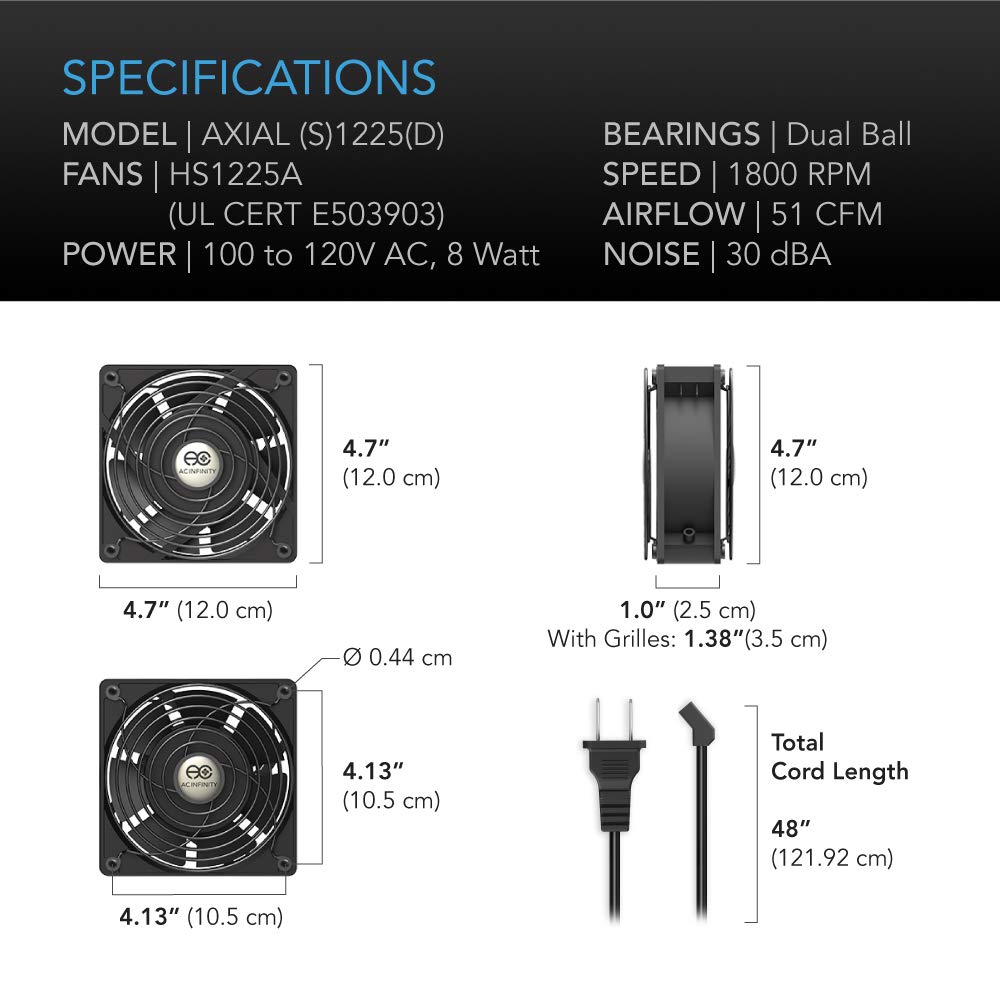
Image: Diagram illustrating the dimensions and key specifications of the AC Infinity AXIAL S1225 fan.
| Modèl | AXIAL (S)1225(D) |
| Nimewo Modèl Atik | AI-120SCX |
| Gwosè fanatik | 120 x 120 x 25 mm (4.7 x 4.7 x 1 pous) |
| BEARINGS | Doub boul |
| Rated Lifespan | 67,000 èdtan |
| Pouvwa | 100 to 120V AC, 8 Watt |
| Voltage | 12 Volts |
| Airflow | 51 CFM (pye kib pou chak minit) |
| Nivo bri | 16 a 38 dBA |
| Materyèl | Metal |
| Longè total kòd | 48 pous (121.92 cm) |
| Sètifikasyon | UL-Certified (E503903), CE, RoHS |
8. Enfòmasyon sou Garanti
The AC Infinity AXIAL S1225 fan is backed by a garanti manifakti dezanGaranti sa a kouvri domaj nan materyèl ak nan fabrikasyon anba itilizasyon nòmal. Tanpri konsève prèv acha ou pou reklamasyon garanti.
For detailed warranty terms and conditions, please refer to the official AC Infinity websit oswa kontakte sipò kliyan yo.
9. Sipò pou Kliyan
For technical assistance, troubleshooting beyond this manual, or warranty inquiries, please contact AC Infinity customer support.
- Websit: Visit the official AC Infinity websit pou resous sipò, FAQ, ak enfòmasyon pou kontakte yo.
- Imèl/Telefòn: Refer to the product packaging or the AC Infinity websit la pou adrès imel espesifik oswa nimewo telefòn pou sèvis kliyan.
When contacting support, please have your product model number (AI-120SCX) and purchase date available.