
1. Entwodiksyon
This manual provides detailed instructions for the installation, operation, and troubleshooting of the Broadcom DW1501 BCM94313HMG2L WLAN 802.11n Half Mini PCI-E Card. This wireless network card is designed to provide 802.11n Wi-Fi connectivity for compatible laptop systems.
2. Enfòmasyon sou Sekirite
- Always power off your computer and disconnect it from the power source before installing or removing any internal components.
- Discharge any static electricity from your body by touching a grounded metal object before handling the card.
- Handle the card by its edges to avoid touching sensitive components.
- Keep the card away from moisture and extreme temperatures.
- This card is not compatible with certain laptop models, specifically IBM/Lenovo/Thinkpad and HP versions. Verify compatibility before installation.
3. Pake kontni
Ensure the following item is included in your package:
- Broadcom DW1501 BCM94313HMG2L WLAN 802.11n Half Mini PCI-E Card
If any items are missing or damaged, please contact your vendor.
4. Enstalasyon
4.1 Lis verifikasyon pre-enstalasyon an
- Verify your laptop has a compatible Half Mini PCI-E slot.
- Ensure your laptop is not an IBM/Lenovo/Thinkpad or HP model, as this card is not compatible with these systems.
- Gather necessary tools, such as a small Phillips head screwdriver.
4.2 Enstalasyon Fizik
- Pouvwa Off: Shut down your laptop completely and disconnect the power adapter and battery.
- Panel Aksè: Locate and open the access panel on the bottom of your laptop that covers the Mini PCI-E slot. Refer to your laptop's service manual for specific instructions.
- Remove Old Card (if applicable): If an existing wireless card is present, carefully disconnect any antenna cables and remove the screw securing the card. Gently slide the card out of its slot.
- Insert New Card: Align the Broadcom DW1501 card with the Half Mini PCI-E slot. Gently push the card into the slot at an angle until it is fully seated.
- Kat Sekirite: Press the card down and secure it with the screw removed earlier.
- Konekte antèn: Carefully connect the antenna cables to the corresponding connectors on the new card. Typically, the main antenna connects to 'MAIN' or '1' and the auxiliary antenna to 'AUX' or '2'.
- Fèmen Panèl la: Replace the access panel and secure it.
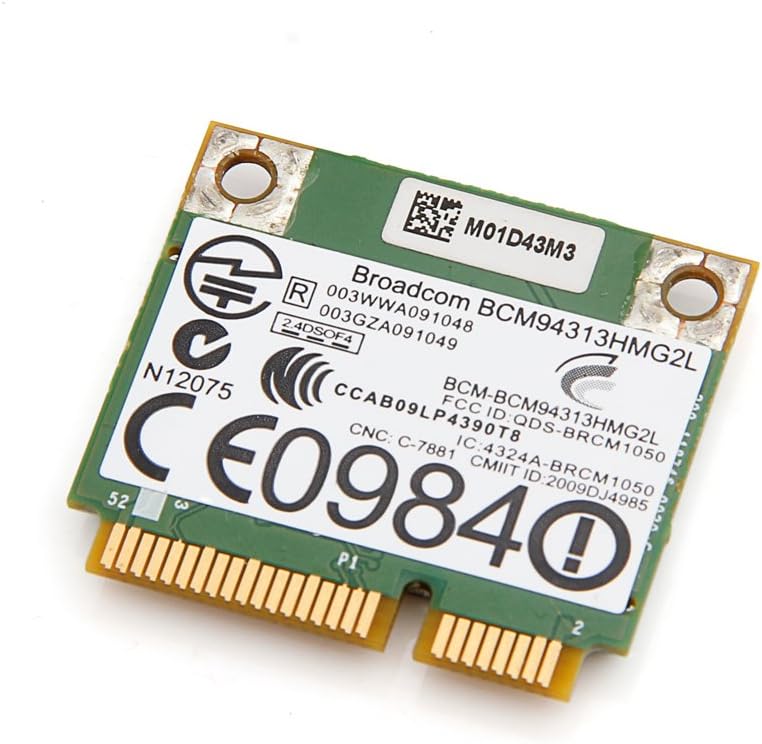
Imaj 1: Anlè view of the Broadcom DW1501 BCM94313HMG2L WLAN Half Mini PCI-E Card, showing the Broadcom branding and regulatory markings. This side typically faces upwards during installation.
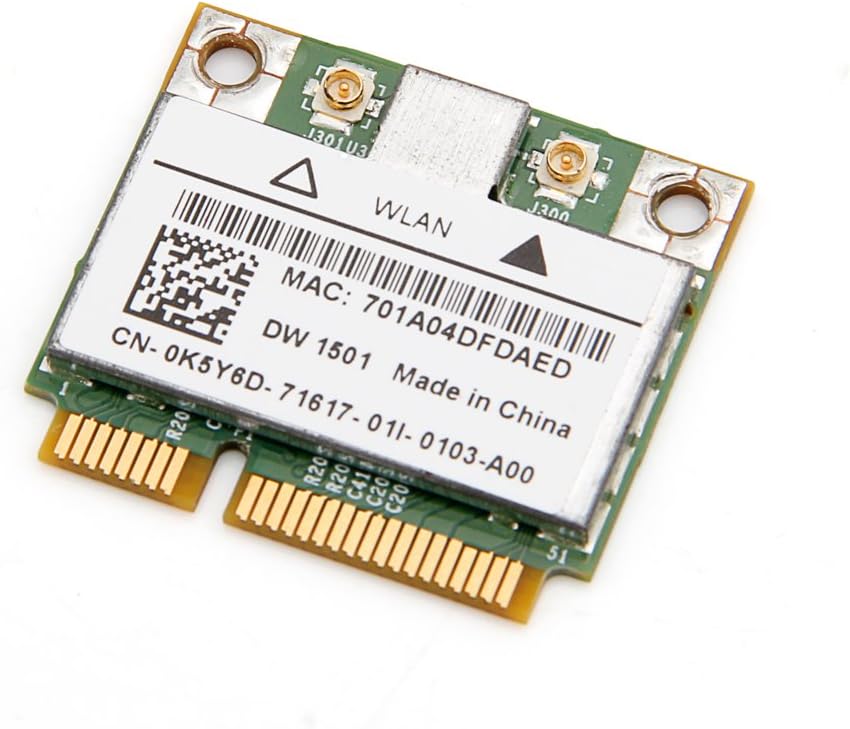
Imaj 2: Anba view of the Broadcom DW1501 BCM94313HMG2L WLAN Half Mini PCI-E Card, displaying the MAC address and model number. This side typically faces downwards during installation.
4.3 Enstalasyon chofè
- Pouvwa sou: Reconnect the battery and power adapter, then power on your laptop.
- Operating System Detection: Your operating system may automatically detect the new hardware and attempt to install generic drivers.
- Install Specific Drivers: For optimal performance, download the latest drivers for the Broadcom DW1501 BCM94313HMG2L from your laptop manufacturer's support website or Broadcom's official websit.
- Swiv Enstriksyon ki sou Ekran yo: Run the downloaded driver installer and follow the prompts to complete the installation.
- Rekòmanse: Rekòmanse òdinatè w la apre enstalasyon chofè a fini.
5. Operasyon Enstriksyon
Once the card is installed and drivers are successfully loaded, your laptop should detect available wireless networks.
- Aksè nan paramèt rezo yo: Navigate to your operating system's network settings (e.g., Wi-Fi settings in Windows, Network Preferences in macOS).
- Pèmèt Wi-Fi: Ensure that Wi-Fi is enabled.
- Chwazi Rezo: A list of available wireless networks will appear. Select your desired network.
- Antre modpas: Si rezo a an sekirite, antre modpas Wi-Fi a (kle sekirite) lè yo mande w la.
- Konekte: Click 'Connect' to establish a wireless connection.
6. Antretyen
The Broadcom DW1501 BCM94313HMG2L card requires minimal maintenance.
- Keep your laptop's internal components clean by periodically removing dust with compressed air.
- Ensure your wireless drivers are up to date for optimal performance and security.
- Avoid exposing your laptop to environments with excessive heat or moisture.
NAN. Depanaj
7.1 Card Not Detected
- Tcheke enstalasyon fizik la: Power off the laptop and re-verify that the card is properly seated in the Mini PCI-E slot and secured with the screw.
- Koneksyon antèn: Ensure antenna cables are securely attached to the card.
- Enstalasyon chofè: Confirm that the correct drivers for the Broadcom DW1501 BCM94313HMG2L are installed. Check Device Manager (Windows) or System Information (macOS) for any error indicators.
- Konpatibilite: Reconfirm that your laptop model is not an IBM/Lenovo/Thinkpad or HP version, as these are incompatible.
7.2 Pa ka konekte ak Wi-Fi
- Wi-Fi pèmèt: Ensure Wi-Fi is enabled in your operating system settings and any physical Wi-Fi switch on your laptop is in the 'on' position.
- Modpas ki kòrèk la: Verifye de fwa ke w ap antre modpas Wi-Fi ki kòrèk la.
- Pwoblèm routeur: Rekòmanse routeur san fil ou ak modèm ou.
- Mizajou chofè: Update or reinstall the wireless card drivers.
- Network Diagnostics: Use your operating system's built-in network diagnostic tools.
7.3 Vitès koneksyon dousman
- Fòs siyal: Pwoche routeur san fil ou a pou amelyore fòs siyal la.
- Entèferans: Minimize interference from other electronic devices or crowded Wi-Fi channels.
- Mizajou chofè: Asire ou ke ou gen dènye chofè yo enstale.
- Anviwònman routeur: Check your router's settings for optimal 802.11n performance.
8. Espesifikasyon
| Non pwodwi | Broadcom DW1501 BCM94313HMG2L WLAN 802.11n Half WiFi Mini PCI-E Card |
| Nimewo Modèl | 8541551410 |
| Wireless Creole | 802.11n |
| Entèfas | Half Mini PCI-E |
| Entèfas Materyèl | PCI |
| Aparèy konpatib | Laptop (excluding IBM/Lenovo/Thinkpad and HP versions) |
| Pwotokòl Done Link | Bluetooth (Note: While listed, primary function is WLAN) |
| Dimansyon pwodwi | 3.3 x 2 x 0.1 pous |
| Pwa atik | 0.32 ons (9.07 g) |
| Manifakti | Broadcom |
| UPC | 612148456344 |
9. Garanti ak sipò
For warranty information and technical support, please refer to the documentation provided by your seller or contact Broadcom directly through their official website. Specific warranty terms may vary depending on your region and point of purchase.