
beyerdynamic 721360
Beyerdynamic Stegos TB Wireless Boundary Microphone User Manual
Modèl: 721360
Entwodiksyon
This manual provides comprehensive instructions for the setup, operation, and maintenance of your Beyerdynamic Stegos TB Wireless Boundary Microphone. Please read this manual thoroughly before using the device to ensure optimal performance and longevity.
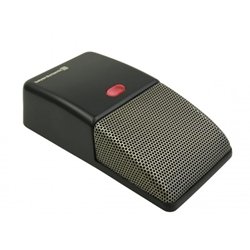
Image: Beyerdynamic Stegos TB Wireless Boundary Microphone. This image displays the compact, black wireless boundary microphone, designed for discreet placement on surfaces like conference tables.
Enstriksyon Sekirite Enpòtan
- Pa ekspoze aparèy la nan dlo oswa imidite twòp.
- Evite tanperati ekstrèm.
- Pa eseye ouvri oswa modifye aparèy la. Konfye tout antretyen bay pèsonèl kalifye.
- Sèvi sèlman ak sous kouran ak akseswa espesifye yo.
- Kenbe soti nan atenn timoun yo.
Kontni pake
Verifye ke tout atik yo prezan nan pakè a:
- Beyerdynamic Stegos TB Wireless Boundary Microphone
- Kab chaje USB (Mikwo USB)
- Manyèl Itilizatè (dokiman sa a)
Enstalasyon
1. Chaje mikwofòn nan
- Connect the Micro USB end of the charging cable to the microphone's charging port.
- Connect the standard USB end of the cable to a powered USB port (e.g., computer, USB wall adapter).
- The LED indicator on the microphone will show charging status.
- Yon fwa konplètman chaje, dekonekte kab la chaje.
2. Konekte ak yon Aparèy
The Stegos TB microphone connects wirelessly to compatible devices, typically personal computers, for video conferencing applications.
- Asire w mikwofòn nan chaje epi li limen.
- Activate Bluetooth on your personal computer or compatible device.
- Put the microphone into pairing mode (refer to the device's specific button combination, usually holding a power/pairing button). The LED indicator will typically flash to indicate pairing mode.
- On your computer, search for available Bluetooth devices. Select "Beyerdynamic Stegos TB" from the list.
- Once paired, the LED indicator on the microphone will show a solid light, indicating a successful connection.
- In your computer's sound settings or video conferencing software, select the "Beyerdynamic Stegos TB" as the input audio device.
Enstriksyon Operasyon
Power On/Off
- To power on: Press and hold the power button for approximately 3 seconds. The LED indicator will illuminate.
- To power off: Press and hold the power button for approximately 3 seconds. The LED indicator will turn off.
Fonksyon bèbè
The microphone features a mute function for privacy during calls.
- To mute: Press the mute button once. The LED indicator may change color or flash to indicate mute status.
- To unmute: Press the mute button again. The LED indicator will return to its normal operating state.
Placement for Optimal Performance
For best audio pickup, place the Stegos TB microphone on a flat surface in the center of the participants. Its omnidirectional polar pattern ensures 360-degree sound capture.
Antretyen
Netwayaj
- Wipe the microphone's exterior with a soft, dry, or slightly damp twal.
- Pa sèvi ak pwodui chimik ki fò, solvang, oswa pwodui netwayaj abrazif.
- Ensure no liquid enters the microphone grille or ports.
Depo
When not in use for extended periods, store the microphone in a cool, dry place, away from direct sunlight and extreme temperatures. It is recommended to fully charge the battery before long-term storage and recharge it every few months to maintain battery health.
Depanaj
| Pwoblèm | Kòz posib | Solisyon |
|---|---|---|
| Mikwofòn nan pa limen. | Batri ki fèb oswa ki vid. | Charge the microphone using the provided USB cable. |
| Pa ka konekte san fil. | Bluetooth is off on the device; microphone not in pairing mode; out of range. | Ensure Bluetooth is enabled. Put microphone into pairing mode. Move microphone closer to the device. |
| Pa gen okenn antre odyo ki soti nan mikwofòn nan. | Microphone is muted; incorrect audio input selected on computer/software. | Unmute the microphone. Select "Beyerdynamic Stegos TB" as the input device in your system settings or application. |
| Pòv kalite odyo. | Microphone too far from speaker; environmental noise; interference. | Place microphone closer to speakers. Reduce background noise. Ensure no obstructions between microphone and receiving device. |
Espesifikasyon
- Mak: Beyerdynamic
- Modèl: Stegos TB (721360)
- Koneksyon Teknoloji: Wireless (USB for charging)
- Kalite konektè: Mikwo USB (pou chaje)
- Karakteristik espesyal: San fil
- Aparèy konpatib: Odinatè pèsonèl
- Koulè: Nwa
- Modèl polè: Omnidireksyon
- Sous pouvwa: Batri Powered
- Itilizasyon Rekòmande: Konferans videyo
Enfòmasyon sou Garanti
Beyerdynamic products are covered by a limited warranty. For specific warranty terms and conditions, please refer to the warranty card included with your product or visit the official Beyerdynamic websit la. Kenbe prèv acha ou pou reklamasyon garanti.
Note: Warranty details are subject to change and may vary by region.
Sipò ak Kontakte
For further assistance, technical support, or service inquiries, please contact Beyerdynamic customer support through their official websit la oswa enfòmasyon kontak ki nan anbalaj pwodwi ou a.
Ofisyèl Websit: www.beyerdynamic.com
Tanpri kenbe nimewo modèl ou a (721360) ak nimewo seri a pare lè w ap kontakte sipò a.
Ask a question about this manual
Ask about setup, troubleshooting, compatibility, parts, safety, or missing instructions. Manuals+ will review the question and use this page’s manual context to help answer it.